
Fetch is a web platform API available in modern browsers and Node.js. Axios is an HTTP client library with shared configuration, request and response transformations, and interceptors. Both can retrieve JSON. Your choice becomes clearer when you compare errors, time limits and routing in the environment where the code will run.
For a small browser request, Fetch often covers the requirement directly. An application that needs consistent defaults and interceptors across many calls may benefit from Axios. Neither choice bypasses browser CORS or turns an arbitrary webpage into a supported API.
In this guide
Compare browser and Node.js requirements
Requirement | Axios | Fetch |
|---|---|---|
Read a JSON response | Data is normally exposed as | Call |
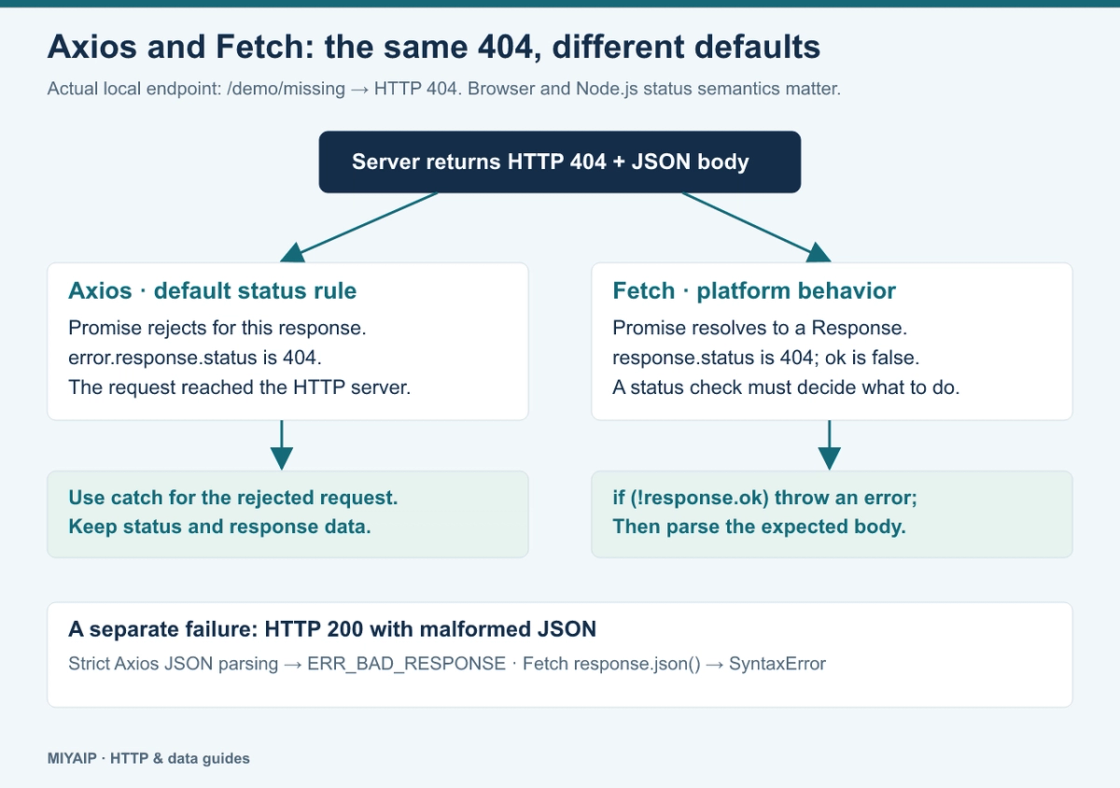
Handle an HTTP 404 | Rejects under the default | Resolves to a Response; check |
Bound request duration |
| Pass an AbortSignal, for example |
Shared request policy | Instances and interceptors | A wrapper function or framework integration |
Browser cross-origin request | Subject to CORS and cookie rules | Subject to CORS and cookie rules |
Node.js proxy route | Depends on the adapter; the Node HTTP adapter supports proxy configuration | Depends on the runtime or HTTP implementation; an Undici dispatcher is one explicit option |
See the Axios request configuration and MDN Fetch guide for the corresponding interfaces. Check adapter and runtime versions before transferring a Node.js example into browser code.
Give both clients the same response contract
The attached examples use Axios 1.20.0 and a Node.js environment with built-in Fetch and AbortSignal.timeout(). The package lock fixes the example dependencies. Prepare and start the fictional local server as described in the archive README, then run:
npm ci
node axios_fetch.mjs
The client code treats non-2xx status codes and invalid JSON as failures:
import axios from 'axios';

const base = 'http://127.0.0.1:8812';
const client = axios.create({
  timeout: 2000,
  proxy: false,
  responseType: 'json',
  transitional: { silentJSONParsing: false },
});

async function withAxios(path) {
  try {
    const response = await client.get(base + path);
    return {
      client: 'Axios', path,
      status: response.status,
      ok: response.status >= 200 && response.status < 300,
      data: response.data,
    };
  } catch (error) {
    return {
      client: 'Axios', path,
      status: error.response?.status ?? null,
      ok: false,
      error: error.code || error.name,
    };
  }
}

async function withFetch(path) {
  let status = null;
  try {
    const response = await fetch(base + path, {
      signal: AbortSignal.timeout(2000),
    });
    status = response.status;
    if (!response.ok) {
      throw Object.assign(Error('HTTP ' + status), { status });
    }
    return {
      client: 'Fetch', path, status,
      ok: true,
      data: await response.json(),
    };
  } catch (error) {
    return {
      client: 'Fetch', path,
      status: error.status ?? status,
      ok: false,
      error: error.name,
    };
  }
}

for (const path of ['/demo/ok', '/demo/missing', '/demo/invalid-json']) {
  console.log(JSON.stringify(await withAxios(path)));
  console.log(JSON.stringify(await withFetch(path)));
}

const observed = await fetch(base + '/demo/missing');
console.log(JSON.stringify({
  case: 'Fetch resolves a 404 response',
  status: observed.status,
  ok: observed.ok,
}));
The explicit Axios JSON settings make malformed JSON a parsing error in this example. Do not assume every Axios response type and transitional setting handles bad JSON in the same way.
Read the results before adding retries
Local endpoint | Axios result | Fetch result with the wrapper above |
|---|---|---|
| HTTP 200, JSON data | HTTP 200, JSON data |
| HTTP 404, rejected by Axios | HTTP 404, rejected by the wrapper's status check |
| HTTP 200, | HTTP 200, |
A final request without the wrapper demonstrates the platform behavior:
{"case":"Fetch resolves a 404 response","status":404,"ok":false}The server responded successfully at the transport level but reported a missing resource at the HTTP level. Adding .catch() alone does not make a Fetch call reject on 404. Conversely, changing Axios validateStatus changes which responses it rejects.
Keep the observed HTTP status when JSON parsing fails. A 200 response with invalid JSON is not a DNS error, and retrying it without changing the cause can simply repeat the failure.
Apply browser rules to browser code
Neither client lets a browser send requests through an arbitrary proxy just by adding a Node.js proxy option. Browser routing belongs to the browser or network configuration.
Cross-origin cookies require the appropriate client option and a cooperating server: Fetch uses credentials, while Axios exposes withCredentials. Those options do not remove CORS restrictions or guarantee that a cookie will be accepted. A JSON content type or custom header may also trigger a preflight request.
Keep backend credentials on the backend. If an application requires a secret proxy username or API key, route that work through a controlled server endpoint instead of embedding the secret in a public browser bundle.
Configure Node.js routing explicitly
The archive includes an HTTP proxy restricted to the fictional local fixtures. This separates client configuration from a live account:
import axios from 'axios';
import { fetch, ProxyAgent } from 'undici';

const target = 'http://127.0.0.1:8812/demo/ok';

const response = await axios.get(target, {
  timeout: 2000,
  proxy: {
    protocol: 'http',
    host: '127.0.0.1',
    port: 8814,
  },
});
console.log(JSON.stringify({
  client: 'Axios',
  status: response.status,
  through_example_proxy: response.headers['x-demo-proxy'] === 'true',
}));

const agent = new ProxyAgent('http://127.0.0.1:8814');
try {
  const res = await fetch(target, {
    dispatcher: agent,
    signal: AbortSignal.timeout(2000),
  });
  await res.arrayBuffer();
  console.log(JSON.stringify({
    client: 'Undici Fetch',
    status: res.status,
    through_example_proxy: true,
  }));
} finally {
  await agent.close();
}
The Axios example uses its Node HTTP adapter's proxy settings. The Fetch example imports Undici's Fetch and ProxyAgent, so the dispatcher belongs to a known implementation. It does not assume that every Fetch implementation accepts the same option.
Run node proxy_clients.mjs; both local requests return HTTP 200. For a real MIYAIP connection, replace the local endpoint with the protocol and connection fields documented for your account. Use the matching agent for SOCKS rather than placing a SOCKS address into an HTTP-only proxy configuration. The static proxy documentation explains the connection fields.
Choose the smallest policy you can maintain
Use Fetch when explicit status checks, a small request wrapper and your runtime's routing support cover the application. Use Axios when instance defaults, interceptors and its request configuration simplify a larger call surface. Whichever you choose, decide where status handling, JSON validation, cancellation and routing live.
For scraping, fetching is only one stage. HTML parsing, pagination and output validation remain separate; the Python scraping guide illustrates that broader workflow in another language.
Frequently asked questions
Does Axios automatically make an API reliable?
No. A shared client still needs a timeout, an expected response shape and an intentional retry policy. Check whether repeating a write operation is safe before retrying it.
Is Fetch always dependency-free?
The API may be built into your runtime, but additional routing or middleware requirements can still introduce a dependency. The Undici proxy example deliberately includes one.
Should I migrate working code purely for performance?
Use measurements from your own request pattern and environment. These examples compare behavior; they do not establish a general performance ranking.