
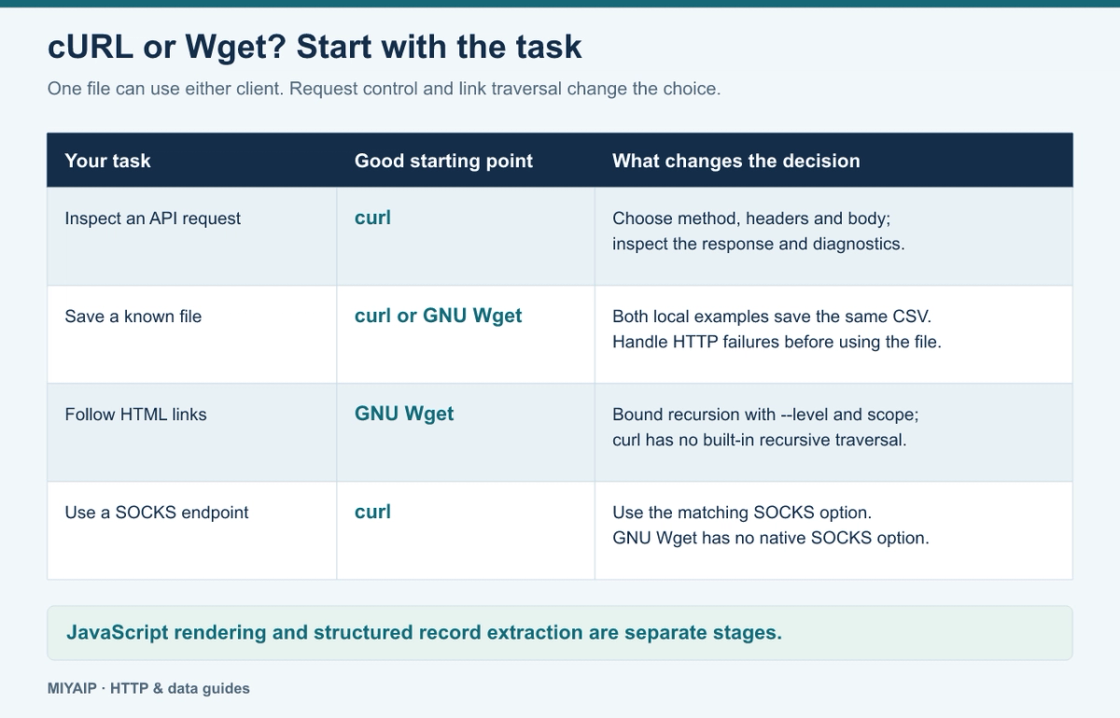
Use curl when you need to inspect or construct an HTTP request: send JSON, choose a method, examine headers or reproduce an API call. Use GNU Wget when your main task is downloading files, especially following links recursively. Either can save one file successfully; the useful distinction is how much work surrounds that download.
The commands below use curl and GNU Wget, rather than Wget2. Check curl --version and wget --version, because installed builds can have different protocol and TLS capabilities.
In this guide
Compare the tasks that change the choice
Task | curl | GNU Wget |
|---|---|---|
Save one HTTP response |
|
|
Inspect response headers and send an API body | Direct request-oriented options | Possible, but less convenient for repeated API debugging |
Follow links from HTML recursively | No built-in recursive website traversal |
|
Resume a file |
|
|
Use an HTTP proxy for HTTPS | HTTP CONNECT tunnel | HTTP CONNECT tunnel |
Use a SOCKS proxy directly | Supported by curl, subject to build options | No native SOCKS proxy option in GNU Wget |
Execute page JavaScript | No | No |
The curl comparison table distinguishes their broader capabilities. It is not a speed ranking. Network route, server behavior, compression and local storage can matter more than the client name for a particular download.
Download the same file with both
The example archive includes a loopback-only server with fictional catalog data. Follow its README to prepare the fixtures and start demo_server.py. Run these commands from the extracted example directory:
curl --noproxy '*' --fail --silent --show-error \
  --output curl-catalog.csv \
  http://127.0.0.1:8812/demo/catalog.csv

wget --no-proxy --quiet \
  --output-document=wget-catalog.csv \
  http://127.0.0.1:8812/demo/catalog.csv

cmp curl-catalog.csv wget-catalog.csv
cmp produces no output when the files match. Both contain:
id,name
p101,Desk Lamp
p102,Travel Mug
The local commands explicitly bypass proxy environment variables. For a public target, choose a direct or proxy route deliberately. Saving an HTTP error page as .csv does not make it a valid catalog. curl's --fail makes HTTP error responses fail the transfer; GNU Wget also reports an unsuccessful exit for server errors. Handle that exit before importing the file.
Use curl to reproduce a request
An API investigation often needs headers, a particular body and a bounded wait:
curl --noproxy '*' --include --max-time 10 \
  --header 'Accept: application/json' \
  http://127.0.0.1:8812/demo/ok
Here --include puts response headers beside the body. The example returns HTTP 200 and a JSON object. If the target returns a redirect, curl does not follow it unless you add --location; inspect where it leads before sending credentials or a write request to another location.
For an API with authentication or a JSON body, start from that API's documented method and content type. Choosing curl does not establish which endpoint, credentials or fields the service accepts.
Use Wget to follow a bounded set of links
The local server exposes an index linking to one item page:
wget --no-proxy --quiet \
  --recursive --level=1 --no-parent \
  --directory-prefix=wget-site \
  http://127.0.0.1:8812/site/
GNU Wget saves the starting page and follows the eligible link within that scope. --level=1 bounds traversal depth; --no-parent keeps traversal below the starting directory. Host restrictions and robots handling still matter for a public site. Check the GNU Wget manual when adding recursion filters or mirroring options.
Downloading linked HTML is different from scraping structured records. Neither client executes the page's JavaScript. A page that depends on browser rendering may require a different collection method, and a recursive download does not automatically produce a clean JSON dataset.
Match the proxy protocol to the client
For an HTTPS target through an HTTP proxy, both clients can establish CONNECT. The local example proxy accepts only the supplied local fixtures:
curl --noproxy '' \
  --proxy http://127.0.0.1:8814 \
  --cacert fixtures/certs/ca.pem \
  https://localhost:8813/demo/ok

env -u no_proxy -u NO_PROXY https_proxy=http://127.0.0.1:8814 \
  wget --ca-certificate=fixtures/certs/ca.pem \
  --output-document=proxy-response.json \
  https://localhost:8813/demo/ok
For a real MIYAIP endpoint, use the protocol, host, port and authentication supplied in your account. An https:// target does not imply that the proxy itself uses an https:// connection.
Use curl's SOCKS options only when the endpoint actually supports SOCKS. For SOCKS5, socks5h:// sends destination hostname resolution through the proxy. Consult the MIYAIP protocol guide before changing transport settings.
Frequently asked questions
Which one is faster?
There is no universal winner established by these examples. Compare the same URL, route, output and retry policy if transfer time is your actual decision criterion.
Is curl a replacement for a crawler?
curl transfers data. It does not supply a recursive scheduler, a browser or a record extraction pipeline. The MIYAIP web scraping guide covers the next stages after fetching.
Which should I install for a collection workflow?
Choose curl for request-level investigation and GNU Wget for bounded file or link retrieval. If the workflow needs both jobs, using both tools is reasonable; keep retries, timeouts and output handling explicit.