
For web scraping with JavaScript, begin by checking whether the data is present in the HTML response. If it is, Node.js fetch() and Cheerio can retrieve and parse it without opening a browser. Use browser automation when the page requires JavaScript execution or interaction to produce the data.
This tutorial builds a two-page scraper against fictional local products. It follows a next-page link and writes one JSON file. The local example makes it easier to distinguish a selector problem from a target site's networking or access restrictions.
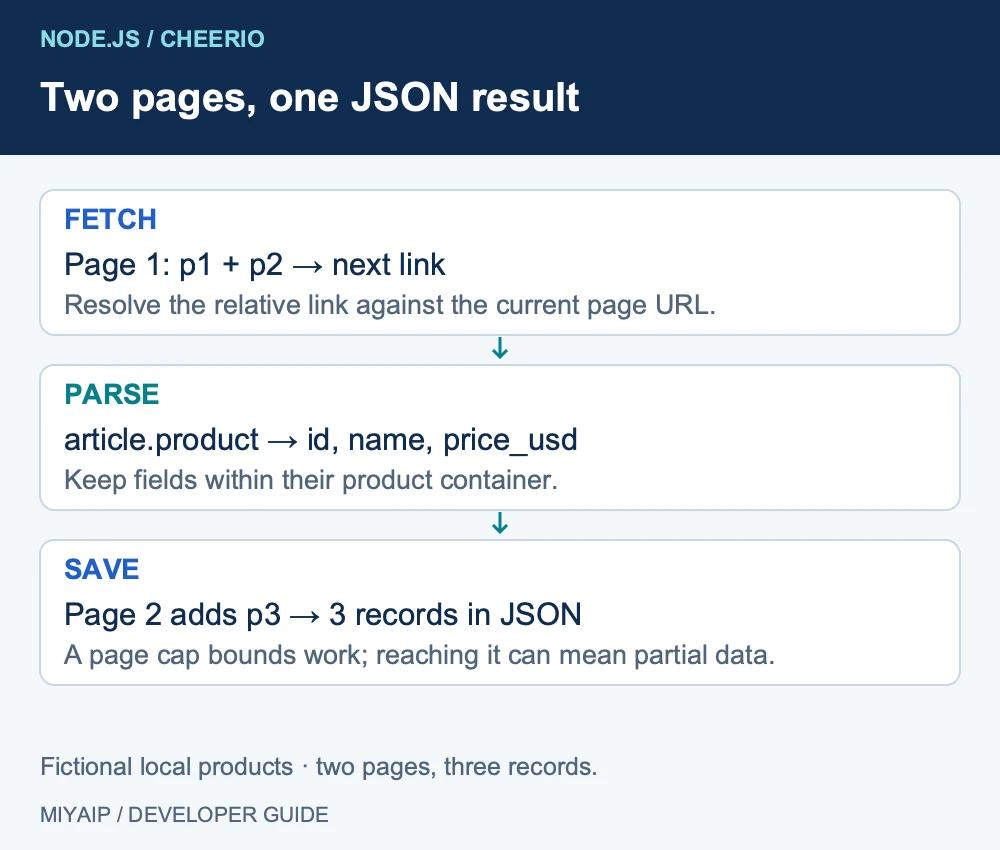
Workflow at a glance
1. Prepare Node.js and the example site
Use a currently supported Node.js LTS release. The example needs
fetch()andAbortSignal.timeout(), plus a compatible Cheerio release. Check the installed package's engine requirements rather than assuming every Node.js version supports it.2. Fetch HTML and select fields with Cheerio
Save this as
products.mjsand runnode products.mjs:3. Check the JSON output
The local example produces three records in
javascript-products.json:4. Follow pagination without losing the current URL
The next-page URL is resolved against the page just fetched. This matters when a site uses relative links such as
?page=2or/products?page=2.5. Decide whether the page needs a browser
If the HTML contains only a placeholder, Cheerio cannot make the missing data appear. Before switching tools, compare the raw response with the rendered page. A redirect, an error page and a JavaScript shell can all lead to an empty product selector for different reasons.
6. Add production concerns one at a time
Keep fetching, parsing and saving as separate responsibilities. That makes it possible to replay a saved HTML sample after a site's markup changes, without sending another network request for every parser adjustment.
1. Prepare Node.js and the example site
Use a currently supported Node.js LTS release. The example needs fetch() and AbortSignal.timeout(), plus a compatible Cheerio release. Check the installed package's engine requirements rather than assuming every Node.js version supports it.
In a new directory, install Cheerio:
npm init -y
npm install cheerio
The accompanying example files include demo_server.py. Start it in a separate terminal:
python3 demo_server.pyOpen http://127.0.0.1:8766/products. Page one contains a Travel Mug and Desk Lamp, followed by a next-page link. Page two contains a Notebook. The records are fictional tutorial data.
Each product uses an article.product container with a data-id, an h2 and a .price. Inspect the response HTML before choosing selectors; browser DevTools can show a DOM that scripts have changed after the original response arrived.
2. Fetch HTML and select fields with Cheerio
Save this as products.mjs and run node products.mjs:
import * as cheerio from 'cheerio';
import { writeFile } from 'node:fs/promises';

let url='http://127.0.0.1:8766/products';
const rows=[]; const seen=new Set();
for(let page=0;url && page<5;page++){
  if(seen.has(url)) throw new Error('Repeated pagination URL');
  seen.add(url);
  const response=await fetch(url,{signal:AbortSignal.timeout(15000)});
  if(!response.ok) throw new Error(`HTTP ${response.status}`);
  const $=cheerio.load(await response.text());
  $('article.product').each((_,card)=>{
    rows.push({id:$(card).attr('data-id'),name:$(card).find('h2').text().trim(),price_usd:$(card).find('.price').text().trim().replace(/^\$/,'')});
  });
  const next=$('a[rel="next"]').attr('href');
  url=next ? new URL(next,url).href : null;
}
await writeFile('javascript-products.json',JSON.stringify(rows,null,2)+'\n');
console.log(JSON.stringify(rows,null,2));
The script checks response.ok before parsing. fetch() does not throw simply because the server returned an HTTP error such as 404. It applies a 15-second abort signal to each fetch operation and stops after at most five pages.
Cheerio reads and queries the returned HTML. It does not execute the target's JavaScript. Its loading documentation explains the HTML parsing entry point used here.
3. Check the JSON output
The local example produces three records in javascript-products.json:
[
  {"id":"p1","name":"Travel Mug","price_usd":"19.90"},
  {"id":"p2","name":"Desk Lamp","price_usd":"32.00"},
  {"id":"p3","name":"Notebook","price_usd":"4.50"}
]
Prices remain strings in this example so the displayed decimal representation is retained. Convert them deliberately in your analysis layer and keep the currency with the field. Avoid mixing currencies or treating a missing price as zero.
Validate the count and the required fields. Flag records with missing identifiers or names, and define how to handle duplicates before writing the final export.
4. Follow pagination without losing the current URL
The next-page URL is resolved against the page just fetched. This matters when a site uses relative links such as ?page=2 or /products?page=2.
The seen set stops a repeated pagination URL, while the page cap bounds this small example. Those controls serve different purposes: one catches a loop, the other limits work. Reaching the cap while another next link still exists means you stopped early; it is not evidence that you collected every record.
Some sites paginate with a cursor or JSON API rather than a link. Inspect that interface's response and documentation; changing page=2 by guesswork can repeat results or skip data.
5. Decide whether the page needs a browser
What you observe | Start with | What to verify |
|---|---|---|
Required fields are in response HTML | Fetch and Cheerio | Container selectors, encoding and missing fields |
Data is available through a documented JSON endpoint | An HTTP request to that endpoint | Parameters, authentication and response structure |
A click or JavaScript render creates the content | Browser automation | A meaningful loaded-state condition and the resulting elements |
If the HTML contains only a placeholder, Cheerio cannot make the missing data appear. Before switching tools, compare the raw response with the rendered page. A redirect, an error page and a JavaScript shell can all lead to an empty product selector for different reasons.
For an existing browser-automation project, use the client you can maintain and wait for the state you need. The Playwright and Puppeteer comparison can help with that choice.
6. Add production concerns one at a time
Keep fetching, parsing and saving as separate responsibilities. That makes it possible to replay a saved HTML sample after a site's markup changes, without sending another network request for every parser adjustment.
Record the source URL and collection time. Respect a target's permitted access conditions and rate limits. For 429 responses, follow the service's retry instructions; a tight loop of immediate retries can make a temporary problem last longer.
If you want to run your own scraper through MIYAIP, choose a suitable proxy plan and use your HTTP client's documented proxy support. A proxy changes the network route; it does not add missing rendering or fix a wrong selector. If you prefer a supported managed collection task, compare the Crawler API workflow.
Frequently asked questions
Can JavaScript scrape a page without Puppeteer or Playwright?
Yes, when the required data is available in the HTTP response. Fetch retrieves it and Cheerio can parse the HTML. Browser automation is needed for different tasks, including interaction-dependent content.
Why does my fetch request succeed but return no products?
Inspect the response status, final URL and actual HTML. Then check the selectors against that HTML. An HTTP 200 page can still be a sign-in page or an unexpected response.
Should I add concurrency immediately?
First verify one request and one complete extraction. Add bounded concurrency only after you understand the target's limits, pagination and output validation.
Keep Node.js in control when you need custom parsing. Use a supported Crawler API interface when you prefer to submit a task and process its result later.