
Use curl with --request PUT and an explicit body to replace a resource at a known URL. For a raw file upload, --upload-file selects PUT for HTTP unless another method overrides it. In both cases, the endpoint's contract decides which fields, authentication and responses are valid.
PUT describes the intended resource state. POST asks the target to process a request according to its own semantics; PATCH applies a defined partial modification. Changing the curl method does not make an endpoint implement a different contract.
In this guide
Send JSON with a matching content type
Start the fictional loopback server from the archive README. The supplied lamp.json contains a complete example representation:
{"name":"Desk Lamp","stock":5,"currency":"USD"}Send it to the local example resource:
curl --noproxy '*' --include --request PUT \
  --header 'Content-Type: application/json' \
  --data-binary @lamp.json \
  http://127.0.0.1:8812/api/items/lamp
--data-binary reads the file without treating it as form fields. Setting the method alone does not attach a body, and attaching --data without a JSON content type does not tell the endpoint to interpret it as JSON. The fixture returns 415 for the wrong content type and 422 if name or stock is missing.
The successful response is HTTP 200 with the stored representation. This local endpoint deliberately replaces the previous object; omitting a field is not an instruction to retain it. Use the actual API documentation to decide whether PUT is appropriate for a production update.
Prevent an update based on an old version
First read the resource and its ETag:
curl --noproxy '*' --silent --show-error \
  --dump-header get-headers.txt \
  --output before.json \
  http://127.0.0.1:8812/api/items/lamp
Copy the complete ETag value from get-headers.txt, including its quotation marks, into an If-Match header:
curl --noproxy '*' --include --request PUT \
  --header 'Content-Type: application/json' \
  --header 'If-Match: "ETAG_FROM_GET"' \
  --data-binary @lamp.json \
  http://127.0.0.1:8812/api/items/lamp
Replace the placeholder with the value you just received; do not send the placeholder literally. The attached put_demo.py automates the same sequence using curl and the current ETag.
Request in a fresh local example | Observed result |
|---|---|
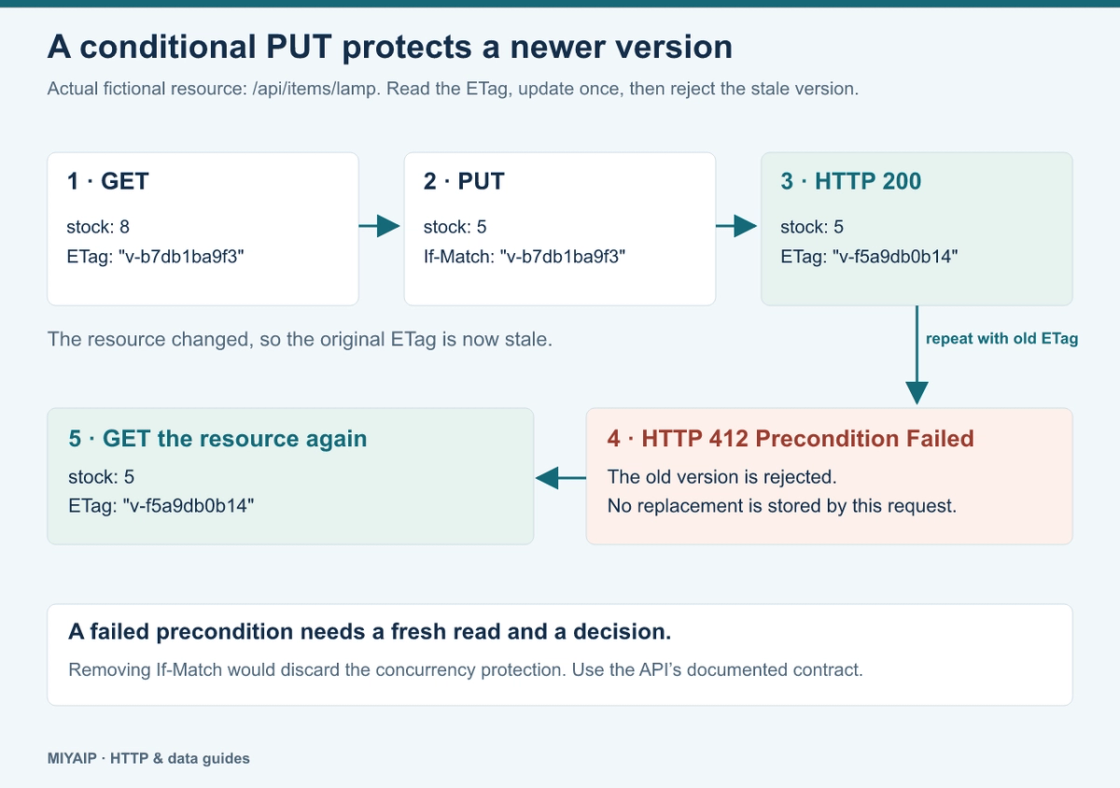
GET the resource | Stock is 8, with an ETag |
PUT stock 5 with that ETag | HTTP 200, stock is 5, a new ETag is returned |
Repeat the PUT with the original ETag | HTTP 412 Precondition Failed |
GET after the rejected request | Stock remains 5 |
If another writer has changed the resource, fetch it again and decide how to reconcile the update. Do not simply remove If-Match to force an old representation through. Conditional requests are useful only when the service supports and enforces them; see RFC 9110's If-Match definition.
Upload a file to an upload endpoint
The example server has a separate raw upload URL:
curl --noproxy '*' --include \
  --upload-file sample.txt \
  http://127.0.0.1:8812/uploads/sample.txt

curl --noproxy '*' --silent --show-error \
  http://127.0.0.1:8812/uploads/sample.txt
The first upload in a fresh server process returns 201 Created. Replacing the existing file returns 204 No Content. The GET returns Example upload followed by a newline. A 204 response intentionally has no response body; trying to parse it as JSON is an error in the client.
This is a raw HTTP upload. It is different from a multipart form upload with --form, and it only works where the receiving service accepts PUT. The curl HTTP scripting guide covers method and upload options.
Interpret the response before retrying
Result | What it tells you |
|---|---|
200 | The server reports success and supplies a response representation |
201 | A resource was created according to the endpoint's contract |
204 | The server reports success without a response body |
400 or 422 | Inspect syntax, required fields and validation details |
401 or 403 | Inspect destination authentication or authorization |
405 | The resource does not support this method |
412 | A supplied precondition failed |
415 | The server does not accept the submitted media type |
By default, curl can finish a transfer with exit status zero even when the HTTP response is an error. Use --fail-with-body in automation when its behavior matches your needs, and still record the HTTP status and response body.
PUT is idempotent in its intended effect: sending the same representation repeatedly should leave the same intended resource state. It does not promise identical timestamps, responses or side effects in every implementation. After a timeout, the first update may already have reached the server. Read the resource or use the API's concurrency controls before deciding to repeat it.
Keep network routing separate from the write contract
A proxy changes the route used to reach an endpoint. It does not add PUT support, supply application authorization or guarantee that a write was accepted. For MIYAIP routing, use the connection fields in the static proxy documentation.
Frequently asked questions
Can I update just one field with PUT?
Only if that is the API's documented contract. For a general partial update, inspect its PATCH support and required patch format rather than assuming omitted PUT fields survive.
Does -X PUT upload a file?
It selects the method. Add an appropriate body option, such as --data-binary @file.json, or use --upload-file for an endpoint that accepts a raw upload.
Does HTTP 200 prove the stored value is what I expected?
It is the server's success response. Compare its returned representation or read the resource again to confirm the value your workflow needs.