

Python web scraping means retrieving a page or rendering it in a browser, extracting the required fields, and turning them into useful records. Start with Requests and Beautiful Soup when the data is already in the HTML. Choose Scrapy when URL discovery and recurring multi-page jobs need structure. Add Playwright when the data depends on JavaScript or browser interaction.
Three questions determine the stack: where does the data appear, does collection require interaction, and how much must be collected over time? This guide follows that progression from a reproducible local exercise to pagination, dynamic content, error handling, storage, and network routing. It assumes basic Python and permission to access any real target you later choose.
Quick tool selection
Scenario | Starting point |
|---|---|
Static HTML; a few pages | Requests + Beautiful Soup |
XPath or specialized HTML/XML parsing | lxml |
Structured multi-page or recurring crawl | Scrapy |
JavaScript-rendered content | Playwright |
Existing browser automation infrastructure | Playwright or Selenium, according to integration needs |
Geographic routing or persistent outbound identity | Evaluate proxies only if the network requirement exists |
The decision tree is a starting point, not a restriction on combining tools. A browser can supply HTML to a parser, and a crawler can manage a collection of extraction tasks. Choose each component for the part of the workflow it actually needs to handle.
What Python web scraping does
A typical flow is URL → HTTP response or rendered DOM → CSS/XPath selection → structured records → cleaning and validation → CSV, JSON, or a database. Product names, prices, SKUs, availability, article titles, and table cells are examples of fields a scraper may extract. A successful request is only the first stage; the resulting dataset must still be complete enough for its intended use.
Crawling and scraping solve different problems. A crawler discovers and visits links, such as homepage → categories → products. A scraper extracts specific fields from those pages. A small script may do both; a larger project benefits from separate responsibilities for URL discovery, extraction, and processing.
Python has HTTP clients, parsers, crawling frameworks, browser automation, and data-processing libraries in one ecosystem. It is not universally better than R. R may be convenient when the next stage is a statistical workflow already written in R; Python fits well when the rest of the application and automation pipeline is Python-based. Choose the language that serves the whole job.
Python scraping libraries and their roles
Tool | Role | Runs page JavaScript? | Crawl organization |
|---|---|---|---|
Requests | HTTP client | No | Write request logic yourself |
Beautiful Soup | HTML/XML parsing interface | No | No built-in crawler |
lxml | HTML/XML parser and XPath | No | No built-in crawler |
Scrapy | Crawling and extraction framework | Not by itself | Scheduling, selectors, pipelines, exports |
Selenium | Browser automation | Yes | Requires crawl orchestration |
Playwright | Browser automation | Yes | Requires crawl orchestration |
Requests + Beautiful Soup
This combination separates retrieval from parsing. Requests provides response status handling and configurable timeouts; Beautiful Soup locates elements and extracts their text. It is a useful starting point for static articles, directories, public tables, documentation, and simple listings. Neither library executes page JavaScript. See the Requests quickstart and Beautiful Soup documentation.
lxml
Use lxml when XPath or its HTML/XML tree APIs fit the extraction problem. It is worth measuring when parsing becomes a bottleneck; do not assume a speed improvement without testing the actual input. The lxml HTML documentation describes its APIs. After the tutorial defines html_text, this optional example extracts the same product titles:
# Optional dependency: python -m pip install lxml
from lxml import html

tree = html.fromstring(html_text)
titles = tree.xpath("//div[@data-sku]/h2/text()")
print(titles)
Scrapy
Scrapy organizes requests and responses around spiders, selectors, and downstream processing. It is useful for category-to-product discovery, recurring catalogs, and pagination across many pages. Its overview explains the framework; item pipelines cover validation, cleaning, duplicate handling, and storage. A one-page script rarely needs all of that structure immediately.
Selenium and Playwright
Browser automation can navigate, click, fill forms, scroll, and inspect the DOM after JavaScript runs. Selenium WebDriver is relevant to existing Selenium environments. Playwright for Python supports Chromium, Firefox, and WebKit, with synchronous and asynchronous APIs. Browser processes add resource and lifecycle management compared with direct HTTP requests. Neither tool guarantees undetectable automation.
Build your first scraper with a local fixture
Use the same local HTML throughout the exercise. This avoids pretending that example.com contains a product catalog. Create an empty practice folder; run Python code steps in order in one scrape.py file or notebook session. The terminal serving HTML must stay running while a second terminal runs the scraper. All sample products and prices are fictional teaching data.
Eight steps from fixture to export
1. Install the two starting packages
Use a virtual environment if this is a new project. The following installs dependencies into the interpreter used by
python.python -m pip install requests beautifulsoup42. Save the fixture as products.html
Save this HTML as
products.htmlin the practice folder. The second card deliberately has no price so the exercise covers missing optional fields.<!doctype html> <html lang="en"> <meta charset="utf-8"> <title>Local product fixture</title> <h1>Example products</h1> <div class="product" data-sku="KB-01"> <h2 class="title">Mechanical Keyboard</h2> <span class="price">$89.99</span> </div> <div class="product" data-sku="MS-02"> <h2 class="title">Wireless Mouse</h2> <!-- A missing price is intentional. --> </div> </html>3. Serve only the local practice folder
In a terminal opened inside that folder, run this command. Binding to loopback keeps this teaching server local. Do not serve a directory containing private files. Stop it with Ctrl+C after the exercise.
python -m http.server 8000 --bind 127.0.0.14. Request the HTML and check the response
Start
scrape.pywith this code. The tuple sets connect and read timeouts; it is not an overall wall-clock deadline.raise_for_status()prevents an HTTP error page from being treated as normal data.import requests url = "http://127.0.0.1:8000/products.html" response = requests.get(url, timeout=(3, 10)) response.raise_for_status() html_text = response.textWhen a target needs custom request headers, follow Python Requests headers to configure them and inspect the fields actually sent, separately from the response headers.
5. Inspect the HTML before choosing selectors
The heading confirms the response is the intended fixture. A successful HTTP status alone does not prove that the response contains the expected page.
from bs4 import BeautifulSoup soup = BeautifulSoup(html_text, "html.parser") heading = soup.select_one("h1") if heading is None: raise ValueError("Expected heading is missing") print(heading.get_text(" ", strip=True)) # Example products6. Extract records and validate required fields
Append this parser. It keeps selectors inside each card, requires SKU and title, and preserves an absent price as
None. Zero cards cause an explicit failure so a broken selector cannot silently look like a successful empty export.from bs4 import BeautifulSoup def parse_products(html_text): soup = BeautifulSoup(html_text, "html.parser") cards = soup.select(".product") if not cards: raise ValueError("No product cards: check the page and selectors") rows = [] for card in cards: title = card.select_one(".title") price = card.select_one(".price") sku = (card.get("data-sku") or "").strip() title_text = title.get_text(" ", strip=True) if title else "" if not sku or not title_text: raise ValueError("Product is missing a required SKU or title") rows.append({ "sku": sku, "title": title_text, "price_text": price.get_text(" ", strip=True) if price else None, }) return rows results = parse_products(html_text) print(results)7. Normalize this fixture’s USD prices
This parser accepts the fixture’s USD format, including
$1,299.99. It rejects unexpected formats rather than guessing the locale. Decimal strings preserve the intended decimal value and serialize consistently; missing prices remainNone.import re from decimal import Decimal def parse_usd(value): if value is None: return None value = value.strip() if not re.fullmatch(r"\$?(?:[0-9]+|[0-9]{1,3}(?:,[0-9]{3})+)\.[0-9]{2}", value): raise ValueError(f"Unexpected USD price: {value!r}") return str(Decimal(value.removeprefix("$").replace(",", ""))) for row in results: row["price"] = parse_usd(row["price_text"]) row["currency"] = "USD" row["source_url"] = url8. Export the same records to CSV and JSON
Append this code and run
python scrape.pyfrom the practice folder. Expect two records: KB-01 has price89.99; MS-02 has a null JSON price. CSV representsNoneas an empty cell. Keep raw and normalized prices for auditing.import csv import json from pathlib import Path fields = ["sku", "title", "price_text", "price", "currency", "source_url"] with open("products.csv", "w", newline="", encoding="utf-8") as f: writer = csv.DictWriter(f, fieldnames=fields) writer.writeheader() writer.writerows(results) Path("products.json").write_text( json.dumps(results, ensure_ascii=False, indent=2), encoding="utf-8" )
Beautiful Soup’s select, select_one, and get_text provide the extraction interface used above. For the serialization choices, see Python’s decimal documentation and CSV documentation. This example deliberately defines one currency format; a real international catalog needs explicit currency and locale rules.
CSS selectors or XPath?
CSS is convenient for classes, IDs, attributes, and descendant relationships. XPath can express more involved tree relationships. In the local fixture, .product .title selects product titles; //div[@data-sku]/h2 is a corresponding XPath when using lxml or Scrapy. Avoid matching an entire class attribute as one string when the page may add extra classes.
Need | CSS | XPath |
|---|---|---|
Simple classes and IDs | Concise | Supported |
Attribute matching | Supported | Supported |
Ancestor/sibling relationships | Depends on selector support | Expressive tree navigation |
Beginner readability | Often straightforward | Requires learning axis syntax |
Scrapy extraction | Supported | Supported |
Choose selectors from the actual response or rendered DOM. If markup changes, the browser still opening normally does not mean the old extraction rules remain correct. Keep representative HTML fixtures and check both required fields and expected record counts.
Cleaning, deduplication, and storage
Extraction begins the data-processing work. Normalize whitespace, dates, currency formats, numeric strings, and availability labels according to a documented schema. Preserve nulls when a value is absent; distinguish absence from parse errors and a real numeric zero. Use a stable product identifier or canonical record URL for deduplication, rather than assuming titles are unique.
Pandas is optional. If it already belongs to the analysis workflow, load the same results into a DataFrame and export it. The basic tutorial does not need Pandas just to write a CSV. Its CSV API documents options such as excluding the index.
# Optional dependency: python -m pip install pandas
import pandas as pd

df = pd.DataFrame(results)
df.to_csv("products-pandas.csv", index=False)
df.to_json("products-pandas.json", orient="records", indent=2,
           force_ascii=False)
For recurring crawls, move validation and duplicate handling into a Scrapy pipeline or the existing processing layer. Choose a database when consumers need queries, updates, or transactions; CSV or JSON may be enough for a portable export. Record source URLs and collection timestamps so readers can understand when and where each value was observed.
Pagination without losing crawl boundaries
Sites may use numbered pages, Next links, category links, infinite scrolling, or API cursors. Numbered URLs help only when the actual site exposes that pattern; do not invent a /products?page=2 route and expect it to exist. Inspect navigation and verify that page two contains different records before extending the loop.
This extension reuses parse_products. It follows HTTP(S) Next links only on the starting origin, removes fragments, rejects redirects in this bounded exercise, tracks visited pages, and stops after five pages. The current fixture stops after one page because it has no Next link. To try page two, create another local HTML file with different SKUs and add <a class="next" href="products-2.html">Next</a> to the first file.
If a real target redirects, use the cURL redirect guide to inspect its status, Location and final URL before deciding how to handle it. Keep this exercise’s same-origin boundary intact.
from urllib.parse import urljoin, urldefrag, urlsplit
import time

start_url = "http://127.0.0.1:8000/products.html"
origin = urlsplit(start_url)
current = start_url
visited = set()
all_results = []

while current and current not in visited and len(visited) < 5:
    visited.add(current)
    response = requests.get(current, timeout=(3, 10), allow_redirects=False)
    response.raise_for_status()
    if 300 <= response.status_code < 400:
        raise ValueError("Review this redirect before expanding crawl scope")
    all_results.extend(parse_products(response.text))
    soup = BeautifulSoup(response.text, "html.parser")
    next_link = soup.select_one("a.next[href]")
    current = None
    if next_link:
        candidate = urldefrag(urljoin(response.url, next_link["href"]))[0]
        target = urlsplit(candidate)
        if (target.scheme in {"http", "https"}
                and (target.scheme, target.netloc) == (origin.scheme, origin.netloc)
                and target.username is None and target.password is None):
            current = candidate
    if current and current not in visited and len(visited) < 5:
        time.sleep(1)  # Teaching default; use the site's actual rate policy.

print(len(all_results))
The visited set prevents a direct URL loop, but distinct URLs can still contain duplicate products. Deduplicate records separately. Query parameters, sorting, and session URLs can multiply the crawl space; define allowed paths and query keys for a real job. For large recurring discovery, Scrapy’s scheduling and filtering are easier to maintain than endlessly extending this loop.
JavaScript-rendered pages with Playwright
If the browser shows data absent from the raw response, compare the initial HTML with the live DOM and inspect how the page fetches data. Some pages require rendering; others expose a documented API that is more suitable. The sequence is often initial HTML → JavaScript → Fetch/XHR → additional data → rendered elements.
Install only the browser needed for this exercise. This command uses the official Playwright installation flow, selecting Chromium explicitly.
python -m pip install playwright
python -m playwright install chromium
This runnable example opens the same local fixture. It demonstrates locator-based waiting and cleanup; the fixture itself is static. For an authorized dynamic page, replace the URL and selectors using the actual DOM, then wait for a specific loaded state or expected record count before collecting a list.
from playwright.sync_api import sync_playwright, expect

with sync_playwright() as p:
    browser = p.chromium.launch(headless=True)
    try:
        page = browser.new_page()
        response = page.goto("http://127.0.0.1:8000/products.html",
                             wait_until="domcontentloaded", timeout=15000)
        if response is None or not response.ok:
            raise RuntimeError("Page navigation failed")
        expect(page.get_by_role("heading", name="Example products",
                                exact=True)).to_be_visible()
        products = page.locator(".product")
        expect(products).to_have_count(2)  # Known fixture count, not a universal rule.
        print(products.locator(".title").all_text_contents())
    finally:
        browser.close()
Playwright’s locator documentation describes its locating and waiting model. Clicking through a locator waits for actionability; reading a whole list still requires knowing when that list is ready. domcontentloaded does not mean asynchronous data has arrived. Fixed sleeps cannot reliably replace a loaded-state assertion.
If a page actually has a Load more button, use a role-based locator and wait for the resulting state. For example, page.get_by_role("button", name="Load more").click() is meaningful only after verifying that button exists. The local fixture has no such button. Infinite scrolling also needs a stopping condition, such as an end marker or a validated maximum batch count.
Network inspection may reveal a structured JSON response. Use a documented, authorized endpoint when appropriate, preserving its authentication and usage requirements. Finding an endpoint in browser traffic does not remove access restrictions or make an internal API public.
Diagnosing 403, 429, CAPTCHA, and missing data
Diagnose the failing layer before changing infrastructure. A timeout, access refusal, missing selector, and duplicate record are different problems. The status code and response body narrow the investigation; extraction metrics reveal failures that a successful HTTP response can hide.
Symptom | Likely category | First check |
|---|---|---|
429 | Rate limit | Request pressure and Retry-After |
403 | Access refused | Authentication, response details, and policy |
CAPTCHA/challenge | Traffic verification | Authorized access method and crawl behavior |
Data absent from raw HTML | Rendering or wrong response | Compare HTML, DOM, and network data |
Missing fields | Markup or selector change | Required-field validation and fixtures |
Timeout | Network/server delay | Connect/read timeout and server health See Python Requests timeout settings and exception handling for separate connect/read limits and the distinction from a whole-job deadline. |
Duplicate records | Discovery/processing logic | Stable keys, pagination, URL normalization |
HTTP 429 and Retry-After
RFC 6585 defines 429 as rate limiting. A server may include Retry-After; HTTP semantics permits either a delay in seconds or an HTTP date. Reduce pressure and respect that guidance. Retrying immediately or rotating an IP to ignore a limit does not fix the workload’s behavior.
This bounded example retries only 429. It supports both header formats with Python’s email date parser, falls back to a short exponential delay for a missing or malformed header, and stops if the requested wait exceeds the local budget. It never shortens a valid server wait. Other HTTP errors and connection exceptions stay visible to the caller.
import math
import re
import time
from datetime import datetime, timezone
from email.utils import parsedate_to_datetime
import requests


def retry_after_seconds(value, now=None):
    if not value:
        return None
    value = value.strip()
    if re.fullmatch(r"[0-9]+", value):
        return int(value)
    try:
        deadline = parsedate_to_datetime(value)
        if deadline.tzinfo is None:
            deadline = deadline.replace(tzinfo=timezone.utc)
        now = now or datetime.now(timezone.utc)
        return max(0, math.ceil((deadline - now).total_seconds()))
    except (TypeError, ValueError, OverflowError):
        return None


def get_with_backoff(url, attempts=3, max_wait=60):
    if attempts < 1 or max_wait < 0:
        raise ValueError("Invalid retry limits")
    for attempt in range(attempts):
        response = requests.get(url, timeout=(3, 10))
        if response.status_code != 429 or attempt == attempts - 1:
            response.raise_for_status()
            return response
        delay = retry_after_seconds(response.headers.get("Retry-After"))
        delay = 2 ** attempt if delay is None else delay
        if delay > max_wait:
            response.raise_for_status()  # Stop; never retry earlier than allowed.
        time.sleep(delay)
Use response = get_with_backoff(url) instead of the earlier requests.get call when this policy fits the job, then parse response.text. Keep retries bounded and record exhausted attempts. A production scheduler can defer long waits instead of holding a worker; this teaching function deliberately stops in that situation.
403 and verification challenges
HTTP 403 says the server understood the request and refuses it; it does not identify a single root cause. Authentication, policy, location, configuration, or application rules may matter. Review the response and documented access method. Repeated CAPTCHA challenges are a reason to review permission, rate, session handling, and official API options, rather than treating challenge circumvention as a parser fix. See RFC 9110.
When proxy infrastructure is useful
A proxy is not a prerequisite for Python scraping. A small authorized job can often use a direct connection. Evaluate a routing layer when the project needs a particular geography, controlled outbound sessions, workload separation, or multiple network locations. The flow becomes Python client → proxy → target, followed by the same parsing and validation work.
Proxy category | Network characteristic | Evaluate against |
|---|---|---|
Datacenter | Datacenter-hosted exit | Throughput, region, access requirements, and cost |
Residential | Residential ISP-associated exit | Available geography and rotation/sticky-session behavior |
Static residential / ISP | Stable ISP-associated endpoint | Required session lifetime and routing consistency |
Mobile | Cellular-network-associated exit | Need for a particular mobile network and session behavior |
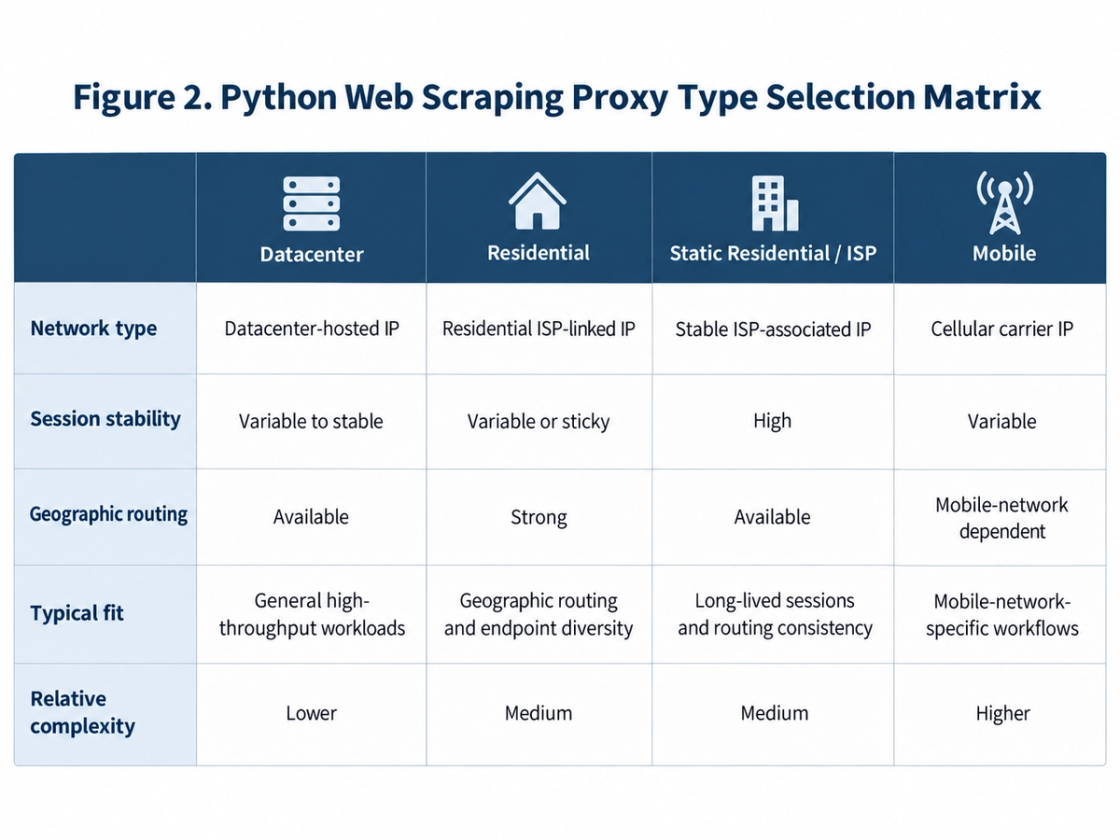
No category is universally best. Geography, session duration, endpoint supply, permitted use, throughput, and budget affect suitability. A sticky session does not guarantee indefinite IP persistence, and changing an IP does not repair a selector or grant additional access rights.
MiyaIP can be evaluated as the routing component when that requirement is real. Its rotating residential proxy page describes rotating and sticky sessions and location-targeting options. Verify current plan coverage, session limits, authentication, and acceptable-use terms before integration. Routing complements the scraper; it does not replace request handling, parsing, rate control, or data validation.
Evaluate MiyaIP for a defined routing requirement
If geography or outbound session management is part of your requirements, compare the residential routing options and their limits.
From one script to a maintainable data pipeline
A growing job benefits from clear responsibilities: discover and schedule URLs; fetch or render; parse; clean and validate; deduplicate; store; and monitor. Keep these boundaries in the existing framework or a few straightforward functions before adding services. Add a component when an observed workload or failure mode requires it.
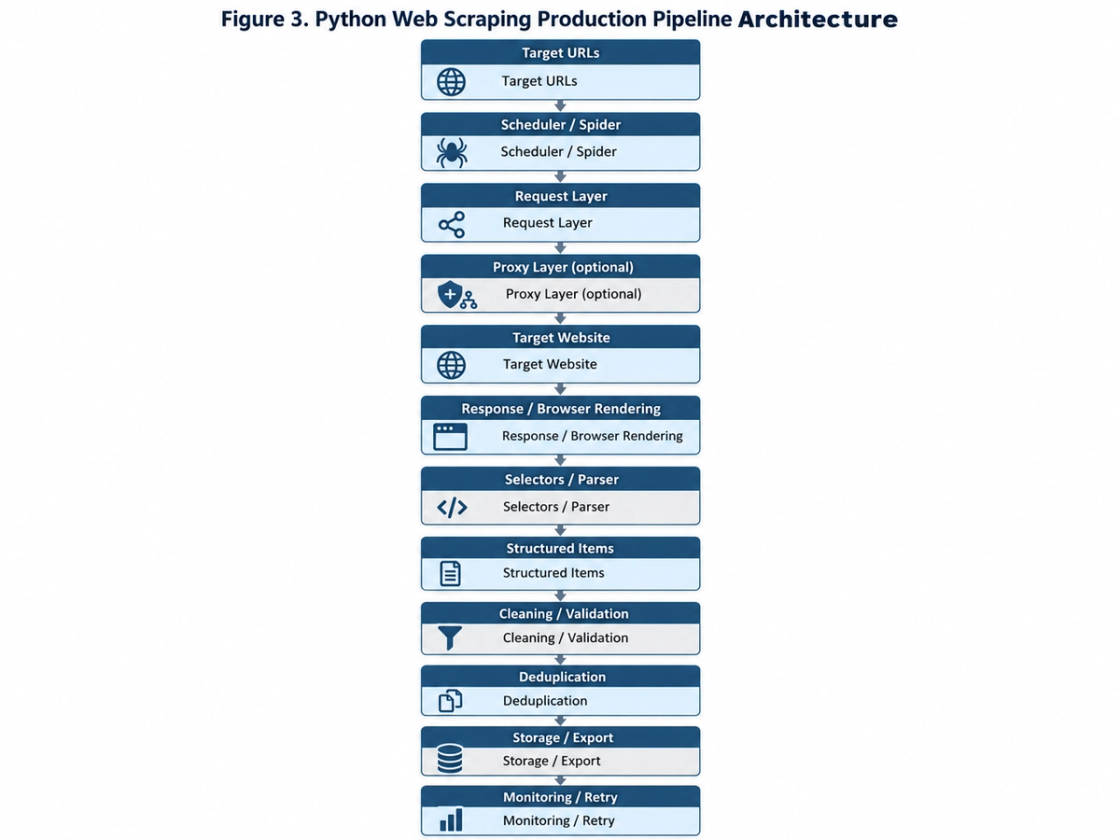
The request layer decides what to fetch, when, and under which retry policy. The parser converts responses into fields such as SKU, title, price, URL, and availability. Processing applies normalization, validation, and duplicate rules. Storage should fit the consumer: file exports, transactional databases, object storage, and internal APIs address different downstream needs.
Scrapy’s item-pipeline model is one place to group record processing. You must still define required fields, reject malformed values, and decide how updates and duplicates are handled. Keep representative fixtures so selector changes can be checked without repeatedly hitting a live site.
Monitor attempted requests, successful responses, status distributions, timeouts, retries, runtime, record counts, required-field failures, and duplicate rate. A process can exit successfully while producing an empty or stale dataset. Alert on data-quality changes as well as crashes. Avoid logging credentials, cookies, or unnecessary personal data.
robots.txt, site terms, and responsible collection
Technical accessibility does not by itself settle whether collection and reuse are permitted. Data type, authentication boundaries, contractual terms, privacy obligations, jurisdiction, and intended use can all matter. For commercial or sensitive work, resolve these questions for the actual target and use case rather than relying on a universal yes-or-no claim.
RFC 9309 defines robots.txt as crawler instructions and explicitly distinguishes it from access authorization. A disallow rule is not an access-control mechanism; its absence is not automatic permission. For example:
User-agent: *
Disallow: /private-area/
Before a real crawl, review robots rules and site terms, prefer an official API when it fits, confirm authorization for authenticated data, collect only necessary fields, and set reasonable request limits. Respect access refusals and rate-limit guidance. Define storage, retention, and deletion requirements before collecting personal or sensitive information.
A practical selection checklist
First inspect how the target delivers data. If HTML contains the fields, start with Requests and Beautiful Soup. Add lxml for a specific parsing need. Move to Scrapy when discovery, scheduling, and repeated crawls need structure. Use Playwright or an existing Selenium workflow when browser execution is necessary. Add Pandas for analysis, and a proxy only for an identified routing requirement. Measure data quality and behavior before scaling.
Python web scraping FAQ
Is Python a good choice for scraping?
Yes, when it fits your runtime and downstream workflow. Its ecosystem covers fetching, parsing, crawling, browser automation, and data processing; the appropriate combination depends on the target.
Which library should a beginner choose?
For static pages, Requests plus Beautiful Soup makes the retrieval/parsing boundary visible. Start with a local fixture, validate required fields, and then adapt selectors to an authorized real target.
Beautiful Soup or Scrapy?
Beautiful Soup parses HTML inside your application. Scrapy adds crawl scheduling, discovery patterns, processing hooks, and exports. Small parsers do not need whole crawlers; recurring multi-page jobs often benefit from one.
Selenium or Playwright?
Both automate browsers. Choose according to browser requirements, existing infrastructure, and maintenance needs. Playwright supports Chromium, Firefox, and WebKit, with sync and async Python APIs.
Can AI tools help write a scraper?
They can explain HTML, draft selectors, review code, and diagnose errors. Generated code still needs execution and verification. Access depends on the runtime, network, credentials, permissions, and available tools.
Can automated scraping be detected?
It can be. Request timing, sessions, network characteristics, and application signals may reveal automation. Mechanisms vary; no library or proxy guarantees invisibility or permission.
Does every scraper need a proxy?
No. Consider one for a defined geographic, session, or network-separation requirement. A direct connection is often sufficient for a small authorized job.
What should I do after a 429 response?
Reduce pressure, honor a valid Retry-After delay or date, and use bounded retries. Stop or reschedule when the waiting requirement exceeds your job’s budget.
Is robots.txt legal permission?
No. It communicates crawler rules and is not an authorization mechanism. Collection and reuse must be assessed against the actual access method, terms, data, jurisdiction, and use.
Start with a working request, a verified selector, and a validated record. Let the delivery mechanism decide whether a browser is necessary, and let observed scale justify the crawler and routing layers. That keeps the pipeline understandable while preserving the checks that make its data trustworthy.
Sources
The following references were checked on 13 September 2026. Living documentation may change; consult the linked sources when adapting the examples.
Microsoft Playwright: Python installation
Microsoft Playwright: Locators
Python Software Foundation: decimal
Python Software Foundation: csv
Python Software Foundation: email.utils
IETF / RFC Editor: RFC 6585, Additional HTTP Status Codes (2012)
IETF / RFC Editor: RFC 9110, HTTP Semantics (2022)
IETF / RFC Editor: RFC 9309, Robots Exclusion Protocol (2022)