
Add --verbose, or -v, when you need to see how curl reaches a server. The log distinguishes connection setup, proxy tunneling, TLS negotiation and HTTP headers. That sequence helps you decide whether to inspect the destination, proxy, certificate trust or application response.
Verbose diagnostics normally go to standard error. Response content goes to standard output unless you select an output file. Keep them separate so a JSON parser does not receive diagnostic lines.
In this guide
Save the body and diagnostics separately
Start the fictional local server from the archive README. Then run:
curl --noproxy '*' --verbose --max-time 10 \
  --output response.json \
  http://127.0.0.1:8812/demo/ok \
  2>curl-verbose.log
response.json contains the response body; curl-verbose.log contains connection diagnostics and progress information. -i includes response headers in the normal output, -I requests headers using HEAD, and -v adds diagnostic information. They answer different questions. A server can treat HEAD differently from GET, so -I is not always a faithful reproduction of a failing GET.
In common verbose output, > marks an outgoing HTTP header line, < marks an incoming header line and * introduces curl's diagnostic information. The curl manual documents these options; exact TLS messages vary by version and TLS backend.
Read an HTTPS request through an HTTP proxy
The local fixture provides an HTTPS destination and a proxy that only reaches the supplied local services. Prepare its local certificates with prepare_demo.py; the CA is passed to this request only and is not installed into your system trust store.
curl --noproxy '' --verbose --max-time 10 \
  --proxy http://127.0.0.1:8814 \
  --cacert fixtures/certs/ca.pem \
  --output response.json \
  https://localhost:8813/demo/ok \
  2>proxy-verbose.log
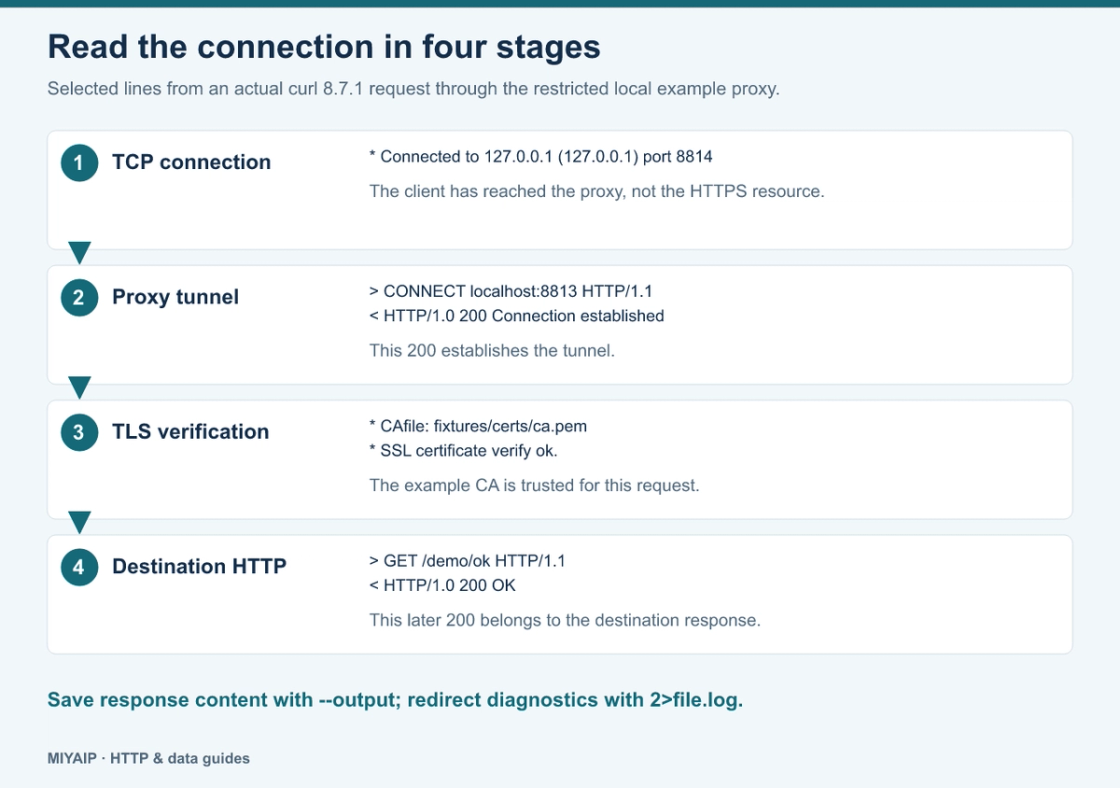
--noproxy '' prevents an inherited localhost bypass from skipping this demonstration's proxy. Selected lines from the resulting local request are:
* Connected to 127.0.0.1 (127.0.0.1) port 8814
> CONNECT localhost:8813 HTTP/1.1
< HTTP/1.0 200 Connection established
* CONNECT tunnel established, response 200
*  CAfile: fixtures/certs/ca.pem
*  subjectAltName: host "localhost" matched cert's "localhost"
*  SSL certificate verify ok.
> GET /demo/ok HTTP/1.1
< HTTP/1.0 200 OK
The first 200 belongs to the proxy's tunnel response. The later 200 belongs to the destination's HTTP response. A tunnel can be established even when the destination later returns 403, 404 or 500. The HTTP proxy explanation describes this CONNECT behavior.
Match the evidence to the next action
Last useful evidence | What to examine next |
|---|---|
Destination or proxy hostname cannot be resolved | The named host and the resolver used for that route |
TCP connection refused or timed out | Host, port, route and whether the service is listening |
Proxy responds 407 | Proxy authentication, rather than destination credentials |
CONNECT succeeds, then certificate validation fails | The destination hostname, issuer chain and the CA store curl uses |
Destination responds 401 | Destination authentication |
Destination responds 403 or 429 | The response body, authorization, access policy or rate limit |
HTTP 200, unexpected HTML instead of JSON | The actual content type and body, including redirects or challenge pages |
These observations narrow an investigation; they do not identify every possible cause by themselves. For example, 403 is not proof that an IP is blocked, and a timeout does not establish that the proxy credentials are wrong.
Keep HTTP status separate from curl's exit status
By default, a completed transfer can exit successfully even when the server returns an HTTP error. For a script that expects a successful response, make the policy explicit:
curl --noproxy '*' --fail-with-body --silent --show-error \
  --output error-response.json \
  --write-out 'HTTP %{http_code}\n' \
  http://127.0.0.1:8812/demo/missing
This endpoint returns 404. curl retains the error body and exits with code 22 when --fail-with-body is available in the installed version. Capture the exit status immediately in the shell or process runner; a later successful command can replace it.
Use --dump-header headers.txt when you need response headers without the rest of the verbose log. If you need byte-level tracing, --trace-ascii trace.txt --trace-time provides a more detailed trace. It can include request and response data, so use a controlled reproduction and remove credentials or private content before sharing it.
Move from the local route to your actual endpoint
Use the proxy scheme, host, port and credentials supplied for your MIYAIP account. Check the protocol guide before switching between HTTP and SOCKS. If you are investigating an HTTPS proxy connection, remember that the proxy's own TLS connection and the target's TLS connection are separate layers.
Keep origin authentication and proxy authentication separate. A log that shows a successful proxy connection does not prove that the destination accepted your application request.
Frequently asked questions
Does -v show the response body?
The body remains normal response output. -v adds diagnostics on standard error; use --output to save the body independently.
Why is there no DNS lookup for the destination in my log?
A literal IP needs no hostname lookup, a cached result may be reused, or the proxy may resolve the destination. Inspect the route before concluding that DNS was skipped incorrectly.
Should I send the entire log for support?
Send the smallest relevant excerpt with the command, curl version and observed status. Redact authorization headers, proxy credentials, cookies and private URLs first; the local example shows the useful sequence without those secrets.