
For a small trusted response, Python Requests can retrieve bytes with response.content. For a file that may be large or interrupted, use a streamed response, write binary chunks to a temporary file and move that file to the final destination only after the transfer finishes.
The downloader below checks HTTP status, limits the number of bytes, closes its network and file resources, and removes its temporary file when a transfer fails. It is a complete-file downloader; it does not append ranges to an existing partial file.
Workflow at a glance
Install Requests and start a reproducible source
Use Python 3.10+ and an isolated environment. These POSIX-shell commands run from the example archive's examples directory:
python3 -m venv .venv
. .venv/bin/activate
python -m pip install -r requirements.txt
python demo_server.py
The requirements pin Requests 2.34.2 and defusedxml 0.7.1 for the included Python examples. Keep the server terminal open. In a second terminal, activate the environment and download the fictional binary:
python download_file.py \
  'http://127.0.0.1:8772/files/archive.bin' \
  downloads/archive.bin
The result is Saved 131072 bytes to downloads/archive.bin. Use a new destination filename when running the example again; an existing destination is preserved.
Stream the response into a temporary file
"""Download one identity-encoded file; keep failed transfers out of the final path."""
import argparse
import os
from pathlib import Path
import tempfile
import requests


def download(url, destination, max_bytes=10 * 1024 * 1024):
    destination = Path(destination)
    if destination.exists():
        raise FileExistsError(f"Destination already exists: {destination}")
    destination.parent.mkdir(parents=True, exist_ok=True)
    temporary = None
    try:
        with requests.Session() as session:
            session.trust_env = False
            proxy = os.environ.get("PROXY_URL")
            if proxy:
                session.proxies.update({"http": proxy, "https": proxy})
            with session.get(url, stream=True, timeout=(3, 10),
                             headers={"Accept-Encoding": "identity"}) as response:
                response.raise_for_status()
                if response.status_code != 200:
                    raise ValueError(f"Expected a complete HTTP 200 response, got {response.status_code}")
                if response.headers.get("Content-Encoding", "identity").lower() != "identity":
                    raise ValueError("Expected an identity-encoded response")
                length = response.headers.get("Content-Length")
                expected = int(length) if length is not None else None
                if expected is not None and expected > max_bytes:
                    raise ValueError("Declared file size exceeds the limit")
                total = 0
                with tempfile.NamedTemporaryFile(mode="wb", dir=destination.parent,
                                                 prefix=destination.name + ".", suffix=".part",
                                                 delete=False) as file:
                    temporary = Path(file.name)
                    for chunk in response.iter_content(chunk_size=64 * 1024):
                        if not chunk:
                            continue
                        total += len(chunk)
                        if total > max_bytes:
                            raise ValueError("Downloaded file exceeds the limit")
                        file.write(chunk)
                if expected is not None and total != expected:
                    raise ValueError("File size does not match Content-Length")
                # One writer per destination; the same directory keeps the move local.
                if destination.exists():
                    raise FileExistsError(f"Destination appeared during download: {destination}")
                temporary.replace(destination)
                return total
    finally:
        if temporary is not None:
            temporary.unlink(missing_ok=True)


if __name__ == "__main__":
    parser = argparse.ArgumentParser()
    parser.add_argument("url")
    parser.add_argument("destination")
    parser.add_argument("--max-bytes", type=int, default=10 * 1024 * 1024)
    args = parser.parse_args()
    if args.max_bytes < 1:
        parser.error("--max-bytes must be positive")
    try:
        size = download(args.url, args.destination, args.max_bytes)
        print(f"Saved {size} bytes to {args.destination}")
    except (requests.RequestException, OSError, ValueError) as error:
        raise SystemExit(f"Download failed: {error}")
The Requests streaming guide explains why the response needs to be consumed or closed. Here, both the session and response use context managers. The file is opened in binary mode and written in chunks rather than reading the whole body into memory at once.
The 64 KiB chunk size is a write unit, not a promise that every network read has that length. The counter uses the bytes actually yielded. The default size ceiling is 10 MiB, and --max-bytes can set a different positive limit for the task.
Check the response before committing the filename
The downloader expects HTTP 200 for a complete file. raise_for_status() rejects HTTP errors; the explicit status check also rejects an unexpected partial-content response. It requests identity encoding and rejects another content encoding, keeping the byte counter comparable with Content-Length when that header exists.
If the length header is absent, the running byte limit still applies. If the header exists, the code rejects a declared size above the limit and checks that the completed byte count matches it. Neither check proves that an HTTP 200 body has the intended file format: validate a CSV header, PDF signature, archive contents or trusted checksum when that matters to your application.
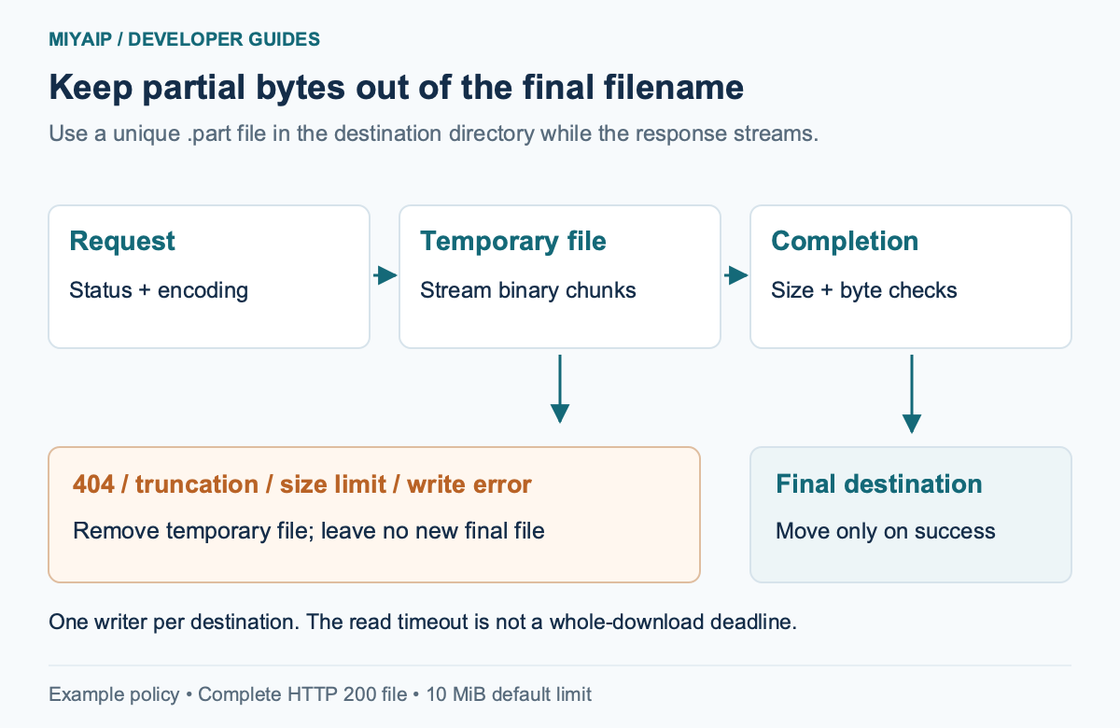
The temporary file is created in the destination directory and receives a unique .part name. After a successful transfer it is moved to the final path. On failure the temporary file is removed in finally. Use one writer per destination: this example is not a cross-process locking protocol, and the destination check should not be treated as a concurrency guarantee.
Observe the failure outcomes
With the fictional source still running:
python download_file.py \
  'http://127.0.0.1:8772/files/missing.bin' \
  downloads/missing.bin

python download_file.py \
  'http://127.0.0.1:8772/files/truncated.bin' \
  downloads/truncated.bin

python download_file.py \
  'http://127.0.0.1:8772/files/archive.bin' \
  downloads/too-large.bin --max-bytes 100
The first fails on HTTP 404. The second receives fewer bytes than the server declares. The third rejects the declared file size. All three exit with a failure message and leave neither a final file nor a temporary .part file for that destination.
For the complete binary, the SHA-256 is:
59f410ae5e17962412e2aed4f815918f634932f2abf084f00bb638c4db017850Compare the actual bytes as well as the terminal message when using this fixture. For a remote file, use an expected checksum from an appropriate trusted source when available.
Set timeouts and proxy settings deliberately
timeout=(3, 10) supplies a connect timeout and a read timeout. It is not a ten-second deadline for the entire download; a slow response that continues delivering data can take longer. An application needing a whole-job deadline needs a separate cancellation policy. Blindly retrying while writing to the same output path can also create conflicting transfers.
The session ignores ambient environment settings and adds an optional PROXY_URL explicitly. To try the bundled fictional HTTP proxy:
PROXY_URL='http://demo:example-only@127.0.0.1:8773' \
python download_file.py \
  'http://127.0.0.1:8772/files/archive.bin' \
  downloads/proxy-archive.bin
For MIYAIP, use the real connection fields from the proxy guide. Encode reserved characters correctly when credentials form part of a proxy URL. Keep normal TLS verification enabled and configure a trusted CA explicitly if your environment requires one; trust_env=False also stops automatic use of environment CA-bundle settings.
FAQ
Why use wb rather than w?
Files downloaded over HTTP are bytes. Text mode can decode or transform them and corrupt binary formats. Decode as text only when the next operation specifically requires text and you know the encoding.
Can I resume with this function?
It downloads a complete response to a new temporary file. A resumable implementation needs range requests, server validation and a rule for changed resources. Do not add append mode alone.
Does a proxy make a bad file valid?
It changes the route used to retrieve the response. Status, format, size and completion checks still belong in the downloader.