
Use curl --output filename URL to save a response under a chosen local name, or curl --remote-name URL to use the filename from the URL path. For a dependable download, also check the HTTP outcome, keep incomplete bytes separate from the final filename, and verify the file you received.
This guide uses a fictional CSV and a 131,072-byte binary file. The local server also supplies a 404 and an interrupted response, so you can see how a failed transfer differs from a complete file.
Workflow at a glance
Choose a local filename with -o or -O
Extract the archive, enter its examples directory and start the source in one terminal:
python3 demo_server.pyIn a second terminal, create an output directory and save the CSV:
mkdir -p downloads
curl --fail --show-error --silent \
  --output downloads/catalog.csv \
  'http://127.0.0.1:8772/files/catalog.csv'
The short equivalent is curl -fSs -o downloads/catalog.csv URL. -o receives a local path; it is not a request parameter. Create the parent directory first. A normal -o command can replace an existing file, so choose a fresh name when you need to retain previous downloads.
To use the URL path's filename, change into the destination directory and use -O:
cd downloads
curl --fail --show-error --remote-name \
  'http://127.0.0.1:8772/files/archive.bin'
cd ..
-O derives archive.bin from the URL. It does not automatically adopt a filename from a Content-Disposition response header; -J is a separate option. Prefer a deliberate local name when the source URL or header filename is not suitable for your output directory. See the curl option reference for those naming options.
Keep the final filename separate from the transfer
A successful connection can return a 404 body, a sign-in page or an HTML error message. --fail makes HTTP errors of 400 and above fail the command, but it cannot tell whether an HTTP 200 body is the file you intended.
For the CSV, save headers and the body separately and use a temporary filename:
curl --fail --show-error --silent \
  --dump-header downloads/catalog.headers \
  --output downloads/catalog.part \
  --write-out 'HTTP %{http_code}; bytes %{size_download}\n' \
  'http://127.0.0.1:8772/files/catalog.csv'
The local response is HTTP 200 with Content-Type: text/csv; charset=utf-8. Open the file and confirm the header id,name,amount,currency and three product rows. After those checks, rename it to the final CSV name. For another file format, use the corresponding parser or file signature rather than relying on the extension.
Only rename a .part file after curl succeeds and the content checks pass. A shell pipeline that renames the file regardless of curl's exit status defeats that separation.
Outcome | What to do with the output |
|---|---|
HTTP 200 and expected file content | Complete the file checks, then use the final name |
HTTP 404 with | Treat the command as failed; do not publish the output |
HTTP 200 containing a login or error page | Correct access or URL selection before retrying |
Transfer ends before the declared length | Keep or discard the partial file deliberately |
Redirect response | Inspect the destination or add an appropriate redirect policy |
To follow a known redirect chain, curl provides --location; --max-redirs bounds the chain. Confirm the resulting destination and content rather than assuming a redirected URL still serves the same file.
Resume a partial file only when the resource is unchanged
Resuming appends bytes after an existing local offset. It requires server support for the range request and confidence that the partial bytes belong to the same resource. A changed file can have the same name and a different byte sequence.
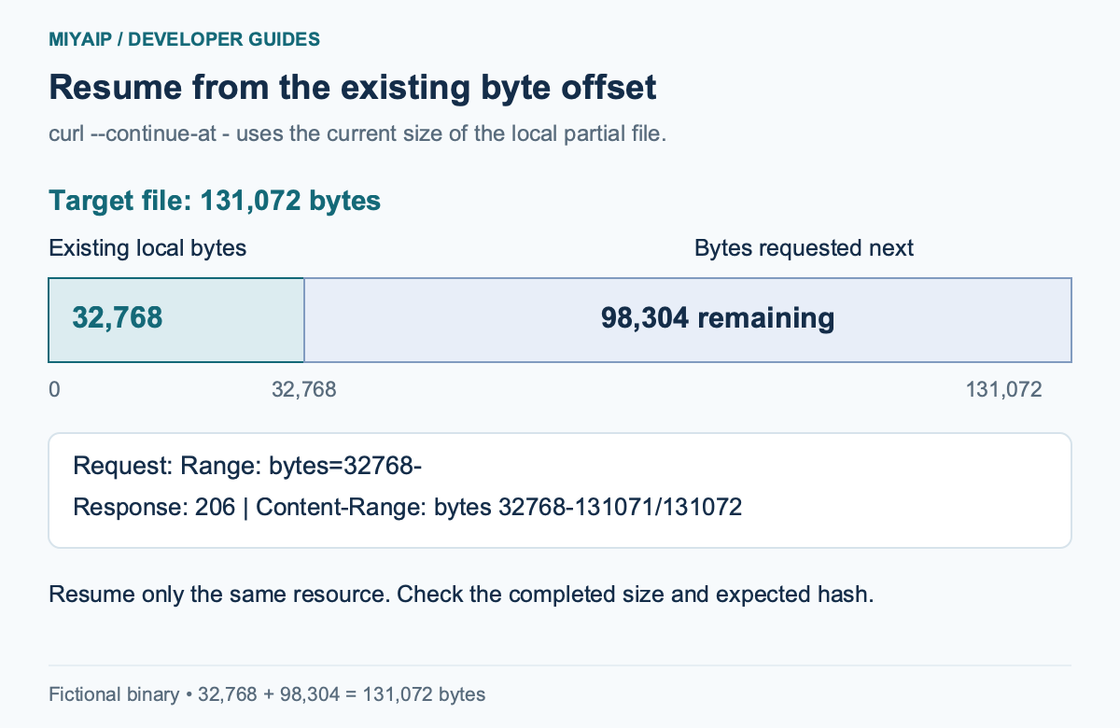
The example below creates a controlled partial copy from the local binary you downloaded above. It starts with 32,768 of the expected 131,072 bytes:
head -c 32768 downloads/archive.bin > downloads/archive.part
curl --fail --show-error --silent \
  --continue-at - \
  --dump-header downloads/resume.headers \
  --output downloads/archive.part \
  'http://127.0.0.1:8772/files/archive.bin'
The - after --continue-at tells curl to use the local file size. The fictional server returns HTTP 206 and:
Content-Range: bytes 32768-131071/131072The completed file contains 131,072 bytes. Its SHA-256 is:
59f410ae5e17962412e2aed4f815918f634932f2abf084f00bb638c4db017850On macOS, calculate shasum -a 256 downloads/archive.part; on systems providing GNU coreutils, use sha256sum. For a remote download, compare with a checksum from a trusted publisher when one is available. Calculating a hash without an expected value records identity, but does not establish authenticity.
If the server rejects continuation or the resource changed, start a fresh download to a new temporary file. Do not append a full HTTP 200 body manually. The curl resume guide explains the continuation mechanism.
Handle failed downloads deliberately
The local /files/missing.bin returns 404. With --fail, curl returns exit code 22. /files/truncated.bin declares 1,000 bytes and sends only 10; curl returns exit code 18. A file existing on disk is therefore not enough to call either transfer complete.
For fresh downloads, curl 7.83.0+ offers --remove-on-error to remove output after an error. Do not combine it with --continue-at: a resumable partial file and automatic removal are different policies, and curl does not permit that combination.
For an optional MIYAIP proxy route, use the actual endpoint and authentication values from the connection guide. Proxy success does not validate the downloaded content. Avoid sending real Basic credentials over an unencrypted connection; the HTTP addresses in this guide are fictional loopback fixtures.
FAQ
Why did curl print the file instead of saving it?
Its default output is the terminal. Supply -o with a local filename or -O for the URL-derived name. A response header filename needs separate handling.
Does -L guarantee a successful download?
It follows redirects. It does not validate a final status, expected content or file completeness by itself. Combine the redirect policy with error handling and a file check.
Can I use these commands in Windows PowerShell?
Use curl.exe to invoke curl explicitly. The line continuations, head and checksum commands above use a POSIX shell; use the equivalent commands for your shell while keeping the same curl options.