
For a website that uses HTTP Basic authentication, supply origin credentials with curl --user username:password URL. If a proxy also needs authentication, its credentials belong in --proxy-user, a separate option. These two logins can fail independently.
The examples below use a fictional origin at 127.0.0.1:8772 and an optional local proxy at port 8773. You can reproduce an origin 401, a proxy 407 and a successful request through both. The supplied passwords are examples for that loopback server.
Workflow at a glance
Start with the origin's Basic challenge
Extract the archive, enter examples and start the fictional server:
python3 demo_server.pyIn another terminal, request the protected resource without credentials:
curl --noproxy '*' --include \
  'http://127.0.0.1:8772/protected/catalog'
The response contains HTTP 401 and:
WWW-Authenticate: Basic realm="Fictional catalog"The challenge identifies the authentication scheme. A 401 alone does not tell you that Basic is the correct scheme; an API may expect Bearer or another method. Check its documentation and challenge before choosing the option.
Authenticate with --user or -u
The fictional origin accepts username reader and password demo-pass:
curl --noproxy '*' --basic \
  --user 'reader:demo-pass' \
  --fail --show-error \
  'http://127.0.0.1:8772/protected/catalog'
The response is HTTP 200 with a JSON items array containing three fictional products. --basic explicitly selects Basic; curl's --user authentication behavior also supports other HTTP authentication choices when configured.
For a real remote service, use HTTPS. Basic encodes the username and password; Base64 is not encryption. You normally do not need to construct the Authorization value yourself.
To avoid putting a real password directly in a shell command, give curl only the username and let it prompt:
curl --user reader --fail --show-error \
  'http://127.0.0.1:8772/protected/catalog'
Enter demo-pass for this local example. For automated jobs, use the credential mechanism approved for that environment; keep secret values out of copied examples and diagnostic output. Supplying --verbose can expose sensitive request information in logs.
Separate proxy authentication from origin authentication
Purpose | curl option | Header | Typical challenge |
|---|---|---|---|
Log in to the target server |
|
| 401 and |
Log in to an HTTP proxy |
|
| 407 and |
Send an API Bearer token |
|
| API-specific Bearer rules |
The bundled proxy accepts demo:example-only and forwards only to the fictional loopback origin. Force proxy use with an empty --noproxy value because many environments bypass proxies for loopback addresses:
curl --noproxy '' \
  --proxy 'http://127.0.0.1:8773' \
  --proxy-basic --proxy-user 'demo:example-only' \
  --basic --user 'reader:demo-pass' \
  --fail --show-error \
  'http://127.0.0.1:8772/protected/catalog'
With neither password, the proxy returns 407. Add only the proxy password and the request reaches the origin, which returns 401. Add the origin credentials as well and the response is 200. A successful proxy login therefore does not imply a successful website login.
For MIYAIP proxy connections, use the real endpoint and authentication fields in the proxy guide. The curl proxy authentication reference describes proxy-specific schemes and options.
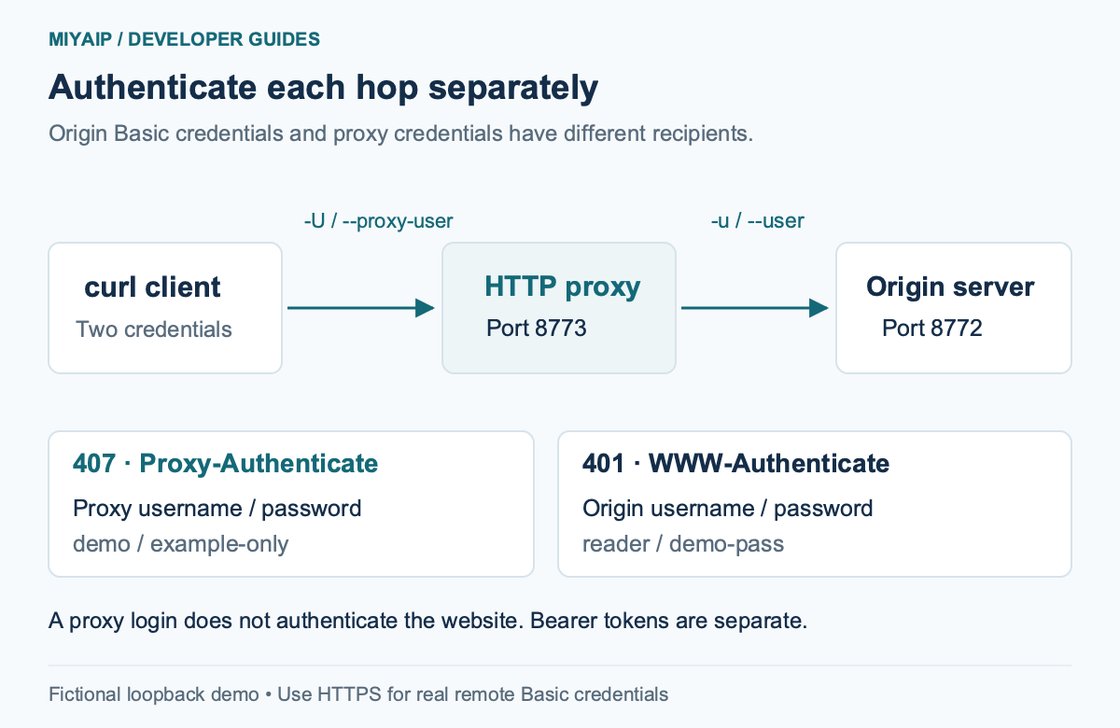
Keep Basic, form login and Bearer tokens distinct
Posting username=...&password=... to a form does not by itself perform HTTP Basic authentication. A website may exchange that form for cookies, require CSRF fields or use an entirely different session flow. Copying -u into that workflow may have no effect.
Likewise, MIYAIP Crawler API uses its documented Bearer-token task workflow. Follow the Crawler API guide for the token and request envelope. A proxy password and a Crawler token are different credentials, even when both products are in the same account.
Keep these distinctions when converting a curl request into application code. auth=(user, password) in an HTTP client is not a replacement for every type of Authorization header.
Diagnose an authentication failure from the response
Observation | Next check |
|---|---|
401 with a Basic challenge | Origin username, password, account access and requested resource |
401 with a different challenge | The required scheme; do not assume Basic |
407 | Proxy endpoint, proxy credentials and proxy scheme |
403 after authentication | The resource's authorization policy; another password is not automatically the answer |
HTML login page with HTTP 200 | Whether the URL is a browser login flow rather than a Basic resource |
Inspect redirects before following them with credentials. --location follows a redirect chain, but does not make every destination an appropriate recipient for the same secret. Do not add --location-trusted merely to make an authentication error disappear.
FAQ
Is --anyauth required?
No. It lets curl discover a supported method from a challenge, potentially adding a round trip. When the service explicitly requires Basic, --basic --user expresses that choice directly.
Why does the same proxy command work on one machine but not another?
Check proxy-bypass settings such as NO_PROXY, especially for loopback examples. Then distinguish a transport failure from HTTP 407 and an origin 401. They describe different parts of the route.
Does --fail verify the authentication scheme?
No. It changes curl's handling of HTTP error responses. Inspect the challenge and service documentation to identify the required authentication.