
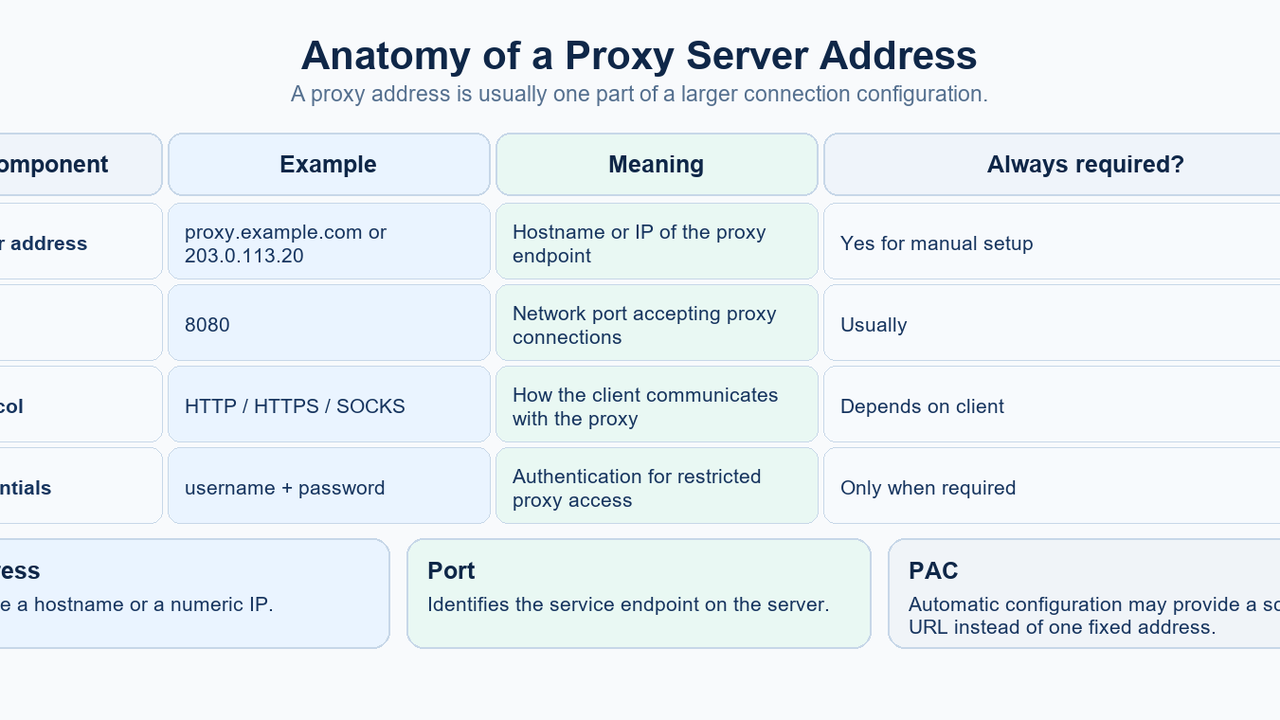
A proxy server address is the network location your device or application uses to reach a proxy.
In a manual configuration, that usually means:
proxy.example.com:8080or:
203.0.113.20:8080The first part is the proxy server name or IP address. The second part is the port.
But not every proxy setup exposes one fixed IP:port. Windows, macOS, Firefox, and Linux desktops can also use automatic discovery or a proxy auto-configuration (PAC) / setup-script URL. In those cases, the visible setting may be a script address rather than one proxy server address.
There is another common source of confusion:
the proxy address you configure is not necessarily the same as the public IP address a website sees after your traffic passes through the proxy.
This guide explains both concepts and shows where to find the relevant settings.
What Is a Proxy Server Address?
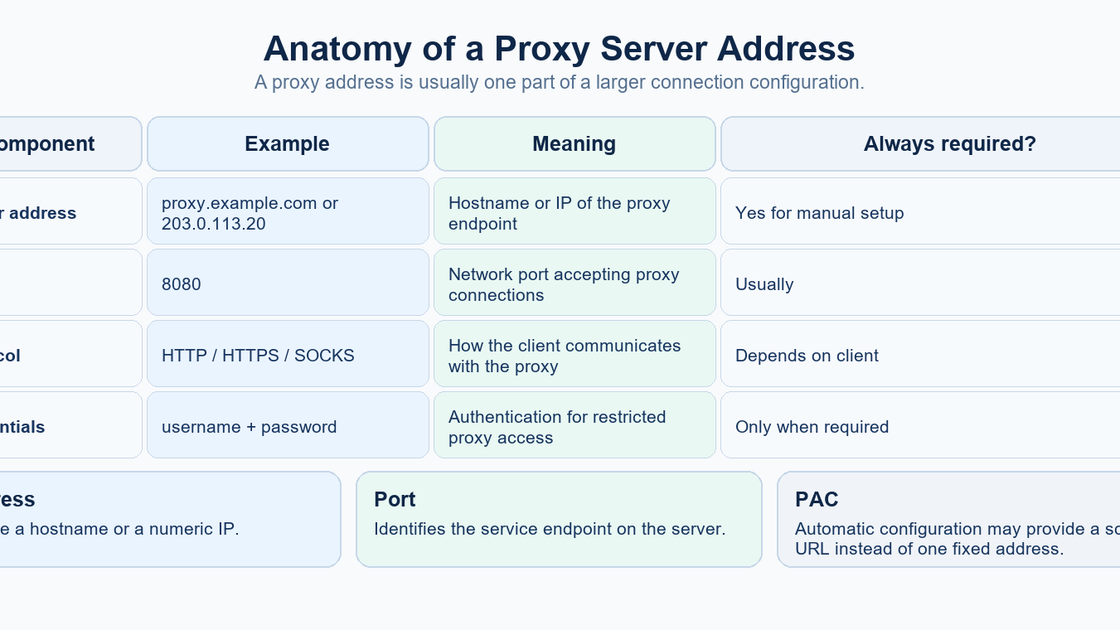
A proxy server sits between a client and a destination.
MDN's definition of a proxy server describes a proxy as an intermediary that can receive client requests and forward or otherwise handle them before returning a response.
For a manually configured forward proxy, the client needs to know where to connect.
That normally involves several fields.
Server address
This can be a hostname:
proxy.example.comor a numeric IP address:
203.0.113.20So proxy server address and proxy server IP address are related, but they are not always identical terms.
A hostname can be a valid proxy address even though it is not itself a numeric IP.
Port
The port identifies the proxy service on that host.
For example:
proxy.example.com:8080Here:
proxy.example.com = server address
8080              = port
Protocol
The client also needs to know the appropriate proxy type or protocol, such as HTTP, HTTPS, or SOCKS.
The same host and port should not automatically be assumed to support every proxy protocol.
Authentication
Some proxy servers require a username and password or another authentication method.
Keep credentials separate from public documentation, screenshots, and support messages unless you are sharing them through an approved secure channel.
Proxy Address vs Proxy IP Address vs Public IP
These three terms are often mixed together.
Proxy server address
This is the endpoint configured in your device or application.
It can be:
- a hostname;
- an IP address;
- an endpoint plus a port.
Example:
proxy.example.com:8080Proxy server IP address
This usually means the numeric IP associated with a proxy endpoint.
For example:
203.0.113.20However, a hostname may resolve to one or more IP addresses, and managed proxy services may use gateways or load-balanced infrastructure. That is why the hostname can be the more meaningful configuration value.
Public or exit IP
This is the IP address a destination website sees for a proxied request.
It is not automatically the same as the proxy address entered in your settings.
A provider may expose a hostname or gateway as the client-facing endpoint while traffic exits from another address.
So if your goal is to answer:
What proxy is configured on this device?
inspect the configuration.
If your goal is:
What IP does the Internet see for this request?
inspect the observed public/exit IP instead.
Those are different diagnostics.
What Does a Proxy Address Look Like?
Common manual formats include:
203.0.113.20:8080proxy.example.com:3128A full application-specific proxy URI may also include a scheme:
http://proxy.example.com:8080or:
socks5://proxy.example.com:1080Do not assume the port number alone tells you the protocol.
Also do not confuse a manual proxy address with an automatic-configuration URL such as:
https://example.org/proxy.pacThat URL points to configuration logic. It is not necessarily the proxy server itself.
How to Find Your Proxy Server Address
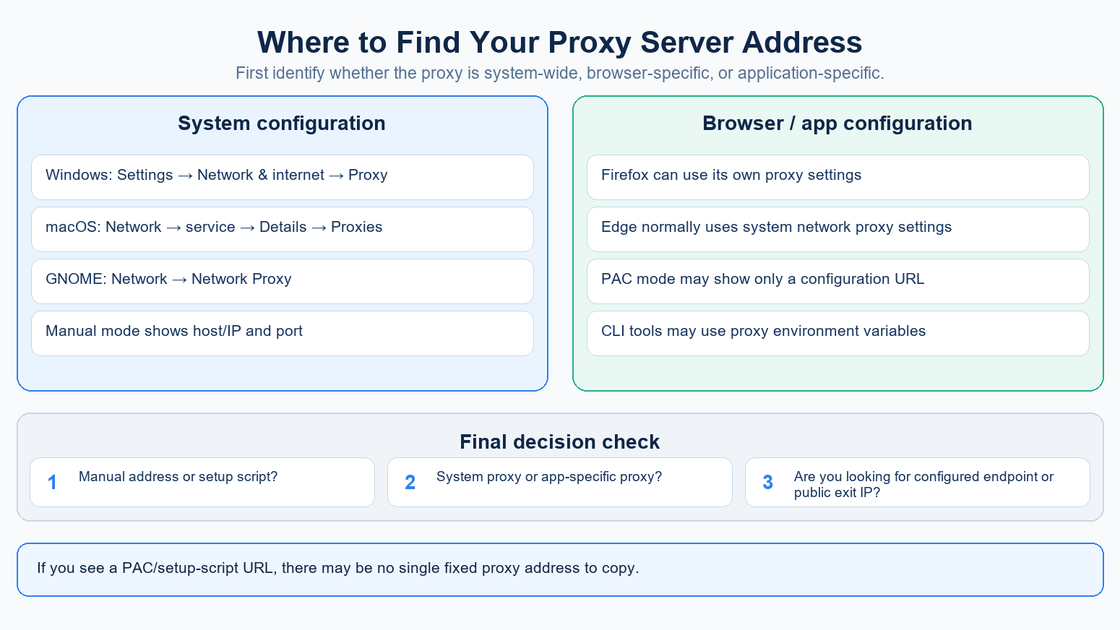
The correct place to look depends on whether the proxy is:
- configured at the operating-system level;
- configured inside a browser;
- configured by a PAC/setup script;
- configured only for one application;
- supplied through environment variables.
Start with the system settings, then check application-specific configuration if the result does not match the behavior you observe.
Find the proxy configuration on your platform
Windows 10 and 11
Microsoft's current Windows proxy guide documents three main configuration modes:
- automatic detection;
- setup script;
- manual proxy.
To inspect the settings:
- Open Settings.
- Select Network & internet.
- Open Proxy.
If manual proxy setup is enabled
Open the manual proxy configuration.
Windows exposes fields for:
- proxy server name or IP address;
- port;
- bypass/exceptions.
This is the easiest case because the configured endpoint is directly visible.
If a setup script is enabled
You may see a script address instead of one proxy IP and port.
That means the system is using an automatic configuration source.
Do not assume the script URL itself is the proxy server.
If automatic detection is enabled
The device may discover proxy configuration from the network.
Again, there may be no manually typed proxy server address displayed.
macOS
Apple's current Mac proxy settings guide places proxy configuration under the active network service.
Open:
Apple menu → System Settings → Network → select the active network service → Details → Proxies
Depending on the configuration, you may see settings for:
- Web proxy (HTTP);
- Secure web proxy (HTTPS);
- SOCKS proxy;
- automatic proxy discovery;
- automatic proxy configuration.
For manual modes, macOS provides a server address and port.
If automatic proxy configuration is enabled, the visible value may instead be a PAC URL.
This is another reason “find my proxy IP” can be the wrong question: the device may not be configured with one fixed proxy IP at all.
Firefox
Firefox deserves a separate check because it can use proxy settings that differ from the rest of the operating system.
Mozilla's Firefox connection-settings guide documents these options:
Depending on your Firefox version, open:
Menu → Settings → General → Network Settings → Settings… / Configure proxy
On newer Firefox layouts, proxy controls may instead appear under:
Settings → Privacy & Security → Connection and software security → Advanced settings → Proxy settings → Configure proxy
- No proxy;
- Auto-detect proxy settings;
- Use system proxy settings;
- Manual proxy configuration;
- Automatic proxy configuration URL.
For manual configuration, Firefox expects a proxy hostname and port.
If Firefox is set to Use system proxy settings, inspect Windows, macOS, or the relevant OS configuration instead.
If Firefox uses an automatic configuration URL, you may only see the PAC location.
This makes Firefox a common reason why a browser behaves differently from another application on the same computer.
Microsoft Edge and Chromium-Based Browsers
Microsoft's Edge proxy documentation states that Edge uses the system network settings by default, including proxy settings.
So for a normal unmanaged Windows Edge setup, the first place to inspect is usually:
Windows Settings → Network & internet → Proxy
Managed browser policies, extensions, or organization-specific configuration can change this behavior, so corporate devices may require administrator documentation rather than a simple local setting.
The same general troubleshooting principle applies to Chromium-based browsers: determine whether the browser is inheriting system settings or being controlled by an application-specific policy or extension before assuming the browser has a separate manually entered proxy address.
Linux and GNOME
Linux proxy configuration is less uniform because desktop environments and applications can use different mechanisms.
For GNOME, GNOME's proxy settings guide documents:
Network → Network Proxy
GNOME supports:
- None;
- Manual;
- Automatic.
In Manual mode, proxy address and port can be defined separately for protocols such as HTTP, HTTPS, FTP, and SOCKS.
In Automatic mode, the visible setting is a configuration URL.
Check application proxy environment variables
Some command-line tools and applications read proxy environment variables.
curl's official tutorial documents variables including:
http_proxy
HTTPS_PROXY
ALL_PROXY
NO_PROXY
On Linux or macOS, a quick inspection can be:
env | grep -i proxyIf output includes something such as:
http_proxy=http://proxy.example.com:8080then that environment variable is configuring proxy behavior for applications that honor it.
But an empty result does not prove that the computer has no proxy configuration.
The desktop, browser, PAC system, extension, or individual application may be using another configuration source.
Manual Proxy vs PAC URL vs Auto-Detect
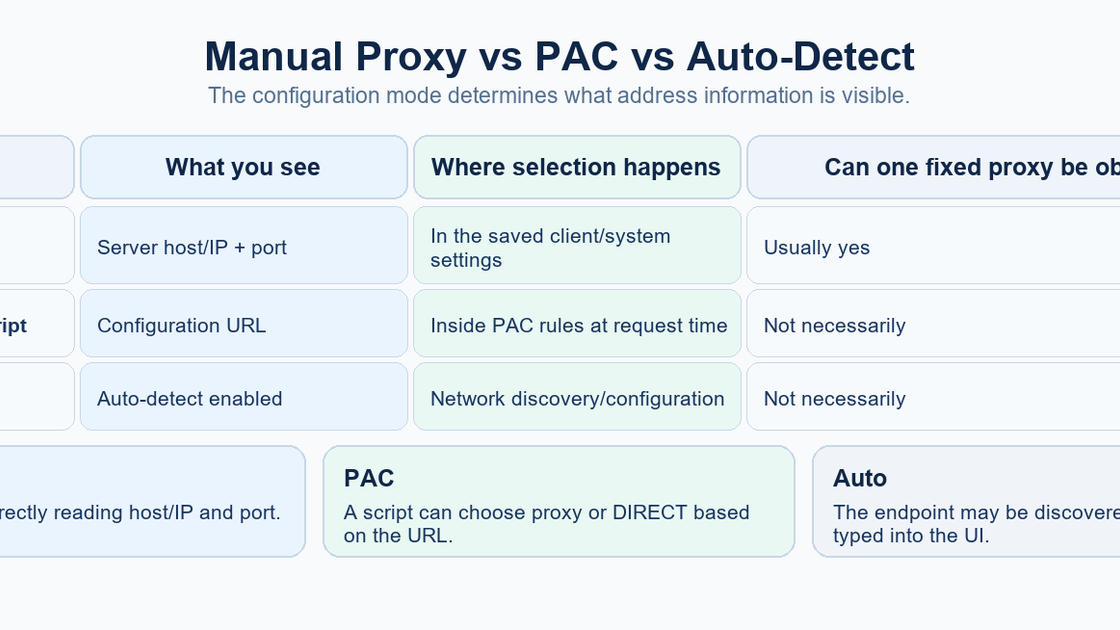
This distinction explains many “I cannot find my proxy address” cases.
Manual proxy
The client stores the proxy server address directly.
Typical visible data:
proxy.example.com
8080
This is the situation where “what is my proxy server address?” has a straightforward answer.
PAC or setup-script configuration
A proxy auto-configuration file contains rules that tell the client whether to use a proxy and, potentially, which proxy to use for a given destination.
The saved setting may therefore be:
https://example.org/proxy.pacrather than:
203.0.113.20:8080The script can contain multiple rules, so one fixed proxy address may not accurately describe the configuration.
Automatic detection
The operating system or browser can attempt to discover configuration automatically.
The endpoint is therefore not necessarily stored as a manually entered host/IP and port.
The practical lesson is simple:
Before looking for an IP address, identify the proxy configuration mode.
How to Verify the Proxy You Found
Finding a configured address and proving that an application is actually using it are separate tasks.
Check that the host and port are complete
A proxy hostname without the expected port may not be enough to reproduce the configuration in another application.
Check the protocol
Confirm whether the endpoint expects HTTP, HTTPS, SOCKS, or another supported mode.
Check whether authentication is required
If a proxy requires credentials, the address alone will not be enough to connect.
Check for bypass rules
Windows, macOS, Firefox, and other clients can exclude certain hosts from proxying.
A website on the bypass list can therefore connect directly even when a proxy is otherwise configured.
Compare application behavior
If Firefox uses a manual proxy but another browser uses the system settings, the two applications can legitimately show different network behavior.
This does not necessarily mean either configuration is broken.
Separate configured endpoint from observed exit IP
If you use an IP-check service and it shows a different address from the host configured in your proxy settings, that can be normal.
The configured endpoint can be a gateway while the public traffic exits elsewhere.
Common Reasons You Cannot Find a Proxy Address
The proxy is configured automatically
You may see only automatic detection or a PAC/setup-script URL.
The browser inherits system settings
The browser may not store a separate proxy host.
The browser has its own configuration
Firefox can maintain a manual or PAC configuration that differs from the OS.
The proxy is application-specific
A command-line tool, development environment, container, or application can have its own proxy settings.
The proxy is configured through environment variables
This is common with command-line tools and development workflows.
A managed policy controls the proxy
Company or school devices may receive proxy settings from administrative policy.
The local UI may not expose the complete management logic.
You are looking for the exit IP instead of the configured endpoint
The two addresses can differ.
Define which one you actually need before troubleshooting further.
Get and test the connection details in MIYA
After generating a connection in the MIYA console, copy the returned host, port, username, and password. The example domains and ports above illustrate formatting; they are not MIYA connection endpoints. Use the MIYA developer center for integration and dynamic residential proxy information for the relevant product context.
MIYA dynamic connection generation supports HTTP and SOCKS5. Keep the selected protocol together with its actual connection details. This HTTP request uses placeholders that must all be replaced:
curl --proxy 'http://PROXY_HOST:PROXY_PORT' --proxy-user 'PROXY_USERNAME:PROXY_PASSWORD' --url 'https://example.com/'In Windows PowerShell, use curl.exe. The destination is an example HTTPS page, not an exit-IP checker. For SOCKS5, curl supports the socks5h:// scheme to resolve the destination through the proxy; see the curl command-line manual.
Treat a dynamic gateway and its assigned exit as separate values. Use the MIYA console's session settings instead of importing another provider's username parameters. If your application needs a longer fixed assignment, review MIYA static residential proxies and the applicable product rules.
FAQ
What is a proxy server address?
It is the network location a client uses to connect to a proxy server. In manual setups, it is usually a hostname or IP address plus a port.
Is a proxy server address the same as a proxy IP address?
Not always. A proxy address can be a hostname such as proxy.example.com. A proxy IP address is specifically numeric.
What is a proxy address and port?
The address identifies the proxy host; the port identifies the proxy service on that host. For example, in proxy.example.com:8080, the address is proxy.example.com and the port is 8080.
Where do I find my proxy server address in Windows?
Open Settings → Network & internet → Proxy. If manual proxy setup is enabled, Windows shows the server name/IP and port. If a setup script or auto-detect mode is used, there may not be one fixed manual address.
Where do I find my proxy address on a Mac?
Open System Settings → Network → active network service → Details → Proxies. Manual HTTP, HTTPS, or SOCKS proxy settings show server and port fields.
How do I find the proxy address in Firefox?
Open Firefox proxy/connection settings. Firefox can use system settings, manual host/port values, auto-detection, or a PAC URL.
Why do I see a PAC URL instead of a proxy IP?
Because a PAC file contains proxy-selection rules. The system may choose a proxy dynamically for each destination rather than storing one fixed IP and port in the UI.
Is my public IP the same as my proxy server address?
Not necessarily. A configured proxy may use a hostname, gateway, or other entry endpoint while the destination sees a different exit IP.
Does an empty env | grep -i proxy mean I have no proxy?
No. It only means no matching proxy environment variables were visible in that shell environment. System, desktop, browser, PAC, extension, or application-specific settings may still exist.
What information do I need to configure a proxy manually?
Usually the server address or hostname, port, protocol/type, and any required authentication details.
Check your proxy configuration with MIYA
Keep the configured endpoint, protocol, and observed request behavior together when troubleshooting. Start with the proxy checker or review the integration documentation.
Sources
Official documentation consulted on 28 September 2026. Interface labels may vary by version.