
For a Python Requests POST, choose the request-body format the destination expects. Use json= for a Python object that should become JSON, data= for form fields or an explicit body, and files= for a multipart upload. Those choices affect the bytes and Content-Type sent to the server.
This guide uses a local echo server so you can inspect the submitted content without sending example data to an outside service. Start the supplied demo_server.py with python3 demo_server.py, and install Requests with python -m pip install requests.
Workflow at a glance
1. Send a JSON object
json=serializes the object and supplies a JSON Content-Type unless you override it. Pass a Python dictionary or list, not a string you have already serialized, unless the API specifically expects a JSON string value.2. Send form fields
The dictionary is form-encoded. The echo fixture represents values as lists to preserve repeated keys. The ampersand in
desk & lampremains part of the value rather than becoming a field separator.3. Upload a file as multipart data
Create a small
sample.csvcontaining fictional data, then use:4. Use the body format the endpoint documents
Do not combine
json=with a separatedata=orfiles=payload and assume all of them become one JSON request. Choose one body format, except for the documented multipart combination of form fields and files.5. Inspect the request and response separately
The request's Content-Type describes what you sent. The response's Content-Type describes what came back. Inspect actual bodies only when they do not contain private data; avoid logging credentials or personal records while debugging.
6. Handle errors without duplicating an operation
A timeout does not establish that a POST failed before reaching the server. Before retrying a task creation, payment or other operation with side effects, follow the service's idempotency or lookup mechanism.
1. Send a JSON object
import requests

url = "http://127.0.0.1:8766/echo"
payload = {"category": "office", "limit": 3}
response = requests.post(url, json=payload, timeout=(3, 15))
response.raise_for_status()
print(response.json()["json"])
# {'category': 'office', 'limit': 3}
json= serializes the object and supplies a JSON Content-Type unless you override it. Pass a Python dictionary or list, not a string you have already serialized, unless the API specifically expects a JSON string value.
Setting Content-Type: application/json by itself does not convert a Python dictionary into a JSON body. The encoding choice still matters. Requests documents its JSON and form handling in the quickstart.
2. Send form fields
response = requests.post(
    "http://127.0.0.1:8766/echo",
    data={"category": "office", "query": "desk & lamp"},
    timeout=(3, 15),
)
response.raise_for_status()
print(response.json()["form"])
# {'category': ['office'], 'query': ['desk & lamp']}
The dictionary is form-encoded. The echo fixture represents values as lists to preserve repeated keys. The ampersand in desk & lamp remains part of the value rather than becoming a field separator.
For repeated field names, use a list of tuples such as [('tag', 'office'), ('tag', 'lighting')]. A normal dictionary cannot express two independent entries with the same key.
3. Upload a file as multipart data
Create a small sample.csv containing fictional data, then use:
from pathlib import Path
import requests

Path("sample.csv").write_text("id,name\np1,Travel Mug\n", encoding="utf-8")
with open("sample.csv", "rb") as handle:
    response = requests.post(
        "http://127.0.0.1:8766/echo",
        data={"source": "tutorial"},
        files={"file": ("sample.csv", handle, "text/csv")},
        timeout=(3, 15),
    )
response.raise_for_status()
print(response.json()["parts"])
Let Requests construct the multipart Content-Type and boundary. Manually setting only multipart/form-data can omit the boundary the server needs to parse the body. Open files in binary mode and keep the handle open until the request finishes.
The field name file is an example. Match the destination API's expected field name, filename constraints and upload limit.
4. Use the body format the endpoint documents
Destination expects | Requests argument | Common mistake |
|---|---|---|
JSON object or array |
| Passing an already encoded JSON string as if it were an object |
URL-encoded form |
| Adding a JSON Content-Type to a form body |
Exact text or binary body |
| Assuming Requests will infer the required content type |
Multipart fields and files |
| Supplying an incomplete multipart boundary header |
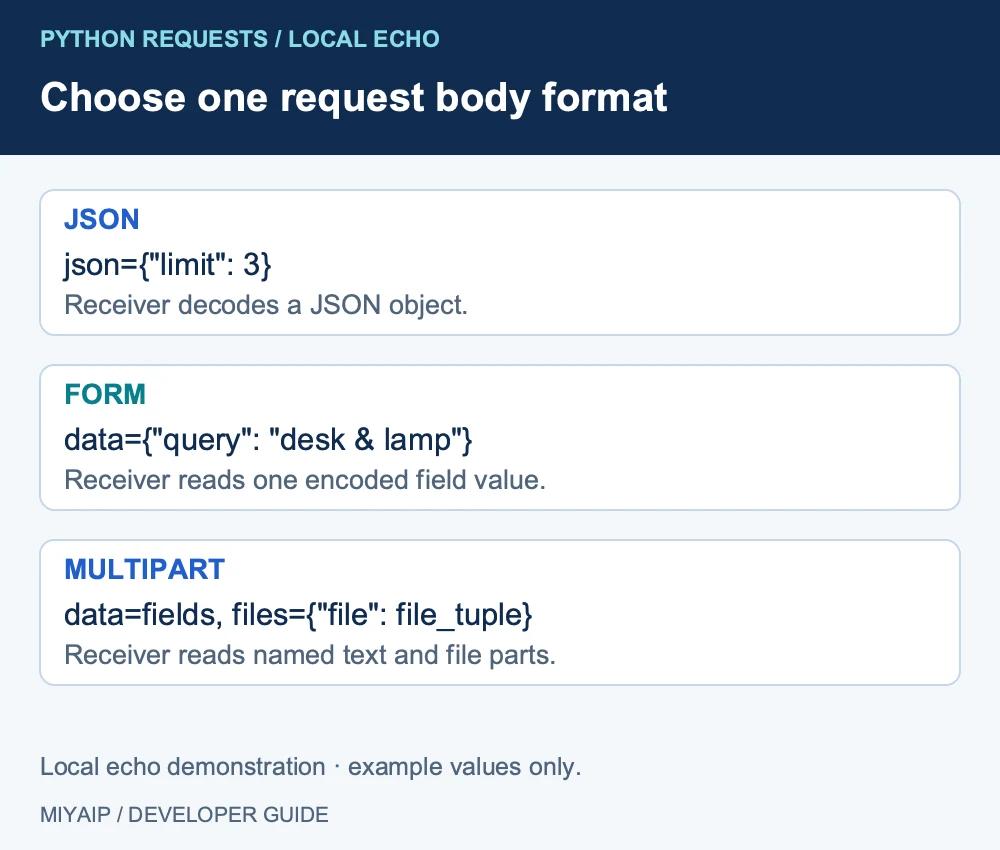
Do not combine json= with a separate data= or files= payload and assume all of them become one JSON request. Choose one body format, except for the documented multipart combination of form fields and files.
5. Inspect the request and response separately
print(response.request.method)
print(response.request.headers.get("Content-Type"))
print(response.status_code)
print(response.headers.get("Content-Type"))
The request's Content-Type describes what you sent. The response's Content-Type describes what came back. Inspect actual bodies only when they do not contain private data; avoid logging credentials or personal records while debugging.
Call raise_for_status() for HTTP failures, then validate the API's own success fields. A valid JSON response can describe an application error. A successful HTTP request can also return no body; a 204 response should not be passed unconditionally to response.json().
6. Handle errors without duplicating an operation
Problem | Check first |
|---|---|
400 Bad Request | Required fields, types, body syntax and the service's error message |
401 or 403 | Authentication and permission for this operation |
415 Unsupported Media Type | Body encoding and Content-Type |
JSON decode failure | Response status, response type and whether a body exists |
Timeout after submission | Whether the server already accepted or completed the operation |
A timeout does not establish that a POST failed before reaching the server. Before retrying a task creation, payment or other operation with side effects, follow the service's idempotency or lookup mechanism.
For MIYAIP Crawler API, a POST creates an asynchronous task. Keep the returned task ID and query it rather than resubmitting while it is running. Its task guide defines the real request envelope and authentication.
Frequently asked questions
Should I use data=json.dumps(payload)?
That sends an explicit body but does not automatically add the JSON Content-Type. Use json=payload for the common object-to-JSON case, or deliberately set both body bytes and headers when exact encoding matters.
Does timeout=(3, 15) limit the entire task to 18 seconds?
No. It configures connection and read waiting, not a total wall-clock deadline. Redirects, retries and ongoing transfer behavior can extend elapsed time.
Can a Session help with several POST requests?
A Session can reuse connections and persist selected state such as cookies. It does not make a non-idempotent POST safe to repeat or validate the response's business meaning.
Once a local echo confirms your body format, use the destination's documented parameters. For MIYAIP, follow the Crawler API interface definition and retrieve the resulting task by ID.