
A basic cURL GET request needs only a URL: curl 'https://example.com/'. For query values, use --get with --data-urlencode so spaces and reserved characters remain part of the intended value. Then inspect the status and response rather than assuming visible output means the request succeeded.
This guide uses a local echo endpoint that reports the query values it received. Start the accompanying demo_server.py with python3 demo_server.py. Commands use Bash syntax; on Windows, use curl.exe and your shell's quoting conventions.
Workflow at a glance
1. Send a GET request and inspect the query
The local result includes:
2. Quote a complete URL or encode individual values
For a URL whose query is already encoded, quote the entire URL:
3. Add headers and authentication deliberately
An Accept header expresses the response format you can consume; it does not force an endpoint to implement that format. Follow the real service's authentication instructions, and keep credentials out of shared example commands.
4. Separate body, headers and status
This saves the response body and headers independently. Use
-iwhen you want headers printed together with the body for inspection; do not mix that output into a file your application expects to contain only JSON.5. Treat redirects and errors as separate decisions
cURL does not follow redirects by default. Use
--locationwhen following the destination is appropriate, and inspect the final URL if your request is going somewhere unexpected.6. Use GET to query an existing MIYAIP task
MIYAIP Crawler API uses a POST to create a task and a GET to retrieve its state and result. After you obtain the returned task ID, the documented lookup follows this structure:
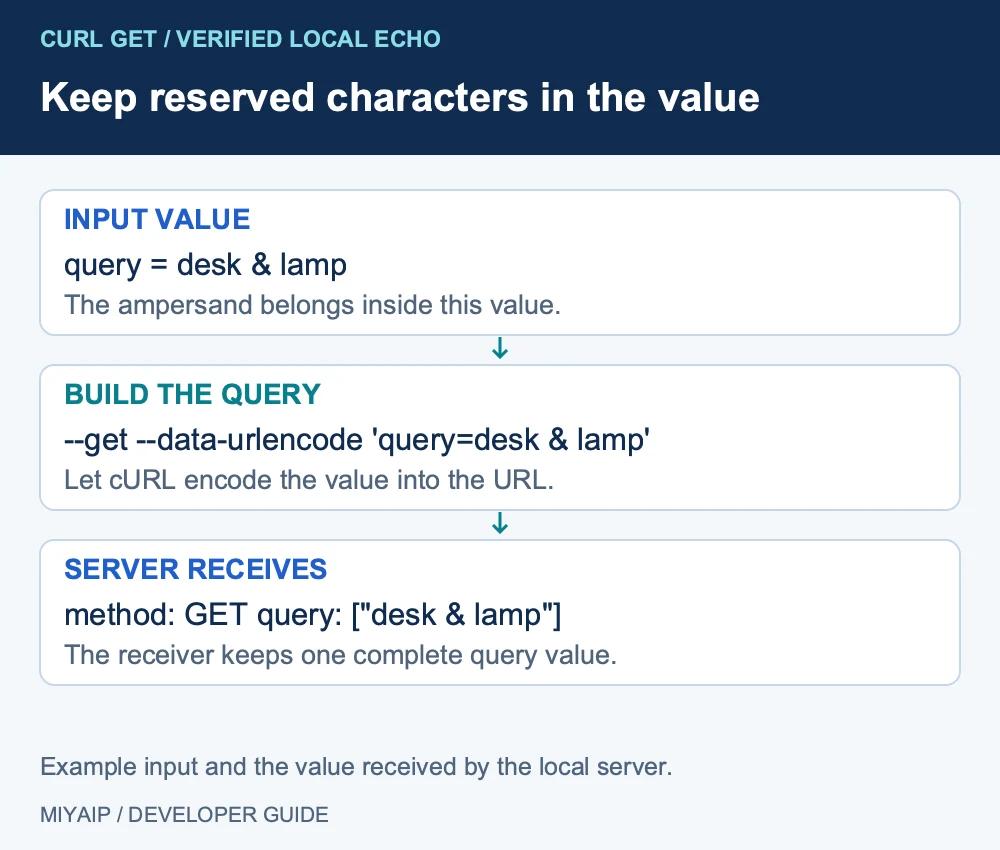
1. Send a GET request and inspect the query
curl --fail-with-body -sS --max-time 30 \
  --get \
  --data-urlencode 'query=desk & lamp' \
  --data-urlencode 'page=2' \
  'http://127.0.0.1:8766/echo'
The local result includes:
{
  "method": "GET",
  "args": {
    "query": ["desk & lamp"],
    "page": ["2"]
  },
  "path": "/echo"
}
Here, --get tells cURL to put the data arguments in the query string. Without it, data options can select a POST request instead. -X GET is not a substitute for deciding where those values should go.
2. Quote a complete URL or encode individual values
For a URL whose query is already encoded, quote the entire URL:
curl --fail-with-body -sS --max-time 30 \
  'http://127.0.0.1:8766/echo?category=office&page=2'
In Bash, an unquoted ampersand has shell meaning. A command can appear to run while the shell has split it into something you did not intend.
When values contain spaces, ampersands or non-ASCII text, prefer --data-urlencode rather than building the encoding by hand. Keep parameter names exactly as the endpoint documents. Sending page=2 cannot paginate an API that actually expects a cursor.
3. Add headers and authentication deliberately
curl --fail-with-body -sS --max-time 30 \
  -H 'Accept: application/json' \
  'http://127.0.0.1:8766/echo'
An Accept header expresses the response format you can consume; it does not force an endpoint to implement that format. Follow the real service's authentication instructions, and keep credentials out of shared example commands.
Avoid adding a request body to a GET simply to imitate a POST example. Query parameters and a body are different parts of the request, and a destination may not assign the meaning you expect to GET content.
4. Separate body, headers and status
curl --fail-with-body -sS --max-time 30 \
  --get --data-urlencode 'query=desk & lamp' \
  --dump-header response-headers.txt \
  --output response.json \
  --write-out 'HTTP %{http_code}\n' \
  'http://127.0.0.1:8766/echo'
This saves the response body and headers independently. Use -i when you want headers printed together with the body for inspection; do not mix that output into a file your application expects to contain only JSON.
-I asks for a HEAD request. It is not a guarantee that you tested the same behavior as a full GET. Some services handle the two methods differently.
The cURL manual describes these output and method options. Inspect an API's own success fields after checking HTTP status: an HTTP 200 response can still contain an application error.
5. Treat redirects and errors as separate decisions
cURL does not follow redirects by default. Use --location when following the destination is appropriate, and inspect the final URL if your request is going somewhere unexpected.
Observation | Inspect | Avoid assuming |
|---|---|---|
301 or 302 response | Location and intended destination | The target data was already returned |
400 response | Query names, encoding and types | A different proxy will repair invalid input |
401 or 403 response | Authentication, permission and service response | The body is a complete public result |
429 response | Rate-limit instructions and Retry-After when supplied | Immediate repeated requests will help |
Network timeout | Connection and response timing | No request ever reached the service |
For a recurring collection, record source URL, collection time and failures. A saved file can contain an error page just as easily as the intended data.
6. Use GET to query an existing MIYAIP task
MIYAIP Crawler API uses a POST to create a task and a GET to retrieve its state and result. After you obtain the returned task ID, the documented lookup follows this structure:
curl --fail-with-body -sS --max-time 30 --get \
  -H "Authorization: Bearer $MIYA_CONSOLE_TOKEN" \
  --data-urlencode "taskId=$MIYA_TASK_ID" \
  'https://miyaip.com/api/Crawler/TaskResult'
Set the variables from your own authenticated workflow. Check the numeric business code as well as HTTP status, then inspect the task state. While it is running, query the same task rather than creating another one. The Crawler API documentation explains authentication, polling and credit records.
Frequently asked questions
Do I need -X GET?
Not for a basic URL-only GET. Use --get when you need data arguments placed in the query string; an explicit method string alone does not perform that conversion.
Why did a value containing & become two parameters?
Check shell quoting and URL encoding. Quote complete URLs, and encode individual values with --data-urlencode when building the query.
Can I save an HTML page with the same command?
Yes. Use a suitable filename with --output, and inspect the returned Content-Type and body. A filename ending in .json does not turn HTML into JSON.
Confirm the query and response in one small request. Then use the documented task lifecycle or add the verified request to your own application.