
To send a cURL POST request, choose the body format the endpoint accepts. --json sends JSON with suitable default headers, --data-urlencode encodes form values and --form creates a multipart upload. You usually do not need -X POST when a body option already selects POST.
The examples use a local echo server to show what arrived. Start the supplied demo_server.py with python3 demo_server.py, then run the commands below. They use Bash syntax; on Windows, call curl.exe and adapt quoting for your shell.
Workflow at a glance
1. Send JSON with a cURL POST request
The receiver reports
method: POST, a JSON content type and the object in itsjsonfield.--jsonadds JSON Content-Type and Accept headers unless you replace them. It does not validate arbitrary text as JSON before sending it.2. Send form fields without breaking special characters
The echoed query value is
desk & lamp. Encoding prevents the ampersand inside the value from being interpreted as another form field separator.3. Send a JSON file or multipart upload
Save the following fictional object as
payload.json:4. Choose the option that preserves the intended bytes
Avoid mixing body modes in the same command unless the manual explicitly documents the combination.
-X POSTchanges the method string; it does not turn an incorrectly encoded body into valid JSON or multipart data.5. Save the response body and status separately
The body goes into
response.json, headers into their own file and the status into the terminal.--fail-with-bodymakes HTTP error responses fail while retaining the body for inspection. Check the command's exit code as well as the HTTP code; a network failure may have no usable HTTP response.6. Check redirects and retry behavior
Adding
--locationchanges the workflow. A redirect can lead to a different method depending on its status and the options used. Do not add-X POSTas a universal fix: it can force a method string in ways that differ from normal body handling.
1. Send JSON with a cURL POST request
curl --fail-with-body -sS --max-time 30 \
  --json '{"category":"office","limit":3}' \
  'http://127.0.0.1:8766/echo'
The receiver reports method: POST, a JSON content type and the object in its json field. --json adds JSON Content-Type and Accept headers unless you replace them. It does not validate arbitrary text as JSON before sending it.
Check your installed version with curl --version. --json is available from cURL 7.82.0. On an older version, send the body and header explicitly:
curl --fail-with-body -sS --max-time 30 \
  -H 'Content-Type: application/json' \
  --data-binary '{"category":"office","limit":3}' \
  'http://127.0.0.1:8766/echo'
The current cURL manual documents these options. The local server validates JSON, so malformed JSON produces a 400 response you can inspect.
2. Send form fields without breaking special characters
curl --fail-with-body -sS --max-time 30 \
  --data-urlencode 'category=office' \
  --data-urlencode 'query=desk & lamp' \
  'http://127.0.0.1:8766/echo'
The echoed query value is desk & lamp. Encoding prevents the ampersand inside the value from being interpreted as another form field separator.
Plain -d 'a=1&b=2' is useful when you intentionally provide an already structured form body. It does not automatically encode every character inside a value. Choose encoding based on the data, not just on which command looks shorter.
3. Send a JSON file or multipart upload
Save the following fictional object as payload.json:
{"category":"office","limit":3}Send it as the request body:
curl --fail-with-body -sS --max-time 30 \
  --json @payload.json \
  'http://127.0.0.1:8766/echo'
For a file-upload endpoint, create sample.csv and use multipart syntax instead:
curl --fail-with-body -sS --max-time 30 \
  --form 'source=tutorial' \
  --form 'file=@sample.csv;type=text/csv' \
  'http://127.0.0.1:8766/echo'
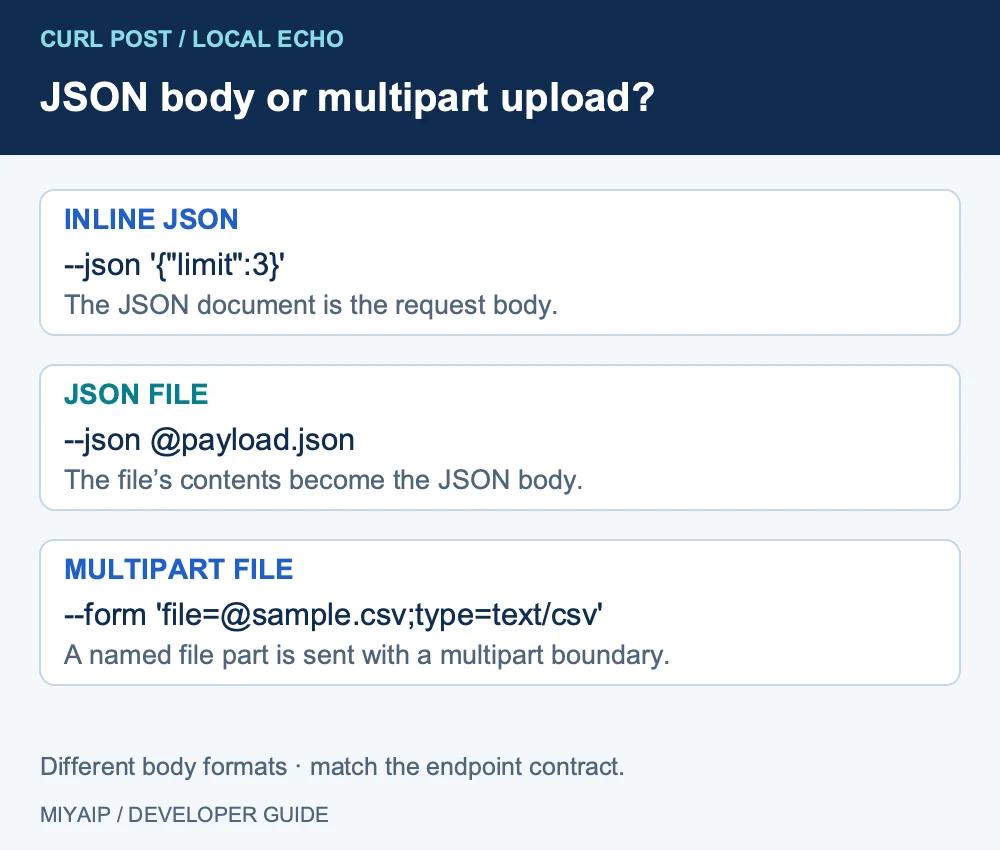
These are different requests. JSON file input sends the file's content as the JSON body. Multipart upload sends a named file part alongside other parts. Let cURL construct the multipart boundary rather than forcing an incomplete Content-Type header.
4. Choose the option that preserves the intended bytes
Task | Option | Detail to check |
|---|---|---|
Inline JSON |
| JSON syntax and endpoint schema |
JSON from a file |
| File content is the body |
Encode a form value |
| Reserved characters stay in the value |
Send a file's bytes as the body |
| Set the required Content-Type |
Send text beginning with @ literally |
| No file interpretation for that argument |
Upload a named file part |
| Field name, filename and upload rules |
Avoid mixing body modes in the same command unless the manual explicitly documents the combination. -X POST changes the method string; it does not turn an incorrectly encoded body into valid JSON or multipart data.
5. Save the response body and status separately
curl --fail-with-body -sS --max-time 30 \
  --json '{"category":"office","limit":3}' \
  --dump-header response-headers.txt \
  --output response.json \
  --write-out 'HTTP %{http_code}\n' \
  'http://127.0.0.1:8766/echo'
The body goes into response.json, headers into their own file and the status into the terminal. --fail-with-body makes HTTP error responses fail while retaining the body for inspection. Check the command's exit code as well as the HTTP code; a network failure may have no usable HTTP response.
Verbose output can reveal authentication headers. Use example credentials and avoid sharing raw logs that contain private values.
6. Check redirects and retry behavior
Adding --location changes the workflow. A redirect can lead to a different method depending on its status and the options used. Do not add -X POST as a universal fix: it can force a method string in ways that differ from normal body handling.
For an operation that creates a task, a timeout can leave the outcome uncertain. Check the service's task lookup or call log before sending the creation request again. MIYAIP's Crawler API guide explains that distinction between submitting a task and retrieving it.
If you need to carry a working request into Python, use the converter for its supported inline options. File uploads and complex redirect combinations require manual review rather than silent conversion.
Frequently asked questions
Why is my server receiving form data instead of JSON?
Check which body option you used and the actual Content-Type. -d with a JSON-looking string does not automatically make the request JSON.
Why does --json still send malformed JSON?
It configures request behavior; it is not a JSON validator. Validate the input locally or inspect the API's validation response.
Does a successful POST mean a crawler task is finished?
Not for an asynchronous API. Inspect the documented creation response, keep the task ID and retrieve its result later.
Confirm the method, body format and response in a small request. Then apply the real service's authentication, parameters and task lifecycle.