
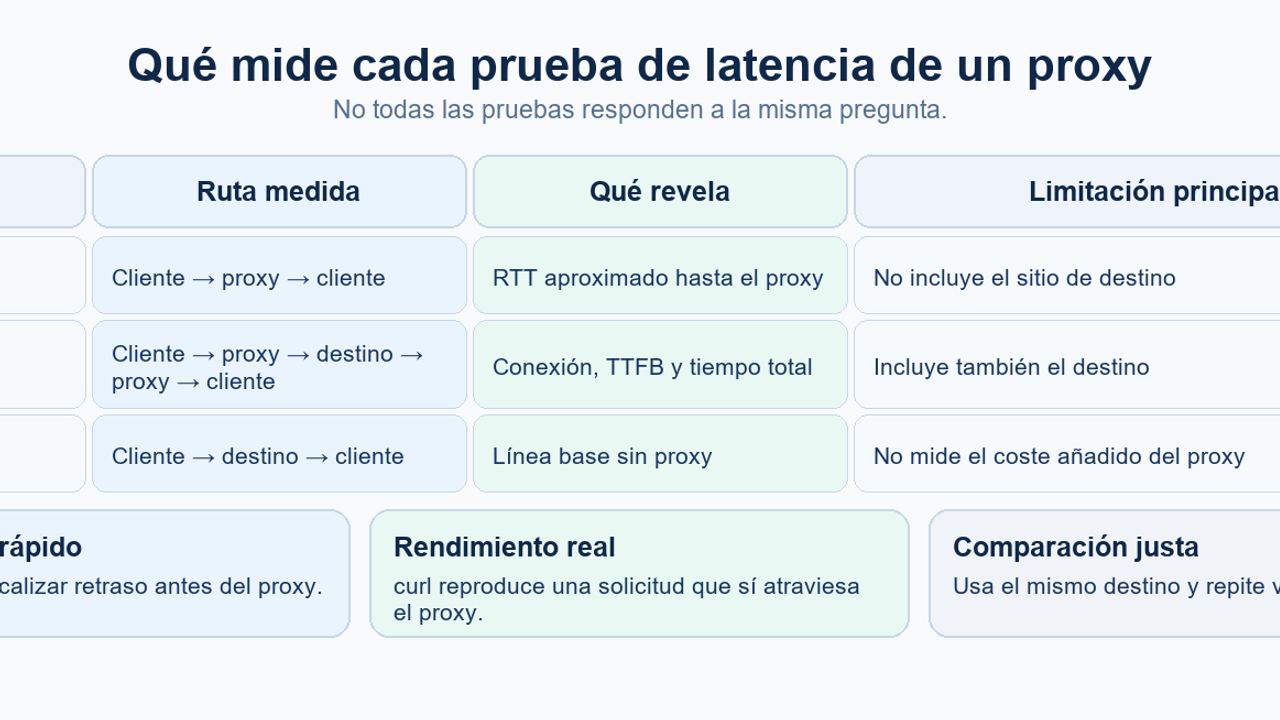
To test proxy latency, measure a real request through the proxy and use ping only as an optional check of the first network hop. Record connection time, time to first byte and total duration, repeat under comparable conditions, and keep failures in the result. One low ping does not establish that the proxy is fast for your destination.
For MIYAIP users, start with the connection values returned by your proxy setup or proxy details page. This guide combines a local cURL test with the existing MIYAIP Proxy Checker and Proxy Speed Test. The distinction matters: a local command starts on your machine, while the website tools send their probes from the MIYAIP test service.
What proxy latency actually measures
A direct web request travels from your client to the destination and back. A proxied request first reaches a proxy entry point, then continues toward the destination through its exit. A provider gateway may represent several possible exits, so the gateway hostname and the public IP observed by the destination are different pieces of information.
Network round-trip time, response delay and download throughput answer different questions. A route can respond quickly to a small packet while transferring a large response slowly. Cloudflare’s latency explanation distinguishes delay from bandwidth; use both response timings and transfer measurements when the workload needs both.
A web request can also include name resolution, connection setup, TLS negotiation and server processing. MDN’s explanation of web latency describes why these stages make a complete request different from a simple network ping.
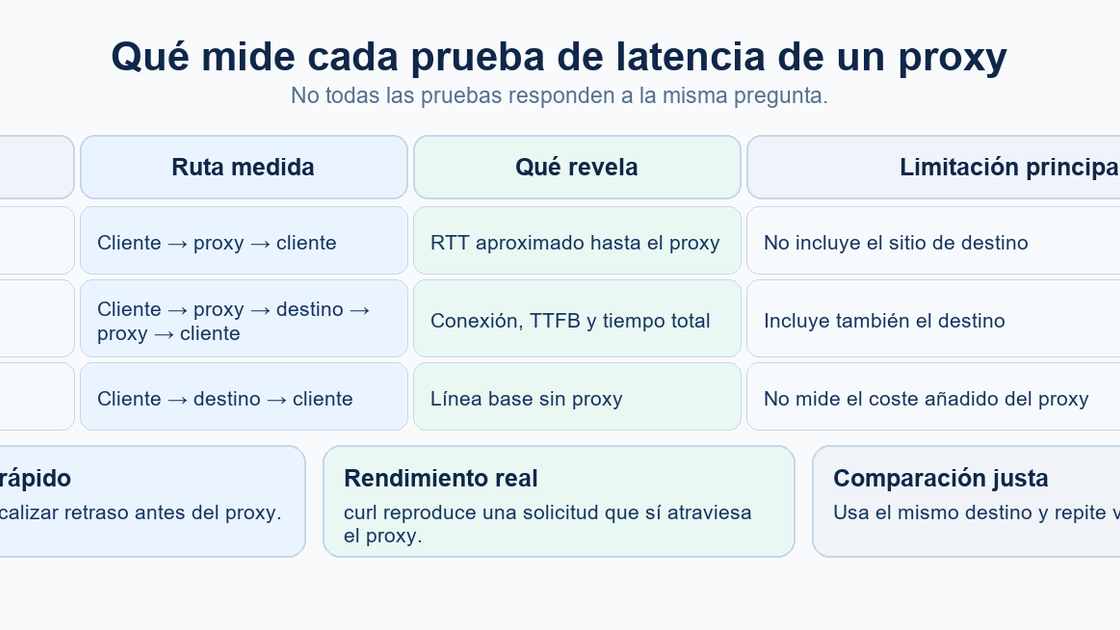
Ping to a proxy is not a request through it
Pinging PROXY_HOST sends ICMP probes to the host that resolves from that name. It does not authenticate to the proxy port or prove that an HTTPS request can pass through it. For a gateway-based service it also does not measure every possible exit. A high or unstable RTT is a useful clue about that first route, but a low RTT leaves the later route untested.
If ICMP is filtered, a ping can time out while the proxy service continues to accept requests. Treat that as a reason to test the actual HTTP or SOCKS connection, rather than declaring the endpoint unavailable. Conversely, successful ping replies do not prove that the supplied port, credentials or protocol are correct.
Run a repeatable MIYAIP proxy latency test
1. Collect the actual connection fields
Copy the host, port, proxy username and proxy password from the current MIYAIP result. Do not replace these with your website login or an example gateway found in another provider’s guide. Keep the chosen gateway region, exit region, protocol and session mode recorded with the test.
The examples below deliberately contain placeholders. Replace them locally; use an approved destination that represents your task. example.com is a syntax example, not a performance benchmark. For dynamic proxies, use the same session policy throughout a comparison; a rotating result may involve different exits.
2. Measure a direct baseline
Run the same request without a proxy. The explicit no-proxy setting in this baseline avoids accidentally using proxy environment variables. On Windows use curl.exe and replace /dev/null with NUL. Compare the same response, rather than a small direct page with a large proxied download.
curl --noproxy '*' --connect-timeout 10 --max-time 30 --output /dev/null --silent --show-error --write-out 'http=%{http_code} connect=%{time_connect}s ttfb=%{time_starttransfer}s total=%{time_total}s\n' --url 'https://example.com/'3. Check ICMP RTT when it is available
Windows can send ten probes using the command below. Read minimum, average, maximum and packet loss together. Microsoft documents the ping command and its count option.
ping -n 10 PROXY_HOSTOn macOS and common Linux implementations, the corresponding count form is ping -c 10 PROXY_HOST. Use only the host or IP, not a URL, port or authentication string. A large spread between repeated replies can matter more than one excellent minimum.
ping -c 10 PROXY_HOST4. Send the real request through the proxy
This follows the MIYAIP cURL generator’s separate proxy endpoint, proxy credentials and target URL layout. The macOS/Linux command discards the body but keeps timing output and errors. The example uses a 10-second connection limit and a 30-second overall limit; use consistent limits for your comparison.
curl --proxy 'http://PROXY_HOST:PROXY_PORT' \
  --proxy-user 'PROXY_USERNAME:PROXY_PASSWORD' \
  --noproxy '' --connect-timeout 10 --max-time 30 \
  --output /dev/null --silent --show-error \
  --write-out 'http=%{http_code} connect=%{time_connect}s ttfb=%{time_starttransfer}s total=%{time_total}s\n' \
  --url 'https://example.com/'
Windows PowerShell uses the executable explicitly:
curl.exe --proxy 'http://PROXY_HOST:PROXY_PORT' --proxy-user 'PROXY_USERNAME:PROXY_PASSWORD' --connect-timeout 10 --max-time 30 --output NUL --silent --show-error --write-out 'http=%{http_code} connect=%{time_connect}s ttfb=%{time_starttransfer}s total=%{time_total}s\n' --url 'https://example.com/'For a SOCKS5 configuration returned by MIYAIP, replace the proxy scheme with socks5h:// so cURL asks the proxy to resolve the target hostname. Keep the actual host, port and credentials unchanged. Do not use an HTTP scheme for a SOCKS-only configuration. The cURL manual defines proxy options and timing variables.
Keep authentication values out of shared history, logs and screenshots. These templates do not contain working credentials. Record the command exit result and HTTP status as well as duration: a fast error page is not a successful workload.
Before running the Windows example, ensure NO_PROXY or no_proxy does not exclude the target; an exclusion can bypass the selected proxy. The command avoids an empty native argument so it also works with older PowerShell argument handling.
5. Compare repeated results
Run five to ten low-volume requests as an initial diagnostic, close together in time and with the same client, target, protocol, output size and session policy. This is a practical starting point, not a statistically guaranteed sample size. Record the typical result, range and failure count; expand the test when the decision requires more evidence.
A fresh cURL process exercises a fresh client connection. A long-running application may reuse connections and therefore behave differently. Test the real application as well before extrapolating to a sustained or concurrent workload.
6. Add the MIYAIP server-side view
Use Proxy Checker to check whether an endpoint can complete its fixed HTTPS probe, then Proxy Speed Test for connection time, TTFB, throughput and failures. These tools start from the current MIYAIP test server; they do not include your local Wi-Fi, ISP or device-to-proxy path.
Treat the tool result as a second observation point. If the online tool is fast but the local command is slow, investigate the local route before blaming the proxy pool. If both are slow, compare their targets and measurements before assuming they describe the same bottleneck.
Read connection time, TTFB and total time together
The cURL values below are elapsed times from the start of the transfer and overlap; do not add them together. They help locate a phase of delay, but they do not expose the provider’s internal timing or isolate one machine’s processing cost.
Metric | What it indicates | How to use it |
|---|---|---|
time_connect | Time until the TCP connection to the remote host or proxy is complete. | A consistently high value suggests investigating the early connection path. |
time_starttransfer | Time until the first response byte, including earlier setup and response preparation. | A large gap after connection setup can involve tunnel negotiation, TLS, later routing or the destination. |
time_total | Elapsed time for the whole transfer. | A large gap after the first byte suggests examining response size and transfer rate. |
Illustrative values only; not a MIYAIP benchmark:
connect=0.085s ttfb=0.310s total=0.355s
In that illustrative result, the response has not started when the initial connection completes. It would be incorrect to call the entire remaining interval “proxy processing.” Repeat the same request, inspect status and compare a direct baseline or a second authorized destination before choosing a cause.
Compare proxies without changing the experiment
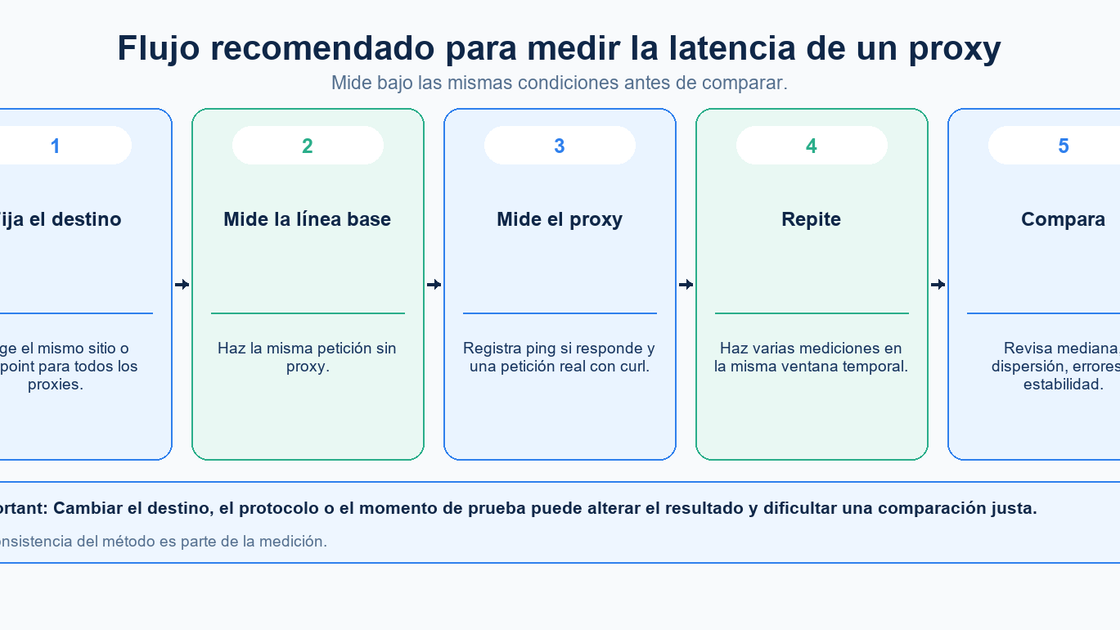
Change one relevant variable at a time. When comparing proxy A and B, keep geography requirements and request size comparable. When comparing gateway regions, record the selected gateway separately from the requested exit location. When comparing rotating and sticky modes, state which behavior you measured instead of treating all samples as the same exit.
Use the median as one summary of repeated durations and keep the range and failure count beside it. For example, hypothetical samples of 210, 215, 208, 214 and 211 ms describe a different experience from 105, 410, 115, 520 and 120 ms. The second set has a better minimum but much wider variation. Neither set is a MIYAIP measurement.
Also keep request method, redirect behavior and connection reuse policy consistent. The provided cURL examples do not follow redirects automatically. If your workload needs redirects, apply the same policy to both baseline and proxy tests, and verify the final destination rather than comparing unlike responses.
Use the MIYAIP speed tool for the question it answers
The current Proxy Speed Test uses six lightweight probes followed by four parallel download streams requesting 2 MiB each. A fully completed download phase therefore transfers about 8 MiB, plus probe and protocol-detection overhead. It measures downloads through that server-side route, not upload speed or browser rendering.
Read the test-node information, samples and failure rate alongside the displayed rating. A fixed-probe result can help compare endpoints under the same service conditions, but it is not a guarantee for an unrelated website. Use your actual destination from your deployment environment for the final decision.
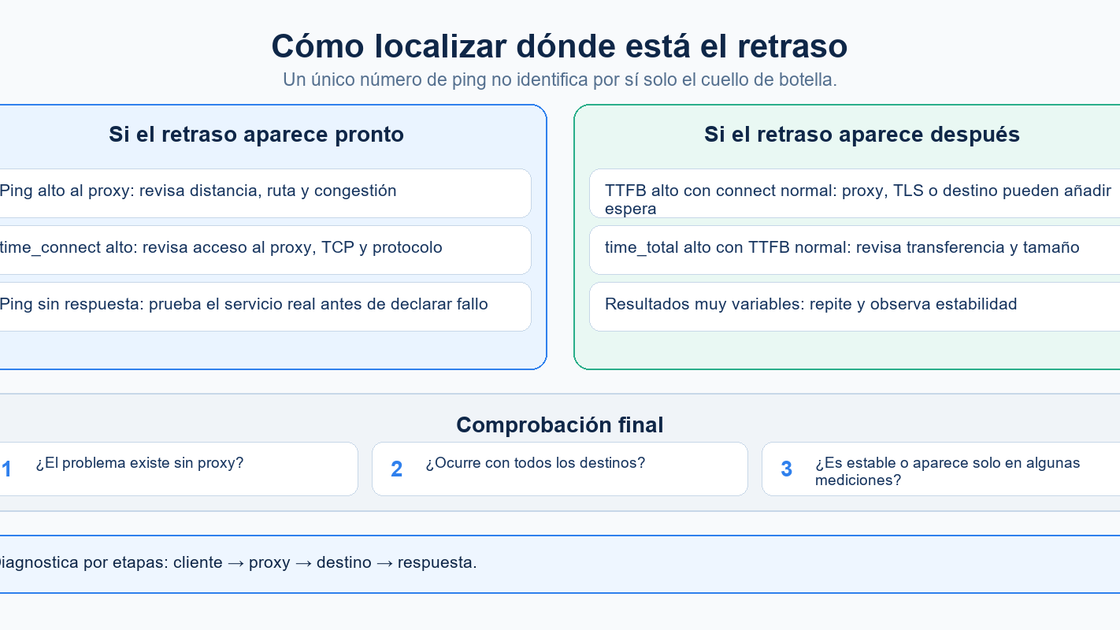
Diagnose a proxy that feels slow
Observation | Next check |
|---|---|
The direct baseline is also slow | Check the destination and local route before changing the proxy. |
Ping fails but proxied HTTP succeeds | Treat ICMP as unavailable for this host and rely on the service test. |
Connection time is consistently high | Check the selected gateway, local network and repeated connection attempts. |
Connection is quick but the first byte is late | Compare the destination, HTTPS setup, later route and session conditions. |
The first byte is quick but total time is long | Compare response size and sustained download rate. |
Some samples fail | Keep the failures visible; check authentication, timeouts, protocol and account availability. |
A nearby gateway can still forward toward a distant or busy target. A busy proxy, poor later route, slow origin or large response can all coexist with good ICMP RTT. Record what you observed before changing configuration; otherwise it becomes hard to tell whether a new setting actually improved the result.
What is a good proxy latency?
There is no universal threshold that fits every destination and workload. An interactive session, a small API response and a background download value different properties. Define the response time and failure rate your task can tolerate, then compare typical performance under the conditions where it will run. Choose on that evidence, not on a provider’s best isolated ping.
Frequently asked questions
Can ping tell me the real speed of my proxy?
It only measures ICMP RTT to the responding host. It does not authenticate to the proxy or measure a complete request to your intended destination.
Why does my proxy work even when ping times out?
ICMP and the proxy service use different mechanisms. Test the supplied service protocol and port before judging availability.
Which timing should I compare first?
Read connection time, first-byte time and total duration together, with HTTP status and failures. Pick the workload’s completion time for comparison and the earlier timings for diagnosis.
How many requests should I run?
Five to ten comparable requests are a useful first check. Important performance decisions need more samples across relevant times and realistic application behavior.
Does the MIYAIP online test measure my home connection?
No. Its probes originate from the MIYAIP test service. Use local cURL or your real application to include your own network path.
Does a faster gateway guarantee a faster exit?
No. The gateway is the entry point. Exit selection, the later network route and the target response also contribute to the full request.
Can I compare a rotating proxy with a sticky session?
Yes, if you label the session policy and understand that the rotating samples may use different exits. For a controlled exit comparison, keep the supported session configuration consistent.
Can I publish these example timings as product performance?
No. The numeric examples illustrate how to read a result. They are not measured MIYAIP performance or service guarantees.
A practical testing sequence
Collect valid MIYAIP connection fields, measure a direct baseline, optionally inspect ICMP RTT, send an authenticated proxied request, and compare repeated timings with errors kept visible. Add the MIYAIP tools as a server-side check, then confirm the outcome in your real client. That sequence separates a slow proxy path from a slow destination or an unavailable ping response.
Verify the proxy, then compare its speed
Check connectivity and the observed exit first, compare server-side timings next, then repeat the request from the environment that will run your workload.