
Overview
Workflow at a glance
Record limits and timings
Run one request from the failing environment with finite limits and transfer timings.
Fix the identified delay
Choose the repair from the failed stage, then repeat the same controlled request.
cURL error 28 means a time limit stopped the operation. It can happen before a connection is ready, while waiting for the first response byte, or during a download. Read the full error and collect transfer timings before deciding to raise a timeout or change a proxy.
The message may come from the curl command, PHP/libcurl, WordPress or another application. Test from the environment where the failing request runs; a successful request on your laptop does not establish that the hosting server has the same route.
Next steps
Which limit produced cURL error 28?
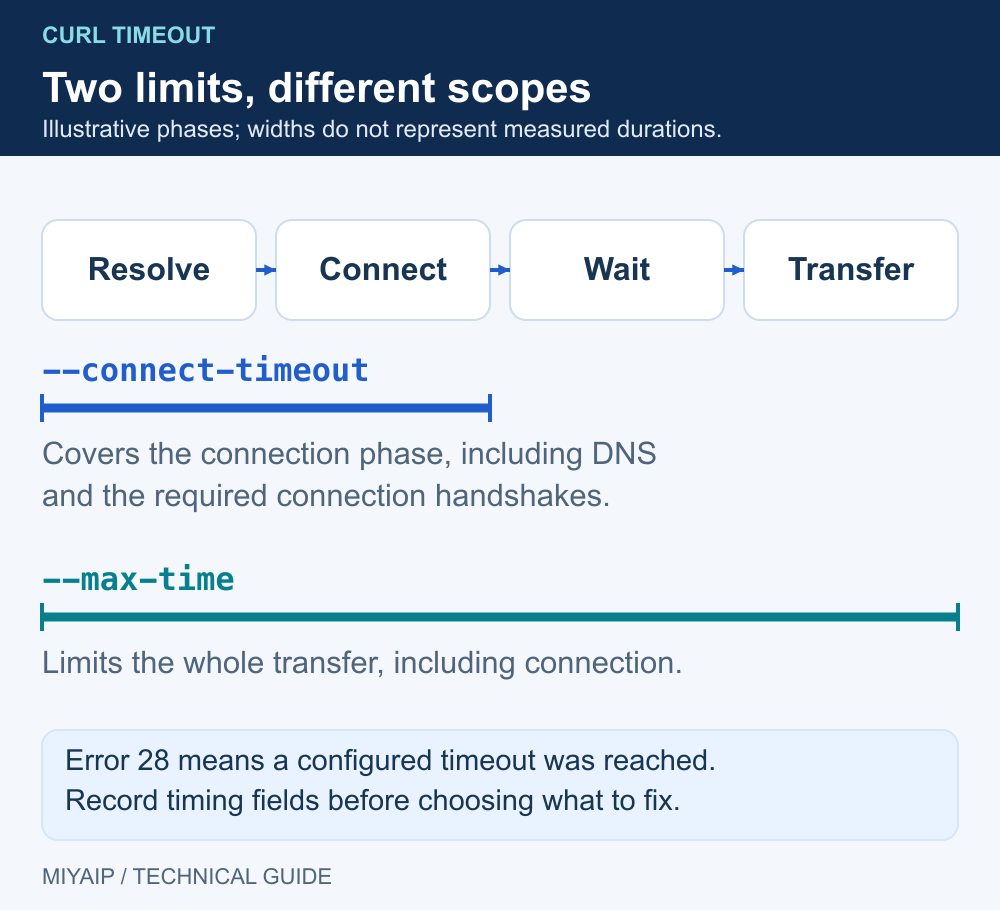
Control | What it limits | Diagnostic use |
|---|---|---|
| Connection setup, including the relevant name lookup and protocol handshakes | Find a request that cannot establish its connection in time |
| The overall transfer attempt | Bound an operation that stalls or downloads too slowly |
| Sustained low transfer speed | Stop a transfer that stays below a chosen rate |
An application's own deadline | The surrounding job or request | Check separately; the application may stop before curl's limit |
The curl timeout guide describes the first three controls. Error 28 identifies a timeout, while other errors identify conditions such as failed certificate verification or a refused connection. Keep the actual error code instead of treating every network failure as a timeout.
1. Collect timings from the failing runtime
Replace TARGET_URL with the destination. This macOS/Linux command keeps the body out of the terminal and prints elapsed timings. It does not add retries or follow redirects, so the first result remains visible.
curl --silent --show-error --output /dev/null \
  --connect-timeout 10 --max-time 30 \
  --write-out 'http=%{http_code} dns=%{time_namelookup} connect=%{time_connect} tls=%{time_appconnect} first_byte=%{time_starttransfer} total=%{time_total}\n' \
  'TARGET_URL'
Use curl.exe and NUL on Windows. The values are elapsed milestones, not independent durations to add together. A zero milestone may mean that stage never completed, while an unused stage can also be zero. Interpret the values alongside stderr and the process exit code.
If a proxy is intentionally configured, add its protocol, host, port and authentication using the MIYAIP connection guide. Compare a direct request only where direct access is intended and permitted. Keep the target, method and time limits the same so the comparison answers a clear question.
2. Match the symptom to a specific check
Symptom | Check next |
|---|---|
DNS does not complete | Resolve the endpoint from the same host or container; check its configured resolver and network reachability. |
Connection setup does not complete | Confirm the host, port, routing and outbound rules. For a native proxy, check the required overseas route. |
Connection is ready but no response arrives | Compare another permitted target; examine tunnel negotiation, destination health and server-side processing. |
Some body data arrives before timeout | Check response size, sustained transfer rate and whether the total limit fits the job. Preserve partial data only if the application can validate and resume it. |
Only the deployed job fails | Compare runtime proxy variables, DNS, container routes and application deadlines with your local environment. |
Only concurrent jobs fail | Reduce concurrency and measure failure rate before increasing limits. A longer wait does not create more connection capacity. |
For a proxy path, the Proxy Speed Test supplies measurements from MIYAIP's test server. Compare those with the local command; they measure different origins and may use different destinations.
3. Fix the owning application, then retest
In WordPress, record the Site Health message and whether the failing request is a REST request, a loopback request or an external service call. Ask the hosting administrator to reproduce that exact request from the PHP runtime. Test a suspected plugin conflict in a staging environment and restore the configuration after the comparison. A generic proxy change does not repair a broken loopback route.
In a scheduled scraper or API client, choose time limits from the expected workload. A small status response and a large export need different budgets. Increase a limit only when the observed operation is valid but needs longer; retain a finite job deadline.
Retry read-only requests only for plausible transient failures, with an attempt limit and waiting budget. Do not automatically resend a timed-out purchase, submission or other state-changing request: the remote operation may have completed even though its response was lost. For 429 responses, honor Retry-After rather than immediately rotating an IP.
Recognize a timeout in a controlled example
With the included network_demo.py running locally, /slow waits two seconds before responding. This command deliberately allows only 0.2 seconds:
curl --noproxy '*' --max-time 0.2 'http://127.0.0.1:8766/slow'The local example exits with code 28. It demonstrates an expired transfer limit. Repeat with --max-time 3 to allow the two-second response to finish.
Frequently asked questions
Is error 28 the same as HTTP 504?
No. Error 28 is a curl operation result. HTTP 504 is a response sent by a gateway. Record both the process result and any HTTP status obtained.
Will --insecure fix it?
Disabling certificate verification does not address a generic transfer timeout. If the actual result is a certificate error, investigate that error separately.
Should I keep raising the timeout until it succeeds?
First locate the delay. A wrong route or stalled service can consume any larger budget you give it.
Compare the endpoint with your own runtime
Check connectivity, compare server-side speed, and repeat the same request from the application environment.
Next steps
Run the local demonstration
Download network_demo.py, or copy the complete source below into a file with that name. Run python network_demo.py using Python 3. The service listens only on 127.0.0.1:8766; stop it with Ctrl+C.
"""Local HTTP demonstration. No external requests, credentials or MIYAIP service calls."""
from http.server import BaseHTTPRequestHandler, ThreadingHTTPServer
from urllib.parse import urlsplit
import json
import time


class DemoHandler(BaseHTTPRequestHandler):
    def log_message(self, *_):
        pass

    def reply(self, code, body=b"", headers=None):
        self.send_response(code)
        for key, value in (headers or {}).items():
            self.send_header(key, value)
        self.send_header("Content-Length", str(len(body)))
        try:
            self.end_headers()
            self.wfile.write(body)
        except (BrokenPipeError, ConnectionResetError, ConnectionAbortedError):
            pass

    def do_CONNECT(self):
        self.reply(407, headers={"Proxy-Authenticate": 'Basic realm="local-demo"'})

    def do_GET(self):
        path = urlsplit(self.path).path
        if path == "/redirect":
            return self.reply(302, headers={"Location": "/headers"})
        if path == "/loop":
            return self.reply(302, headers={"Location": "/loop"})
        if path == "/slow":
            time.sleep(2)
        if path in {"/headers", "/slow"}:
            payload = {"method": self.command, "headers": dict(self.headers)}
            return self.reply(200, json.dumps(payload, indent=2).encode(),
                              {"Content-Type": "application/json"})
        self.reply(404, b"Use /headers, /redirect, /loop or /slow")

    def do_POST(self):
        body = self.rfile.read(int(self.headers.get("Content-Length", "0")))
        if urlsplit(self.path).path == "/redirect307":
            return self.reply(307, headers={"Location": "/headers"})
        if urlsplit(self.path).path == "/redirect302":
            return self.reply(302, headers={"Location": "/headers"})
        payload = {"method": self.command, "headers": dict(self.headers),
                   "body": body.decode("utf-8", errors="replace")}
        self.reply(200, json.dumps(payload, indent=2).encode(),
                   {"Content-Type": "application/json"})


if __name__ == "__main__":
    print("Local demonstration: http://127.0.0.1:8766 (Ctrl+C to stop)", flush=True)
    ThreadingHTTPServer(("127.0.0.1", 8766), DemoHandler).serve_forever()