
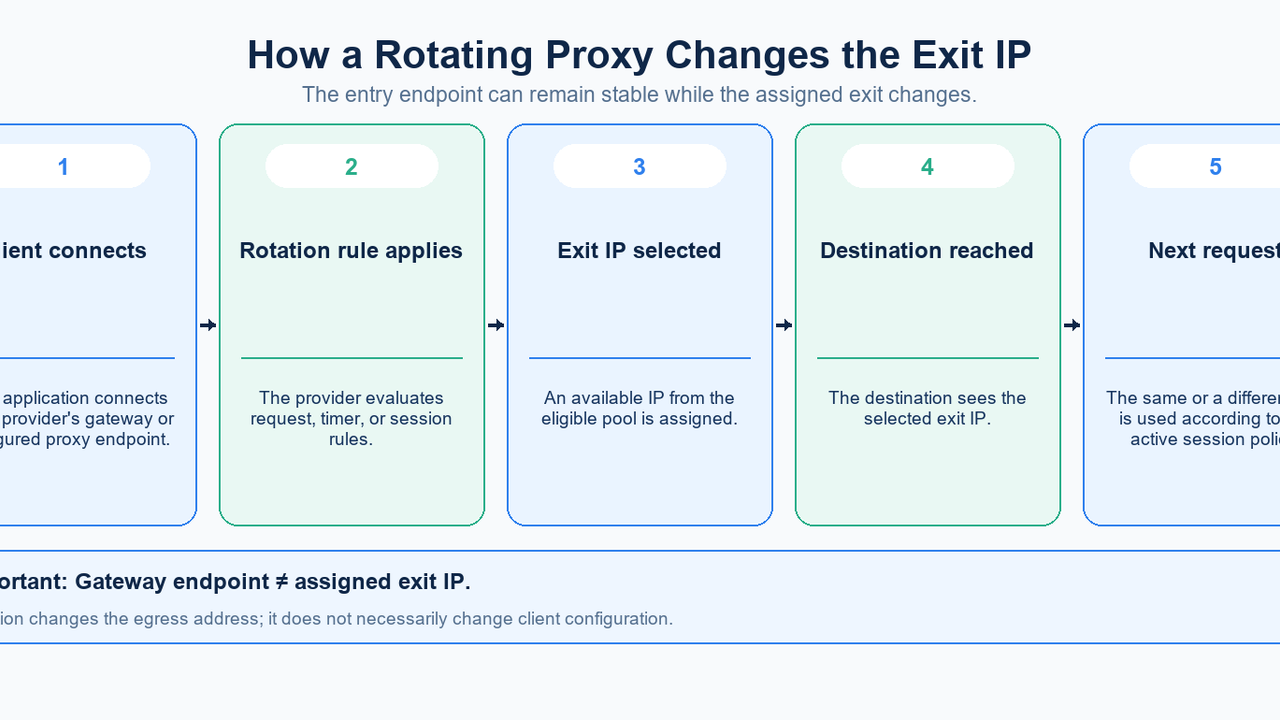
A rotating proxy changes the exit IP used for traffic according to a configured policy. Your application can keep connecting to the same gateway while a website sees different exit addresses. The useful question is therefore what triggers a change and how much continuity your workflow needs.
In MIYA, Dynamic Residential Proxy is the relevant starting point for residential IP rotation. Its current Proxy Setup offers rotation on every request, sticky sessions of 5, 10, 15, or 30 minutes, and a Manual API switch option. The generator initially selects a 30-minute sticky session. Check that choice explicitly: opening a rotating-proxy product does not mean every request is already configured to rotate.
Quick answer: separate the gateway from the exit IP
The gateway is the host and port configured in your client; the exit IP is the source address seen by the destination. A stable proxy hostname and a changing public IP are compatible. A backconnect-style gateway describes the access architecture, while rotating describes how exit assignments change.
This distinction also appears in Webshare’s gateway documentation, which warns users to check the assigned exit rather than the gateway address when verifying location. That is a useful diagnostic principle, not a reason to copy another provider’s gateway or port into MIYA.
How a rotating proxy works
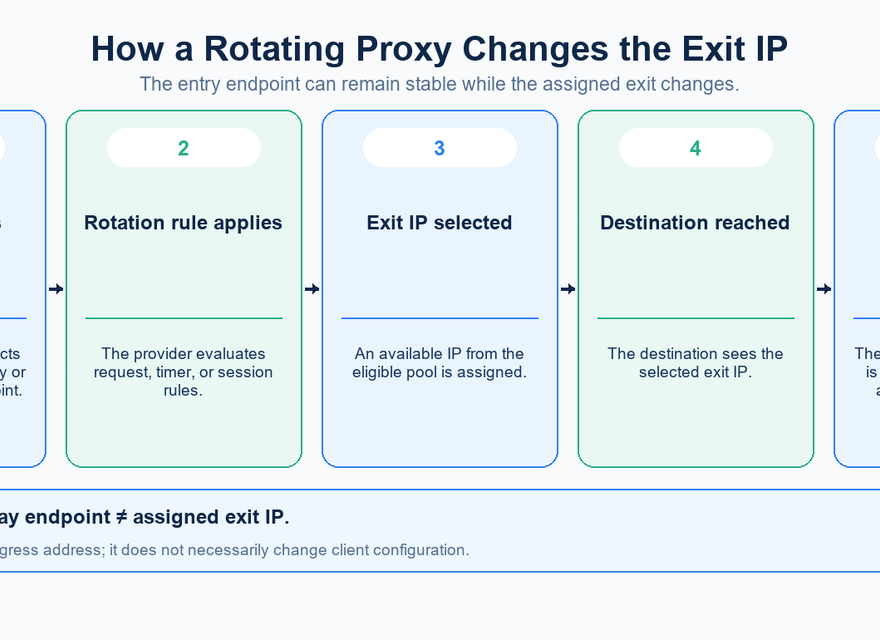
Your application sends a request to the proxy gateway with the required authentication. The service uses the selected product, routing settings, and session policy to determine an eligible exit. The destination receives the request through that exit. A later request is evaluated under the same policy.
The diagram separates the entry point, IP pool, and destination. Treat it as a conceptual flow: the displayed addresses and arrows do not establish live MIYA endpoints, a particular allocation algorithm, or a guarantee that every request gets a previously unused address.
What actually triggers IP rotation?
Per-request rotation asks the service to select an exit for each request. It fits independent requests where one task does not depend on the IP used by the previous task. It should not be interpreted as an unlimited supply of globally unique addresses: repeated observations alone do not describe the full pool or allocation policy.
A sticky session requests temporary continuity. MIYA’s current duration choices are 5, 10, 15, and 30 minutes. Keep the generated session credentials consistent when testing that continuity. Regenerating credentials or changing session settings while comparing requests mixes separate configurations and makes the result hard to interpret.
Manual API switch is a separate option in the Dynamic Residential generator. Use the instructions provided with that mode rather than inventing a switching endpoint. Dynamic Unlimited currently exposes per-request rotation and sticky windows, without the manual option. Session controls and defaults are product-specific.
For comparison, Webshare documents rotating and sticky modes. Its parameter syntax and duration limits belong to its service; they are not MIYA settings. The same labels across providers do not make their configurations interchangeable.
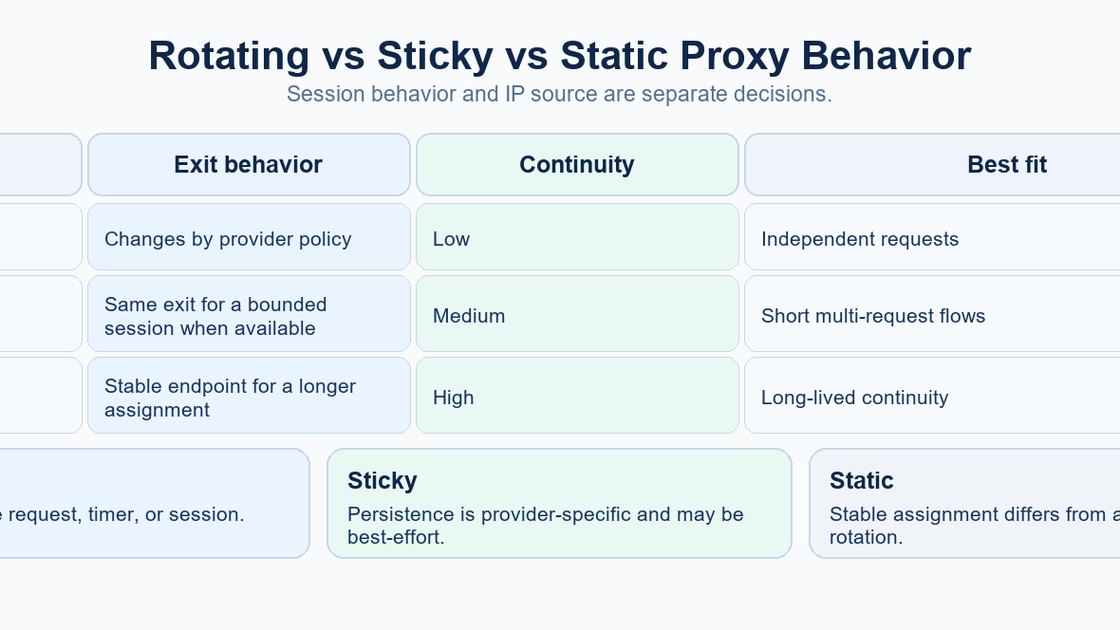
Rotating, sticky, and static describe different persistence models
Model | What it requests | Where it fits | What to verify |
|---|---|---|---|
Rotating | Exit selection according to a rotation rule | Independent collection or regional checks | Trigger, available exits, and errors |
Sticky | Temporary continuity within a session | A bounded sequence of related requests | Duration, session identity, and interruption handling |
Static | A longer-lived IP assignment | Workflows that require a consistent address | Assignment terms, renewal, and actual availability |
A sticky timer is a requested session window, not proof that a residential peer will remain available throughout it. Rayobyte’s residential FAQ explicitly notes that a residential IP can become unavailable during a session. That supports the general caution; it does not establish MIYA’s failure response. Test interruptions and confirm the current product behavior before relying on continuity.
What is a rotating residential proxy?
Residential identifies the network source of the exit; rotating identifies the assignment behavior. Those are separate dimensions. A residential service can rotate between requests or preserve an exit temporarily through a sticky session. A static residential product addresses a different persistence requirement.
Rotating datacenter proxies apply an assignment policy to datacenter exits instead. Rotation alone does not prove an exit is residential, mobile, or from a specific ISP. Likewise, a residential label does not prove that every plan has the same targeting precision or session behavior. MIYA has distinct product pages and setup flows, so select the actual product before comparing features.
When rotating proxies are useful
For public-data collection, managed rotation can reduce the work of maintaining a raw proxy list. Keep requests independent where possible and retain the information needed to retry failed reads. For authorized localization QA, choose an available exit location and compare the public content returned from that location.
Availability monitoring can compare how a service responds through several network paths. Market research can sample public catalog or price pages, while advertising QA can inspect public landing pages in supported regions. These tasks benefit from controlled sampling, consistent application settings, and records of the observed exit.
Use sticky sessions when a short workflow needs continuity across related requests. If an IP must remain stable for a longer operational period, evaluate the appropriate static product and its terms. Rotation does not grant access rights or replace the destination’s rate limits, permissions, or normal authentication.
What rotation does not guarantee
Rotation does not guarantee low latency. Client-to-gateway distance, the chosen exit, the destination, and the network path all affect request time. A fast gateway connection can still lead to a slow destination response. Measure the complete request from the machine that will run the workload.
It also does not guarantee that every exit has identical location, performance, or availability. Do not infer unlimited concurrency, uninterrupted sessions, automatic failover, or successful access to every site from the presence of a rotation selector. These are separate capabilities that need their own evidence.
Your application still needs timeouts, bounded retries, error classification, and sensible request pacing. An authentication error should prompt a credential check; a destination rejection should be investigated at the destination layer. Changing IP repeatedly is not a diagnosis for every failure.
Configure a MIYA test around one clear policy
Start from MIYA Dynamic Residential Proxy, then use the account’s Proxy Setup to choose the product, available location, protocol, and rotation policy. Copy the generated host, port, username, and password from the current console output. Do not assemble a username from another provider’s examples.
The current setup provides HTTP(S) and SOCKS5 choices. Gateway routing and exit location are different settings: selecting an entry route such as America or Europe does not by itself request an American or European exit. Select the exit location separately and verify the public IP actually observed.
Choose only geographic controls available for the selected product and pool. A country, city, or ASN choice narrows the desired exits; it is not a promise that all locations have equal supply. Begin with the least restrictive selection that meets the task and keep it unchanged during a comparison.
For per-request testing, select Rotate every request. For continuity testing, select Sticky session and one duration, then reuse the same generated credentials. Record the configured policy, timestamp, requested location, and result without recording the password. The MIYA Developer Center is the internal starting point for integration guidance.
How to verify rotation with a small curl test
Use an endpoint that reports the public IP it observes, such as ipify’s documented API. Replace all uppercase placeholders below with the generated console values. The examples supply a username without a password so curl can prompt for the password interactively; keep secrets out of shared command snippets and logs.
curl --proxy "http://PROXY_HOST:PROXY_PORT" --proxy-user "PROXY_USERNAME" --connect-timeout 10 --max-time 30 "https://api.ipify.org?format=json"For a SOCKS5 endpoint, use the corresponding command:
curl --proxy "socks5h://PROXY_HOST:PROXY_PORT" --proxy-user "PROXY_USERNAME" --connect-timeout 10 --max-time 30 "https://api.ipify.org?format=json"The curl manual documents proxy authentication, timeouts, and SOCKS5 hostname handling. In this example, socks5h asks the proxy to resolve the destination hostname. An HTTPS destination URL is separate from the protocol used to connect to the proxy. On Windows PowerShell, use curl.exe if curl resolves to a different command.
Run a few requests sequentially, recording the observed IP and whether each completed. Compare observations with the selected policy. For sticky testing, keep credentials and settings fixed; for a new test configuration, record that change explicitly. A few requests verify basic behavior under those conditions, not pool size, long-term availability, or a service-level guarantee.
How to evaluate a rotating proxy service
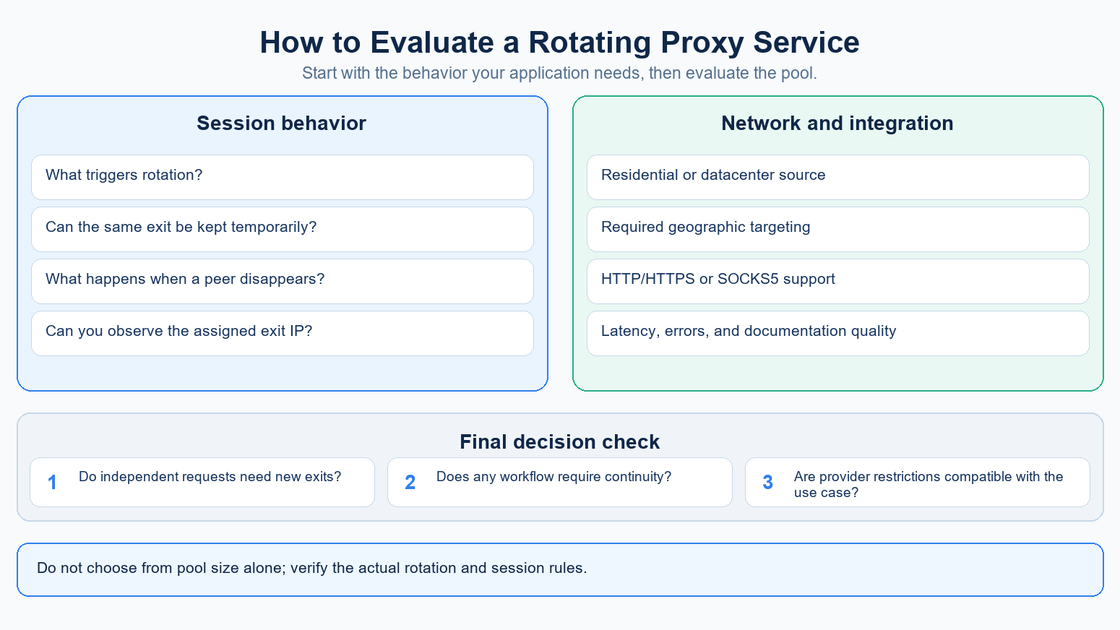
Compare the rotation trigger first, then the continuity rules: what starts a session, which duration choices exist, and what the client should do after an interruption. Check the exit network type separately. Avoid treating a large pool headline as evidence that your selected location or task will always be available.
Next verify protocol compatibility, authentication, the generated endpoint format, and the geographic controls your workload actually needs. Use one representative target and a small, consistent request sample. Compare successful-request rate, timeout frequency, complete request duration, observed exit location, and session stability.
Inspect errors and usage reporting before scaling. Keep the application, request size, location, and policy comparable when assessing results. The useful outcome is a configuration you can reproduce and troubleshoot, with measured limits, rather than a claim that rotating is always faster or better.
Frequently asked questions
What is a rotating proxy?
It is a proxy service that changes the exit IP according to a policy. The gateway configured in your application may remain the same while the address seen by the destination changes.
Does a rotating proxy change IP on every request?
Only when that is the selected and supported policy. MIYA’s Dynamic Residential setup also offers sticky sessions and currently starts with a 30-minute sticky selection.
What is a rotating residential proxy?
It combines residential-network exits with an exit-assignment policy that supports rotation. Residential describes the network source; rotating describes how the selected exit changes.
Are all rotating proxies residential?
No. A rotation policy can apply to other network types. Check the actual product and pool rather than inferring the network source from the word rotating.
What is the difference between rotating and sticky?
Rotating prioritizes changing assignments under a rule. Sticky requests temporary continuity for related requests. Choose around the workflow’s need for continuity, then verify the selected behavior.
Can a sticky session lose its IP before the timer ends?
A residential exit can become unavailable. The timer alone is not an uninterrupted-availability guarantee. Confirm the product’s current interruption behavior and design the application to handle failure.
Is rotating the same as backconnect?
No. Rotating describes exit changes; backconnect commonly describes access through a gateway to a pool. A gateway can serve different session policies.
Why does the proxy hostname stay the same?
The hostname identifies the entry point. The service selects an exit behind that entry point, so a destination can observe a different public IP without a changed hostname.
How can I test rotation?
Make a limited number of requests to an IP-reporting endpoint through the proxy. Record the observed exits and selected policy. Keep session credentials fixed when evaluating stickiness.
What matters when choosing a service?
Compare rotation triggers, session limits, exit source, supported locations, protocols, authentication, actual request performance, error handling, and documentation for the product you will use.
Choose the rotation policy your workflow needs
Review MIYA’s dynamic residential options, then use the current console-generated endpoint and a small test to confirm the selected policy before expanding the workload.
Sources
Product alignment: MIYA Dynamic Residential Proxy and MIYA Developer Center; current setup controls checked against the project on 28 September 2026.
Endpoint Generator: Rotating Residential — Webshare; Backbone Connection: Gateway IP Address — Webshare (3 July 2026). Accessed 28 September 2026.
Residential (Rotating) Proxy FAQ — Rayobyte (updated 26 August 2026). Accessed 28 September 2026.
curl command-line manual — curl and Public IP API documentation — ipify. Accessed 28 September 2026.
HTTP scripting: proxy authentication — curl. Accessed 28 September 2026.