
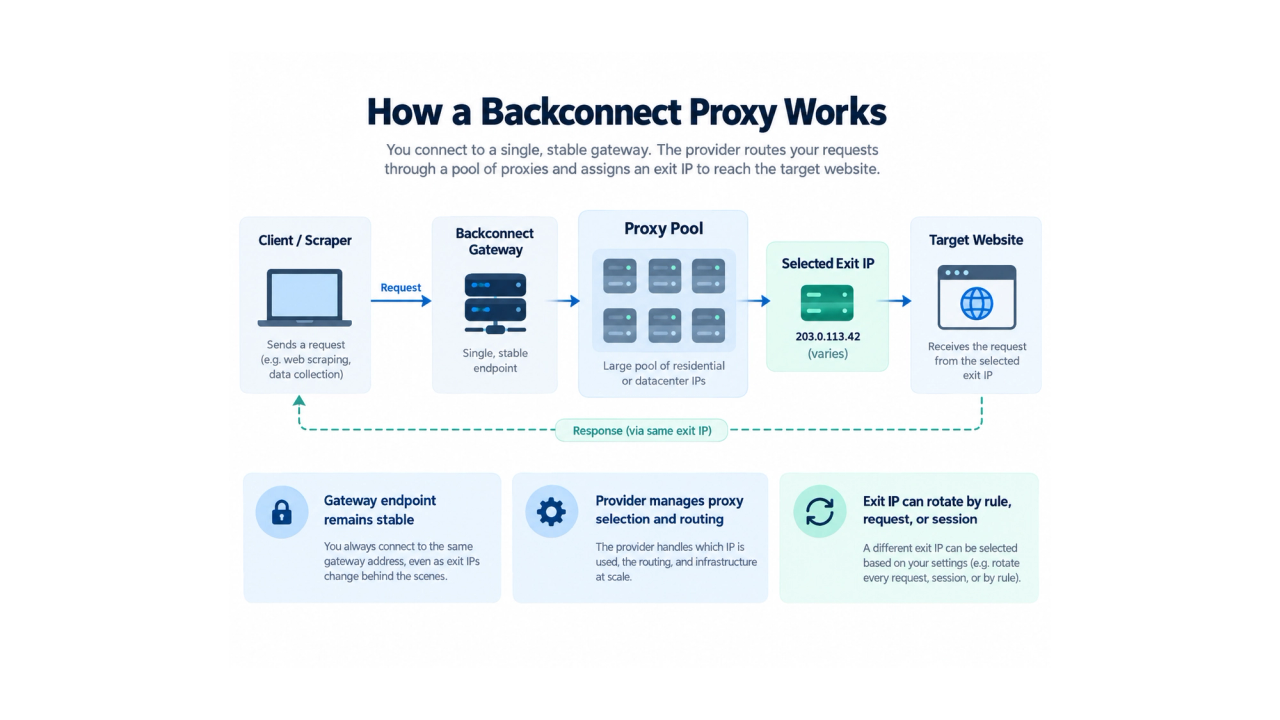
A backconnect proxy service lets an application access a provider-managed pool of proxy IPs through a stable gateway. Instead of storing and selecting individual proxy addresses manually, the client connects to one gateway endpoint. The provider then decides which exit IP should carry each request according to its routing, location, rotation, and session rules. That sounds straightforward, but proxy terminology often makes the architecture harder to understand than it needs to be.
Backconnect proxies are frequently discussed together with rotating proxies, residential proxies, sticky sessions, proxy pools, and static proxy lists. These terms describe different parts of the same system. The easiest way to understand a backconnect service is to separate three questions:
- How do you connect to the proxy network? — the gateway architecture
- When does the exit IP change? — the rotation or session policy
- What kind of network does the exit IP belong to? — residential, mobile, ISP, or datacenter
Once those layers are separated, comparing backconnect proxy services becomes much easier.
Quick Answer: What Is a Backconnect Proxy Service?
A backconnect proxy service provides a stable gateway in front of a provider-managed pool of proxy exit IPs. The client normally connects to the same hostname and port. Behind that gateway, the provider selects an exit IP according to the configured routing rules. A simplified connection looks like this: Client → Backconnect Gateway → Proxy Pool → Selected Exit IP → Target Website The gateway can remain stable even when the exit IP changes. Bright Data provides a concrete provider example in its BackConnect overview.
This architecture reduces the need to manually maintain a large list of proxy addresses and makes it easier for the provider to manage rotation, geographic routing, session persistence, and endpoint availability. A backconnect service is not limited to residential IPs. Residential, mobile, ISP, and datacenter proxy networks can all be delivered through a gateway-based model.
How Does a Backconnect Proxy Work?
A backconnect service separates the client-facing gateway from the backend proxy pool. The diagram shows a request reaching one selected exit and the response returning to the client.
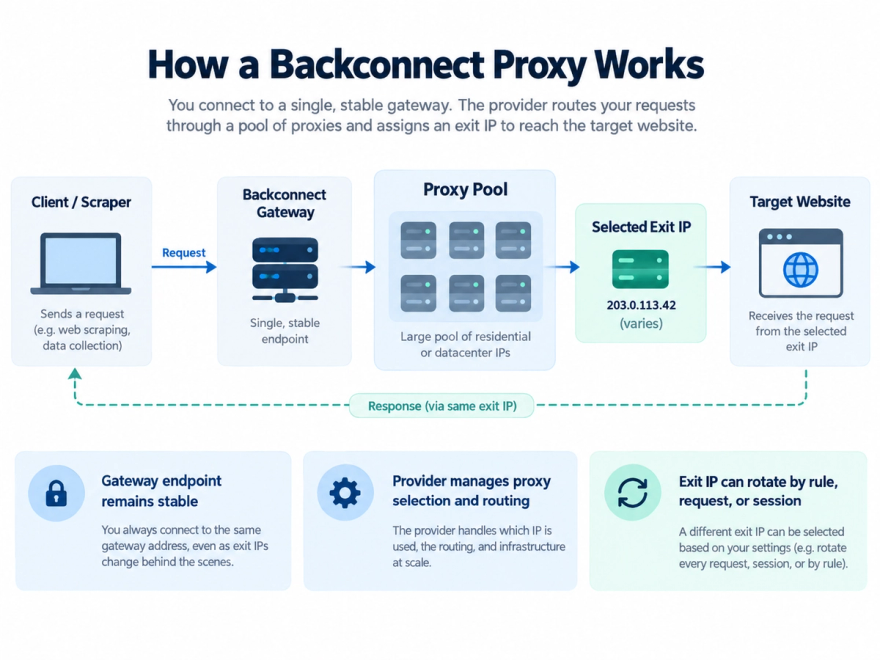
The client first connects to a gateway using connection details supplied by the provider. These typically include:
- gateway hostname
- port
- authentication credentials
- optional location or session parameters
The gateway receives the request and selects an appropriate exit IP from the provider’s proxy pool. Selection may depend on factors such as:
- requested country or region
- available proxy type
- session identifier
- rotation policy
- endpoint availability
- provider-specific routing rules
The selected exit then connects to the destination website. The response returns through the same proxy infrastructure to the client. From the application’s perspective, the important advantage is abstraction. The client does not need to know the address of every proxy exit in advance. The provider manages the backend pool while the user works with a much simpler connection point. This is why gateway-based proxy delivery is especially useful when the underlying pool contains many changing endpoints.
The Three Layers Behind a Backconnect Proxy Service
A backconnect service becomes much easier to evaluate when its three technical layers are considered separately.
1. Gateway Architecture
The gateway answers: How does the client enter the proxy network? Instead of connecting directly to individual proxy IPs, the application connects to a stable provider endpoint. The gateway then routes the request to one of the available exits. This is the architectural part of backconnect proxy delivery.
2. Rotation and Session Behavior
The second layer answers: When does the exit IP change? A provider may support:
- a new exit for each request
- rotation after a connection ends
- timed rotation
- rotation after a session expires
- sticky sessions
- manual or API-triggered changes
Rotation behavior is therefore configurable and provider-dependent. See the provider-specific rotation and session documentation for an implementation example. A backconnect connection does not automatically mean that every request receives a new IP.
3. Exit Network Type
The third layer answers: What kind of network does the exit IP come from? Possible exit types include:
- residential
- mobile
- ISP / static residential
- datacenter
This distinction matters because each network type has different characteristics, pricing models, routing behavior, and typical applications. Backconnect therefore describes the delivery architecture rather than the network origin of the IP itself.
Backconnect Proxy vs. Rotating Proxy
Backconnect proxy and rotating proxy are often treated as synonyms, but they describe different concepts. A backconnect proxy describes how the client connects to a provider-managed pool. A rotating proxy describes the behavior of the exit IP. A service may be both. For example, a client can connect to one backconnect gateway while the provider changes the exit IP after each request. But the same gateway can also support a sticky session that keeps one exit IP for several requests. This distinction is important because not every workflow benefits from aggressive rotation. Independent requests may work well with frequent changes.
A multi-step session may require the same exit to remain stable long enough for the workflow to complete. The correct configuration depends on the application rather than on a universal rule such as “always rotate every request.”
Backconnect Proxy vs. Static Proxy List
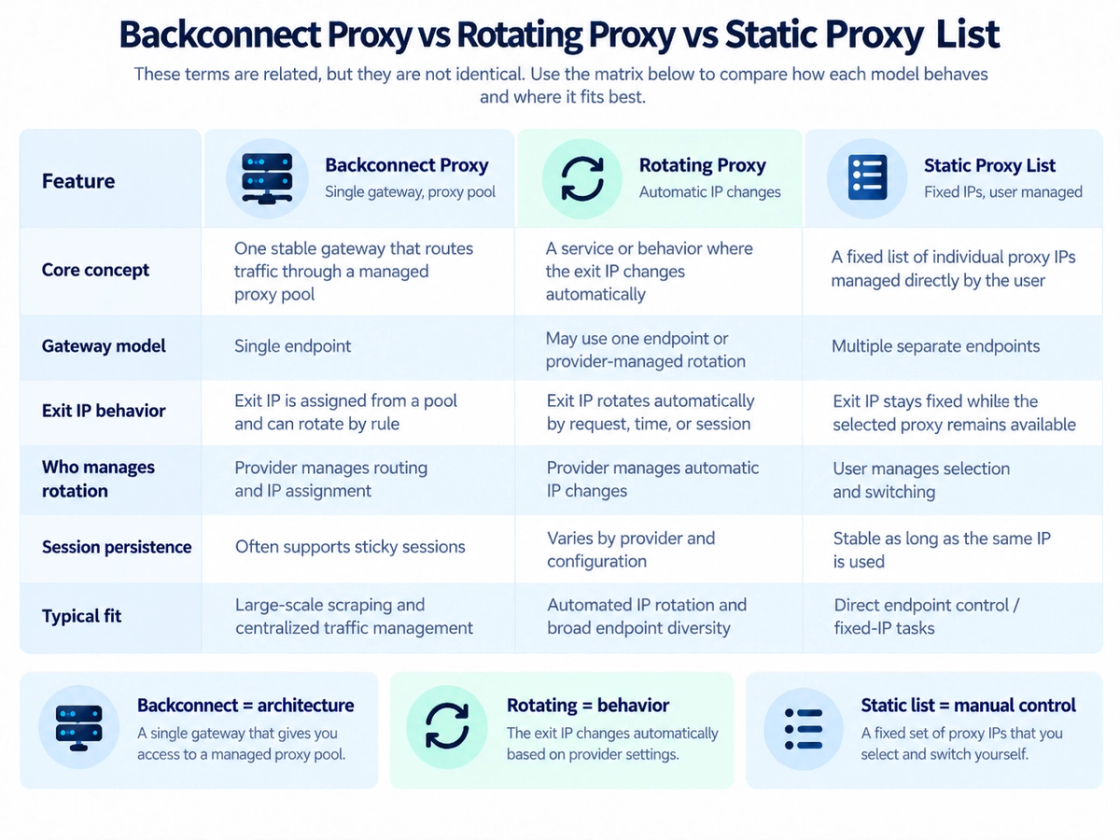
A static proxy list uses a different management model. Instead of connecting through one provider-managed gateway, the user receives individual proxy endpoints and decides which one to use.
Dimension | Backconnect Proxy | Static Proxy List |
|---|---|---|
Client connection | Stable gateway | Individual proxy addresses |
Exit selection | Usually provider-managed | Usually user-managed |
Rotation | Can be automated | Usually requires client-side logic |
Pool maintenance | Managed by provider | Managed more directly by user |
Session behavior | Depends on routing rules | Stable while the selected proxy remains available |
Operational model | Centralized | Direct endpoint control |
A backconnect service is generally easier to manage when the underlying pool is large or changes frequently. A static proxy list can make more sense when the workflow requires direct control over specific long-lived endpoints. Neither architecture is universally better. The correct choice depends on how much control the application needs over individual proxy addresses.
Rotation Modes and Sticky Sessions
Rotation policy is one of the most important variables in a backconnect service. Different providers may offer different routing rules.
Per-Request Rotation
A new available exit may be selected for each request. Rotation does not guarantee that an IP can never be selected again. This can be appropriate for independent requests that do not require network continuity.
Connection-Based Rotation
The service may maintain an exit during one connection and choose another when a new connection is created.
Timed Rotation
Some services rotate exits after a configured time interval.
Sticky Sessions
A sticky session attempts to keep the same exit IP across multiple requests for a session or period. This is useful when several requests belong to one continuous workflow. Sticky routing should not be interpreted as a guarantee that an exit can never change. If an endpoint becomes unavailable or the provider’s session policy expires, the route may need to be replaced. Bright Data documents fallback when a peer is unavailable and an option to fail instead; those are provider rules, not a universal property of every backconnect service. Session failure behavior. The practical question is therefore not simply: Does the service rotate IPs?
It is: Can the service provide the rotation and session behavior required by the application?
What Types of IPs Can Sit Behind a Backconnect Gateway?
Backconnect architecture can be used with several kinds of proxy networks.
Residential Proxies
Residential proxies use exits associated with residential ISP networks. Large residential pools are commonly delivered through gateway-based systems because the provider can centrally manage many distributed endpoints. Residential services may support rotating or sticky sessions depending on the configuration.
Mobile Proxies
Mobile proxies use exits associated with cellular networks. A gateway can route requests through different mobile exits while controlling session duration and geography according to provider rules.
ISP / Static Residential Proxies
ISP or static residential proxies are typically associated with longer-lived ISP-network endpoints. They are useful when the application needs more session stability than a highly dynamic rotating pool. These endpoints may be provided individually or integrated into a broader managed proxy system. An ISP label does not by itself mean the proxy runs on a household device.
Datacenter Proxies
Datacenter proxies originate from hosting or server infrastructure rather than residential access networks. Depending on the service, datacenter exits may be assigned as individual endpoints or selected from a provider-managed pool. Gateway-delivered datacenter exits can be managed through rotation or session policies. The important point is that proxy type and gateway architecture should be evaluated independently.
When Is a Backconnect Proxy Service Useful?
Backconnect services are most useful when centralized proxy management solves a real operational problem. Common authorized use cases may include:
- public web data collection
- price and product monitoring
- market research
- regional content verification
- advertising and localization checks
- search-result monitoring
- distributed testing
- automated workflows using multiple network locations
The common requirement is not simply access to “more IPs.” The more important benefit is the ability to work with a large or changing proxy pool without manually managing every endpoint. For a small workflow using only a few stable proxy addresses, a backconnect service may add unnecessary complexity. For larger, distributed, or geographically targeted workloads, provider-managed routing can simplify infrastructure considerably.
Benefits of the Backconnect Model
Simpler Endpoint Management
The client can connect to one logical gateway instead of maintaining a long list of changing proxy addresses.
Provider-Managed Rotation
Exit selection and rotation logic can be handled by the proxy service rather than being implemented entirely inside the client application.
Access to Larger Pools
A single gateway can expose a much larger backend network than would be convenient to maintain manually.
Geographic Routing
Depending on the provider, users may be able to request exits by country, region, city, carrier, ASN, or other parameters.
Session Control
Services may support both rotating and sticky routing, allowing applications to balance endpoint diversity with session continuity.
Backend Pool Maintenance
If individual exits become unavailable, the provider can manage replacement inside the network without requiring the client to rebuild its proxy list.
Trade-Offs to Consider
The backconnect model also creates several trade-offs.
Less Direct Control Over Individual Exits
Because the provider manages the backend pool, the user may not know in advance which exact IP will be selected.
Provider Dependency
Routing, rotation, session duration, targeting, and availability depend on provider infrastructure and policy.
Shared vs. Dedicated Resources
Some pools may be shared between customers, while other services provide more dedicated resources. Backconnect architecture itself does not determine whether the network is shared or dedicated.
Pricing Model
Backconnect architecture also does not determine how a provider charges. Depending on the service, pricing may be based on:
- bandwidth
- subscription tier
- number of IPs
- number of ports
- usage duration
- other capacity limits
A bandwidth-based rotating network can have very different economics from a fixed-IP service.
Session Limits
Sticky sessions may be available, but their duration can still depend on provider rules and endpoint availability.
Latency
The request path may include several network stages: Client → Gateway → Exit IP → Destination Geography and network conditions can affect overall response time.
Proxy Infrastructure Is Only One Layer
A proxy does not replace:
- appropriate request pacing
- authentication
- session logic
- error handling
- data validation
- target-site policy review
- applicable legal and compliance requirements
Backconnect routing changes the network path. It does not guarantee unrestricted access or eliminate rate limits.
How to Evaluate a Backconnect Proxy Service
A useful provider comparison should go beyond headline pool size.
1. Identify the Required Proxy Type
Does the workload need:
- residential exits
- mobile exits
- ISP / static residential endpoints
- datacenter infrastructure
The answer should come from the workload rather than from marketing terminology.
2. Check Rotation Controls
Look for:
- per-request rotation
- timed rotation
- session-based routing
- sticky sessions
- manual or API-controlled session changes
The service should provide enough control for the application’s session model.
3. Evaluate Geographic Targeting
Some projects only need country-level routing. Others may need:
- state or region
- city
- carrier
- ASN
More granular targeting is useful only when the workload actually requires it.
4. Review Authentication and Protocol Support
Common options include:
- username and password authentication
- IP allowlisting
- HTTP
- HTTPS
- SOCKS5
The service needs to integrate cleanly with the application stack.
5. Understand Pool Allocation
Ask whether the pool is:
- shared
- dedicated
- partially reserved
- dynamically allocated
Pool structure can affect both availability and cost.
6. Examine Session Behavior
Check:
- maximum sticky-session duration
- what happens if an exit becomes unavailable
- whether reconnecting changes the exit
- how session identifiers are configured
7. Compare Pricing Against Actual Usage
A lower headline price does not necessarily produce a lower total cost. Estimate the workload using the provider’s real billing unit. For example, bandwidth-based residential routing and fixed-IP ISP proxies should not be compared as if they were priced the same way.
8. Review Sourcing, Support, and Operational Controls
Other useful questions include:
- How does the provider describe endpoint sourcing?
- What usage controls are available?
- Is documentation sufficient?
- What happens when routing fails?
- What support channels are available?
- Are usage and compliance requirements clearly documented?
The best service is the one whose architecture matches the workload, not simply the one with the largest advertised network.
Where Bright Data Fits
Bright Data is a commercial proxy infrastructure provider. Its BackConnect article describes gateway-based access to a rotating residential proxy pool. That is one common implementation of the backconnect model, but the underlying concept is broader than residential proxies alone. Bright Data’s proxy rotation documentation covers residential, ISP, datacenter, and mobile networks, including shared-pool rotation and session controls. Availability and allocation depend on the selected zone and product. This makes Bright Data a useful example of how a provider can combine:
- gateway-based access
- multiple proxy network types
- configurable rotation
- session persistence
The important point for buyers is not the BackConnect label itself. The more useful question is which combination of network type, routing behavior, geography, session duration, and pricing model fits the workload. The same distinction can be seen in MiyaIP’s current product structure. MiyaIP separates dynamic residential proxies, static residential / ISP proxies, dynamic mobile proxies, and datacenter proxies. Its plan and gateway FAQ explains how billing and connection models differ.
MiyaIP’s dynamic residential and dynamic mobile pages describe rotating and sticky sessions. Static residential / ISP products are positioned around persistent ISP-associated endpoints. Session windows and availability still depend on the product. That product structure illustrates the central principle of this guide: A user can choose the network type and the session behavior separately from the basic gateway model. For example:
- a geographically distributed workload may favor dynamic residential routing
- a session-sensitive workflow may favor a static ISP-associated endpoint
- a mobile-network-specific workflow may require mobile exits
- a workflow that requires datacenter-network exits may use datacenter infrastructure
The correct configuration should follow the application requirements rather than a single proxy label.
Backconnect Proxy Service FAQ
Is a backconnect proxy the same as a rotating proxy?
No. Backconnect describes a gateway architecture that connects the client to a backend proxy pool. Rotating describes behavior where the exit IP changes according to a routing rule. Many commercial services use both concepts together.
Are all backconnect proxies residential?
No. Residential proxies are commonly delivered through backconnect gateways, but mobile, ISP, and datacenter proxy infrastructure can also use a gateway-based architecture.
Does a backconnect proxy change IP on every request?
Not necessarily. A service may support per-request rotation, timed rotation, connection-based routing, or sticky sessions. The exact behavior depends on the provider configuration.
What is a sticky session?
A sticky session attempts to preserve the same exit IP across multiple requests for a session or period. It is useful when a workflow requires temporary network continuity.
Why use a gateway instead of a static proxy list?
A gateway allows the provider to manage exit selection, rotation, and pool maintenance. This can reduce the amount of proxy-management logic required inside the client application.
Does a backconnect proxy prevent rate limiting or blocking?
No. Proxy routing is only one part of the system. Rate limits and access decisions may also depend on request frequency, authentication, account behavior, application behavior, network reputation, and target-site policy. No proxy architecture guarantees unrestricted access.
What should I compare when choosing a backconnect proxy service?
Evaluate:
- proxy network types
- rotation controls
- sticky-session behavior
- geographic targeting
- protocols
- authentication
- pool allocation
- session limits
- pricing model
- sourcing
- documentation
- support
The service should match the workload rather than being selected only by advertised pool size.
Final Takeaway
A backconnect proxy service simplifies access to a provider-managed proxy pool. Instead of manually maintaining a large number of individual proxy addresses, the client connects to a stable gateway while the provider manages exit selection behind the scenes. The most useful way to evaluate the architecture is to separate three decisions:
- Gateway architecture — how the application connects to the proxy network
- Session and rotation policy — when the exit IP changes
- Proxy network type — whether the exit comes from residential, mobile, ISP, or datacenter infrastructure
These choices are related, but they are not the same thing. Bright Data’s BackConnect implementation is one example of this model, particularly in rotating residential infrastructure. Other providers, including MiyaIP, package similar network and session decisions into different proxy products. A useful backconnect proxy service should therefore be evaluated according to the actual workload: geography, session continuity, proxy type, scale, integration requirements, and pricing model. Start with those requirements first. Then choose the gateway, rotation policy, and network type that fit them.
Match the proxy plan to your workload
If you need geographic routing and configurable sessions, review MiyaIP’s dynamic residential options and the connection rules before choosing a plan.
Sources
Product documentation checked September 13, 2026. Session behavior and product availability can change.