
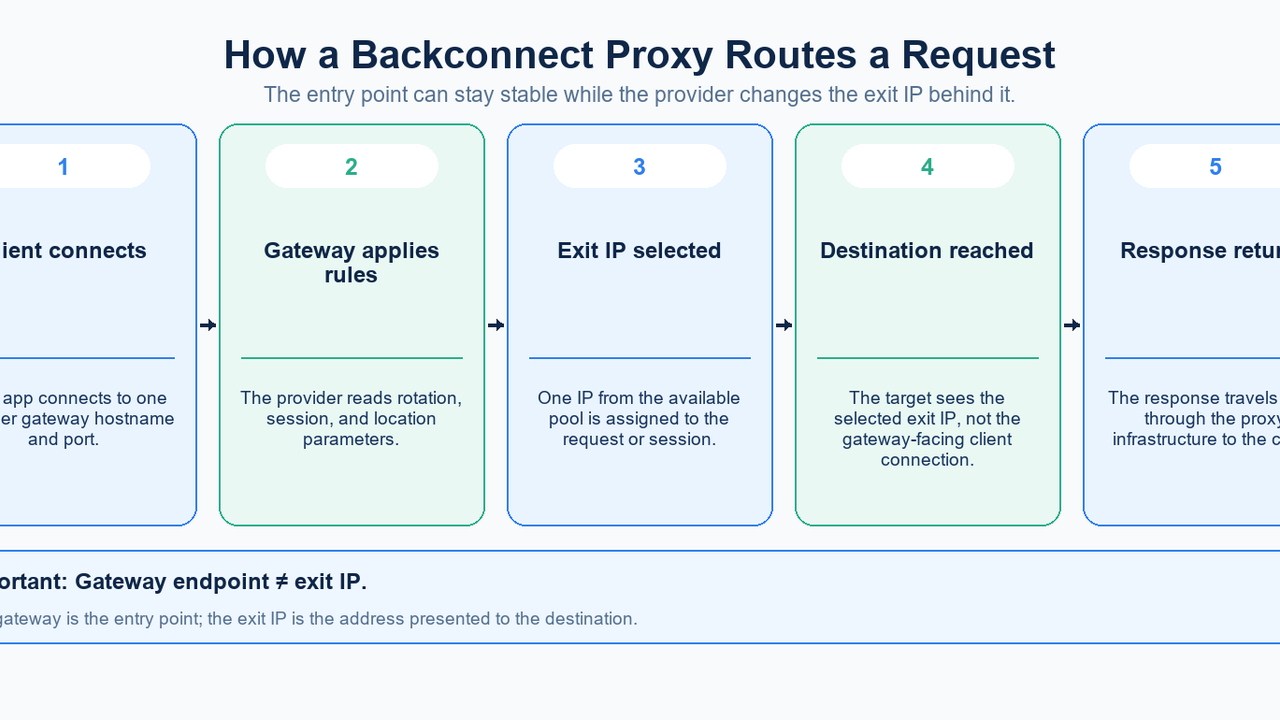
A backconnect proxy gives your application a gateway into a pool of proxy exits. Your client connects to an entry hostname and port; the destination sees the selected exit IP. Backconnect describes this access architecture. Rotating describes when that exit changes. The same gateway can support rotating requests or a sticky session that keeps one exit temporarily.
The practical question is therefore twofold: what endpoint does the application connect to, and how long must the visible exit remain the same? This guide explains the model, preserves the distinction from static proxies and client-managed lists, and shows how to test the behavior using the settings currently exposed by MIYAIP.
What is a backconnect proxy?
Think of the gateway as an access layer in front of multiple possible exits. A conventional configuration might identify one assigned proxy directly, while a gateway configuration identifies an entry point that can route through different exits. Residential, mobile, and datacenter describe the pool or network resource; none is implied by the word backconnect alone.
For example, Oxylabs’ residential quickstart uses an entry hostname with proxy credentials rather than asking the client to choose a raw residential exit for each request. Proxy-Seller’s connection documentation separately describes gateway hosts, location filters, and session parameters. These are examples of the model, not interchangeable MIYAIP connection instructions.
How a request travels through the gateway
- Connect: the client supplies the gateway hostname, port, protocol, and required authentication. Keep these values separate from the public exit IP reported by a diagnostic endpoint.
- Apply settings: the service interprets the requested location and session policy. The syntax and available controls belong to that provider and product.
- Select an exit: provider-side routing assigns a suitable available exit from the relevant pool. The application does not have to maintain the entire exit list itself.
- Reach the destination: the request arrives from the exit IP. A gateway located in one region does not, by itself, establish the geographic identity of that exit.
- Return the response: data travels back through the proxy path. A subsequent request may keep or change the exit according to the active policy.
This is a conceptual request path, not a disclosure of a provider’s internal deployment. A stable entry hostname does not prove how load balancing, health checks, or failover are implemented. Those operational details require explicit documentation or confirmation rather than an inference from the gateway address.
Backconnect is architecture; rotation is behavior
A gateway can preserve one mapping or change it. A rotating service can use a shared gateway, dedicated rotator ports, or a client-selected list. Ask about the entry point and the change policy separately.
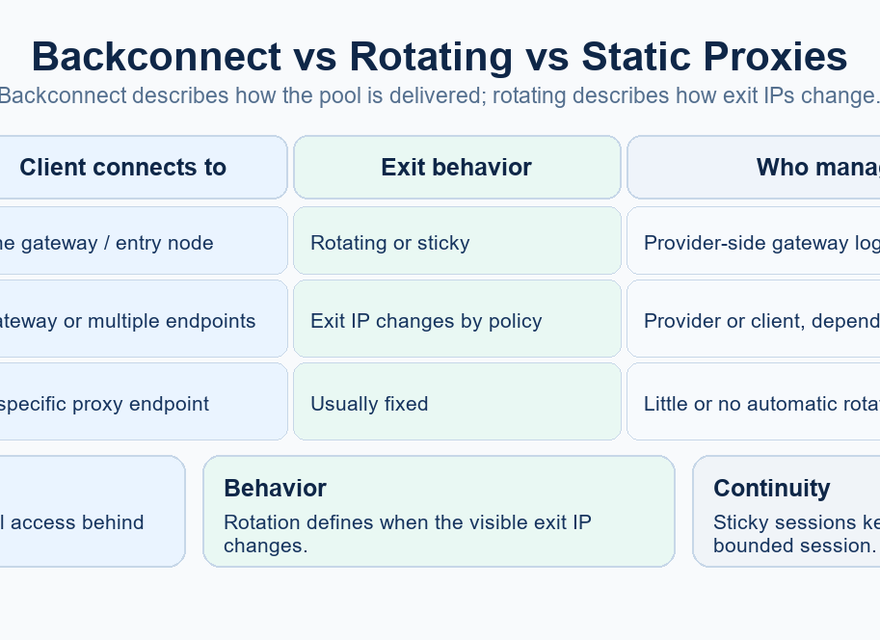
A useful counterexample appears in Oxylabs’ dedicated datacenter quickstart: one access mode selects an assigned address, while a separate rotation port selects from the customer’s list. Rotation is therefore a selection policy, not proof that the underlying pool is residential or that every service uses an identical topology.
Backconnect, static proxies, and client-managed lists
Model | What the client manages | Exit behavior | Main trade-off |
|---|---|---|---|
Backconnect gateway | Gateway credentials and session settings | Rotating or sticky, by policy | Less list management; provider-specific semantics |
Static or dedicated endpoint | An assigned endpoint and its credentials | Intended to remain stable | Predictable identity; explicit replacement when needed |
Client-managed proxy list | Endpoint selection, health, and per-IP state | Chosen by application logic | More control; more maintenance |
A static endpoint is useful when an application needs a stable identity for longer workflows and explicit per-IP monitoring. A managed list is useful when your own scheduler must decide which individual endpoint handles a job. With a gateway, those assignment decisions move behind the access layer, but your application still owns its request lifecycle, cookies, concurrency, and retry policy.
Dedicated and static also answer different questions: dedicated concerns who shares the resource; static concerns whether its identity changes. Check the actual allocation terms. For MIYAIP workflows that need a longer-lived assigned address, compare the static residential product with the dynamic product instead of assuming that a sticky session is a permanent allocation.
Rotating requests and sticky sessions
Choose rotation when jobs are independent and do not need one network identity across a sequence. Choose sticky behavior when related requests should keep the same exit, for example during an authorized regional checkout test. A sticky proxy session preserves a network mapping; it does not preserve browser cookies, application authentication, or a server-side login for you.
Oxylabs’ session-control documentation illustrates session identifiers that reuse an IP across requests, while Proxy-Seller documents a different suffix format. Do not transfer either provider’s username syntax to MIYAIP. Use the credentials generated for your selected MIYAIP policy, and treat the configured duration as a session setting rather than an unconditional availability guarantee.
The word rotating does not necessarily mean every HTTP request. Products can rotate on a new request, connection, elapsed interval, or explicit event. Reused connections and session identifiers affect what a small test observes. A repeated IP in a short sample is an observation to investigate against the documented policy, not enough evidence to declare an entire pool broken.
Applying the distinction in MIYAIP
MIYAIP’s dynamic residential product offers rotating and sticky modes with HTTP(S) and SOCKS5 access. In the current dashboard, the dynamic generator starts at a 30-minute sticky setting. Its controls include rotation on every request and sticky durations of 5, 10, 15, or 30 minutes. Manual API switching appears for supported dynamic products; the unlimited generator does not show that option.
Gateway selection and exit targeting are separate controls. The current gateway choices are Smart Routing, America, Europe, Hong Kong, and CN Transit. Choosing America as an entry gateway does not itself request an American exit; choose the required country, region, city, or ASN separately where the product and available pool support it, then verify the result.
Copy the actual hostname, port, username, and password from the dashboard. Do not substitute a gateway drawn in a marketing illustration, an address from another provider, or a guessed session suffix. The MIYAIP Developer Center is the starting point for current application interfaces. A supported control does not disclose MIYAIP’s internal balancing or automatic replacement strategy.
Where a gateway helps, and where it does not
A gateway can simplify authorized public-data collection, regional content QA, distributed availability checks, and application testing across network locations. The common benefit is one manageable integration point for multiple exits. Match the session policy to the job: separate regional probes can rotate, while a multi-step test may need one temporary identity.
It does not guarantee low latency, identical exits, uninterrupted sessions, or successful access to every destination. End-to-end time depends on the client-to-gateway, gateway-to-exit, and exit-to-target paths as well as the destination itself. A large advertised pool is not a measurement of your target’s success rate or your session’s continuity.
Applications still need bounded timeouts, controlled retries, error classification, and a recovery plan for interrupted sessions. Avoid automatically replaying a state-changing operation just because a connection failed; first determine whether the original operation completed. Proxy access also does not change the destination’s authorization or request limits.
Test the actual gateway and session behavior
Start with a few requests to an IP diagnostic service, then test an endpoint you own or are authorized to use. The commands below are templates, not live MIYAIP credentials. Replace every placeholder locally using the dashboard’s generated connection details. Keep production secrets out of shared terminal history, screenshots, logs, and source files.
curl --proxy "http://GATEWAY_HOST:PORT" --proxy-user "PROXY_USERNAME:PROXY_PASSWORD" --connect-timeout 10 --max-time 30 "https://ip.oxylabs.io/location"

curl --proxy "socks5h://GATEWAY_HOST:PORT" --proxy-user "PROXY_USERNAME:PROXY_PASSWORD" --connect-timeout 10 --max-time 30 "https://ip.oxylabs.io/location"
Use only the command that matches the selected protocol. In curl, socks5h:// asks the proxy to resolve the destination hostname; ordinary socks5:// resolves it locally. The connect timeout and total timeout bound different parts of the request. These options are defined in the curl manual. On Windows, use curl.exe if curl resolves to a PowerShell alias.
- Record the timestamp, selected gateway, requested exit location, returned exit IP, session policy, and whether the same generated credentials were reused. Do not record the password.
- Compare a small series within one sticky window with a separate series using the rotating setting. Change one setting at a time and keep the target consistent.
- Check the observed location and application response, not only whether an IP changed. Keep response codes, timing, and session interruptions alongside successful observations.
An IP-check result describes the exit seen by that diagnostic service. It does not prove that every application uses the proxy or that another destination will classify the same IP identically. If results differ, first separate local routing, proxy authentication, session configuration, and destination behavior before increasing request volume.
Evaluate the service by operational requirements
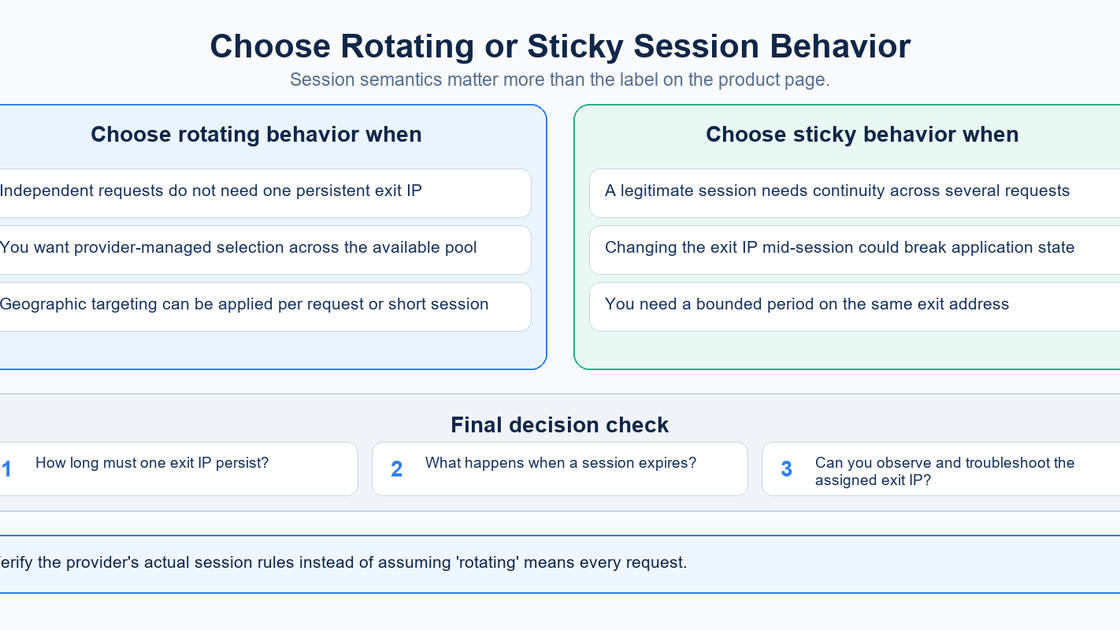
Before choosing a plan, define how long one exit must persist, which locations are necessary, and which protocols your client supports. Ask what happens on expiry or exit loss, whether sessions can be reused, and what concurrency and billing rules apply. Compare equivalent workloads rather than headline pool sizes or an isolated fastest response.
A useful trial records successful requests, errors, time to first byte, total time, geographic consistency, and traffic usage over repeated runs. The best fit is the service whose documented controls and observed behavior match the workload. Clear endpoint generation and understandable diagnostics often matter more than the product label.
Frequently asked questions
Is a backconnect proxy the same as a rotating proxy?
Backconnect describes access through a gateway; rotating describes the policy that changes the exit IP. A service can combine both, and a backconnect gateway can also provide sticky sessions.
Does every request receive a different IP?
Only if that is the selected product policy, and observations must be interpreted with its session and connection rules. Do not infer per-request rotation merely from a gateway hostname or a rotating product label.
Why can the gateway stay the same while the exit changes?
The gateway is the entry point configured in your client. The destination sees an exit selected behind that entry point, so the two identities can change independently.
Is a sticky session a static proxy?
No. A sticky session requests temporary continuity under the provider’s rules. A static product is intended for a stable assigned identity; confirm its allocation, lifetime, and replacement terms separately.
Are backconnect proxies always residential?
No. The term describes access architecture. Residential, mobile, or datacenter exits are separate product characteristics that must be checked in the service specification.
When should I keep a client-managed proxy list?
Keep one when the application needs explicit endpoint selection, per-IP state, and its own scheduling logic. Accept that health checks, list updates, and endpoint replacement then become part of the integration.
What should I confirm before using MIYAIP?
Confirm the chosen product, generated credentials, entry gateway, exit targeting, rotation or sticky setting, and supported protocol. Start with a small observed test rather than assuming the default is per-request rotation.
Match the gateway to your session requirements
Explore MIYAIP dynamic residential settings, then use the Developer Center and your dashboard-generated credentials to validate one small workflow.
Sources
Sources checked on September 28, 2026. MIYAIP dashboard settings were also checked against the current application implementation; generated connection values remain account- and product-specific. The three diagrams are retained from the supplied article.
- Proxy-Seller: Connect & target via login (updated July 21, 2026)
- Oxylabs: Start using Residential Proxies
- Oxylabs: Start using Dedicated Datacenter Proxies
- Oxylabs: How to use session control
- curl: command-line manual
- MIYAIP: Dynamic Residential Proxy
- MIYAIP: Static Residential Proxy
- MIYAIP: Developer Center