
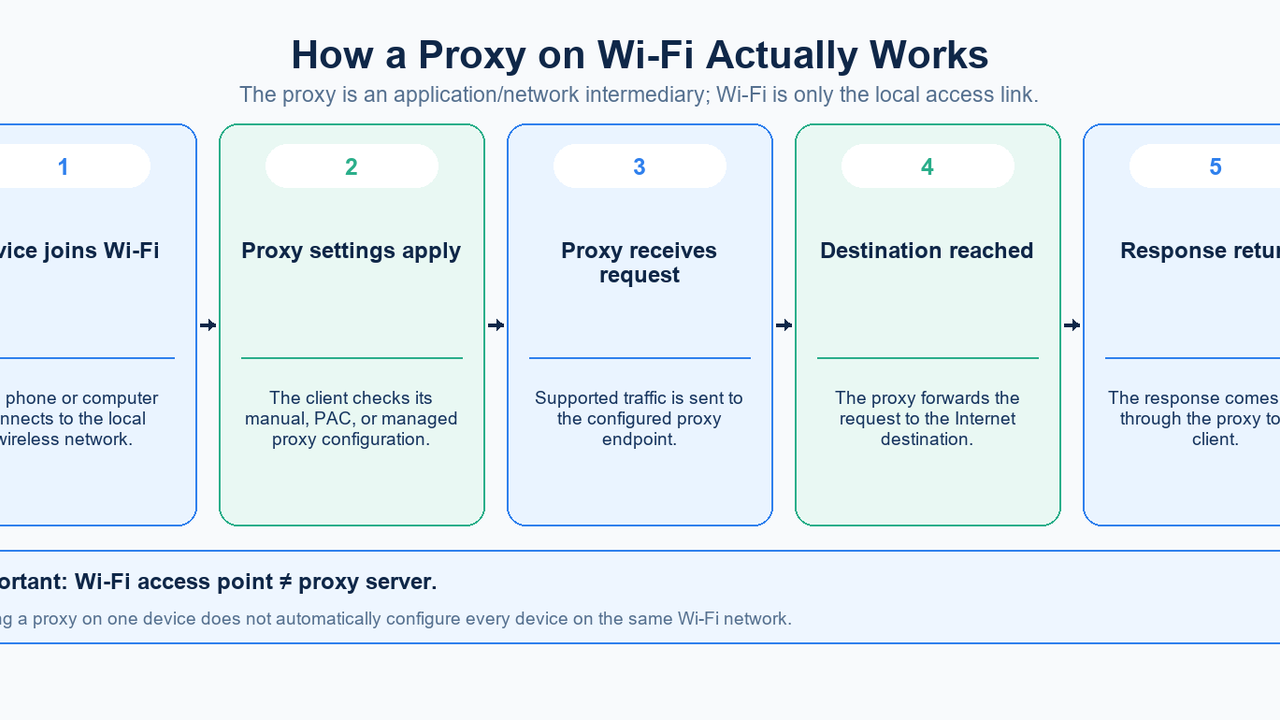
A proxy on Wi-Fi means that a device uses a proxy server while it is connected through a Wi-Fi network.
That does not usually mean the Wi-Fi router itself has become a proxy, and it does not automatically mean every device connected to that Wi-Fi network will use the same proxy.
In the common device-level setup, the path looks like this:
your device → Wi-Fi access point/router → proxy server → destination
The Wi-Fi network provides the local connection. The proxy is a separate intermediary used by the device or application for supported traffic.
This distinction matters because “Wi-Fi proxy” can refer to several different configuration layers: a proxy saved for one Wi-Fi network on a phone, a system proxy on Windows, a network-service proxy on macOS, or a managed proxy deployed by an organization.
What Does Proxy on Wi-Fi Mean?
A proxy server is an intermediary between a client and a destination. MDN's proxy server definition describes proxies as systems that receive requests on behalf of clients and communicate with other servers.
When a proxy is configured for a Wi-Fi connection, the device can send supported network traffic to the proxy first.
Without a proxy:
device → Wi-Fi router → destination
With a device-level proxy:
device → Wi-Fi router → proxy → destination
The proxy and the Wi-Fi router are therefore different components.
The router or access point gets your device onto the local network and forwards packets toward the Internet. The proxy operates at a higher application/network-service layer and handles supported requests according to the client configuration.
This distinction matters because a device-level Wi-Fi proxy should not be confused with network-wide proxy enforcement. In a centrally managed network, broader proxy behavior can be enforced, but entering proxy details on one phone does not reconfigure every other device on the same access point.
How a Wi-Fi Proxy Actually Works
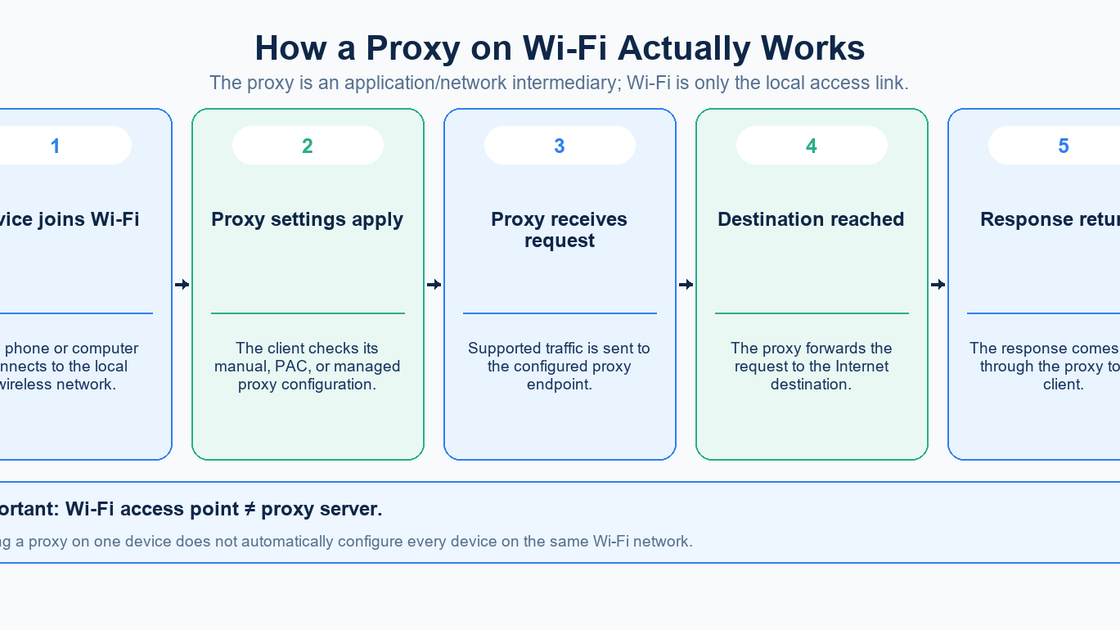
A typical device-level Wi-Fi proxy flow has five stages.
1. The device joins the wireless network
Your phone, tablet, or computer connects to a Wi-Fi access point.
The Wi-Fi link itself exists independently of the proxy.
2. The device loads its proxy configuration
Depending on the operating system, that configuration may be:
manual proxy host/IP and port;
automatic proxy configuration;
a PAC URL;
an organization-managed setting.
3. Supported traffic is sent to the proxy
The application or operating system sends traffic that honors the proxy settings to the configured proxy endpoint.
4. The proxy communicates with the destination
The destination receives the proxied request and returns a response to the proxy.
5. The response returns to the device
The proxy relays the response back over the existing Internet and Wi-Fi connection.
The important point is that Wi-Fi carries the traffic to and from the local network, while the proxy changes the route used by supported requests after the client applies its proxy rules.
What a Wi-Fi Proxy Changes — and What It Does Not
A Wi-Fi proxy can change the network path used by supported traffic.
It can also change the public source IP seen by a destination if the request exits through a different proxy address.
But several things should not be inferred from the word “proxy.”
It does not configure every device on the Wi-Fi network
A proxy saved in your phone's network settings is a client-side setting.
Another phone or laptop connected to the same SSID can have completely different proxy settings.
A network administrator can enforce broader proxy behavior using router, gateway, device-management, or enterprise controls, but that is a different architecture from changing one device's Wi-Fi proxy field.
It does not automatically cover cellular data
On mobile devices, Wi-Fi proxy configuration is normally attached to the Wi-Fi network being edited.
When the phone leaves Wi-Fi and switches to cellular data, that Wi-Fi configuration is no longer the active network path.
It does not make the Wi-Fi link itself encrypted
A proxy setting is separate from Wi-Fi link security and HTTPS/TLS. Apple's router security guidance describes WPA2/WPA3 as wireless security settings that control Wi-Fi authentication and encryption, while MDN's TLS guide explains how HTTPS/TLS protects web traffic in transit.
It may not behave identically in every application
Operating systems provide proxy settings, but applications can use different networking implementations or their own proxy configuration.
Therefore, a proxy that works in one browser is not proof that every application is using the same route.
How to Configure a Proxy on Wi-Fi
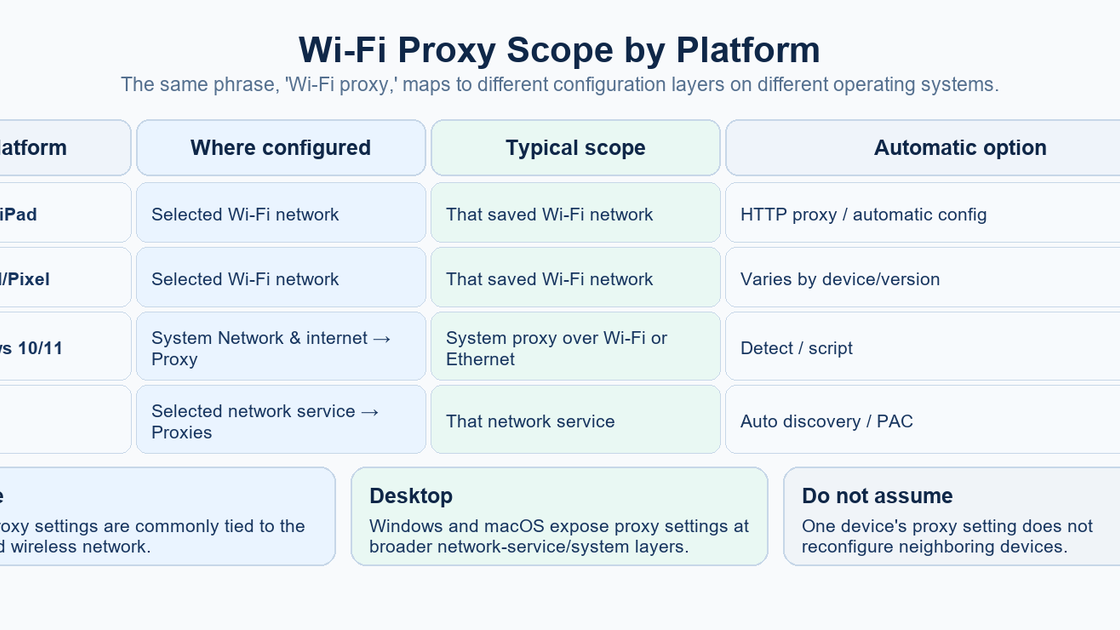
The exact path depends on the platform.
Before entering anything, have the information supplied by your network administrator or proxy provider:
proxy hostname or IP address;
port;
configuration type;
PAC URL if automatic configuration is used;
authentication details only when required.
Do not publish real proxy passwords or API credentials in screenshots or shared troubleshooting logs.
Set up the proxy on your platform
iPhone and iPad
Apple exposes HTTP proxy controls inside the settings for the connected Wi-Fi network.
Apple's current iPhone Wi-Fi settings guide directs users to:
- Open Settings.
- Tap Wi-Fi.
- Tap the Info (i) button next to the connected network.
- Open the HTTP proxy/network setting.
- Enter the required configuration details.
Apple's iPad Wi-Fi settings guide likewise places HTTP Proxy under the selected network's Info-button settings.
The important scope clue is that Apple places this control inside the selected Wi-Fi network's settings.
That means changing the proxy for one saved Wi-Fi network is not the same thing as deploying a global proxy across the entire device.
Organizations can deploy broader managed behavior separately. Apple's Global HTTP Proxy device-management documentation, for example, describes a managed proxy payload with Manual and Automatic/PAC modes.
For an ordinary user, however, the Wi-Fi screen is the relevant place to inspect a network-specific HTTP proxy.
Android and Pixel
Android interfaces vary by manufacturer and Android version, so menu labels are not perfectly universal.
For Google's Pixel interface, Google's current Pixel network-settings guide documents:
- Open Settings.
- Tap Network & internet → Internet.
- Select the Wi-Fi network.
- Tap Edit → Advanced options.
- Under Proxy, choose the required configuration type.
- Enter the proxy settings.
- Tap Save.
This is also a per-network configuration model.
Google's broader Android advanced-network guide warns that available options and paths can vary by phone and Android version.
So if your Samsung, Xiaomi, OnePlus, or other Android device uses different labels, search the selected Wi-Fi network's advanced settings rather than assuming the Pixel wording must match exactly.
Windows 10 and 11
Windows handles this differently from the mobile per-SSID model.
Microsoft's current Windows proxy guide states that a proxy can be used when the PC is connected through Wi-Fi or Ethernet.
Open:
Settings → Network & internet → Proxy
Windows supports:
automatic detection;
setup script;
manual proxy.
For manual setup, enter the proxy server name or IP address and port.
This is a system network proxy configuration, not simply a field stored inside one Wi-Fi SSID's details.
That difference matters when switching between Wi-Fi and Ethernet.
macOS
On macOS, proxy settings live under the selected network service.
Apple's current Mac proxy settings guide gives this path:
Apple menu → System Settings → Network → select a network service → Details → Proxies
macOS supports options including:
Auto proxy discovery;
Automatic proxy configuration;
Web proxy (HTTP);
Secure web proxy (HTTPS);
SOCKS proxy.
Manual proxy modes expose a server address and port.
Automatic proxy configuration instead expects a PAC URL.
Because the configuration is attached to a network service, always confirm that you are editing the active service you actually use.
Manual Proxy vs PAC/Automatic Configuration
When people ask for the “Wi-Fi proxy address,” they often assume there must be one visible IP and port.
That is true only for some configurations.
Manual proxy
Manual mode stores a specific server endpoint.
Typical fields are:
Server: proxy.example.com
Port:   8080
Some systems may also expose authentication fields and bypass rules.
PAC or automatic proxy configuration
A PAC file contains logic that decides how requests should be handled.
The visible setting might therefore be:
https://example.org/proxy.pacrather than one fixed proxy server address.
Automatic discovery
Some managed networks can discover proxy configuration automatically.
Again, the user may not see a manually entered host and port.
The practical lesson is:
Identify the configuration mode before assuming you should find one fixed proxy address.
How to Check Whether the Proxy Is Working
Do not rely on only one signal.
1. Check the saved configuration
Confirm:
you are editing the Wi-Fi/network service currently in use;
the hostname or IP is correct;
the port is correct;
the configuration mode is correct;
the PAC URL is correct if automatic mode is used.
2. Test normal connectivity
Open a normal HTTPS website or another destination you are authorized to access.
If nothing loads after enabling the proxy, the problem may be the proxy endpoint, authentication, or configuration—not the Wi-Fi connection itself.
3. Compare the observed public IP
Use a reputable public IP-check service before and after enabling the proxy.
A changed public IP can indicate that the request is exiting through the proxy.
The configured proxy host can be an entry gateway while a different address handles the request to the destination. Keep the saved endpoint and observed exit IP as separate values when testing MIYA dynamic residential proxies.
4. Test the application you actually care about
If the browser works but another app does not appear to use the proxy, the difference may be application-specific.
Do not assume one successful browser test proves universal device-wide proxying.
Common Wi-Fi Proxy Problems
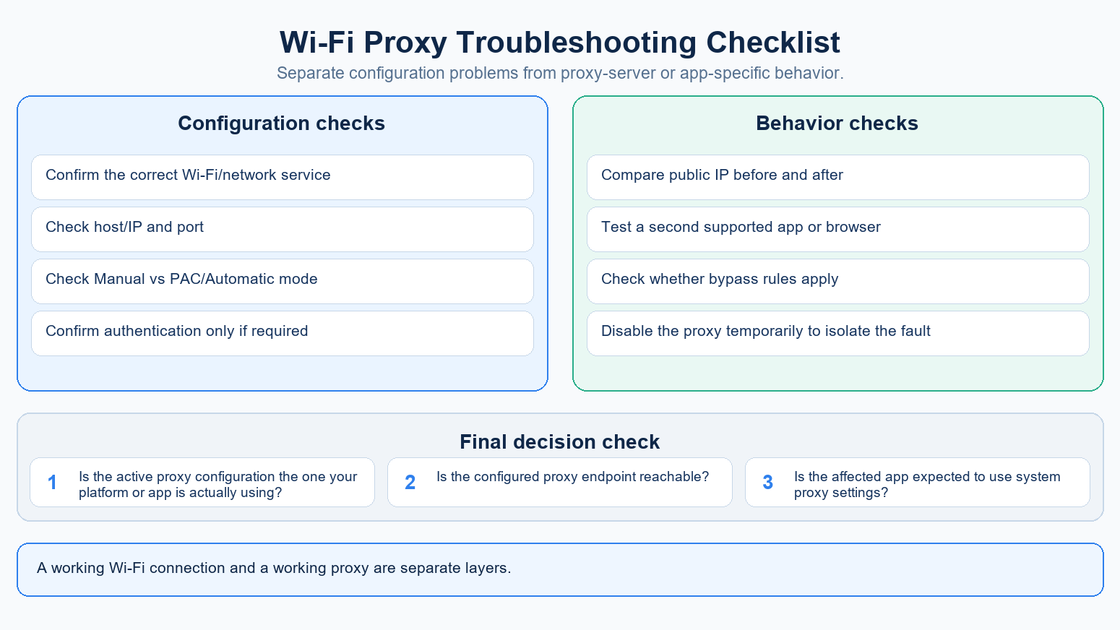
Wi-Fi connects, but websites stop loading
This usually means the local Wi-Fi link is working but the proxy path is not.
Check the proxy hostname, port, configuration mode, authentication requirements, and whether the proxy endpoint is reachable.
As a diagnostic step, temporarily disable the proxy. If normal connectivity returns immediately, the problem is probably in the proxy configuration or proxy service rather than the Wi-Fi radio link.
The public IP did not change
Possible reasons include:
the proxy configuration is not active;
the app bypasses that proxy configuration;
a bypass rule applies;
the proxy forwards traffic through an exit you did not expect;
you are testing a different network than the one whose settings you edited.
The proxy works on one Wi-Fi network but not another
On iPhone and Android/Pixel, proxy configuration is commonly attached to the selected Wi-Fi network.
Check the proxy settings of the network you are currently using.
The proxy works in the browser but not another app
The app may use its own networking or proxy controls.
Check that application's documentation before assuming the system proxy should control it.
You only see a PAC URL
That is normal for automatic proxy configuration.
The PAC URL is configuration logic, not necessarily the final proxy endpoint used for every request.
Windows still uses the proxy after switching networks
Windows exposes a system network proxy configuration used over Wi-Fi or Ethernet, so its behavior is broader than the per-Wi-Fi configuration commonly found on phones.
Review Settings → Network & internet → Proxy rather than only the current Wi-Fi network details.
Check MIYA connection details independently
Copy the actual host, port, and credentials returned by the MIYA console, and verify the selected protocol. The MIYA developer center is the integration starting point. Dynamic connection generation supports HTTP and SOCKS5, while support in a particular system settings screen depends on that platform and application.
If applications disagree, explicitly specifying a proxy in curl can isolate whether a client is honoring system settings. This HTTP example contains placeholders; replace every uppercase value:
curl --proxy 'http://PROXY_HOST:PROXY_PORT' --proxy-user 'PROXY_USERNAME:PROXY_PASSWORD' --url 'https://example.com/'Use curl.exe in Windows PowerShell. This destination demonstrates an ordinary HTTPS request; it does not report an exit IP. Respect the target's access rules, record errors, and keep actual credentials out of public troubleshooting material.
For SOCKS5, the socks5h:// scheme asks curl to resolve the destination through the proxy, as documented in the curl manual. A successful explicit curl request proves that command's path; it does not prove that your phone or browser uses the same configuration.
FAQ
What does proxy mean on Wi-Fi?
It means supported traffic from your device can be sent through a proxy server while you use that network connection.
Does a Wi-Fi proxy affect every device on the network?
Not when you configure the proxy only on one device. Other devices keep their own network and proxy settings unless the network administrator enforces a proxy centrally.
Is a Wi-Fi proxy the same as a router?
No. The router or access point connects devices to the network. A proxy is a separate intermediary for supported application traffic.
Does a Wi-Fi proxy change my IP address?
It can change the public IP seen by destinations for traffic that actually passes through the proxy. The configured proxy endpoint and observed exit IP may still be different.
Does a proxy on iPhone apply to all Wi-Fi networks?
The built-in HTTP proxy control appears inside the selected Wi-Fi network's settings, so check and configure the specific network you intend to use.
How do I set a proxy on Android Wi-Fi?
On Pixel, open the selected Wi-Fi network, choose Edit → Advanced options → Proxy, enter the required settings, and save. Other Android devices can use different menu names.
Where is the Windows Wi-Fi proxy setting?
Windows uses Settings → Network & internet → Proxy. Microsoft documents this proxy configuration for Wi-Fi and Ethernet connections.
Where is the proxy setting on Mac?
Open System Settings → Network → select the active network service → Details → Proxies.
Why does Wi-Fi stop working when I enable a proxy?
The Wi-Fi link may still be connected while the configured proxy is unreachable, incorrectly configured, or unable to handle the request.
Does a Wi-Fi proxy encrypt my connection?
A proxy setting is separate from WPA2/WPA3 Wi-Fi security and HTTPS/TLS transport protection.
What is the difference between Manual and Automatic proxy settings?
Manual mode stores a proxy server address and port directly. Automatic mode can use a PAC/configuration URL or network discovery instead.
Check your proxy configuration with MIYA
Keep the configured endpoint, protocol, and observed request behavior together when troubleshooting. Start with the proxy checker or review the integration documentation.
Sources
Official documentation consulted on 28 September 2026. Interface labels may vary by version.
- MDN — Proxy server
- Apple — Manage Wi-Fi settings on iPhone
- Apple — Manage Wi-Fi settings on iPad
- Google — Manage advanced network settings on your Pixel phone
- Google — Manage advanced network settings on Android
- Microsoft — Use a proxy server in Windows
- Apple — Change proxy settings on Mac
- Apple — Global HTTP Proxy device management payload settings
- Apple — Recommended settings for Wi-Fi routers and access points
- MDN — Transport Layer Security
- curl — Command line manual