

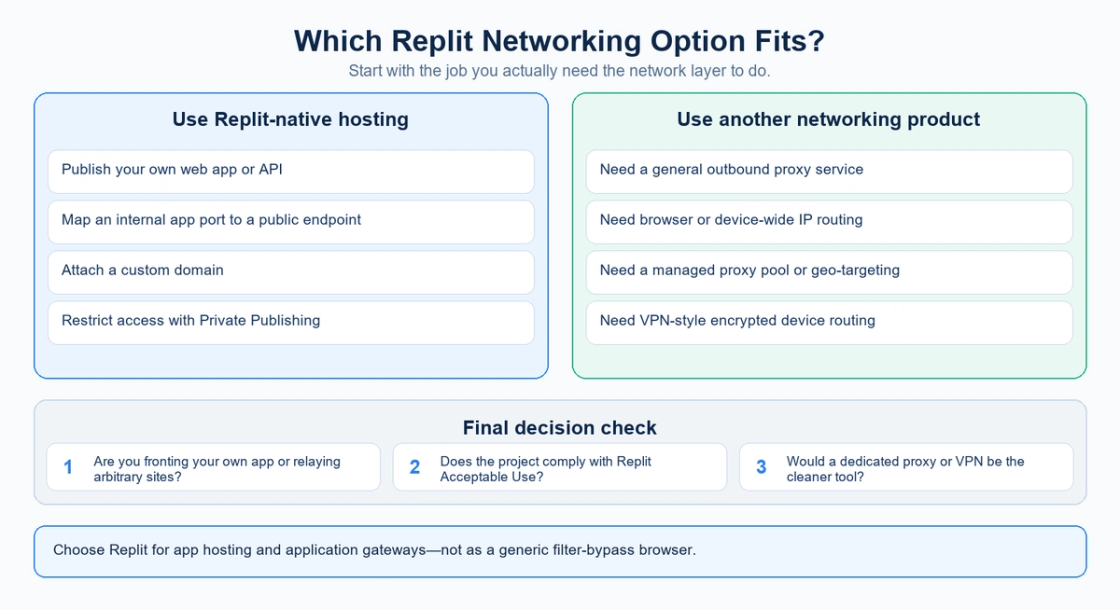
A Replit proxy can mean three things: the routing that makes a Replit app reachable, an application gateway you build for your own backend, or a forward proxy that relays outbound requests. Choose the tool by traffic direction. Use Replit to publish an application, an application gateway to front services you control, and a dedicated proxy provider such as MIYA when selected requests need a managed outbound endpoint.
These options can work together. A backend hosted on Replit can send an authorized request through a MIYA proxy without turning the whole application into a public proxy browser. This guide explains the differences, compares the alternatives, and shows which networking questions to settle before choosing a setup. A proxy connection does not guarantee access to a destination or replace its authentication requirements.
What does Replit proxy mean?
The first meaning is inbound hosting. Someone visits your app, and the platform routes that request to the server running your code. The user wants your application. Replit handles the public entry point, while your process must listen on the expected internal port. This is an app delivery problem rather than a request to obtain a residential IP address.
The second meaning is an application-specific reverse proxy. For example, your frontend calls one API endpoint, and that gateway forwards permitted requests to an inventory service or another backend you operate. Your application chooses the destination. Authentication, routing rules, and response handling remain part of your application design.
The third meaning is a forward proxy or browser relay. A client asks an intermediary to contact an external destination on its behalf. If anyone can submit arbitrary URLs, the relay has a much broader responsibility than an ordinary application API. The fact that it runs on Replit does not establish who operates it, how it handles data, or which destinations it should access.
How Replit routes traffic to an app
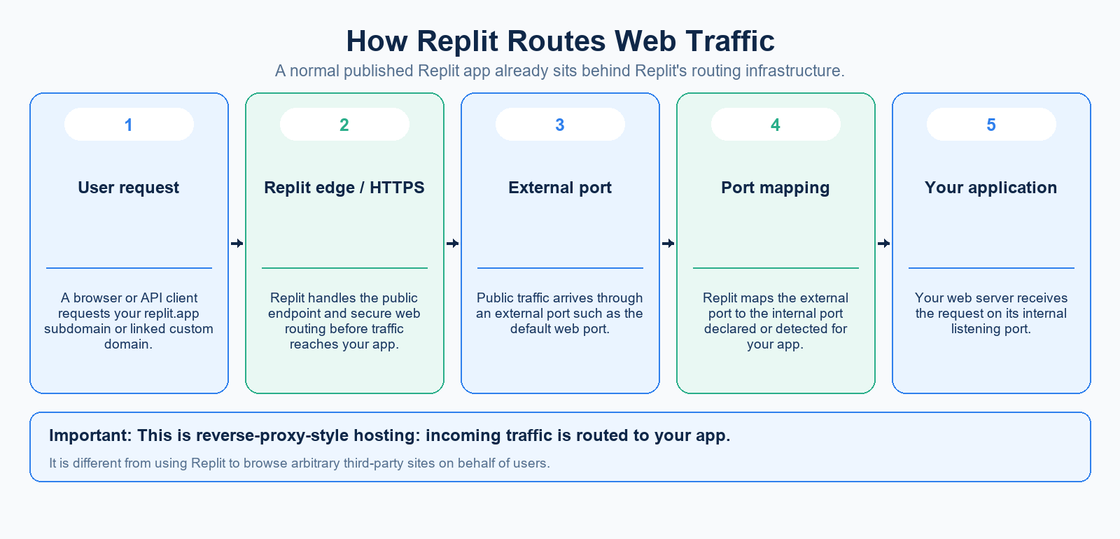
Replit documents a mapping between a local application port and an external port. Its Ports documentation describes localPort and externalPort entries in the .replit configuration. A mapping must agree with the port where the server actually listens. This explanation concerns incoming access; it does not configure an outbound proxy for HTTP requests made by your code.
Publishing is a separate part of operating the application. Replit describes a published app as an instance created from a snapshot of the project, separate from the editor version. See the Publishing overview. When a change works in the editor but is absent from the live app, check which revision was published before investigating a proxy provider.
For a custom hostname, follow Replit custom-domain setup. A domain points visitors toward the application. An outbound proxy controls the path of selected requests leaving it. Changing one does not automatically change the other, so write down the request direction when reporting a networking problem.
Replit, application gateways, MIYA, and VPNs compared
Option | Primary job | Who selects the destination? | Important limit |
|---|---|---|---|
Replit Publishing | Run and publish your app or API | Visitors request your application | Does not provide a general managed proxy pool |
Application gateway on Replit | Front approved backend services | Your routing rules | Requires application access controls and maintenance |
MIYA proxy service | Route configured outbound requests | Your proxy-aware client | Does not host your application or replace target authentication |
VPN | Route traffic covered by a device or network tunnel | Applications under the tunnel policy | Scope depends on the VPN and device configuration |
Compare these options against a concrete requirement, not a shared word in their descriptions. If a customer cannot open your API, investigate app availability and inbound routing. If your backend needs a selected outbound endpoint, investigate client proxy support. If several desktop applications need a common tunnel, evaluate that device-level requirement separately. One product rarely answers all three questions.
When Replit remains the right choice
Keep the application on Replit when the task is to publish a web app, expose an API, receive a webhook, or run a backend workflow. A dedicated proxy service supplies a network intermediary; it does not replace the compute runtime, application code, domain configuration, or release process required to serve your users. Switching proxy providers will not correct an application that fails to start.
An application gateway is useful when several services you control need one public entry point. It can route approved paths, validate a user, and pass a request to the appropriate service. Prefer explicit destinations and a narrow API contract. A gateway that only needs to call your inventory service has no reason to accept an unrestricted destination URL from the browser.
For private applications, review the access controls available for the chosen Replit plan and deployment. Access to your app and access to an external destination are separate decisions. Making a Replit app private does not provide a residential outbound identity, and adding a proxy to outbound requests does not make an otherwise public app private.
When a MIYA proxy fits the outbound requirement
Consider a dedicated endpoint when a permitted workflow needs a particular proxy type, an explicitly configured exit, or controlled changes between independent requests. The application can continue running on Replit. Only the HTTP client or other supported networking component sends the relevant requests through the proxy. Confirm protocol support in that client before choosing an integration method.
MIYA provides static residential proxies for a fixed ISP-backed exit and dynamic residential proxies for workflows that need changing residential exits. Choose based on the identity your application needs across requests. A fixed endpoint is easier to reason about for a long conversation with one service; independent regional checks may call for a different plan. Availability and session behavior must be checked in the selected product.
For workloads that accept datacenter IP space, MIYA datacenter proxies are another option to compare. Evaluate the endpoint, protocol, region, expected transfer volume, and observed response behavior together. Do not interpret a category name as evidence that a destination will accept every request. Authentication failures, rate limits, and application errors still need their own handling.
How to connect the two without building an open relay
Start with one authorized destination and one server-side request path. Keep the destination in application configuration or select it from an explicit allowlist. Let the user request a business action rather than pass a raw URL through an unrestricted fetch endpoint. This keeps proxy credentials and destination policy under the backend’s control.
Store the proxy credentials in server-side secrets, then read them only where the proxy client is configured. Replit Secrets makes sensitive values available to the application through environment variables. Do not put credentials in a frontend bundle, example screenshot, query string, or diagnostic response. Ensure logs redact proxy URLs that contain a username or password.
Verify the connection with a small request before running the full workflow. Record whether the proxy connection succeeds, whether the destination responds, and whether the application receives the expected content. Use bounded timeouts and a limited retry policy. Repeatedly retrying an authentication error or a rejected destination does not establish compatibility and can obscure the useful first failure.
For a multi-request session, decide when the network identity may change and keep that decision consistent with the application’s cookies and authentication state. Do not rotate an endpoint simply because a response is slow. First identify whether the delay occurred while connecting to the proxy, waiting for the destination, or processing the result. MIYA’s setup and troubleshooting FAQ provides the next place to check product-specific configuration.
Why a proxy browser adds a different set of problems
A browser relay must handle more than fetching HTML. Cookies, authentication, redirects, scripts, relative links, downloads, and WebSocket connections can all depend on the original site’s context. A relay that displays a simple page successfully may still fail on a login flow. This is an architectural limitation to test, not evidence that an unrelated proxy setting needs to be changed.
It also places another operator in the request path. Before using a third-party relay, consider which data passes through it and whether that operator should receive the information. For your own application, enforce access controls and limit destinations and resource usage. Check the current platform rules for the actual workload; avoid assuming that an app-hosting account is an unrestricted public relay service.
Frequently asked questions
Is Replit a proxy provider?
Replit is an application platform. It routes traffic to hosted apps, but that role is different from supplying managed outbound proxy endpoints. Use the publishing features for application hosting and evaluate a separate proxy product when an application needs a configured exit.
Can a Replit app use MIYA?
An application with a compatible server-side proxy client can be configured to send selected requests through a MIYA endpoint. Check the protocol, credentials, product behavior, and destination requirements. This article describes the architecture; it does not claim a certified integration for every runtime or library.
Will changing the app domain change its outbound IP?
A hostname directs incoming visitors to an app. An outbound endpoint concerns connections the app initiates. Treat these as separate configuration tasks and verify the address observed by the authorized destination when testing outbound behavior.
Should I use a static or rotating residential proxy?
Choose a stable exit when the workflow needs continuity across requests. Consider changing exits only when the application has a clear reason and the selected plan supports the required behavior. Neither choice guarantees a successful response or removes destination restrictions.
Is a browser proxy the same as a VPN?
No. A browser relay processes the requests handled by that web application. A VPN routes the traffic covered by its tunnel and device policy. Neither term alone tells you the exact traffic scope, so inspect the actual configuration and trust model.
What should I check first when requests fail?
Identify the direction of the failing request. For inbound failures, check application startup, listening port, published version, and domain routing. For outbound failures, check the client proxy configuration, authentication, endpoint reachability, and destination response before changing unrelated settings.
Choose the outbound proxy your application needs
Compare MIYA proxy products, then confirm the endpoint and protocol for one small test before expanding the workflow.
Sources
Official documentation checked on September 22, 2026. Product-specific availability and configuration can change; use the linked documentation and current MIYA product pages when implementing the setup.
MIYA static residential proxies, dynamic residential proxies, datacenter proxies, and setup FAQ.