
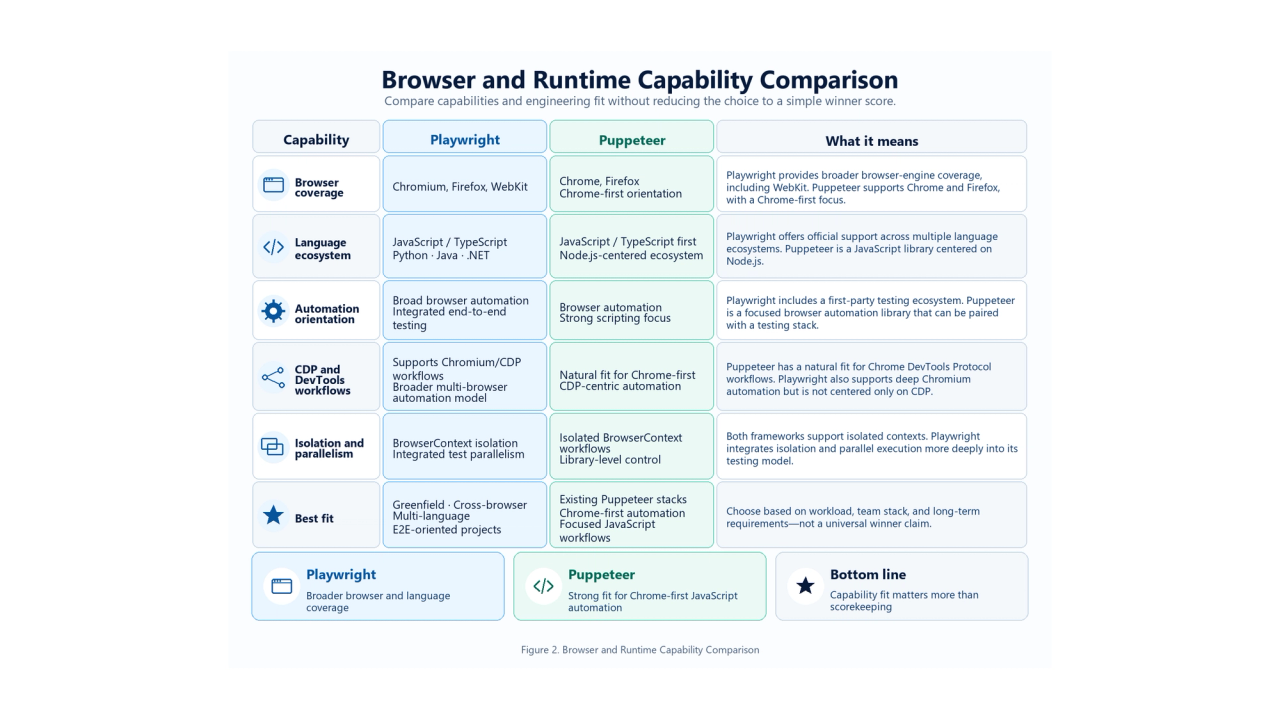
In a Playwright vs Puppeteer decision, the useful question is which tool creates less engineering friction for your browser automation workload. Browser coverage, language, test architecture, isolation, existing code, and Chrome DevTools Protocol (CDP) requirements often matter more than a small timing gap.
The recorded benchmark reinforces that point: across five controlled workloads, the faster framework changed and the practical gaps ranged from negligible to meaningful. There is no universal performance winner. The full methodology, measurements, and limitations appear below so you can judge whether the comparison resembles your own workload.
Quick verdict
Playwright is the stronger default for many greenfield projects that need cross-browser automation, multiple languages, or integrated end-to-end testing. Puppeteer remains a rational, and often simpler, choice for focused JavaScript automation, Chrome/CDP work, and existing Puppeteer systems. This is an engineering recommendation based on requirements, rather than a claim that one framework is always faster.
- Choose Playwright if you need Chromium, Firefox, and WebKit; Python, Java, or .NET; or a cohesive E2E testing model.
- Choose Puppeteer if your work is JavaScript-centered, Chrome/CDP-focused, narrowly scoped, or already built around Puppeteer.
- Benchmark your own workload if latency or concurrency is a material operating constraint.
The capability comparison follows the current Playwright language documentation, Playwright browser documentation, and Puppeteer supported-browser documentation, checked on September 13, 2026.
Playwright vs Puppeteer at a glance
Dimension | Playwright | Puppeteer |
|---|---|---|
Best fit | New cross-browser automation and integrated E2E suites | Focused JavaScript automation and Chrome/CDP-oriented systems |
Language ecosystem | JavaScript/TypeScript, Python, Java, .NET | JavaScript library in a Node.js-centered ecosystem |
Browser coverage | Chromium, Firefox, WebKit | Chrome and Firefox |
Testing model | Browser library plus first-party Playwright Test | Browser automation library that can be paired with a test stack |
Auto-waiting and locators | Actionability-based waiting integrated with its locator and test workflows | Locators also support automatic waiting and precondition checks |
Isolation | Browser contexts integrated deeply with test isolation | Browser contexts available at library level |
Chrome/CDP focus | Automation across several engines, with Chromium/CDP capabilities | Strong fit for Chrome-first and DevTools-oriented work |
Proxy configuration | Browser-wide or per-context HTTP(S)/SOCKSv5 proxy settings | Current BrowserContext API documents proxy server and bypass options |
Recorded benchmark takeaway | Strong cold-start result; modest screenshot lead | Strong four-context result; small warm-operation leads |
These workloads measure different parts of the automation lifecycle and should not be added into an overall score. The waiting, isolation, and proxy differences are explained in their dedicated sections below.
Browser support in 2026: retire the Chrome-only shorthand
The old shorthand that Playwright is multi-browser while Puppeteer is Chrome-only is no longer accurate. Current Puppeteer documentation includes Chrome and Firefox. From Puppeteer 23 onward, Chrome uses CDP by default while Firefox uses WebDriver BiDi by default; Chrome can also be automated using BiDi. See the Puppeteer protocol and cross-browser FAQ.
Playwright still covers a broader unified set of engines: Chromium, Firefox, and WebKit. The modern distinction is broader engine coverage versus a JavaScript library with a strong Chrome/CDP orientation that also supports Firefox. WebKit is useful when an additional engine matters, but Playwright's patched WebKit build is not branded Safari. The Playwright browser guide documents that distinction.
How the recorded benchmark was conducted
Benchmark provenance and limits
The numbers below reproduce the recorded tests in the source manuscript supplied for this article, Puppeteer vs Playwright.docx. They were not rerun for this publication and are not presented as a new independent measurement or a vendor benchmark. The manuscript describes one formal session on one machine. It does not provide a test date, raw sample logs, or executable benchmark scripts, so readers cannot independently audit all runs from this article alone.
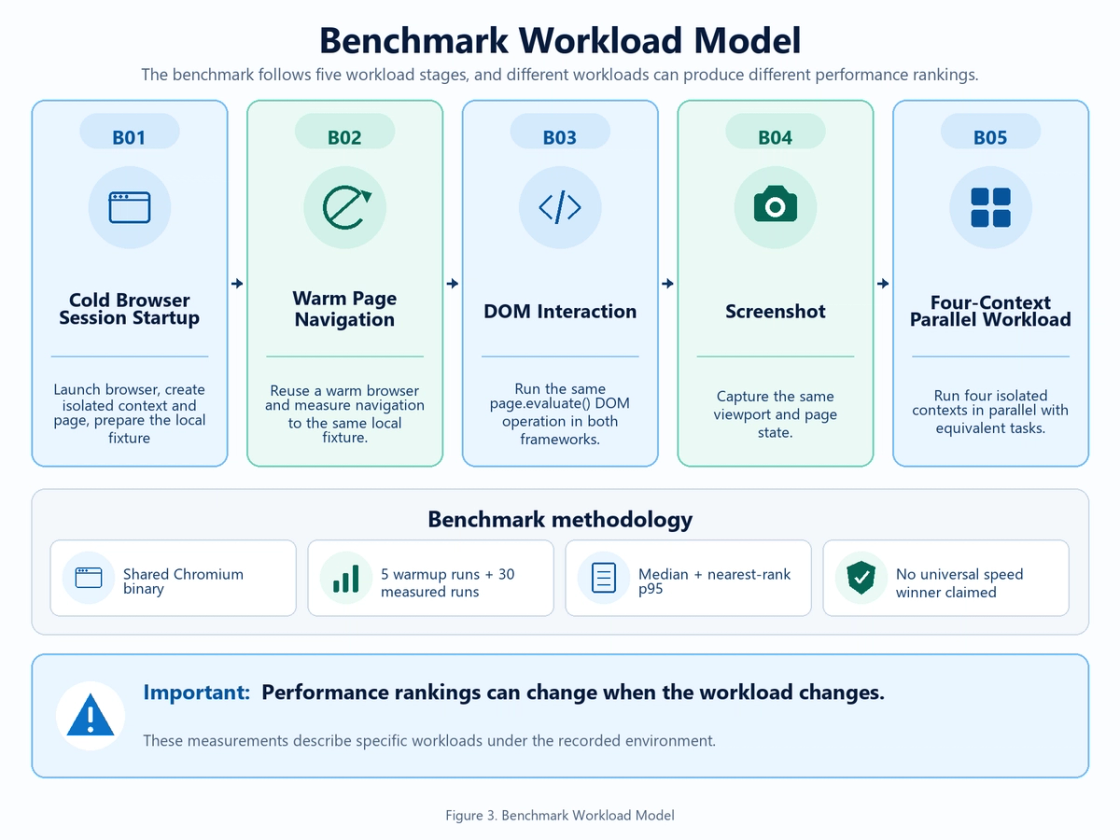
The recorded setup used Playwright 1.63.0 and Puppeteer 25.10.0 on the same machine, in headless mode, with one shared Chromium executable and a local fixture. Preserve that scope when interpreting the results: they describe this recorded setup, not all versions or deployment environments.
Benchmark environment
Component | Recorded value |
|---|---|
Operating system | Windows (win32 10.0.26200) |
CPU | AMD Ryzen 9 7945HX, 32 logical CPUs |
Memory | 33,521,238,016 bytes total |
Node.js | v24.19.0 |
Frameworks | Playwright 1.63.0; Puppeteer 25.10.0 |
Browser | Shared Chromium 153.0.8010.12 |
Mode | Headless |
Viewport | 1280 × 720, device scale factor 1 |
The recorded setup standardized both frameworks on Chromium 153.0.8010.12 installed with Playwright to reduce browser-build variance. This improves comparability within the measured workloads, but does not reproduce each framework's default browser pairing. In particular, the current Puppeteer supported-version table pairs Puppeteer 25.10.0 with Chrome for Testing 152.0.7977.75. The shared binary in the recorded experiment should therefore not be described as Puppeteer's default supported pairing.
The target was a deterministic fixture served over localhost. External network variability and real-site response behavior were largely removed; these measurements do not represent live-site conditions.
Benchmark methodology
The benchmark record includes five warmup runs and 30 measured repetitions per framework and workload. Framework order alternated in paired runs. Browser state, load condition, viewport, screenshot settings, and task boundary were kept equivalent where applicable.
B01 covers more than process launch: it includes launch, isolated-context creation, page creation, viewport setup, and fixture readiness. B03 uses equivalent page.evaluate() DOM work in both frameworks, rather than comparing different locator or fill semantics. B05 runs four isolated browser-context tasks concurrently and includes context teardown. Those boundaries define what the numbers mean.
Metrics
The median represents the typical measured run. The p95 was calculated with the nearest-rank method: 95% of recorded samples were at or below that value. With 30 measured runs, p95 is best treated as a descriptive tail indicator rather than a production-grade latency estimate. No significance test, overall average, or total score was reported.
Benchmark results
All values below are milliseconds and retain the recorded precision.
Workload | Playwright median | Playwright p95 | Puppeteer median | Puppeteer p95 | Practical reading |
|---|---|---|---|---|---|
Cold Browser Session Startup | 268.377 ms | 279.088 ms | 471.152 ms | 487.727 ms | Clear Playwright advantage in this workload |
Warm Page Navigation | 22.779 ms | 24.612 ms | 19.241 ms | 21.618 ms | Small Puppeteer advantage |
DOM Interaction | 0.524 ms | 0.816 ms | 0.392 ms | 0.556 ms | Negligible practical difference |
Screenshot | 17.652 ms | 19.890 ms | 20.653 ms | 25.169 ms | Modest Playwright advantage |
Four-Context Parallel Workload | 407.748 ms | 454.438 ms | 340.274 ms | 369.083 ms | Meaningful Puppeteer advantage in this workload |
Cold browser session startup
Playwright's median was about 43% lower than Puppeteer's in this workload: 268.377 ms versus 471.152 ms. The p95 results, 279.088 ms and 487.727 ms respectively, point in the same direction.
This was a clear difference on the recorded machine using the shared Chromium binary. Because the measured boundary included context, page, viewport, and local fixture setup, it is a session-startup result rather than a pure process-launch measurement.
Warm page navigation
Puppeteer recorded the lower median after browser startup: 19.241 ms against Playwright's 22.779 ms. Its p95 was 21.618 ms, compared with 24.612 ms for Playwright.
The median gap was only 3.538 ms. That is a small advantage in this controlled navigation case, not a reason by itself to redesign an automation stack.
DOM interaction
For the equivalent in-page DOM operation, Puppeteer recorded a 0.392 ms median and 0.556 ms p95. Playwright recorded 0.524 ms and 0.816 ms.
The absolute median difference was 0.132 ms. Percentage language makes that gap sound far more consequential than it is. For most real applications, it is negligible in practical terms. This case intentionally did not measure locator ergonomics or auto-waiting.
Screenshot performance
Playwright completed the screenshot workload with a 17.652 ms median and 19.890 ms p95. Puppeteer recorded 20.653 ms and 25.169 ms. The median gap was 3.001 ms, a modest Playwright advantage for this fixed viewport, PNG format, and fixture state.
Four-context parallel workload
Puppeteer showed a meaningful advantage in this specific four-context workload: a 340.274 ms median and 369.083 ms p95, versus Playwright's 407.748 ms median and 454.438 ms p95. The median difference was 67.474 ms.
The result describes four concurrent isolated tasks under one lifecycle and teardown design. Different task counts, pages, browser engines, machine resources, or session reuse strategies can change the outcome.
Why benchmark results change by workload
Observed runtime combines framework behavior, the browser lifecycle and build, environment, API semantics, concurrency design, network conditions, and the target application. A cold session emphasizes process and state setup. A warm navigation removes most startup work. A DOM microbenchmark emphasizes a short protocol round trip, while concurrent contexts put pressure on scheduling and teardown.
That is why relative and absolute differences belong together. A 20–25% difference can be irrelevant when the absolute gap is a fraction of a millisecond. A 60–100 ms gap may matter more when repeated across cold starts or high-volume jobs. These ranges illustrate interpretation, not additional recorded tests. A microbenchmark is diagnostic evidence, not a production ranking.
Browser and language support
Choose based on the engines you must exercise, not the longest feature list. A Chrome-only service may gain little from WebKit. A product team that explicitly needs a third engine has a concrete reason to prefer Playwright. Its browser documentation also explains why branded-browser behavior and the bundled engine builds should not be treated as identical.
Playwright officially supports JavaScript/TypeScript, Python, Java, and .NET. That can make it the practical default when automation must live inside an existing non-JavaScript stack. Its language guide also distinguishes ecosystem-specific test integrations: Playwright Test is the Node.js test runner, not a claim that every language uses that same runner.
Puppeteer is officially positioned as a JavaScript library centered on Node.js. Community ports should not be presented as first-party Python, Java, or .NET bindings. For a JavaScript team, this scope may be entirely sufficient and can keep the decision simple. See the Puppeteer introduction.
Auto-waiting and the locator model
Playwright makes actionability checks central to interactions. Depending on the action, it checks conditions such as visibility, stability, event reception, and enabled state before proceeding. This can remove repeated synchronization code from a test workflow. The exact checks differ by action; the Playwright auto-waiting table is the reference.
Puppeteer also has locators with automatic waiting and precondition checks, including visibility, enabled state, and a stable bounding box for relevant interactions. It is inaccurate to describe Puppeteer as having no auto-waiting. The useful comparison is each tool's behavior, diagnostics, and integration with the surrounding test stack. See Puppeteer page interactions.
The recorded DOM microbenchmark does not settle that comparison because it used page.evaluate() in both frameworks. Test the actual actions and page behavior your application requires.
Browser contexts and parallelism
Both frameworks can create isolated browser contexts. Playwright connects context isolation directly to its test model, while Puppeteer exposes context creation at library level. The relevant references are Playwright isolation and Puppeteer Browser.createBrowserContext.
The recorded four-context case favored Puppeteer, yet that timing does not negate Playwright's test-isolation ergonomics. Runtime performance and engineering ergonomics answer different questions: one measures completion time for a defined task; the other affects how safely a team builds and maintains a suite. Context count, browser reuse, teardown, retries, and resource limits should be explicit in a production design.
Playwright vs Puppeteer for web scraping
Puppeteer is a strong fit for Node.js scraping services that are Chrome-first, already use CDP-oriented code, and automate a narrow, predictable flow. Playwright becomes more attractive when multiple engines, non-JavaScript languages, or broader testing requirements materially affect ownership of the service.
Neither choice guarantees production throughput. Live scraping can be dominated by target response time, network latency, proxy quality, rate limits, session strategy, and anti-automation behavior. The localhost fixture removed much of that variability, so its timings should not be projected onto a real website. Evaluate authorized targets with the actual deployment, session policy, and permitted request rate.
Proxy support
Proxy capability is not exclusive to Playwright. Its network documentation supports HTTP(S) and SOCKSv5 configuration for a whole browser or an individual context. The documented username/password options apply to HTTP(S) proxies; do not infer universal proxy-authentication support from that API shape.
Puppeteer's current BrowserContextOptions documents proxyServer and proxyBypassList, and points to Page.authenticate() for username/password credentials. Verify the actual browser, proxy scheme, and authentication arrangement used in your deployment.
For proxy-heavy scraping, the larger architecture usually matters more: pool quality, rotation policy, authentication, session persistence, retry behavior, and the target's controls. Framework configuration is one part of that system, not the entire decision.
Playwright vs Puppeteer for end-to-end testing
For a new Node.js E2E suite, Playwright is usually the stronger default because Playwright Test combines a runner, assertions, isolation, parallel execution, and supporting debugging/reporting tools. Its multi-engine support also makes cross-browser requirements easier to plan. The Playwright introduction describes this integrated testing toolkit.
Puppeteer can drive end-to-end tests; it is not incapable of testing. Teams can pair it with their runner, assertion library, reporting, and observability choices. That flexibility is reasonable when the stack already exists, but may mean more infrastructure to assemble for a greenfield suite. Compare the cost of maintaining your current setup before treating integration as an automatic migration benefit.
Chrome DevTools and low-level automation
Puppeteer is maintained by the Chrome Browser Automation team, and Chrome uses CDP by default. Its official FAQ also describes continued CDP support alongside WebDriver BiDi. That makes Puppeteer a natural option for Chrome-specific automation and existing DevTools-oriented code.
Playwright can also work deeply with Chromium. The advantage here is fit and project orientation, not an exclusive ability that Playwright lacks. Preserve the protocol-specific features your application actually needs when assessing either tool.
Migration: should existing Puppeteer users switch?
Not automatically. Evaluate migration when WebKit becomes a requirement, a Python/Java/.NET team must own the automation, or custom E2E infrastructure has become more expensive than adopting Playwright Test. Those are concrete benefits that may justify API changes and regression work.
Stay on Puppeteer when the current system works, Chrome/CDP remains the real target, and runner and observability needs are solved. A benchmark headline, especially one that changes direction by workload, is a weak migration case. Test a representative flow before committing to a rewrite, and include failure diagnosis and deployment maintenance in the comparison.
Decision matrix
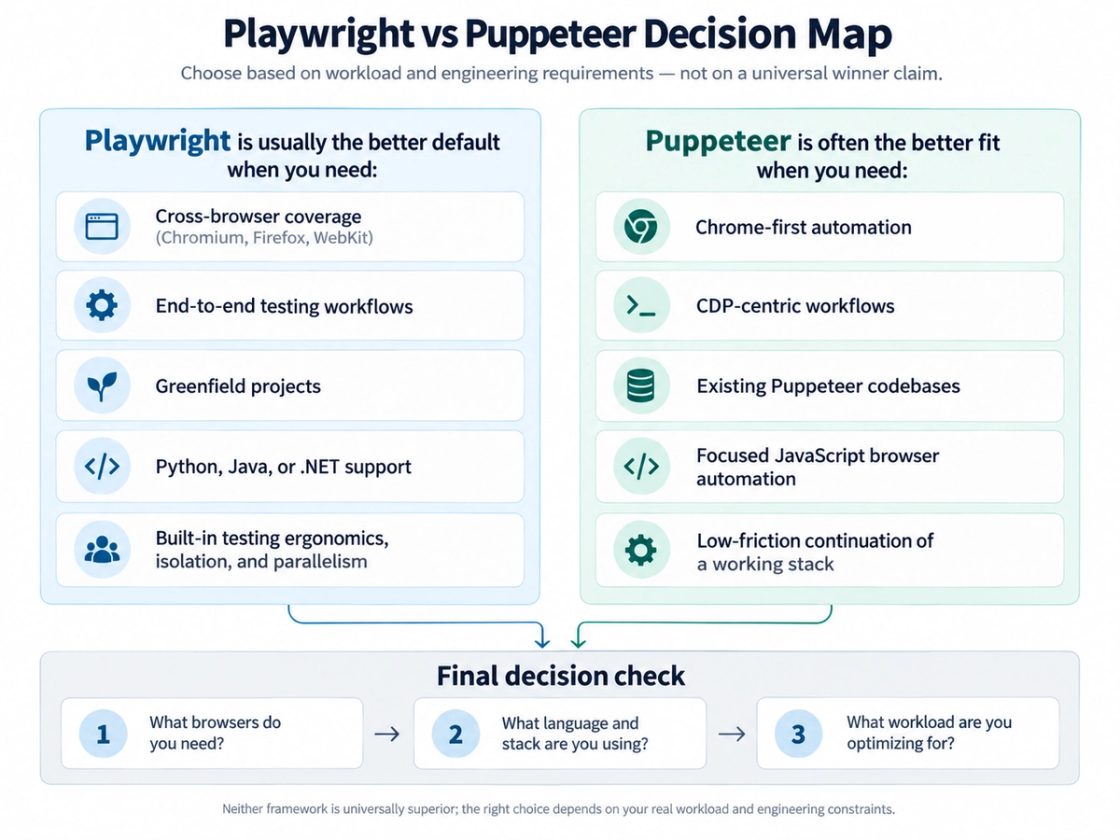
Scenario | Recommended default | Why |
|---|---|---|
New cross-browser E2E suite | Playwright | Broader engine coverage and integrated test architecture |
Python automation | Playwright | Official Python support |
Java or .NET automation | Playwright | Official bindings for both ecosystems |
Existing Puppeteer service | Puppeteer unless requirements change | Migration cost needs a concrete payoff |
Chrome/CDP-focused automation | Puppeteer | Direct fit with its core orientation |
Simple Node.js screenshot or PDF job | Either | Choose based on deployment needs and the existing stack |
WebKit requirement | Playwright | WebKit is part of its supported engine set |
Proxy-heavy scraping | Depends on architecture | Both expose proxy settings; operations often dominate |
High-concurrency job | Benchmark your own workload | Concurrency shape and lifecycle design can reverse the result |
FAQ
Is Playwright better than Puppeteer?
It is a broader default, not an absolute winner. Playwright is often a better fit for new cross-browser, multi-language, and E2E projects. Puppeteer remains a sound choice for focused JavaScript and Chrome/CDP automation. Start with the requirements your team must support.
Is Playwright faster than Puppeteer?
Not universally. In the recorded benchmark, Playwright clearly led cold browser session startup and modestly led screenshots. Puppeteer led warm navigation and the four-context workload; its sub-millisecond DOM lead was negligible in practical terms.
Which is better for web scraping?
Choose Puppeteer for a focused Node.js and Chrome-first pipeline; consider Playwright when engine coverage, another supported language, or a broader testing system matters. Benchmark against your actual authorized targets, sessions, and proxies rather than using localhost timings as a throughput promise.
Which is better for end-to-end testing?
Playwright is usually the stronger default for a new Node.js suite because its runner, isolation, actionability model, and multi-engine coverage form a cohesive system. Puppeteer can still support E2E testing when a team has the surrounding stack. Other Playwright language ecosystems use their own supported test integrations.
Does Puppeteer support Firefox?
Yes. Current Puppeteer documentation includes Firefox support. From Puppeteer 23 onward, Firefox uses WebDriver BiDi by default. Describing modern Puppeteer as Chrome-only is outdated.
Should an existing Puppeteer project migrate to Playwright?
Only when a concrete requirement justifies the cost, such as WebKit, a supported non-JavaScript language, or replacing expensive custom test infrastructure. Do not migrate solely because one microbenchmark shows a large percentage.
Final verdict
For a greenfield project without special constraints, Playwright is a reasonable default recommendation because its browser, language, and testing coverage is broader. Puppeteer remains an efficient choice when JavaScript, Chrome/CDP, simplicity, or an existing Puppeteer investment defines the work.
The recorded benchmark shows why the decision should not rest on a headline: the faster framework changed with the workload. Choose the framework that removes the most engineering friction from your actual automation, and measure the parts of that automation that materially affect cost or reliability.
Choose with a real workload
Compare one representative workflow with the browser, language, and deployment settings you intend to use. Start from the official documentation, then evaluate timing, reliability, and maintenance together.
Sources
Benchmark data and diagrams: supplied manuscript, Puppeteer vs Playwright.docx.
The following first-party product documentation was accessed on September 13, 2026.
- Browsers — Playwright: supported engines, browser-build distinctions, and WebKit versus branded Safari.
- Supported languages — Playwright: official languages and their test integrations.
- Auto-waiting — Playwright: action-specific checks.
- Isolation — Playwright: browser contexts and test isolation.
- Network — Playwright: browser-wide and context-level proxy settings.
- Installation — Playwright: Playwright Test and the integrated testing toolkit.
- Introduction — Puppeteer: JavaScript browser automation library and entry point.
- FAQ — Puppeteer: maintenance, CDP, Firefox, and WebDriver BiDi.
- Supported browsers — Puppeteer: supported browsers and version pairings.
- Page interactions — Puppeteer: locator behavior and waiting.
- Browser.createBrowserContext — Puppeteer: isolated contexts.
- BrowserContextOptions — Puppeteer: proxy server, bypass list, and credential reference.