
BeautifulSoup find_all() returns matching elements from an HTML tree. Use it to narrow a search by tag name, attributes, class or text, then extract fields within each matched record. It parses the HTML you give it; it does not fetch a website or run JavaScript.
The most useful debugging question is not “which selector should I try next?” It is “does this HTML contain the record I expect, and which element represents that record?”
Workflow at a glance
1. Start with a small, known HTML sample
Install the packages with
python -m pip install beautifulsoup4 requests. Then run this example without contacting a website:2. Choose the right filter
Use
class_becauseclassis a reserved Python keyword. For attributes such asdata-id, theattrsdictionary avoids trying to express the HTML attribute as a Python keyword.3. Understand multiple classes
class_="product"matches an element containing that class token, includingclass="product featured".4. Keep fields attached to their record
Extracting inside each card prevents one missing price from shifting every later price onto the wrong product. Preserve raw price text until you have defined currency and parsing rules.
5. Search text and nesting deliberately
Text filtering uses
string, and returns matching text nodes when used on its own:6. Debug an empty result before changing libraries
find_all()returns an empty collection when there are no matches.find()returnsNonewhen no element matches. Guard those cases before accessing text or attributes.
1. Start with a small, known HTML sample
Install the packages with python -m pip install beautifulsoup4 requests. Then run this example without contacting a website:
from bs4 import BeautifulSoup

html = """
<main>
  <article class="product featured" data-id="p1">
    <h2>Travel Mug</h2><span class="price">$19.90</span>
    <a href="/item/p1">Details</a>
  </article>
  <article class="product" data-id="p2">
    <h2>Desk Lamp</h2><span class="price">$32.00</span>
    <a href="/item/p2">Details</a>
  </article>
</main>
"""
soup = BeautifulSoup(html, "html.parser")
cards = soup.find_all("article", class_="product")
print([card["data-id"] for card in cards])
# ['p1', 'p2']
The result is a collection of Tag objects. Extract text or attributes from those tags rather than treating the collection as one element.
2. Choose the right filter
Need | Example | Result in this sample |
|---|---|---|
All product containers |
| Two article tags |
One identifier |
| The first article |
Links with an href |
| Two links |
Several possible tags |
| Headings and links |
First matching article only |
| A collection with one article |
Use class_ because class is a reserved Python keyword. For attributes such as data-id, the attrs dictionary avoids trying to express the HTML attribute as a Python keyword.
The Beautiful Soup search documentation defines the filters and their combinations. Keep the HTML parser consistent when diagnosing malformed source: different parsers can repair broken markup differently.
3. Understand multiple classes
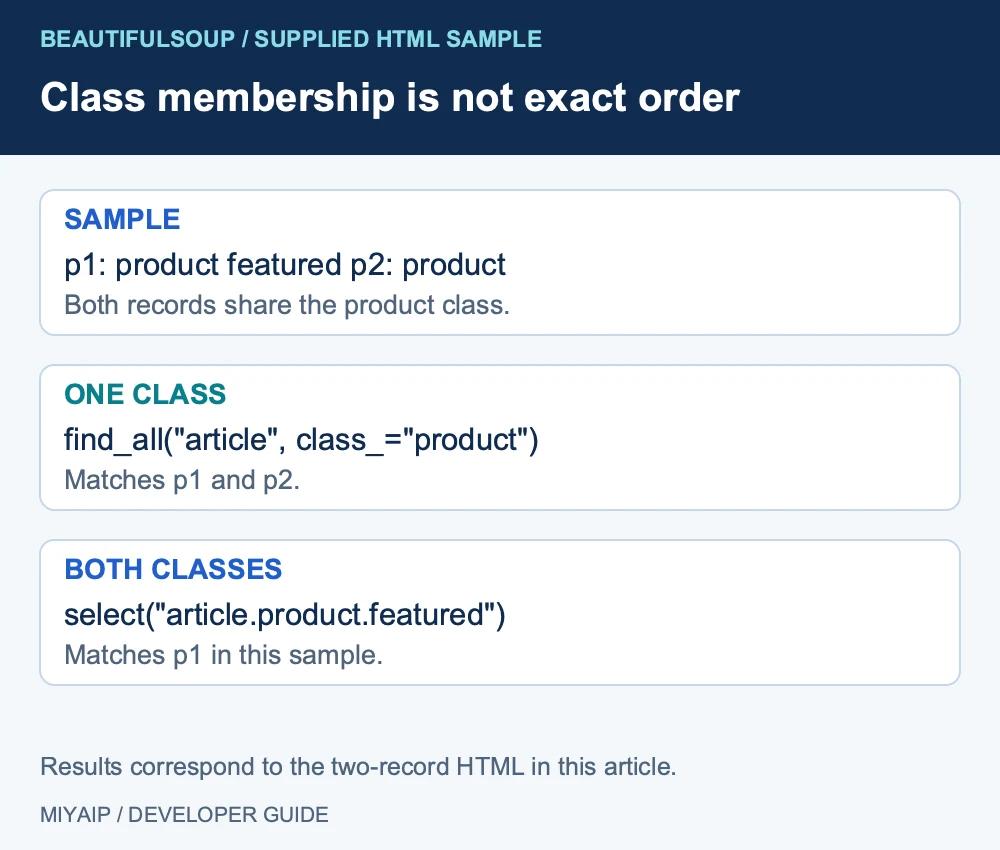
class_="product" matches an element containing that class token, including class="product featured".
If you need an element that has both classes, a CSS selector expresses that directly:
featured_products = soup.select("article.product.featured")
print([card["data-id"] for card in featured_products])
# ['p1']
Passing a list of class values to find_all() does not mean all those classes must be present. Avoid relying on the exact order of a multi-class attribute string when your actual requirement is membership in both classes.
4. Keep fields attached to their record
rows = []
for card in soup.find_all("article", class_="product"):
    title = card.find("h2")
    price = card.find("span", class_="price")
    if title is None or price is None:
        raise ValueError("Product is missing a required field")
    rows.append({
        "id": card.get("data-id"),
        "name": title.get_text(" ", strip=True),
        "price_text": price.get_text(strip=True),
    })
print(rows)
Extracting inside each card prevents one missing price from shifting every later price onto the wrong product. Preserve raw price text until you have defined currency and parsing rules.
5. Search text and nesting deliberately
Text filtering uses string, and returns matching text nodes when used on its own:
import re
matches = soup.find_all(string=re.compile(r"Mug|Lamp"))
print([str(value) for value in matches])
A tag's .string may be None when it contains several child nodes. For a heading that includes nested markup, get the heading first and use get_text() to read its combined text.
Searches normally include descendants. To restrict a search to direct children, set recursive=False on find_all(). Apply it to the correct parent; calling it on the entire document can return nothing when the desired tags sit several levels down.
6. Debug an empty result before changing libraries
- Check the HTTP status and the response body your program actually received.
- Search that body for a known record name or attribute.
- Confirm the container and selector against this body, not only the browser's rendered DOM.
- Check whether authentication, a redirect or client-side rendering explains the difference.
find_all() returns an empty collection when there are no matches. find() returns None when no element matches. Guard those cases before accessing text or attributes.
For the fetch, pagination and export around this parsing step, continue with the Python scraping guide. If a request needs a different network route, MIYAIP's proxy plans can support the HTTP client; they do not change how BeautifulSoup matches HTML.
Frequently asked questions
Is find_all() different from select()?
Both locate elements, but they accept different query forms. Use find_all() for its tag, attribute and callable filters, or select() when a CSS selector expresses the structure more clearly.
Why does calling .text on my result fail?
The collection contains tags; it is not one tag. Iterate over it, or use find() when you specifically need the first match.
Can limit=10 collect the first ten pages?
No. It limits matching elements in the current parsed tree. Requests and pagination are separate operations.
Validate a known HTML sample first. Then add fetching, bounded pagination and output checks around the parser.