
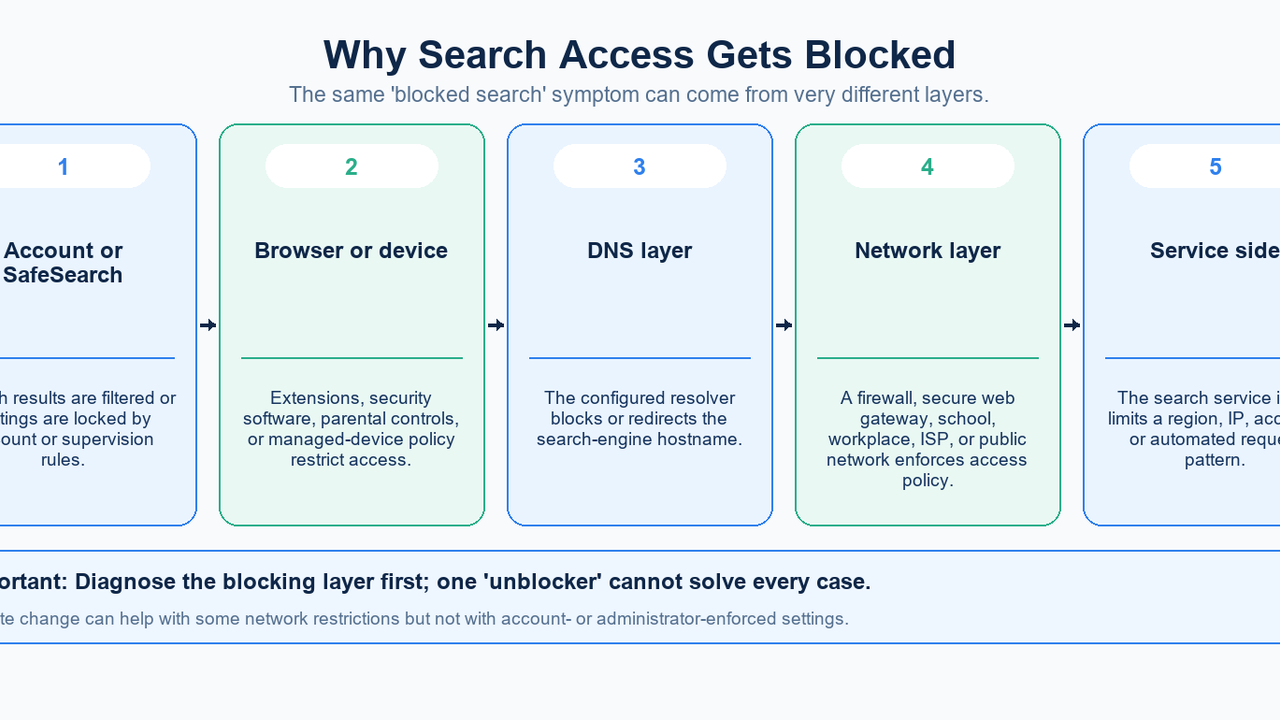
Search unblock means restoring access when a search engine, its results, or a linked website does not behave as expected. Start by identifying the failed layer: search settings, DNS, a browser or device policy, the network route, or the destination service. A proxy can change the exit used by configured traffic, but it cannot repair every kind of restriction.
For someone researching a market, checking a regional result, or troubleshooting a work connection, the useful outcome is repeatable access with a known cause. This guide explains the diagnosis first, then shows where MIYA connection checks and proxy products fit.
What exactly is blocked?
Separate three cases. The search homepage may be unreachable; the homepage may work while results are filtered; or search may work until you open a destination page. Write down which case you have before changing anything. The same browser error can also result from a temporary outage or a broken local configuration.
An “unblocked search engine” is simply one that your current account, device, and network can reach. It is not a special protocol. Switching search services may be a useful comparison, but it does not explain why the original service failed, and the linked destination can still have its own restriction.
Why search access gets restricted
SafeSearch changes the content shown in Google Search. Google explains that it does not filter other search engines or unrelated websites. If queries work but expected results disappear, inspect the filter before treating the issue as a connection failure. See Google’s SafeSearch overview.
A locked setting can come from supervision, school or organization administration, browser configuration, or network controls. Google’s troubleshooting guidance explains how to identify who manages it. A different proxy exit does not give you authority to change that setting.
DNS is the name-lookup stage before the browser connects to a domain. A filtering resolver can refuse a lookup according to policy; other web controls can apply after resolution. Cloudflare’s DNS filtering explanation distinguishes DNS controls from broader filtering. A resolver change is relevant only when this stage is involved and the change is permitted.
Browsers, extensions, device profiles, firewalls, and the destination itself add other possible layers. A failure limited to one browser suggests a local setting to investigate; a failure across an entire network suggests a different scope. These comparisons narrow the investigation rather than proving a cause.
A challenge page also differs from an unreachable domain. Google documents unusual-traffic messages on shared networks, including VPN networks. An alternate exit can therefore encounter a challenge too. Follow the service’s recovery process, investigate unexpected automated traffic, and avoid assuming repeated address changes will restore reliable access.
How proxies, VPNs, DNS changes, and private browsing differ
A forward proxy receives configured client requests and sends them onward. The simplified path is Browser → Proxy → Search engine, with replies returning through the intermediary. Cloudflare’s explanation of forward proxies describes this client-side role. A web proxy accessed through a webpage and a manually configured proxy can present different interfaces to that underlying idea.
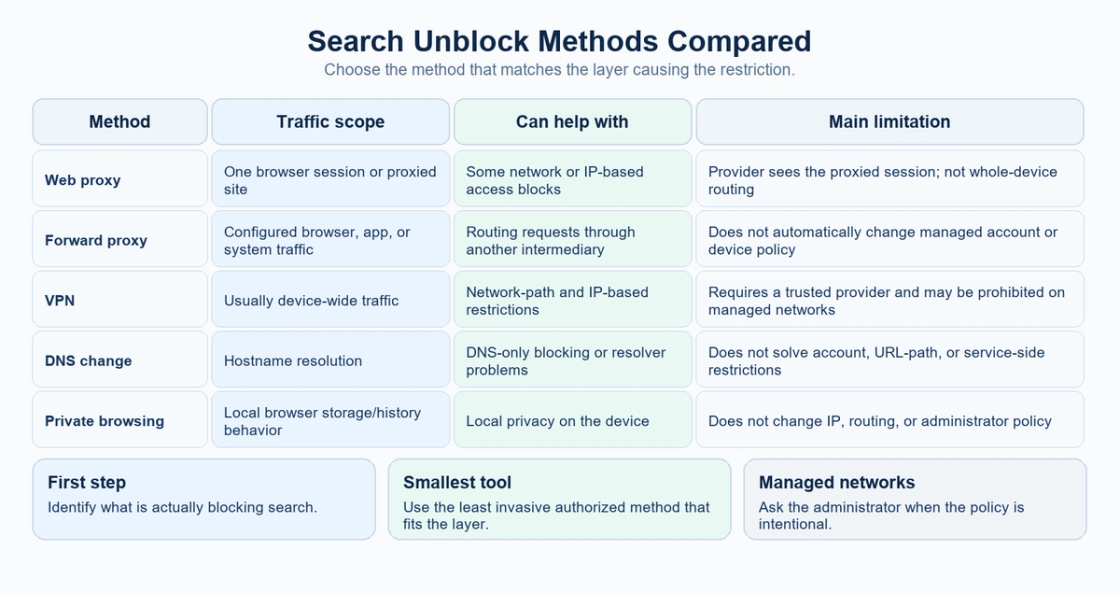
Method | What changes | Useful scope | What it does not automatically fix |
|---|---|---|---|
Web proxy | Requests handled through the proxy website | A supported browsing session | Other applications, account restrictions, managed policies |
Configured forward proxy | Network exit for traffic that uses its configuration | Selected browser, application, or supported system traffic | Traffic that bypasses the configuration; search settings |
VPN | Routing through the VPN connection | Traffic included by the client and its routing rules | Account controls, destination rules, excluded traffic |
DNS change | Resolver used for domain lookups | An authorized DNS failure or DNS-policy investigation | Later connection blocking or account filtering |
Private browsing | Browser session storage and cookies | Comparing local session state | Public IP changes or network-policy changes |
Mozilla’s proxy-versus-VPN comparison helps distinguish browser-focused routing from a broader device connection. Check the particular client: a VPN can exclude applications or routes, and a system proxy can be ignored by software. Do not infer full-device coverage from a connected badge alone.
Mozilla’s private-browsing guidance makes a separate point: a private window does not conceal the public IP. It can help isolate cookies or a signed-in session while testing, but a different result in that window is not evidence that the network has been unblocked.
Diagnose the failure in six steps
A controlled search-access check
1. Record the exact failing action
Open the search homepage, submit a harmless query, then open one relevant result. Record where it fails, the displayed error, and the time. “Homepage does not load” and “destination returns access denied” lead to different investigations.
2. Check settings and ownership
Inspect the search filter and whether the account, browser, or device is managed. A lock or organization message changes the next step: collect the resource you need and ask the administrator to review access. Avoid modifying unrelated controls during the test.
3. Compare one variable at a time
Where permitted, repeat the same action on another browser or device, then on another authorized connection. Keep the query and account state consistent. If only Wi-Fi fails, record that observation; it may involve DNS, routing, a captive portal, or network policy.
4. Separate DNS lookup from connection failure
Use the operating system’s approved diagnostics to check the domain. MIYA DNS / NSLookup provides a comparison lookup, but a server-side result does not prove what your own network’s resolver returned. Successful resolution also does not prove that HTTPS access is allowed.
5. Check the observed exit
Record the browser’s public exit with MIYA IP and Browser Environment Check. If an approved proxy is configured, run the check again in that same browser. A changed exit confirms something about this request path; it does not establish that every application uses it.
6. Retest the original task and record the outcome
Repeat the same search and destination visit once the relevant change is complete. Record whether access, filtering, or the error changed. If the failure persists, preserve that evidence and stop stacking unrelated adjustments. It gives support a clearer case to investigate.
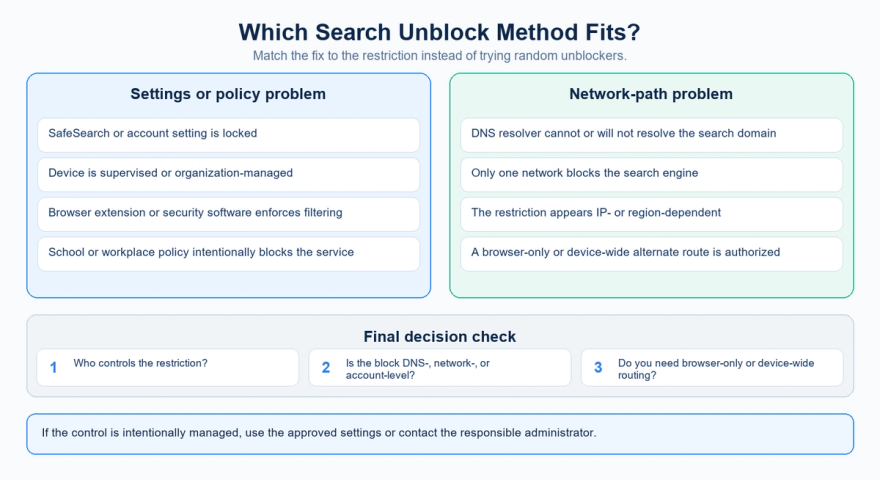
Choose the fix that matches the restriction
The decision is about ownership, layer, and scope. Account or device restrictions need the corresponding settings owner. A DNS problem needs a resolver investigation. An authorized alternate network route may help when access depends on the current exit.
Use the diagram as a triage map, then validate the result with the actual search task. It is a decision aid, not evidence that any provider can unblock a particular service.
Where MIYA fits in an authorized search workflow
MIYA is relevant after the diagnosis points to a need for a different configured exit, such as a permitted regional website check or research workflow. It is not a search-engine account manager, a SafeSearch override, or an automatic repair for a blocked destination.
Choose the session behavior around the task. MIYA static residential proxies suit workflows that need a consistent proxy endpoint; rotating residential proxies provide rotation and sticky-session options. Availability and settings depend on the selected product. Changing exits between related requests can also make a comparison harder to interpret.
Get the actual endpoint, port, protocol, and authentication details from your MIYA account. Follow the relevant client instructions rather than pasting credentials into an unfamiliar “unblock” website. Firefox’s official connection settings guide covers manual, system, and automatic proxy options; menu locations can vary by version. For MIYA setup details, use the help center or developer center.
First verify that the endpoint works with MIYA Proxy Checker, then verify the exit in the configured browser and repeat the target request. A server-side proxy check confirms the test node’s result, not your browser’s entire routing. None of these checks guarantees acceptance by Google, Bing, or a destination site.
Provider trust matters more than “free” or “unblocked”
A proxy operator becomes part of the connection path. Review who operates it, how authentication is handled, its stated retention policy, and whether the service rewrites pages or asks you to ignore certificate warnings. For sensitive work, use an approved provider and a configuration you can explain. A price label is not a security assessment.
HTTPS remains important. The US Federal Trade Commission’s public Wi-Fi guidance explains that widespread encryption protects data in transit, while an encrypted connection to a fraudulent website still exposes information to that website’s operator. In the same way, a lock icon on a web-proxy page does not establish trust in the proxy service.
Keep credentials out of shared notes and diagnostic screenshots. If a test fails, share the time, protocol, sanitized error, and expected behavior with support. Do not post a complete proxy URL containing a username or password.
School, workplace, and other managed connections
When a restriction is deliberately managed, request the resource or use the organization’s approved route. A useful access request names the exact domain, the business or study task, the error, and the time it occurred. This helps an administrator distinguish a policy decision from a misclassified site or configuration problem.
Alternatives may include an approved search database, a corrected category classification, the organization’s proxy or VPN, or a personal connection when policy permits. Technical reachability alone does not establish permission. The practical goal is an access arrangement the responsible team can support.
Frequently asked questions
Can a proxy unblock Google or another search engine?
It may change the route or visible exit for configured requests. Whether that helps depends on the failed layer and the destination’s response. It does not automatically change supervised-account settings, managed-device rules, or a restricted destination account.
Why does search work but one result stay blocked?
The search engine and the linked website are separate destinations. Diagnose the result URL itself: the failure may involve that domain’s DNS, the network’s policy, its login requirements, or the site’s own access decision.
Should I change DNS first?
Only when lookup failure is a plausible cause and you are permitted to change it. A working DNS answer followed by a block page calls for a different investigation. Keep the original configuration so an approved test can be reversed.
Does private or incognito mode unblock search?
It does not change the public IP by itself. It can change cookies or account-session behavior, which is useful for diagnosis. That difference should not be confused with changing a network route.
Why is SafeSearch locked even through a proxy?
The setting may be managed by an account, device, browser, or network administrator. Check the settings page for ownership information. A changed exit does not remove a policy controlled elsewhere.
Is a web proxy better than a VPN?
Use the scope you need. A browser workflow may fit a configured proxy; several applications may need an approved VPN route. Confirm actual coverage and provider trust instead of assuming either category fixes every restriction.
Can MIYA guarantee search access or anonymity?
No guarantee follows from a changed IP or a successful proxy test. Search services make their own access decisions, and accounts, cookies, browser signals, and other network paths remain relevant. Test the intended workflow and interpret each result within its limits.
Check the connection before choosing a proxy
Use MIYA to record your current public exit, then compare proxy options only if an alternate route fits the diagnosis.
Sources
- Google Search Help — Make Google Search safer with SafeSearch. Accessed September 22, 2026.
- Google Search Help — Fix problems with SafeSearch. Accessed September 22, 2026.
- Cloudflare Learning Center — What is DNS filtering?. Accessed September 22, 2026.
- Cloudflare Learning Center — Proxy servers explained. Accessed September 22, 2026.
- Mozilla Support — Connection settings in Firefox. Accessed September 22, 2026.
- Mozilla — The difference between a VPN and a web proxy. Accessed September 22, 2026.
- Mozilla Support — Common Myths about Private Browsing. Accessed September 22, 2026.
- Google Search Help — Resolve unusual traffic messages. Accessed September 22, 2026.
- US Federal Trade Commission — Are Public Wi-Fi Networks Safe? (February 2023). Accessed September 22, 2026.
- MIYA — Static residential proxies. Product and tool reference; reviewed September 22, 2026.
- MIYA — Rotating residential proxies. Product and tool reference; reviewed September 22, 2026.
- MIYA — IP and Browser Environment Check. Product and tool reference; reviewed September 22, 2026.
- MIYA — DNS / NSLookup. Product and tool reference; reviewed September 22, 2026.
- MIYA — Proxy Checker. Product and tool reference; reviewed September 22, 2026.
- MIYA — Developer center. Product and tool reference; reviewed September 22, 2026.
MIYA help center — configuration and product support resources.