

This proxy for web scraping tutorial takes one permitted public-page job from proxy selection through configuration, collection, parsing, JSON and CSV export, and troubleshooting. Use it only for targets you are authorized to collect, keep request rates within published limits, and replace the example target and contact address before running it.
1. Choose the proxy policy
Workload | Starting policy | Why |
|---|---|---|
Stable, permissive public endpoint | Datacenter or one static endpoint | A simple route is easier to monitor and budget |
Independent permitted pages across regions | Rotating residential with explicit location | Each page can use the required regional context without sharing session state |
Cookie-bound multi-step flow | Sticky residential session or static residential IP | The network identity stays aligned with cookies for the permitted flow |
Carrier-sensitive owned experience | Mobile proxy | Use only when the test question depends on a cellular-carrier route |
Start with the simplest route that supplies the required location and session behavior. More IPs do not replace authorization, throttling, reliable selectors, or record validation.
2. Configure a local Python project
Create an isolated environment and install the only external package used by the example:
python -m venv .venv
# macOS or Linux: . .venv/bin/activate
# Windows PowerShell: .\.venv\Scripts\Activate.ps1
python -m pip install requests
Set the complete proxy URL in the process environment. Percent-encode special characters in the username or password. Do not paste the real value into the script, terminal history shared with others, screenshots, or logs.
# Inject SCRAPING_PROXY_URL into this process with your approved secret manager.
# Confirm the variable exists without printing its value:
python -c "import os; assert os.environ.get('SCRAPING_PROXY_URL')"
3. Collect, parse, and save the page
Save the following as scrape.py. It uses one Session, enforces connect and read timeouts, stops on proxy authentication failure, parses the first title and H1, and exports JSON and CSV. It allows at most three attempts per URL and 60 seconds of cumulative retry waiting across the task. Valid Retry-After seconds or HTTP dates are never shortened. If the required wait exceeds the remaining budget, or the final attempt is rate limited, it prints a UTC retry_at with outcome=deferred and exits with code 2. An external scheduler must resume at or after retry_at; this script does not schedule the next run itself. Missing or invalid Retry-After values use limited exponential backoff.
import csv
import json
import math
import os
import time
from datetime import datetime, timedelta, timezone
from email.utils import parsedate_to_datetime
from html.parser import HTMLParser
from pathlib import Path

import requests

URLS = ["https://example.com/"]  # Replace with pages you are authorized to collect.
MAX_ATTEMPTS = 3
MAX_WAIT_SECONDS = 60  # Cumulative waiting budget across the task; never cap Retry-After.
TIMEOUT = (10, 30)


class PageParser(HTMLParser):
    def __init__(self):
        super().__init__()
        self.capture = None
        self.parts = []
        self.title = ""
        self.h1 = ""

    def handle_starttag(self, tag, attrs):
        if not self.capture and tag in ("title", "h1"):
            if tag == "title" and self.title:
                return
            if tag == "h1" and self.h1:
                return
            self.capture = tag
            self.parts = []

    def handle_data(self, data):
        if self.capture:
            self.parts.append(data)

    def handle_endtag(self, tag):
        if tag != self.capture:
            return
        value = " ".join("".join(self.parts).split())
        setattr(self, tag, value)
        self.capture = None
        self.parts = []


class RetryAfterOutOfRange(RuntimeError):
    pass


class RetryDeferred(RuntimeError):
    def __init__(self, delay, reason):
        try:
            self.retry_at = (datetime.now(timezone.utc) + timedelta(seconds=delay)).isoformat()
        except OverflowError:
            raise RetryAfterOutOfRange(
                "Retry-After exceeds the supported UTC scheduling range; manual rescheduling required."
            ) from None
        self.reason = reason
        super().__init__("Retry later: retry_at={} reason={}".format(self.retry_at, reason))


def retry_delay(value, fallback):
    value = str(value or "").strip()
    if not value:
        return fallback
    if value.isascii() and value.isdecimal():
        digits = value.lstrip("0") or "0"
        available = datetime.max.replace(tzinfo=timezone.utc) - datetime.now(timezone.utc)
        largest = str(available.days * 86400 + available.seconds)
        if len(digits) > len(largest) or (len(digits) == len(largest) and digits > largest):
            raise RetryAfterOutOfRange(
                "Retry-After exceeds the supported UTC scheduling range; manual rescheduling required."
            )
        return int(digits)
    try:
        retry_at = parsedate_to_datetime(value)
        if retry_at.tzinfo is None:
            retry_at = retry_at.replace(tzinfo=timezone.utc)
        return max(math.ceil((retry_at - datetime.now(timezone.utc)).total_seconds()), 0)
    except (TypeError, ValueError, OverflowError):
        return fallback


def wait_before_retry(delay, wait_budget):
    if delay > wait_budget["remaining_seconds"]:
        raise RetryDeferred(delay, "waiting_budget_exhausted")
    if delay > 0:
        time.sleep(delay)
        wait_budget["remaining_seconds"] -= delay


def fetch(session, url, proxies, wait_budget=None):
    if wait_budget is None:
        wait_budget = {"remaining_seconds": MAX_WAIT_SECONDS}
    for attempt in range(1, MAX_ATTEMPTS + 1):
        try:
            response = session.get(url, proxies=proxies, timeout=TIMEOUT)
        except requests.Timeout:
            if attempt == MAX_ATTEMPTS:
                raise
            delay = 2 ** (attempt - 1)
            print("attempt={} timeout retry_in={}s".format(attempt, delay))
            wait_before_retry(delay, wait_budget)
            continue
        except requests.exceptions.ProxyError as error:
            raise RuntimeError(
                "Proxy connection or authentication failed; check protocol, host, port, and credentials."
            ) from error

        if response.status_code == 407:
            raise RuntimeError("Proxy authentication failed (407); do not retry unchanged credentials.")
        if response.status_code == 429:
            delay = retry_delay(response.headers.get("Retry-After"), 2 ** (attempt - 1))
            if attempt == MAX_ATTEMPTS:
                raise RetryDeferred(delay, "maximum_attempts_reached")
            print("attempt={} status=429 retry_in={}s".format(attempt, delay))
            wait_before_retry(delay, wait_budget)
            continue

        response.raise_for_status()
        print("attempt={} status={} url={}".format(attempt, response.status_code, url))
        return response

    raise RuntimeError("Maximum attempts reached")


def parse(response, url):
    parser = PageParser()
    parser.feed(response.text)
    return {"url": url, "title": parser.title, "h1": parser.h1}


def save(records):
    output = Path("output")
    output.mkdir(exist_ok=True)
    (output / "results.json").write_text(
        json.dumps(records, ensure_ascii=False, indent=2), encoding="utf-8"
    )
    with (output / "results.csv").open("w", newline="", encoding="utf-8-sig") as file:
        writer = csv.DictWriter(file, fieldnames=["url", "title", "h1"])
        writer.writeheader()
        writer.writerows(records)


def main():
    proxy_url = os.environ.get("SCRAPING_PROXY_URL")
    if not proxy_url:
        raise SystemExit("Set SCRAPING_PROXY_URL in the environment; do not put credentials in code.")

    wait_budget = {"remaining_seconds": MAX_WAIT_SECONDS}
    proxies = {"http": proxy_url, "https": proxy_url}
    with requests.Session() as session:
        session.headers["User-Agent"] = "AuthorizedResearchBot/1.0 (+contact@example.com)"
        records = [parse(fetch(session, url, proxies, wait_budget), url) for url in URLS]
    save(records)
    print("saved=output/results.json,output/results.csv records={}".format(len(records)))


if __name__ == "__main__":
    try:
        main()
    except RetryDeferred as error:
        print(json.dumps({"outcome": "deferred", "retry_at": error.retry_at, "reason": error.reason}))
        raise SystemExit(2)
    except RetryAfterOutOfRange as error:
        print(json.dumps({"outcome": "failed", "reason": "retry_after_out_of_range", "error": str(error)}))
        raise SystemExit(1)
4. Run the Python example and inspect the files
python scrape.py
python --version
python -m pip show requestsVerified Python output (redacted)
tested_at=2026-09-05T08:54:04Z
runtime=Python 3.12.14 requests 2.31.0
attempt=1 status=200 url=https://example.com/
saved=output/results.json,output/results.csv records=1
Verified output/results.json
[
  {
    "url": "https://example.com/",
    "title": "Example Domain",
    "h1": "Example Domain"
  }
]
The CSV contains the same url, title, and h1 fields. Treat an HTTP 200 as transport success only: validate required fields before accepting each record.
5. Configure Scrapy with HttpProxyMiddleware
Install Scrapy, keep the same SCRAPING_PROXY_URL environment variable, and configure the official HttpProxyMiddleware explicitly. These conservative limits are starting values; lower them when the target publishes stricter rules or returns errors.
python -m pip install scrapysettings.py
HTTPPROXY_ENABLED = True
DOWNLOADER_MIDDLEWARES = {
    "scrapy.downloadermiddlewares.httpproxy.HttpProxyMiddleware": 750,
}

ROBOTSTXT_OBEY = True
AUTOTHROTTLE_ENABLED = True
AUTOTHROTTLE_START_DELAY = 2.0
AUTOTHROTTLE_MAX_DELAY = 60.0
AUTOTHROTTLE_TARGET_CONCURRENCY = 1.0
CONCURRENT_REQUESTS_PER_DOMAIN = 2
DOWNLOAD_DELAY = 1.0

RETRY_ENABLED = True
RETRY_TIMES = 2
# Keep 429 out of immediate retries; the spider stops and reports Retry-After.
RETRY_HTTP_CODES = [408, 500, 502, 503, 504, 522, 524]
spiders/example_spider.py
import os

import scrapy
from scrapy.exceptions import CloseSpider


class ExampleSpider(scrapy.Spider):
    name = "authorized_example"
    handle_httpstatus_list = [407, 429]

    async def start(self):
        proxy_url = os.environ.get("SCRAPING_PROXY_URL")
        if not proxy_url:
            raise CloseSpider("SCRAPING_PROXY_URL is not set")
        yield scrapy.Request(
            "https://example.com/",
            meta={"proxy": proxy_url},
            callback=self.parse,
        )

    def parse(self, response):
        if response.status == 407:
            raise CloseSpider("proxy_authentication_failed")
        if response.status == 429:
            wait = response.headers.get(b"Retry-After", b"not provided").decode()
            self.logger.warning("Rate limited; Retry-After=%s. Reschedule after that delay.", wait)
            raise CloseSpider("rate_limited")
        yield {
            "url": response.url,
            "title": response.css("title::text").get(default="").strip(),
            "h1": response.css("h1::text").get(default="").strip(),
        }
scrapy crawl authorized_example -O output/scrapy-results.jsonVerified Scrapy output (redacted)
runtime=Scrapy 2.18.0
finish_reason=finished
item_scraped_count=1
record url=https://example.com/ title="Example Domain" h1="Example Domain"
The spider uses Scrapy 2.18.0's current async start() interface. The same authorized check exported one record for example.com with title and H1 both equal to Example Domain. Proxy host, IP, connection form, and credentials are omitted. This one-item result validates the route and export path; it is not a throughput, latency, or success-rate benchmark.
This spider stops on 407 and reports Retry-After on 429 so an external scheduler can resume after the requested delay. It does not rotate immediately to work around a rate limit.
6. Place the tutorial in a production architecture
An implementable scraping-proxy architecture
Separate the system into an approved job queue, a policy and rate-limit layer, a session-aware proxy controller, a bounded fetcher, a record validator, and observability. This makes connection errors, rate limits, login walls, parser failures, and regional mismatches diagnosable instead of labeling every failure as a bad proxy.
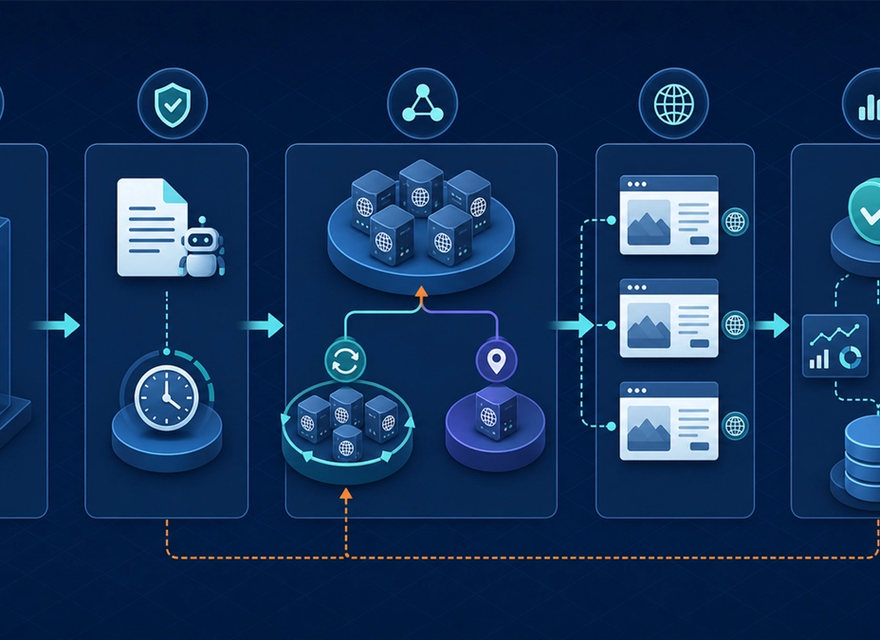
The single-file examples cover the fetch path. A production job should also have an approved queue, per-target policy and rate limits, explicit session ownership, record validation, quarantine for parser failures, and logs that never contain proxy credentials.
7. Troubleshoot common failures
Symptom | Likely cause | Exact checks | Action |
|---|---|---|---|
HTTP 407 | The proxy rejected authentication | Check proxy protocol, host, port, username format, percent-encoding, account status, and any IP allowlist | Correct the credentials or access rule; do not retry the unchanged request |
HTTP 429 | The target requested a lower rate | Read Retry-After, current concurrency, download delay, and requests per domain | Pause for the requested interval, reduce concurrency, and keep a finite retry limit |
Connect or read timeout | Gateway, DNS, route, destination, or timeout issue | Test gateway reachability, verify the target is allowed, compare direct and proxy DNS behavior, and inspect connect versus read timing | Retry at most the configured three attempts; then record and escalate the route failure |
HTTP 200 but empty fields | Parser or page variant changed | Save a permitted diagnostic copy, check content type, final URL, language, title, and H1 selectors | Quarantine the record and update the parser before accepting data |
8. Verify before scaling
- Replace example.com and the contact address with the authorized target and operator contact.
- Run one request, verify the observed exit region separately, and save a redacted timestamped console result.
- Open both output files and confirm schema, encoding, completeness, and duplicate handling.
- Test one controlled 407, 429, and timeout path without exposing credentials or placing load on a third party.
- Increase concurrency only after accepted-record rate, latency, target responses, and cost remain within the approved limits.
Frequently asked questions
Does rotating proxies make scraping automatically reliable?
No. Rotation addresses network-route diversity. It does not fix permissions, rate limits, cookies, JavaScript rendering, parser changes, duplicate records, or poor retry logic.
When should I use a sticky or static proxy?
Use a sticky session or static residential IP when several permitted requests must keep the same network identity. Use rotation between independent jobs when continuity is not required.
Should a crawler obey robots.txt?
RFC 9309 standardizes the Robots Exclusion Protocol as a way for service owners to control crawler access. It is not access authorization by itself, so teams must also evaluate terms, contracts, APIs, and applicable law.
What should happen after HTTP 429?
Reduce the request rate and honor Retry-After when present. Repeatedly changing IPs while maintaining the same load is not a responsible substitute for backoff.
Build a controlled proxy layer
Start with an authorized target, a small job queue, explicit rate limits, and one observable proxy policy. Expand only after data quality and target impact remain acceptable.