
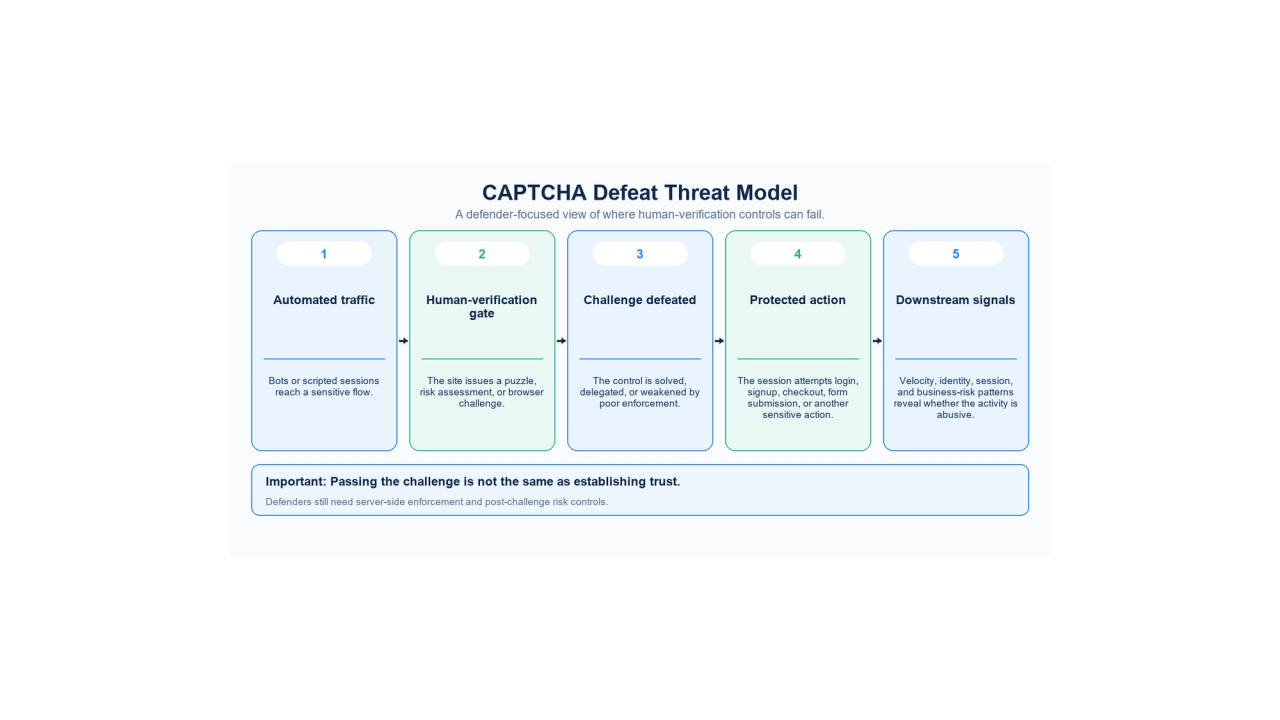
If you search how to bypass captcha, most results are written from the perspective of scrapers or automation operators. For a security team, the more useful question is different: how does automated abuse get through a human-verification gate, and what should still be checked after the gate is passed?
CAPTCHA remains useful friction against simple automation, but it is not a proof of identity and it is not a complete bot-defense system. OWASP classifies CAPTCHA Defeat as a specific automated threat, while current guidance from Google, Cloudflare, and OWASP increasingly emphasizes risk scoring, server-side verification, rate limits, and layered bot controls rather than one puzzle standing between a bot and a sensitive action.
This article explains the threat model at a defensive level. It does not provide instructions, code, solver workflows, stealth settings, or token-manipulation procedures for bypassing third-party CAPTCHA systems.
Quick Answer
Fraudsters get automated traffic past CAPTCHA gates in several broad ways: machines can solve weaker visual or audio challenges, humans can be brought into the loop to complete challenges, automated browsers can carry challenge completion inside a larger bot workflow, and weak server-side enforcement can make a correctly displayed CAPTCHA far less useful than it appears.
The key defensive lesson is that a solved CAPTCHA is not the same as a trusted user. Modern anti-bot systems therefore combine the challenge itself with server-side token checks, browser and client signals, rate limits, account or session velocity, fraud scoring, and controls on the protected action.
For most sites, the goal should not be to make one CAPTCHA “impossible to bypass.” It should be to make automated abuse expensive, detectable, and difficult to scale.
What "How to Bypass CAPTCHA" Means in Security Terms
The phrase CAPTCHA bypass covers several different failure modes, and treating them as one thing makes incident analysis harder.
OWASP CAPTCHA Defeat (OAT-009) defines the automated threat as solving anti-automation tests. OWASP's terminology matters because a challenge does not always fail through a software vulnerability. A motivated attacker may simply get the challenge answered by machine recognition or by another human, then continue the abusive workflow.
That creates four useful defensive categories:
Category | What happened | Defender question |
|---|---|---|
Challenge solving | The verification task was completed by automation | Was the puzzle itself too weak for the threat level? |
Delegated solving | The challenge was completed outside the original user flow | Does a successful solve still match the expected session and behavior? |
Enforcement failure | The site displayed a challenge but did not securely enforce the result | Is verification checked server-side and bound to the protected action? |
Post-challenge abuse | Verification succeeded, but the later activity was still abusive | Are identity, velocity, and business-risk controls still active after the challenge? |
This distinction is the first reason CAPTCHA should be treated as an anti-automation signal rather than a universal human-or-bot verdict.
How Fraudsters Use Bots to Defeat CAPTCHAs
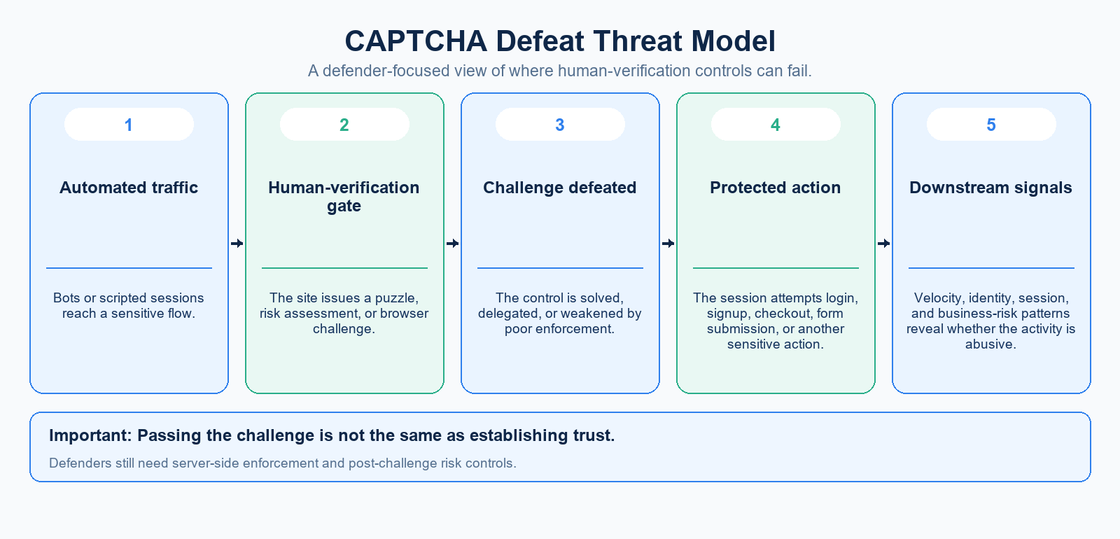
The mechanics vary by challenge provider and application, but most CAPTCHA defeat can be understood through a small number of threat classes.
Machine solving of legacy challenges
Traditional text, image, and audio CAPTCHAs depend on a gap between what people and machines can recognize. That gap has narrowed. OWASP notes that CAPTCHA defeat can use OCR, prepared image matching, other machine-reading techniques, or human farms.
From a defender's perspective, the important point is not which model or library is used. It is that a visual puzzle should not be assumed to create a durable barrier against automation simply because it is inconvenient for a basic script.
Human-in-the-loop solving
A bot does not have to solve every challenge itself. A larger automated workflow can pause at the verification step, obtain a valid human solution, and resume automated activity afterward.
This changes the economics of CAPTCHA. If the rest of the workflow is automated, the attacker only needs human effort at the narrow point where the site asks for proof of humanity. The downstream action can still occur at machine scale.
That is why defenders should ask what happens after the challenge is passed. If one successful solve grants broad trust to an entire session, a human-verification step may become a temporary toll rather than a durable control.
Automated browser workflows
Modern bot traffic can behave much more like normal browser traffic than older request scripts. The browser can load JavaScript, preserve cookies, move through multi-step flows, and react to whether a site presents a challenge.
The safe defensive conclusion is not that a particular automation framework can “beat CAPTCHA.” It is that the challenge exists inside a larger application workflow, so detection should also examine the larger workflow: session state, navigation, identity, request velocity, account behavior, and the protected action itself.
Weak enforcement around a valid challenge
Some CAPTCHA failures are implementation failures rather than challenge-solving breakthroughs. A site can render a modern challenge correctly and still weaken the protection if the backend does not verify the result or does not enforce it at the sensitive action.
Google's server-side verification guidance requires the application backend to verify the response token. The reCAPTCHA tokens described there are single-use and expire after two minutes. reCAPTCHA v3 guidance also requires checking that the returned action matches the expected protected action.
hCaptcha follows the same architectural principle: its developer guidance requires applications to verify returned passcodes server-side and describes those passcodes as short-lived and single-use.
The architectural rule is straightforward: client-side appearance is not enforcement.
Why Modern CAPTCHAs Are More Than Visual Puzzles
The old mental model is a distorted word or a grid of traffic lights. Current human-verification products increasingly operate as risk systems.
Cloudflare Turnstile can run non-interactive checks in the browser and adapt the challenge to the visitor. Cloudflare also documents challenge systems that gather browser-side signals and combine them with other bot-detection controls.
Google's score-based reCAPTCHA products similarly focus on risk assessment rather than forcing every visitor through the same visible puzzle. This means the modern question is often not “can the bot recognize the image?” but “does the complete request and session look trustworthy enough to allow the protected action?”
That shift has two consequences for defenders.
First, a visible challenge may be only one part of the decision. Second, the absence of a visible CAPTCHA does not mean the application has no bot protection. Risk scoring, JavaScript detections, WAF decisions, and server-side assessments can all operate without an image puzzle.
Why a Solved CAPTCHA Does Not Equal a Trusted User
A CAPTCHA answers a narrow question: did this verification step return an acceptable result?
It does not answer broader questions such as:
- Is this account legitimate?
- Is the session behaving normally?
- Is one actor creating many accounts?
- Is the transaction consistent with prior behavior?
- Is a login attempt part of credential stuffing?
- Is a verified session submitting forms or purchases at abusive velocity?
This is why OWASP's bot-management guidance recommends layered controls. A request may look acceptable at one layer while looking obviously abusive at another.
A useful trust model is therefore:
challenge result + session context + identity + velocity + business action
not:
CAPTCHA passed = safe
What Happens After CAPTCHA Defeat
The business impact depends on which endpoint the CAPTCHA was protecting.
At login, automated traffic may continue credential-stuffing or password-spraying attempts. At signup, it can create batches of fake accounts. At forms, it can inject junk leads or spam. At checkout, it can support payment abuse, inventory manipulation, or fraudulent purchases. At content endpoints, it can contribute to large-scale scraping.
OWASP's Automated Threats project separates these behaviors into distinct abuse categories because the same bot infrastructure can pursue different goals. CAPTCHA Defeat is often an enabling step rather than the attacker's final objective.
That distinction matters operationally. If a team only measures “CAPTCHA solved” and “CAPTCHA failed,” it may miss the event that actually matters: what the verified session did next.
What Defenders Can Observe
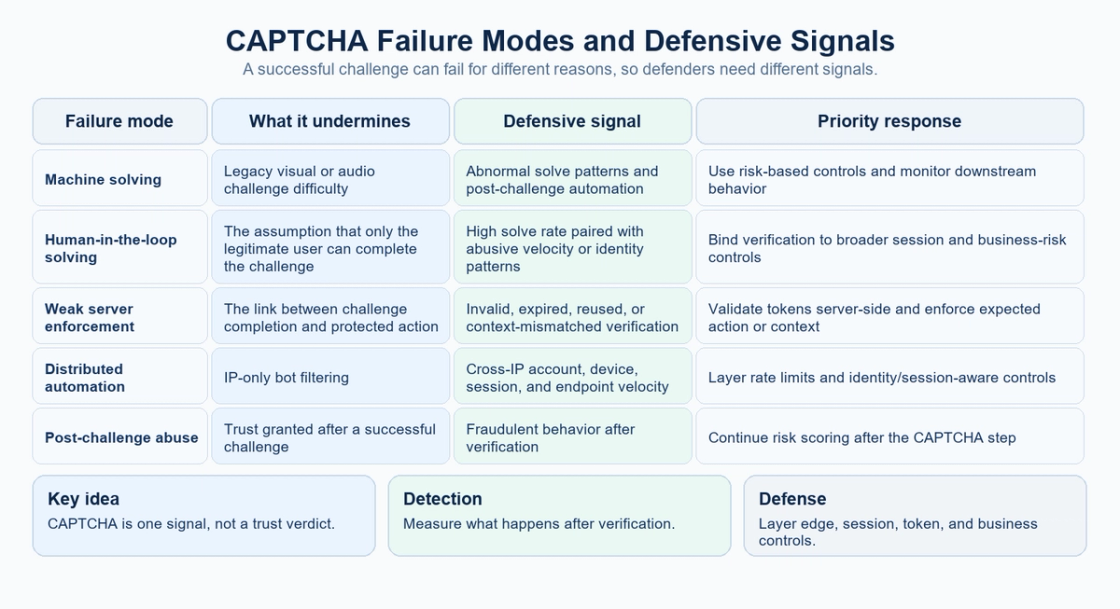
The strongest signals are usually combinations rather than one magic indicator.
Useful defensive telemetry includes:
- challenge issuance and solve rates;
- invalid, expired, or rejected verification attempts;
- repeated protected actions after successful verification;
- account-creation or login velocity;
- many accounts associated with the same session or device pattern;
- one account appearing across implausible network or session patterns;
- payment, checkout, or form behavior that changes abruptly after challenge completion;
- endpoint-specific request rates;
- spikes in successful CAPTCHA completion without a matching improvement in legitimate conversion.
OWASP's credential-stuffing guidance specifically notes that CAPTCHA solve-rate metrics can help identify both automated CAPTCHA breaking and friction imposed on legitimate users.
The goal is not to treat every unusual signal as malicious. The goal is to make automated abuse visible across the entire funnel. Collection and retention of these signals should also follow privacy and data-minimization requirements.
Why CAPTCHA Bypass Is a Layered Security Problem
CAPTCHA sits in the application layer, but the attacker's workflow crosses multiple layers.
At the edge, a defender may see network reputation, request rate, protocol characteristics, and broad traffic anomalies. At the application layer, the site can see session state, challenge outcomes, login or form behavior, and endpoint velocity. At the identity and business layer, the application can see account age, transaction patterns, payment risk, inventory behavior, and other signals that a CAPTCHA provider cannot fully understand by itself.
This is why per-IP rate limiting is useful but insufficient on its own. Distributed automation can spread requests across many addresses, while authenticated abuse may be more visible by account or session than by IP.
A layered model also reduces dependence on any single vendor decision. If one challenge is solved, the next control can still detect suspicious behavior.
How to Reduce CAPTCHA Bypass Risk
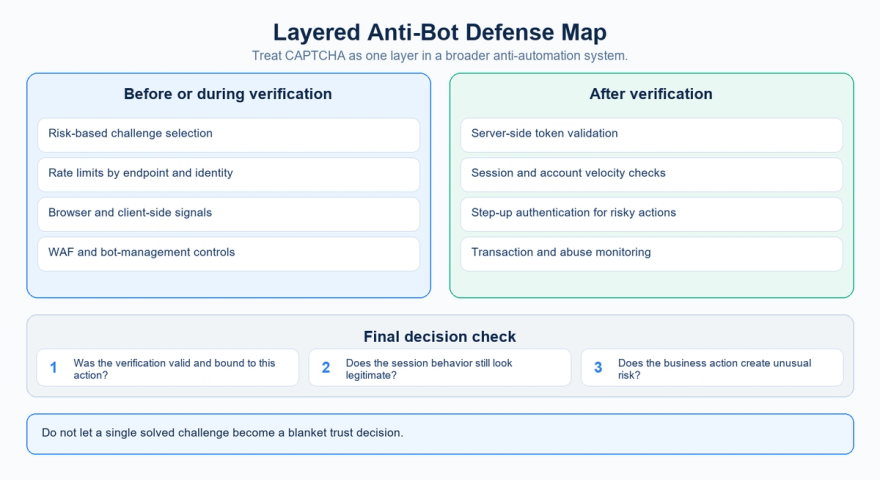
The practical objective is to keep the protected action secure even when a challenge is occasionally solved. In the diagram, "after verification" means after the user completes the challenge but before the sensitive action is allowed: server-side validation must precede that action.
1. Enforce verification on the server
Never treat a client-side widget or visual success state as sufficient. Validate the returned token or assessment on the backend and reject invalid, expired, reused, or context-mismatched verification.
2. Bind verification to the sensitive action
The challenge should protect the actual action that matters: login, account creation, payment, form submission, password reset, or another abuse-sensitive endpoint. Risk assessment should occur close to that action, not only when a page loads.
3. Use adaptive challenges instead of challenging everyone
CAPTCHA is most useful as step-up friction for suspicious traffic, not necessarily as a permanent obstacle for every user. Risk scoring allows low-risk users to move through the flow while higher-risk sessions receive additional verification.
4. Layer rate limits and identity-aware controls
Rate limits should exist at more than one key: IP, endpoint, session, and authenticated identity where available. This makes simple distribution across addresses less effective.
5. Keep monitoring after the CAPTCHA passes
A verified session can still be abusive. Continue evaluating account velocity, transaction risk, form behavior, session anomalies, and other business signals.
6. Add stronger step-up controls for high-risk actions
For sensitive account or financial actions, use stronger verification when risk rises. The exact control depends on the application, but the design principle is to escalate friction when the business consequence is high.
7. Combine CAPTCHA with bot-management and edge controls
Turnstile, WAF, bot management, and application fraud controls address different parts of the problem and can complement one another. No single product combination is mandatory. Choose the layers that match the threat model and verify that they reduce the actual abuse.
CAPTCHA, User Experience, and Accessibility
A security control that blocks legitimate users creates its own risk.
Visible image and audio CAPTCHAs can add friction, particularly for users with visual, auditory, cognitive, or motor impairments. WCAG 2.2 guidance on CAPTCHA requires text alternatives that describe the purpose of CAPTCHA content and alternative forms that use different sensory modalities when the CAPTCHA depends on non-text content.
This is another reason to avoid treating “make the puzzle harder” as the entire security strategy. A challenge that frustrates humans while motivated automation simply routes around it can produce poor security and poor usability at the same time.
Risk-based or non-interactive verification can reduce visible friction, but it still needs careful tuning, privacy review, monitoring, and a fallback path for legitimate users who are misclassified.
FAQ
Can bots bypass CAPTCHA?
Yes. OWASP recognizes CAPTCHA Defeat as an automated threat. Depending on the system, a challenge may be machine-solved, delegated to a human, weakened by poor enforcement, or passed while later behavior remains abusive.
Can AI solve CAPTCHA?
Machine vision and other machine-reading techniques can solve some classes of visual or audio challenges. That does not mean every modern human-verification system is simply an image-recognition problem; many current systems also use browser, behavioral, session, and server-side risk signals.
Do CAPTCHA-solving services make CAPTCHA useless?
No. CAPTCHA can still block or slow unsophisticated automation and raise attacker cost. The problem is relying on it as the only control. If a solver can provide a valid challenge result and the application grants broad trust afterward, the rest of the abusive workflow may continue.
Is reCAPTCHA enough to stop bots?
No single challenge should be treated as sufficient for every threat. Google's own guidance for automated threats includes backend assessments and broader fraud-mitigation strategies. The required defense depends on the protected action and the abuse you are trying to stop.
Why is server-side CAPTCHA verification important?
Because the backend is where the application decides whether to allow the protected action. A client-side success state alone should not be trusted. The server should validate the verification result and apply the appropriate risk or business rule.
What is the best defense against CAPTCHA bypass?
Defense in depth. Combine human verification with server-side enforcement, rate limits, bot-management signals, identity and session controls, and post-challenge monitoring. The goal is to make one successful challenge insufficient to unlock an entire abusive workflow.
Should every user see a CAPTCHA?
Usually not. Risk-based step-up verification can reduce friction for normal users while applying stronger controls to suspicious traffic. The correct threshold depends on your user population, abuse patterns, and false-positive tolerance.
Final Takeaway
The useful security interpretation of how to bypass captcha is not a list of tricks. It is a map of where human-verification systems can fail.
Fraudsters do not need a universal CAPTCHA breaker. They only need one scalable path through the verification layer: machine solving, delegated human solving, weak enforcement, or a session that looks acceptable at the challenge step but becomes abusive afterward.
That is why CAPTCHA should remain a component, not a verdict.
Verify challenge results on the server. Bind them to the protected action. Rate-limit by more than IP. Continue evaluating the session after verification. Use stronger step-up controls when the business risk rises. And measure downstream abuse, not only challenge completion.
The strongest anti-bot system is not the one with the hardest puzzle. It is the one in which passing one puzzle still does not grant enough trust to complete an abusive workflow.
Review your verification flow
Choose one protected endpoint and trace challenge issuance, server validation, the sensitive action, and downstream monitoring. Use the OWASP checklist to identify existing controls and gaps.
Sources
Official documentation checked September 13, 2026. Dates below are page publication or update dates where provided.
- OWASP: OAT-009 CAPTCHA Defeat
- Google: Verifying the user's response (2024-10-14)
- Google: reCAPTCHA v3 (2024-07-10)
- hCaptcha: Developer Guide
- Cloudflare: Turnstile overview (2026-08-14)
- OWASP: Bot Management and Anti-Automation Cheat Sheet
- OWASP: Credential Stuffing Prevention Cheat Sheet
- W3C: Understanding SC 1.1.1 Non-text Content