
Overview
Workflow at a glance
Inspect the first response
Check the status and Location before following the redirect chain.
Follow and inspect the final request
Use -L with a redirect limit; verify the final URL, method and body.
Use curl --location URL, or curl -L URL, to follow an HTTP redirect. Add a redirect limit and inspect the final URL before treating the returned body as your intended page. By default, curl returns the initial response without following its Location header.
For scraping and location testing, a successful final status is only part of the result. A chain may end at a login page, a regional homepage or a different host with content your parser was not expecting.
Follow the chain and keep the evidence
Replace TARGET_URL with the starting address. This macOS/Linux command saves response headers and body separately and reports the final destination:
curl --location --max-redirs 5 --max-time 30 \
  --silent --show-error --dump-header redirect-headers.txt \
  --output response.html \
  --write-out 'final=%{url_effective} status=%{http_code} redirects=%{num_redirects}\n' \
  'TARGET_URL'
The header file contains the responses encountered along the chain. Match each status with its Location value, then inspect the final body. Header files can contain cookies, so remove sensitive fields before sharing them. On Windows, use curl.exe and put the command on one line.
To inspect only the initial response without following it, omit --location. --head makes a HEAD request; it does not simply hide the body of a GET request. Use a GET with its body discarded if the server treats HEAD differently. See the curl redirect guide.
Check the method when a POST is redirected
Response | Usual |
|---|---|
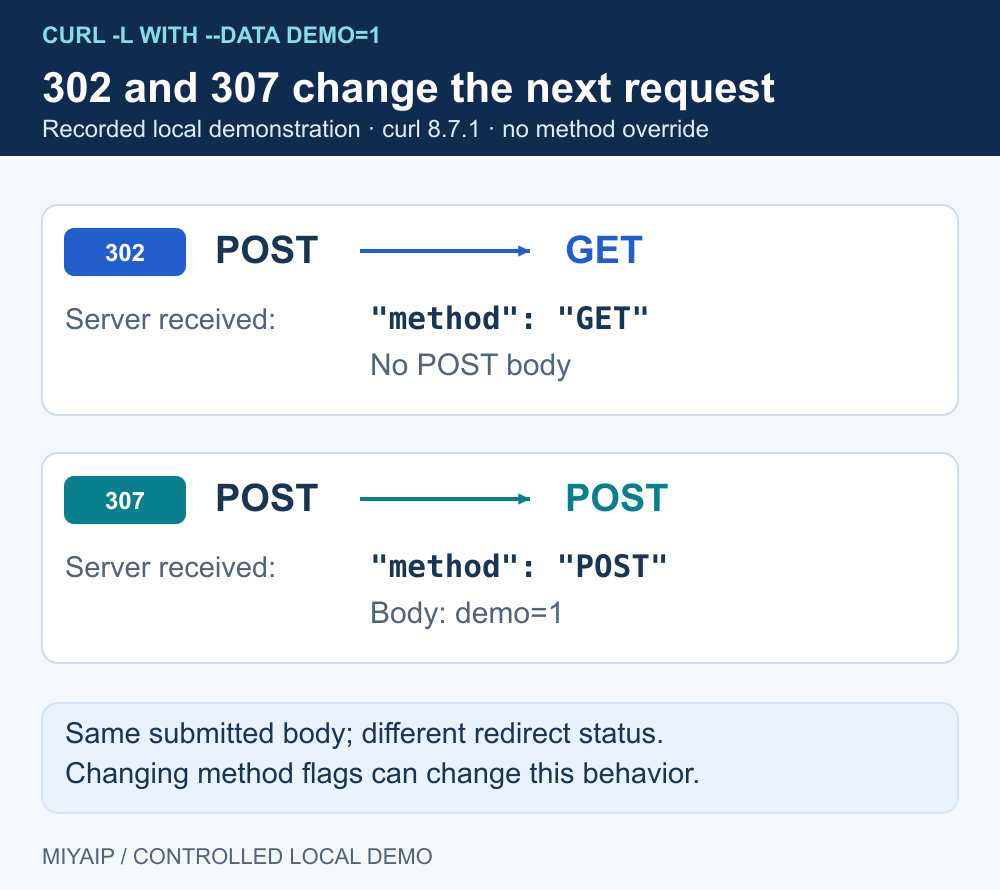
301 or 302 | curl changes the following request to GET by default |
303 | The following request normally becomes GET |
307 or 308 | The method and body are preserved |
Avoid adding -X POST merely to make a request with data. An explicit custom method can produce different redirect behavior from the normal method curl chooses. Use method-preserving options only when the target API contract requires them, and verify the receiving endpoint.
Treat a redirect to another host as a new destination. curl restricts forwarding of standard authentication credentials across hosts by default; --location-trusted relaxes that protection. Custom secret headers such as X-API-Key require particular care. Inspect destinations and avoid blindly following redirects when credentials belong to only one origin.
Compare no-follow, follow and loop behavior locally
Start the included network_demo.py. Its routes return controlled responses and make no external requests.
curl --noproxy '*' --silent --output /dev/null \
  --write-out '%{http_code}\n' 'http://127.0.0.1:8766/redirect'

curl --noproxy '*' --silent --location --max-redirs 5 \
  'http://127.0.0.1:8766/redirect'

curl --noproxy '*' --location --max-redirs 2 \
  'http://127.0.0.1:8766/loop'
The first command reports 302. The second reaches the JSON response at /headers. The third stops with curl exit code 47 because the redirect limit is exhausted. These local outcomes make a loop distinguishable from a connection timeout.
The same fixture provides /redirect302 and /redirect307 for POST comparisons. Send --data 'demo=1' with --location: the first final response reports GET, while the second reports POST. Use only demonstration data in this test.
Keep routing consistent across the redirect chain
When testing through MIYAIP, add the assigned proxy fields to the same command. Confirm the applicable session policy and inspect each destination. A stable proxy endpoint string does not by itself prove that a rotating service kept the same exit for every request.
Compare direct and proxied results only with the same starting URL, method, headers and redirect policy. Differences may reflect language, region, authentication or destination rules; they are not automatically proof of a faulty proxy. For a browser-based check, the IP and browser environment tool reports what that browser sees, while curl is a separate client.
If you set an explicit client identifier, set and verify the cURL User-Agent, then keep that value unchanged when comparing redirect behavior.
For a scraper, validate the final content type and required fields before export. A 200 login page should not become a successful product record. If redirects must stay within a known set of hosts, inspect and follow approved steps explicitly; a numeric redirect limit does not enforce a host allowlist.
Frequently asked questions
Does curl follow JavaScript redirects?
No. --location follows HTTP redirects. It does not execute JavaScript or provide a browser runtime. Use a browser workflow when the task requires page execution.
Can I use --max-redirs 0 ?
With redirect following enabled, zero prevents following any redirect. It is useful when an unexpected redirect should cause the request to stop.
Why is the final status 200 but my data missing?
Inspect the final URL, response type and body. The chain may have reached a different page. Validate content as well as transport success.
Connect the request to the right workflow
Use proxy connection examples for HTTP requests, or compare browser and API routes when the task needs more than a redirect.
Next steps
Run the local demonstration
Download network_demo.py, or copy the complete source below into a file with that name. Run python network_demo.py using Python 3. The service listens only on 127.0.0.1:8766; stop it with Ctrl+C.
"""Local HTTP demonstration. No external requests, credentials or MIYAIP service calls."""
from http.server import BaseHTTPRequestHandler, ThreadingHTTPServer
from urllib.parse import urlsplit
import json
import time


class DemoHandler(BaseHTTPRequestHandler):
    def log_message(self, *_):
        pass

    def reply(self, code, body=b"", headers=None):
        self.send_response(code)
        for key, value in (headers or {}).items():
            self.send_header(key, value)
        self.send_header("Content-Length", str(len(body)))
        try:
            self.end_headers()
            self.wfile.write(body)
        except (BrokenPipeError, ConnectionResetError, ConnectionAbortedError):
            pass

    def do_CONNECT(self):
        self.reply(407, headers={"Proxy-Authenticate": 'Basic realm="local-demo"'})

    def do_GET(self):
        path = urlsplit(self.path).path
        if path == "/redirect":
            return self.reply(302, headers={"Location": "/headers"})
        if path == "/loop":
            return self.reply(302, headers={"Location": "/loop"})
        if path == "/slow":
            time.sleep(2)
        if path in {"/headers", "/slow"}:
            payload = {"method": self.command, "headers": dict(self.headers)}
            return self.reply(200, json.dumps(payload, indent=2).encode(),
                              {"Content-Type": "application/json"})
        self.reply(404, b"Use /headers, /redirect, /loop or /slow")

    def do_POST(self):
        body = self.rfile.read(int(self.headers.get("Content-Length", "0")))
        if urlsplit(self.path).path == "/redirect307":
            return self.reply(307, headers={"Location": "/headers"})
        if urlsplit(self.path).path == "/redirect302":
            return self.reply(302, headers={"Location": "/headers"})
        payload = {"method": self.command, "headers": dict(self.headers),
                   "body": body.decode("utf-8", errors="replace")}
        self.reply(200, json.dumps(payload, indent=2).encode(),
                   {"Content-Type": "application/json"})


if __name__ == "__main__":
    print("Local demonstration: http://127.0.0.1:8766 (Ctrl+C to stop)", flush=True)
    ThreadingHTTPServer(("127.0.0.1", 8766), DemoHandler).serve_forever()