
Overview
Workflow at a glance
Choose one header setting
Use --user-agent or -A with a clear application identifier.
Inspect the received field
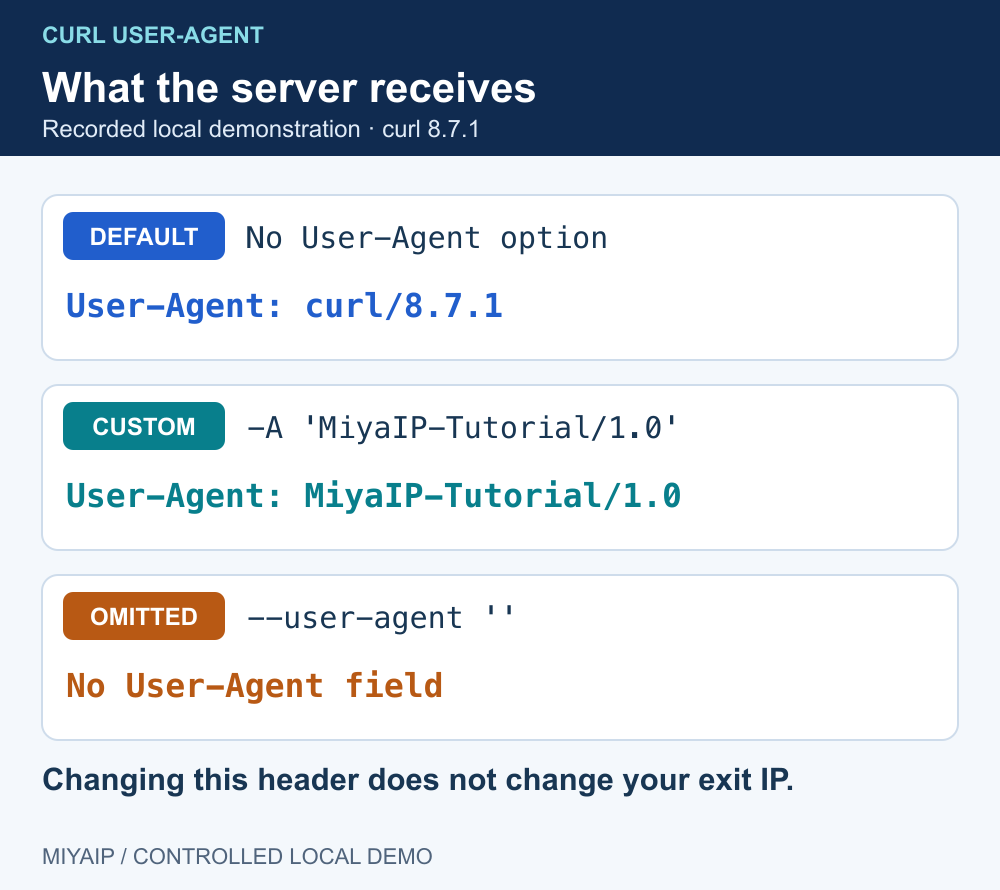
Compare default, custom and omitted User-Agent values at the local receiver.
Set a cURL User-Agent with curl --user-agent 'MiyaIP-Tutorial/1.0' URL, or use the short option -A. The value identifies the client in an HTTP header. It does not change the connection's IP address or turn curl into a browser.
Use an explicit identifier when documenting an integration, testing how a service handles different client names, or reproducing an application's HTTP request. Verify the value at the receiver before attributing a response difference to it.
Set, replace or remove the User-Agent header
Goal | curl option |
|---|---|
Set an application identifier |
|
Use the short form |
|
Set it as an ordinary request header |
|
Omit the User-Agent field |
|
Choose one method for setting the header in a command. Combining multiple User-Agent options makes the intended value harder to audit. The curl command normally sends a curl/version identifier when you do not override it; inspect your actual result rather than assuming a particular version number.
The official curl guide explains the User-Agent option. --user is a different option: it supplies destination authentication credentials, not a User-Agent string.
Compare three requests against a local echo endpoint
Start the included network_demo.py. Its /headers route returns the received HTTP fields. These commands use loopback and send no account credentials:
curl --noproxy '*' 'http://127.0.0.1:8766/headers'

curl --noproxy '*' --user-agent 'MiyaIP-Tutorial/1.0' \
  'http://127.0.0.1:8766/headers'

curl --noproxy '*' --user-agent '' \
  'http://127.0.0.1:8766/headers'
Request | Receiver observation in the local demonstration |
|---|---|
Default command | A User-Agent beginning with |
Custom identifier |
|
Empty User-Agent argument | No User-Agent field |
On Windows, call curl.exe explicitly. Empty native arguments can behave differently in older PowerShell versions; --header 'User-Agent:' is an alternative way to suppress curl's generated field. Verify the receiver's result in the shell you actually use.
For a production service, inspect a redacted application log or an endpoint you control. Do not send cookies or API keys to a public header-echo service just to check the User-Agent.
A User-Agent and a proxy change different parts of the request
A User-Agent is metadata sent by the client. A forward proxy changes the route and the exit visible to the destination. Keep these variables separate when comparing results.
For an HTTP proxy, the macOS/Linux template below sends a custom User-Agent to an HTTPS destination. Replace the connection fields; curl prompts for the proxy password when only a username is supplied.
curl --proxy 'http://PROXY_HOST:PROXY_PORT' \
  --proxy-user 'PROXY_USERNAME' --noproxy '' \
  --user-agent 'MiyaIP-Tutorial/1.0' \
  --connect-timeout 10 --max-time 30 \
  'https://example.com/'
Use the MIYAIP protocol examples if your assigned connection is SOCKS5 or requires a different mode. --proxy-header addresses a separate proxy-facing header use case; it is not a substitute for setting the destination's User-Agent.
To compare server behavior, keep the target, method, cookies, proxy session and redirect policy fixed. Change one User-Agent value and record the response status and expected content. A different result is evidence for that test condition, not proof that User-Agent is the only signal the service uses.
Diagnose what the header cannot change
Observation | Next check |
|---|---|
The server sees the old value | Shell quoting, the actual executable, wrapper scripts and competing header options |
The page still requires JavaScript | Use a browser workflow; changing this header does not execute scripts |
A connection error occurs before an HTTP response | Check endpoint reachability and proxy configuration first |
A 403 response remains | Read the service's response and allowed access methods; a copied browser string does not grant access |
Region is wrong | Verify the actual exit and product location setting; User-Agent does not select geography |
Frequently asked questions
Does a browser User-Agent give curl a browser fingerprint?
No. The TLS handshake, JavaScript runtime, cookies and many other behaviors remain those of the actual client and its configuration.
Is removing User-Agent the same as sending a blank header?
No. Omission and an empty field are different wire representations. Inspect the receiver if the distinction matters to your test.
Should I rotate User-Agent on every request?
Only when varying that field is part of a defined test. For a reproducible integration, a stable, descriptive application identifier makes results easier to compare.
Verify the network path independently
After checking request metadata, confirm the proxy endpoint and use the intended routing mode in the actual application.
Next steps
Run the local demonstration
Download network_demo.py, or copy the complete source below into a file with that name. Run python network_demo.py using Python 3. The service listens only on 127.0.0.1:8766; stop it with Ctrl+C.
"""Local HTTP demonstration. No external requests, credentials or MIYAIP service calls."""
from http.server import BaseHTTPRequestHandler, ThreadingHTTPServer
from urllib.parse import urlsplit
import json
import time


class DemoHandler(BaseHTTPRequestHandler):
    def log_message(self, *_):
        pass

    def reply(self, code, body=b"", headers=None):
        self.send_response(code)
        for key, value in (headers or {}).items():
            self.send_header(key, value)
        self.send_header("Content-Length", str(len(body)))
        try:
            self.end_headers()
            self.wfile.write(body)
        except (BrokenPipeError, ConnectionResetError, ConnectionAbortedError):
            pass

    def do_CONNECT(self):
        self.reply(407, headers={"Proxy-Authenticate": 'Basic realm="local-demo"'})

    def do_GET(self):
        path = urlsplit(self.path).path
        if path == "/redirect":
            return self.reply(302, headers={"Location": "/headers"})
        if path == "/loop":
            return self.reply(302, headers={"Location": "/loop"})
        if path == "/slow":
            time.sleep(2)
        if path in {"/headers", "/slow"}:
            payload = {"method": self.command, "headers": dict(self.headers)}
            return self.reply(200, json.dumps(payload, indent=2).encode(),
                              {"Content-Type": "application/json"})
        self.reply(404, b"Use /headers, /redirect, /loop or /slow")

    def do_POST(self):
        body = self.rfile.read(int(self.headers.get("Content-Length", "0")))
        if urlsplit(self.path).path == "/redirect307":
            return self.reply(307, headers={"Location": "/headers"})
        if urlsplit(self.path).path == "/redirect302":
            return self.reply(302, headers={"Location": "/headers"})
        payload = {"method": self.command, "headers": dict(self.headers),
                   "body": body.decode("utf-8", errors="replace")}
        self.reply(200, json.dumps(payload, indent=2).encode(),
                   {"Content-Type": "application/json"})


if __name__ == "__main__":
    print("Local demonstration: http://127.0.0.1:8766 (Ctrl+C to stop)", flush=True)
    ThreadingHTTPServer(("127.0.0.1", 8766), DemoHandler).serve_forever()