
Overview
Workflow at a glance
Set connect and read timeouts
Use explicit timeout values and catch the relevant Requests exceptions.
Verify the application deadline
Test the delayed local endpoint and control the overall job deadline separately.
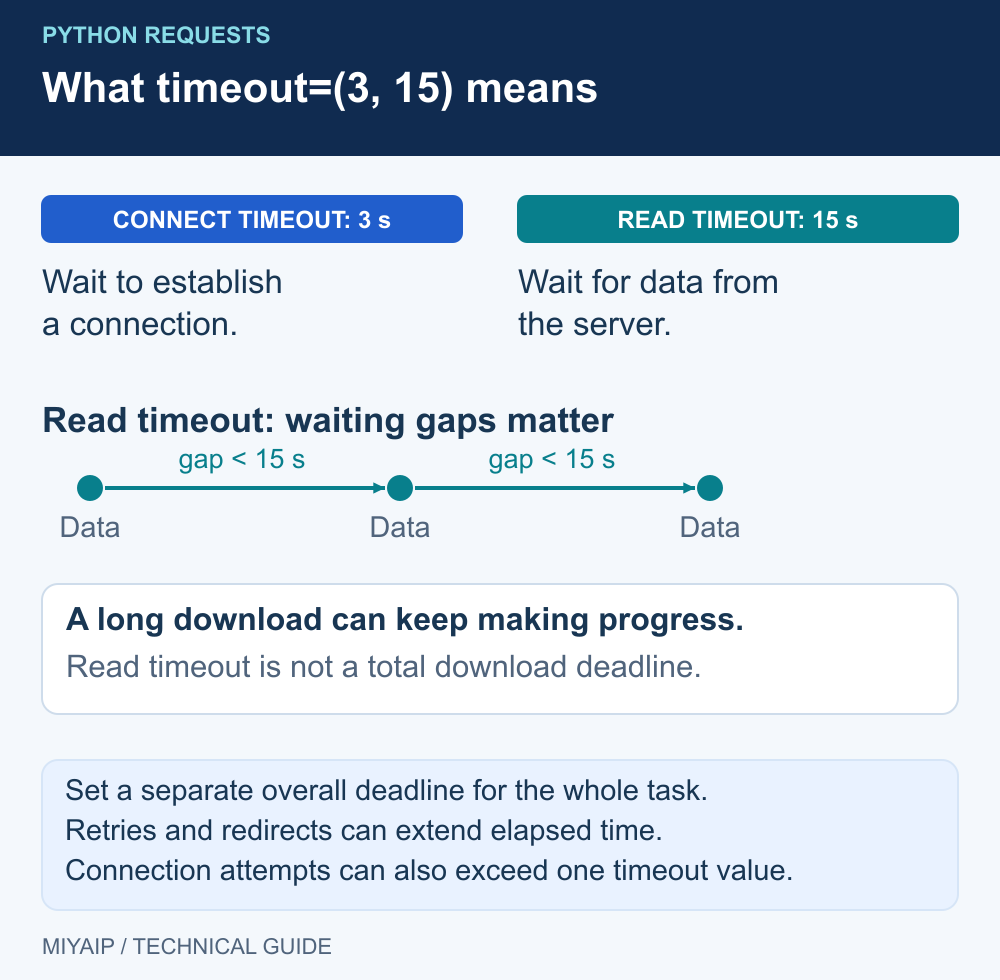
Set a Python Requests timeout explicitly, for example requests.get(url, timeout=(3, 15)). The tuple separates connection setup from waiting for response data. Requests does not impose a default timeout, and this setting is not a deadline for the entire scraping job.
Use the timeout together with a response-status check and a small set of error categories. That lets a worker stop predictably and report whether the next action belongs to the network, proxy configuration or destination.
Choose connect and read limits separately
Setting | Meaning | Example use |
|---|---|---|
| Apply the same value to connect and read timeouts | A simple starting configuration |
| Use different connect and read limits | Fail sooner on a connection that cannot open, while allowing a slower response |
| No Requests timeout for the operation | Avoid for an unattended worker unless another mechanism controls its lifetime |
A read timeout concerns inactivity while waiting for response data; it is not a maximum size or total download duration. Retries, multiple address attempts and redirects can add further time. Values such as 3 and 15 seconds are example settings. The Requests timeout documentation describes these semantics.
Send one request and report a useful outcome
Install Requests with python -m pip install requests. The example below makes one read-only request and does not retry it automatically.
import requests

url = "https://example.com/"
try:
    response = requests.get(url, timeout=(3, 15))
    response.raise_for_status()
    print({"outcome": "ok", "status": response.status_code})
except requests.exceptions.ConnectTimeout:
    print({"outcome": "connect_timeout"})
except requests.exceptions.ReadTimeout:
    print({"outcome": "read_timeout"})
except requests.exceptions.ProxyError:
    print({"outcome": "proxy_error"})
except requests.exceptions.SSLError:
    print({"outcome": "tls_error"})
except requests.exceptions.HTTPError as error:
    print({"outcome": "http_error", "status": error.response.status_code})
except requests.exceptions.RequestException:
    print({"outcome": "request_error"})
The specific exception handlers come before the general handler. A proxy negotiation problem is not guaranteed to arrive as Timeout, and failures while consuming a streamed response can be wrapped differently. The final handler prevents those request failures from being mistaken for a successful empty result. It deliberately avoids printing raw exception strings that may contain connection information.
Separate proxy configuration from response waiting
If the application uses MIYAIP, copy the protocol, endpoint and credentials from its connection settings and follow the Requests proxy example. Keep the same target and timeout while comparing routes. For a native connection, verify its required network path before assuming that a larger read timeout will help.
Outcome | Useful next check |
|---|---|
| Endpoint reachability, DNS, port and the route from this runtime |
| Destination response time, response size and whether the route stalls after connection |
| Proxy protocol, credentials, CONNECT response and configuration inherited from the environment |
| Certificate chain, hostname and the trust store used by this Python environment |
| The actual response status and destination instructions, including rate-limit headers |
Requests can use environment proxy settings. A notebook, container and scheduled worker may inherit different variables. Compare the active configuration without exposing passwords. For an isolated local demonstration, a Session with trust_env=False avoids inheriting proxy and other environment settings; do not apply that switch blindly to a deployment that needs them.
A request timeout is not a complete job deadline
For a multi-URL job, separately control the number of attempts, time spent waiting between attempts and the overall task lifetime. A thread future's waiting timeout stops the caller waiting; it does not automatically cancel the Requests operation in the worker. If a task needs a strict wall-clock stop, give the execution system an explicit cancellation or process-termination mechanism.
Use the included local demonstration server to see a read timeout without depending on an external slow site. Start network_demo.py, then run:
import requests

with requests.Session() as session:
    session.trust_env = False
    try:
        session.get("http://127.0.0.1:8766/slow", timeout=(1, 0.2))
    except requests.exceptions.ReadTimeout:
        print("read_timeout")
The demonstration route waits two seconds before sending its response, so the 0.2-second read wait expires. Increasing the read value to 3 allows this local response to finish. This demonstrates how the code reacts to a delayed response.
Frequently asked questions
Does a Requests Session give every request a default timeout?
Creating a Session alone does not add one. Pass timeout on each call or use a wrapper that consistently supplies it.
Is a ten-second timeout guaranteed to finish the whole call in ten seconds?
No. Connect/read limits and total elapsed time are different. Account for redirects, address attempts, response streaming and any retries in the surrounding workflow.
Should every timeout be retried?
No. Check whether the operation is safe to repeat and whether the cause looks transient. The MIYAIP scraping example includes bounded attempts and deferred handling of Retry-After for a collection workflow.
Verify the route before scaling the job
Start with one valid request, confirm its result and then choose limits for the actual workload.
Next steps
Run the local demonstration
Download network_demo.py, or copy the complete source below into a file with that name. Run python network_demo.py using Python 3. The service listens only on 127.0.0.1:8766; stop it with Ctrl+C.
"""Local HTTP demonstration. No external requests, credentials or MIYAIP service calls."""
from http.server import BaseHTTPRequestHandler, ThreadingHTTPServer
from urllib.parse import urlsplit
import json
import time


class DemoHandler(BaseHTTPRequestHandler):
    def log_message(self, *_):
        pass

    def reply(self, code, body=b"", headers=None):
        self.send_response(code)
        for key, value in (headers or {}).items():
            self.send_header(key, value)
        self.send_header("Content-Length", str(len(body)))
        try:
            self.end_headers()
            self.wfile.write(body)
        except (BrokenPipeError, ConnectionResetError, ConnectionAbortedError):
            pass

    def do_CONNECT(self):
        self.reply(407, headers={"Proxy-Authenticate": 'Basic realm="local-demo"'})

    def do_GET(self):
        path = urlsplit(self.path).path
        if path == "/redirect":
            return self.reply(302, headers={"Location": "/headers"})
        if path == "/loop":
            return self.reply(302, headers={"Location": "/loop"})
        if path == "/slow":
            time.sleep(2)
        if path in {"/headers", "/slow"}:
            payload = {"method": self.command, "headers": dict(self.headers)}
            return self.reply(200, json.dumps(payload, indent=2).encode(),
                              {"Content-Type": "application/json"})
        self.reply(404, b"Use /headers, /redirect, /loop or /slow")

    def do_POST(self):
        body = self.rfile.read(int(self.headers.get("Content-Length", "0")))
        if urlsplit(self.path).path == "/redirect307":
            return self.reply(307, headers={"Location": "/headers"})
        if urlsplit(self.path).path == "/redirect302":
            return self.reply(302, headers={"Location": "/headers"})
        payload = {"method": self.command, "headers": dict(self.headers),
                   "body": body.decode("utf-8", errors="replace")}
        self.reply(200, json.dumps(payload, indent=2).encode(),
                   {"Content-Type": "application/json"})


if __name__ == "__main__":
    print("Local demonstration: http://127.0.0.1:8766 (Ctrl+C to stop)", flush=True)
    ThreadingHTTPServer(("127.0.0.1", 8766), DemoHandler).serve_forever()