
Overview
Workflow at a glance
Send explicit headers
Configure a controlled request and inspect its prepared headers.
Verify at the receiver
Compare the echo response and response headers; keep destination and proxy credentials separate.
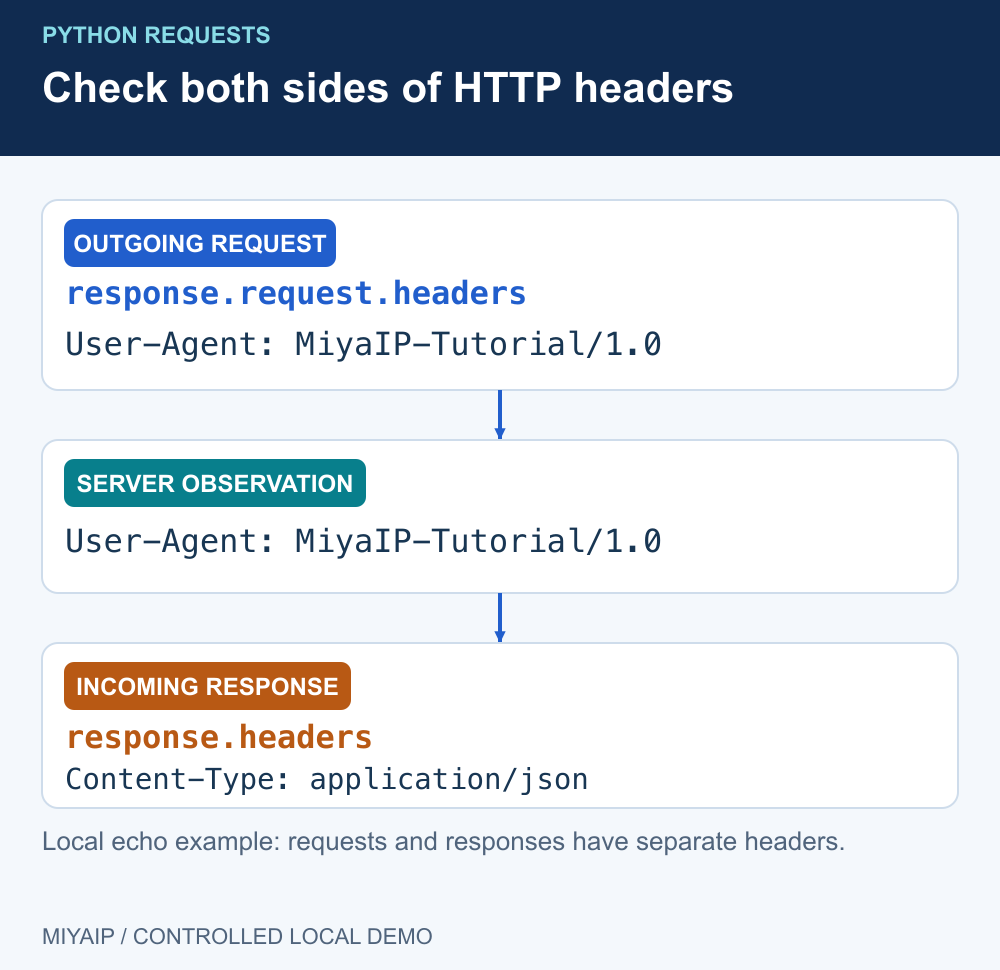
Pass a dictionary through headers= to send Python Requests headers. Inspect response.request.headers for the outgoing request and response.headers for the received response. Those objects describe opposite sides of the exchange.
Headers can declare the expected representation, identify an application or authenticate to an API. They do not change your source IP, run JavaScript or guarantee that a website will accept an automated request.
Send a request with explicit headers
Install Requests with python -m pip install requests. Start the included network_demo.py, then run this local example. The demonstration endpoint echoes the headers it receives.
import requests

headers = {
    "User-Agent": "MiyaIP-Tutorial/1.0",
    "Accept": "application/json",
}
with requests.Session() as session:
    session.trust_env = False  # Isolate this loopback demonstration.
    response = session.get(
        "http://127.0.0.1:8766/headers", headers=headers, timeout=(1, 3)
    )
    response.raise_for_status()
    print("sent_user_agent:", response.request.headers.get("User-Agent"))
    print("received_type:", response.headers.get("Content-Type"))
    observed = response.json()["headers"]
    print("server_saw:", observed.get("User-Agent"))
The local output identifies the sent User-Agent as MiyaIP-Tutorial/1.0, the response type as application/json, and the server-observed User-Agent as the same tutorial value. Compare selected non-sensitive fields rather than dumping every header from an authenticated production request.
Choose headers for the receiving service
Header | What it expresses | Common mistake |
|---|---|---|
| Preferred response representation | Assuming the server must return JSON because the client asked for it |
| The representation of the body being sent | Setting JSON while sending a form-encoded body |
| A client-supplied application identifier | Treating a browser-looking string as a complete browser environment |
| Credentials for the destination service | Using a proxy password or sending a token to the wrong host |
| Language preference | Assuming it changes the network exit country |
HTTP field names are case-insensitive, but use their conventional spelling for readability. Values still have their own syntax. The Requests quickstart explains custom headers and precedence.
Let the body format and Content-Type agree
Use json= for a JSON request body. Requests serializes the object and supplies its JSON Content-Type unless you override that header. This local example sends only demonstration data:
import requests

with requests.Session() as session:
    session.trust_env = False
    session.headers.update({"User-Agent": "MiyaIP-Tutorial/1.0"})
    response = session.post(
        "http://127.0.0.1:8766/headers",
        json={"demo": 1},
        headers={"Accept": "application/json"},
        timeout=(1, 3),
    )
    response.raise_for_status()
    print(response.request.headers.get("Content-Type"))
    print(response.json()["method"])
The example reports application/json and POST. A data= dictionary normally creates a form body instead. Do not set Content-Type manually unless it describes the body you actually send.
A Session is useful for common headers across requests. Per-request values can override those defaults. Keep authentication scoped to the intended destination; do not put a secret in a broadly reused Session and send it to unrelated services.
Keep destination headers separate from proxy credentials
For a MIYAIP proxy connection, configure the proxy URL and credentials through the proxies argument described in the connection guide. Do not add a proxy password as an ordinary Authorization header for the website. Likewise, an MCP key or Crawler API token belongs to its own service and authentication contract.
Unexpected result | What to inspect |
|---|---|
HTML arrives when JSON was requested | Status, actual response Content-Type, final URL and whether the endpoint supports JSON |
Header value differs from your dictionary | Session defaults, authentication configuration, prepared request and any redirect |
HTTP 401 | The destination service's authentication requirements |
HTTP 407 | Proxy authentication, independently of destination headers |
HTTP 403 | The response explanation and permitted access method; changing User-Agent alone is not a general fix |
Connection or TLS error | Diagnose the connection before adjusting content-negotiation headers |
For redirects, response.request describes the final request. Inspect the entries in response.history when an earlier request matters. Check only the fields needed for diagnosis; cookies and bearer tokens should stay out of shared logs.
Frequently asked questions
Is response.headers what my client sent?
No. It contains response headers. Use response.request.headers to inspect the associated outgoing request, or a controlled echo endpoint to see what the receiving server observed.
Does Accept-Language select a proxy country?
No. It declares a language preference. Proxy location selection happens in the connection configuration supported by the product.
Can headers make Requests execute JavaScript?
No. Choose a browser workflow when the task requires JavaScript execution or user-interface interaction.
Verify request configuration and network routing separately
Confirm the expected response first. Add a proxy only where the task needs its routing or exit behavior.
Next steps
Run the local demonstration
Download network_demo.py, or copy the complete source below into a file with that name. Run python network_demo.py using Python 3. The service listens only on 127.0.0.1:8766; stop it with Ctrl+C.
"""Local HTTP demonstration. No external requests, credentials or MIYAIP service calls."""
from http.server import BaseHTTPRequestHandler, ThreadingHTTPServer
from urllib.parse import urlsplit
import json
import time


class DemoHandler(BaseHTTPRequestHandler):
    def log_message(self, *_):
        pass

    def reply(self, code, body=b"", headers=None):
        self.send_response(code)
        for key, value in (headers or {}).items():
            self.send_header(key, value)
        self.send_header("Content-Length", str(len(body)))
        try:
            self.end_headers()
            self.wfile.write(body)
        except (BrokenPipeError, ConnectionResetError, ConnectionAbortedError):
            pass

    def do_CONNECT(self):
        self.reply(407, headers={"Proxy-Authenticate": 'Basic realm="local-demo"'})

    def do_GET(self):
        path = urlsplit(self.path).path
        if path == "/redirect":
            return self.reply(302, headers={"Location": "/headers"})
        if path == "/loop":
            return self.reply(302, headers={"Location": "/loop"})
        if path == "/slow":
            time.sleep(2)
        if path in {"/headers", "/slow"}:
            payload = {"method": self.command, "headers": dict(self.headers)}
            return self.reply(200, json.dumps(payload, indent=2).encode(),
                              {"Content-Type": "application/json"})
        self.reply(404, b"Use /headers, /redirect, /loop or /slow")

    def do_POST(self):
        body = self.rfile.read(int(self.headers.get("Content-Length", "0")))
        if urlsplit(self.path).path == "/redirect307":
            return self.reply(307, headers={"Location": "/headers"})
        if urlsplit(self.path).path == "/redirect302":
            return self.reply(302, headers={"Location": "/headers"})
        payload = {"method": self.command, "headers": dict(self.headers),
                   "body": body.decode("utf-8", errors="replace")}
        self.reply(200, json.dumps(payload, indent=2).encode(),
                   {"Content-Type": "application/json"})


if __name__ == "__main__":
    print("Local demonstration: http://127.0.0.1:8766 (Ctrl+C to stop)", flush=True)
    ThreadingHTTPServer(("127.0.0.1", 8766), DemoHandler).serve_forever()