
Screen scraping is a way to extract information from the interface a human user sees rather than from a purpose-built data feed. A scraper opens a website, desktop application, terminal, or other user-facing system, reaches the relevant screen, reads the required values, and converts them into structured data that another system can use.
The term is often treated as a synonym for web scraping, but that is too simple. Screen scraping is defined mainly by the layer being read: the presentation or user-interface layer. Web scraping is defined mainly by the environment being accessed: web-delivered resources. The two can overlap, but they are not identical.
Screen scraping is also broader than literal pixel reading. Modern UI automation can extract text from interface elements, use native application controls or selectors, inspect rendered web content, or fall back to optical character recognition (OCR) when the interface exposes little structure.
Quick Answer
A typical screen-scraping workflow looks like this:
- Open the target application or page.
- Navigate to the screen containing the required data.
- Identify the relevant UI elements or visible regions.
- Extract text, values, or images through UI automation, native text methods, selectors, or OCR.
- Normalize the result into a structured format.
- Validate and store the data or pass it to another workflow.
Screen scraping remains useful when an application has no usable API, export, or stable structured data layer. That is common in legacy software, desktop automation, terminal systems, and some third-party portals.
Its main trade-off is reliability. A screen scraper depends on how an application presents information, so layout changes, UI updates, window state, selectors, screen resolution, or authentication flows can break an automation that previously worked.
What Is Screen Scraping?
Screen scraping is the automated extraction of data from a user-facing interface.
The target might be:
- a web page rendered in a browser;
- a Windows desktop application;
- a legacy ERP or accounting program;
- a terminal emulator;
- a virtualized or remote application;
- a report that can only be accessed through an interface.
The important distinction is that the automation does not begin with a clean, purpose-built data contract. Instead, it works through the same presentation layer that a human uses to view or interact with the information.
That presentation layer may still expose useful structure. For example, a desktop automation tool can identify a text box as a UI element instead of guessing its location from screen coordinates. A browser can expose a page's Document Object Model (DOM). A terminal may expose text fields. If none of those layers is accessible, OCR can interpret text from rendered pixels or images.
That is why “screen scraping = taking a screenshot and reading pixels” is an incomplete definition.
How Does Screen Scraping Work?
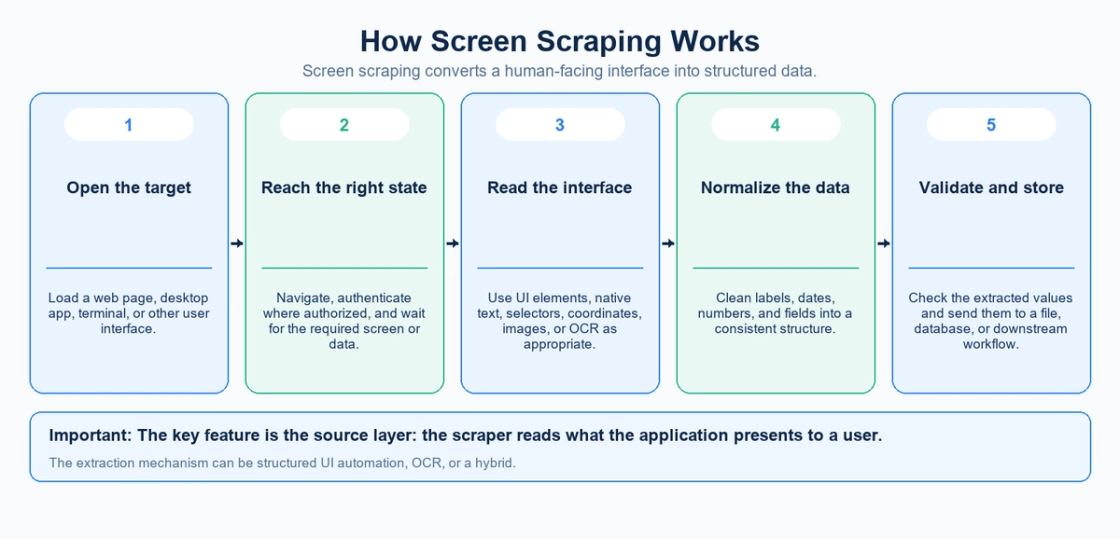
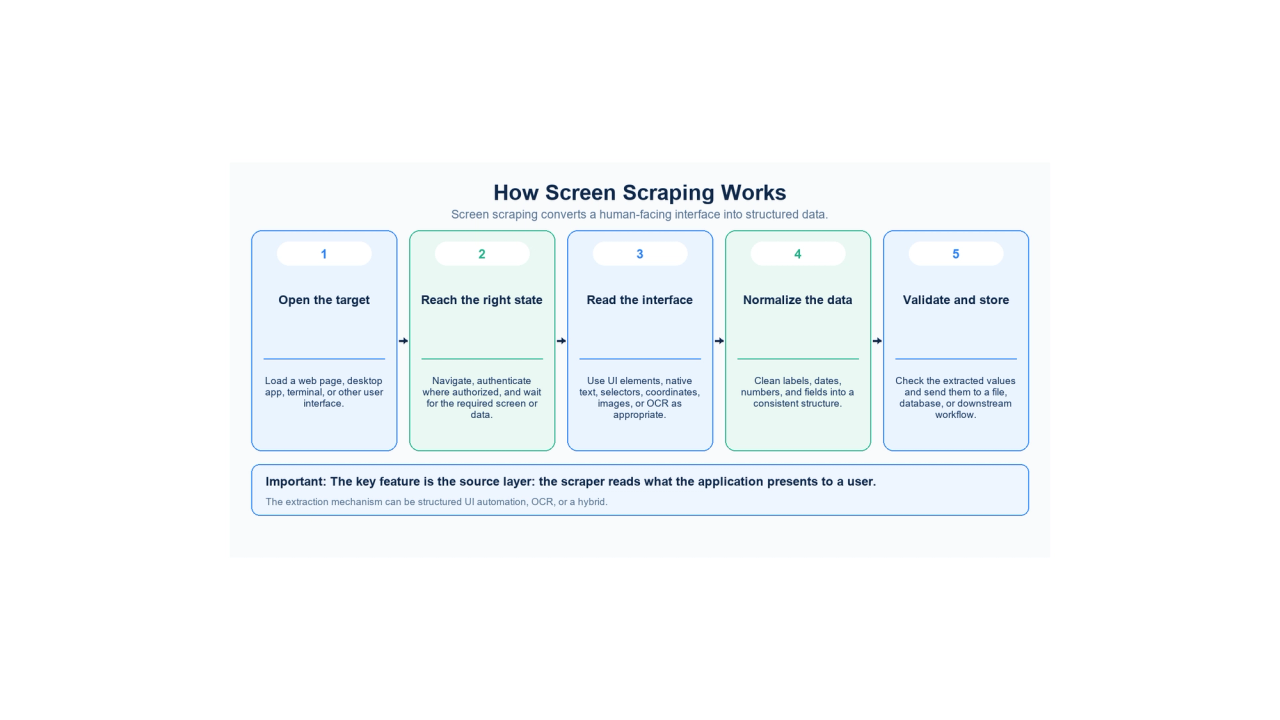
The exact implementation depends on the target system, but the workflow usually has five stages.
1. Load the target interface
The scraper launches or connects to the application that contains the data. That may mean opening a browser page, starting a desktop application, connecting to a legacy terminal, or opening a remote session.
2. Reach the required screen state
The automation navigates until the relevant information is present. It may click menus, move through forms, select an account or record, or wait for a page to finish rendering.
In authenticated systems, this step should occur only with appropriate authorization and credential-handling controls.
3. Identify and extract the data
This is the actual scraping step. The automation might read named UI elements, selectors, native text, coordinates, images, or OCR results.
The more structure the target exposes, the less the automation has to infer from pixels and geometry.
4. Normalize the output
Displayed information is optimized for people, not machines. Currency symbols, thousands separators, labels, line breaks, date formats, and repeated headers often need to be cleaned before the data is useful downstream.
A scraper may therefore convert:
Balance: $2,450.00
into something more structured such as:
balance = 2450.00
The conversion should also preserve the currency and locale assumptions so display formatting is not mistaken for data meaning.
5. Validate and store the result
Reliable automations check that expected fields were actually found and that extracted values meet basic quality rules before saving them to a database, spreadsheet, file, or another application.
This last step matters because presentation-layer extraction can fail silently. A layout change can cause a scraper to read the wrong field without necessarily crashing.
Common Screen Scraping Methods
Modern screen scraping is not one technique. It is a family of UI-level extraction methods.
UI element and selector-based extraction
Desktop automation platforms can identify controls such as text fields, buttons, labels, tables, and windows through automation frameworks rather than raw coordinates.
Microsoft's UI element documentation distinguishes UI Automation (UIA), UIA3 Raw, and Microsoft Active Accessibility (MSAA) selectors. UIA is the default capture mode. MSAA can target legacy applications that do not expose UIA selectors, while UIA3 Raw exposes intermediate layers in the automation tree.
This approach is usually more maintainable than telling an automation to “click at x=420, y=315” because it targets interface objects rather than one fixed screen position.
Native or full-text extraction
Some automation tools can access text exposed by the application itself. UiPath's screen-scraping methods distinguish FullText, Native, and OCR approaches.
Native or full-text access can be fast and accurate when the target application exposes the required content in a machine-readable form.
OCR
Optical character recognition reads text from visual output. It becomes useful when an interface exposes little or no structured text—for example, an image, remote session, scanned document, or custom-rendered application.
OCR is flexible, but it introduces recognition errors and usually needs more validation than structured UI extraction.
Browser or DOM-level extraction
On the web, the boundary between screen scraping and web scraping can blur.
MDN's DOM documentation describes the DOM as the programmable tree-like representation of a web document. A browser automation workflow may interact with the rendered page while still locating elements through the DOM rather than reading their pixels.
In practice, many teams would call that browser automation or web scraping rather than pure screen scraping. The terminology matters less than understanding which layer your automation depends on.
Screen Scraping vs Web Scraping vs APIs
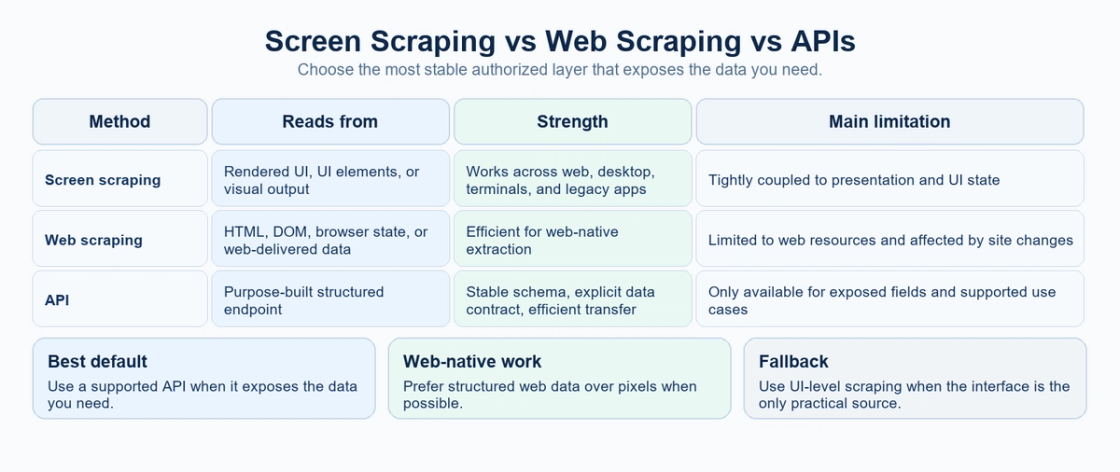
The three approaches solve related problems but access data at different layers.
Method | Primary source | Typical scope | Main strength | Main weakness |
|---|---|---|---|---|
Screen scraping | User interface or rendered presentation | Web, desktop, terminal, legacy apps | Works where UI is the only available integration surface | Fragile when presentation changes |
Web scraping | HTML, DOM, browser state, or other web-delivered content | Websites and web apps | Efficient access to web-native structure | Limited to web resources and site behavior |
API | Purpose-built machine-readable endpoint | Systems that expose supported integration interfaces | Structured contract, predictable fields, efficient transfer | Limited to what the API exposes and permits |
A useful rule is: use the most structured supported layer that provides the data you need.
If an API exposes the required fields, it is usually easier to validate and maintain than UI automation. If there is no API but a website exposes stable HTML or DOM structure, ordinary web scraping may be enough. If the information exists only in a desktop, terminal, remote, or heavily presentation-driven interface, screen scraping can become the practical option.
This is also why screen scraping and web scraping should not be separated too rigidly. A browser bot reading a rendered web application may use both UI interaction and DOM structure. The categories describe engineering choices, not mutually exclusive technologies.
Common Screen Scraping Use Cases
Legacy application integration
Legacy systems are one of the clearest reasons screen scraping still exists.
A company may depend on an old ERP, mainframe, terminal, or desktop application that has no modern API. Replacing that system may be expensive or operationally risky, yet employees still need to move data between it and newer software.
Screen scraping and robotic process automation (RPA) can bridge that gap by reading the legacy interface and passing the extracted data into a modern workflow.
Microsoft's desktop-flow documentation, for example, explicitly supports automating legacy applications, web applications, desktop software, images, and coordinate-based interactions.
Repetitive back-office workflows
Screen scraping can automate tasks such as reading values from an application, transferring records between systems, collecting report fields, or reconciling data that would otherwise require repetitive manual copying.
The benefit is not merely extraction. The scraper becomes part of a larger workflow that can navigate, read, normalize, validate, and transfer the data.
Price and market monitoring
When public information is presented through a website or application but no supported data feed exists, screen or browser-level extraction may be used to collect prices, availability, listings, or other displayed information.
For web-native projects, however, structured HTML, DOM, or authorized data endpoints are generally preferable to pixel-level extraction when available.
Data migration
Screen scraping can also act as a temporary bridge during migration. If an old application exposes important records only through its interface, automation can retrieve those records and transform them for a new system.
This can be useful as a transition technique even when the long-term architecture should not depend on scraping.
What Is Screen Scraping in Banking?
Financial screen scraping is a specific and higher-risk version of the broader technique.
In credential-based financial screen scraping, consumers provide online-banking credentials to a fintech or data aggregator. The third party signs in to the consumer portal and extracts balances, transaction history, account details, or other information.
The CFPB's 2024 rule announcement described password-sharing and data access through online-banking portals as a risky practice.
The risk model here is different from scraping a public product page. Financial screen scraping can involve:
- storage or transmission of sensitive credentials;
- broad account access rather than narrowly scoped data access;
- difficulty limiting what data a third party can see;
- repeated access over time;
- privacy and data-minimization concerns;
- uncertainty about whether activity comes from the account holder or an aggregator.
The published text of CFPB section 1033.311 describes standardized machine-readable developer interfaces and states that third parties must not access those interfaces using the credentials consumers use for the consumer interface. This is a developer-interface requirement, not a statement that every form of screen scraping is prohibited.
That direction illustrates a broader engineering principle: when sensitive data needs to move between organizations, a purpose-built interface with explicit authorization and scope is preferable to having software impersonate a human user at the consumer interface.
As checked on September 13, 2026, the CFPB compliance page states that the rule's compliance dates were stayed by a court on October 29, 2025, and describes ongoing reconsideration. Consult the current official status for the applicable obligations and timetable.
Advantages of Screen Scraping
Screen scraping survives because it solves integration problems that cleaner architectures sometimes cannot.
It can work without a dedicated API
If a third-party or legacy application exposes information only through its interface, scraping may be the only realistic automation layer available.
It can automate human-only workflows
A screen scraper can work with systems designed only for interactive use, including older desktop applications and terminal interfaces.
It can reduce repetitive manual data entry
Automating navigation, extraction, normalization, and transfer can remove large amounts of copy-and-paste work.
It can support transitional integrations
During system migration or modernization, screen scraping can provide a temporary bridge while a more durable data interface is being developed.
Limitations and Risks
The same property that makes screen scraping flexible also makes it fragile: it depends on presentation.
Interface changes can break extraction
A renamed field, new layout, updated application version, different window state, or modified login flow can invalidate the assumptions built into the automation.
Microsoft's troubleshooting guidance notes that selectors and desktop automation can be affected by factors such as screen resolution, DPI scaling, application updates, operating-system versions, window size or mode, element state, and permissions.
Coordinate and image automation is especially brittle
If an automation depends on fixed screen positions, even a small layout change can cause it to click or read the wrong location. UI elements and stable selectors are preferable where the target application supports them.
OCR introduces recognition error
OCR is valuable when nothing better is available, but text recognition can misread characters, numbers, or formatting. High-value workflows need validation rules rather than assuming every OCR result is correct.
Authentication can complicate automation
Multi-factor authentication, session expiration, risk challenges, SSO changes, and credential-rotation policies can all affect a screen-scraping workflow. Automation should not be designed by weakening those security controls.
Privacy and authorization still matter
A technical ability to display or extract information does not automatically create permission to collect, retain, or reuse it. Authorization, contractual restrictions, privacy requirements, data sensitivity, and jurisdiction can all affect a scraping project.
For sensitive systems, the security design should also consider where credentials, cookies, extracted records, and logs are stored.
When Should You Use Screen Scraping?
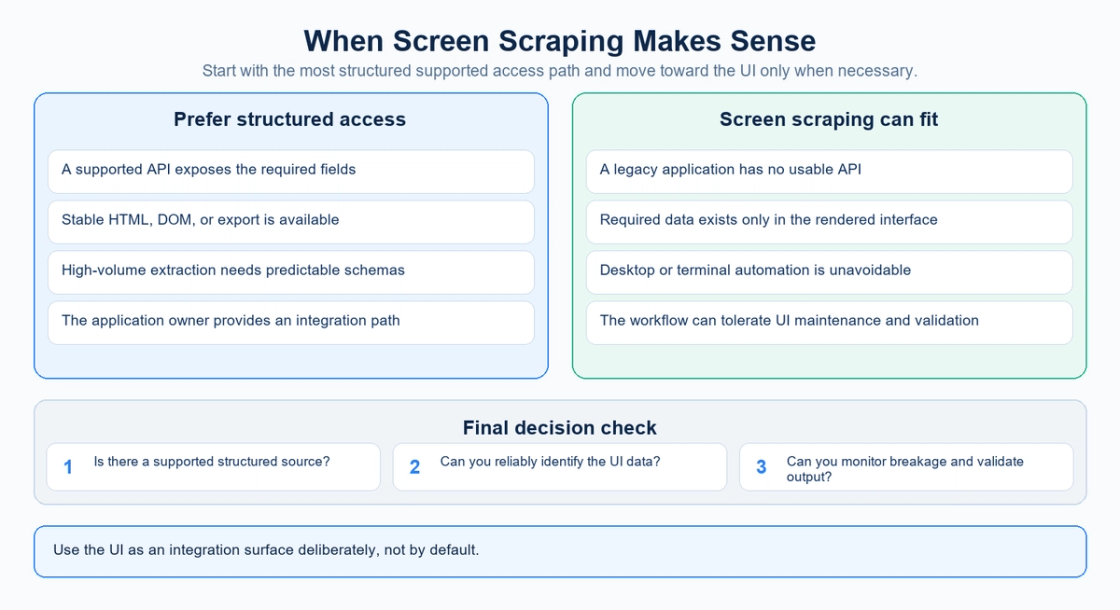
Screen scraping is most defensible when three conditions are true:
- the required information is available through a user interface;
- no suitable supported API, export, or more stable structured interface exists;
- the workflow can tolerate maintenance, monitoring, and validation when the UI changes.
Prefer an API when a supported endpoint exposes the required fields and service behavior. Prefer structured web extraction when the task is web-only and stable HTML or DOM data is available. Use screen scraping when the presentation layer is genuinely the most practical integration surface.
For critical workflows, also ask:
- How quickly will we detect a broken scraper?
- Can extracted fields be validated automatically?
- What happens if a label or screen layout changes?
- Does the workflow require storing credentials?
- Is the automation authorized to access and retain the data?
- Is this a temporary bridge or a long-term dependency?
Those questions usually matter more than the choice of a specific scraping tool.
FAQ
Is screen scraping the same as web scraping?
No. They overlap, but they describe different dimensions. Screen scraping focuses on extracting data from a presentation or UI layer and can include desktop and legacy applications. Web scraping focuses on web-delivered resources such as HTML, the DOM, or browser state. A rendered web application can sit in both categories.
Does screen scraping always use OCR?
No. OCR is one method. Modern automation can also read UI elements, native text, selectors, accessibility or automation trees, terminal fields, or browser DOM elements.
Is screen scraping still used?
Yes. It remains useful in legacy integration, desktop automation, RPA, data migration, and systems that expose needed data only through a user interface.
Why is screen scraping considered fragile?
Because the automation depends on how the interface is presented. Changes to selectors, labels, layout, resolution, window state, authentication flows, or application versions can cause extraction to fail or return the wrong data.
What is screen scraping in banking?
In banking, the term often describes a third-party service using a consumer's credentials to sign in to an online-banking portal and collect account data. That use case creates additional credential, privacy, authorization, and data-minimization risks.
Is screen scraping secure?
It can be implemented securely or insecurely depending on the system and workflow. The risk rises when scraping requires shared credentials, broad access to sensitive data, weak secret storage, or insufficient output validation.
Is screen scraping legal?
There is no universal yes-or-no answer. The answer depends on authorization, the target system, contracts or terms, privacy obligations, the data being accessed, and applicable law. Technical implementation guidance should not be treated as legal advice.
Is an API always better than screen scraping?
Not always, but a supported API is usually the cleaner option when it exposes the required data. APIs provide a purpose-built machine interface. Screen scraping is most useful when no suitable structured interface exists.
Final Takeaway
Screen scraping is not simply “web scraping with screenshots.” It is a broader form of presentation-layer automation that extracts information from the interfaces people use.
Sometimes that means OCR. Sometimes it means desktop UI elements, native text, terminal fields, or browser-rendered content. The common feature is that the automation depends on the presentation layer rather than a dedicated data contract.
That makes screen scraping both useful and fragile.
It can connect legacy systems, automate repetitive work, and recover data from applications that were never designed for integration. But it also creates maintenance, validation, security, and privacy burdens that structured interfaces can avoid.
The practical hierarchy is simple: use a supported API when it meets the requirement, use stable web or application structure when available, and rely on screen scraping when the UI is the only realistic source. When you do use it, treat change detection and output validation as part of the system—not as cleanup work after the scraper breaks.
Sources
Official documentation checked September 13, 2026. Dates below are page publication or update dates where provided.
- Microsoft: Automate using UI elements
- UiPath: Examples of Using Output or Screen Scraping Methods
- MDN: Document Object Model
- Microsoft: Introduction to desktop flows
- Microsoft: Troubleshoot unattended desktop flow execution failures (2026-05-05)
- CFPB: Personal Financial Data Rights Rule announcement (2024-10-22)
- CFPB: Section 1033.311 Requirements applicable to developer interface
- CFPB: Personal financial data rights compliance resources (2026-01-06)