
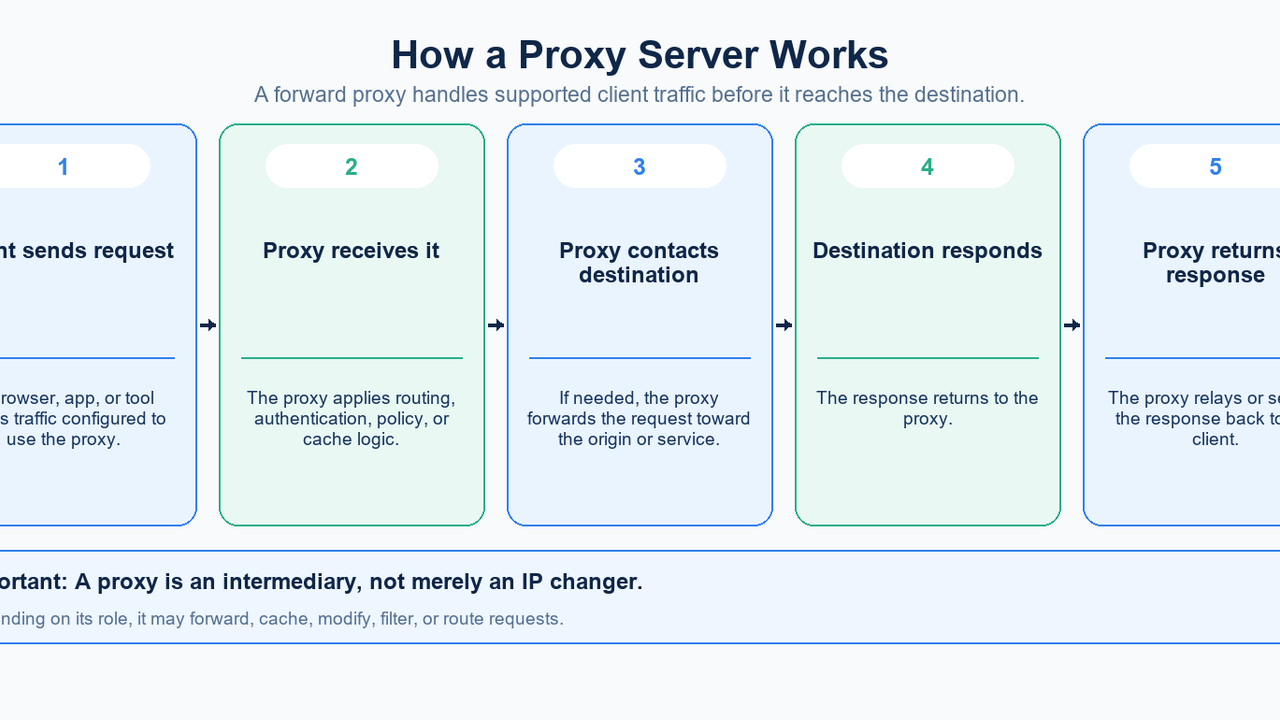
A proxy server is an intermediary between a client and another network service.
Instead of a browser, application, or device always communicating directly with a destination, traffic can be sent to a proxy first. The proxy can then forward the request, apply policy, serve cached content, change selected request information, or route the request elsewhere before returning a response.
In the simplest forward-proxy example:
client → proxy server → destination
and the response comes back:
destination → proxy server → client
That basic picture is useful, but it is not the whole definition. “Proxy server” is a broad networking term. A forward proxy used by a client, a reverse proxy protecting a website, an HTTP proxy, a SOCKS5 proxy, and a residential proxy describe different aspects of proxy architecture.
The most important thing to understand is therefore not just what a proxy server is, but which kind of proxy is being discussed and what role it plays.
Quick Answer
A proxy server is a program or computer that handles network requests on behalf of another system.
For client-side internet access, a forward proxy typically receives a request from a browser or application, contacts the destination on the client's behalf, receives the response, and returns it to the client.
A reverse proxy works from the other side: it receives incoming requests on behalf of one or more backend servers.
Proxy servers are commonly used for:
- controlled outbound internet access;
- request filtering and policy enforcement;
- caching;
- load balancing;
- protecting or abstracting backend infrastructure;
- application and network testing;
- routing selected traffic through a specific intermediary.
A proxy can also change the IP address visible to a destination for traffic that passes through it. But a proxy does not automatically guarantee anonymity, encryption, or device-wide coverage.
What Is a Proxy Server?
MDN's proxy server definition describes a proxy as an intermediary program or computer used between networks.
The key word is intermediary.
A proxy sits somewhere in the communication path and handles a request or response on behalf of another system.
That handling can mean several things.
A proxy may:
- forward a request to another server;
- return a cached response without contacting the origin again;
- modify selected headers;
- enforce access rules;
- authenticate clients;
- route requests to different backend servers;
- log or measure traffic;
- hide or abstract one side of the connection from the other.
This is why “a proxy changes your IP address” is too narrow as a definition.
Some forward proxies do make a destination see the proxy-side IP rather than the client's direct public IP. But reverse proxies, caching proxies, corporate gateways, and load-balancing proxies are also proxy servers even when “changing the user's IP” is not their primary purpose.
How Does a Proxy Server Work?
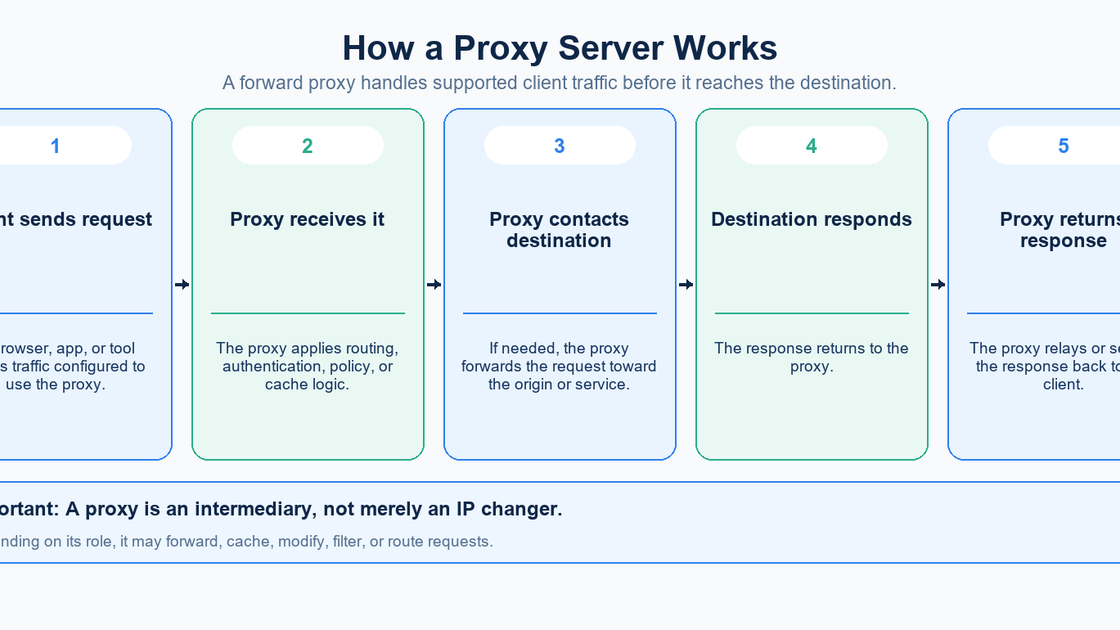
A basic forward-proxy flow is straightforward.
1. The client is configured to use a proxy
A browser, operating system, application, or command-line tool is given proxy settings.
Those settings might include:
proxy.example.com:8080
or a setup script/PAC URL.
Microsoft's Windows proxy guide, for example, documents automatic detection, setup scripts, and manual configuration using a proxy server name/IP and port.
2. The client sends supported traffic to the proxy
Instead of opening the relevant connection directly to the destination, the client sends the request to the proxy endpoint.
Exactly which traffic uses the proxy depends on the application, operating system, proxy protocol, and configuration.
3. The proxy applies its rules
The proxy may check:
- authentication;
- destination policy;
- cache state;
- routing rules;
- access-control rules;
- logging or monitoring requirements.
It may then forward the request, modify it, answer from cache, or reject it.
4. The proxy communicates with the destination
If the request must be forwarded, the proxy connects onward to the target service.
From the destination's perspective, the network connection may come from the proxy infrastructure rather than directly from the original client.
5. The proxy returns the response
The destination replies to the proxy, and the proxy returns or serves the response to the client.
That gives the full logical path:
client → proxy → destination → proxy → client
The proxy is therefore part of the request path, not simply a label attached to an IP address.
Forward Proxy vs Reverse Proxy
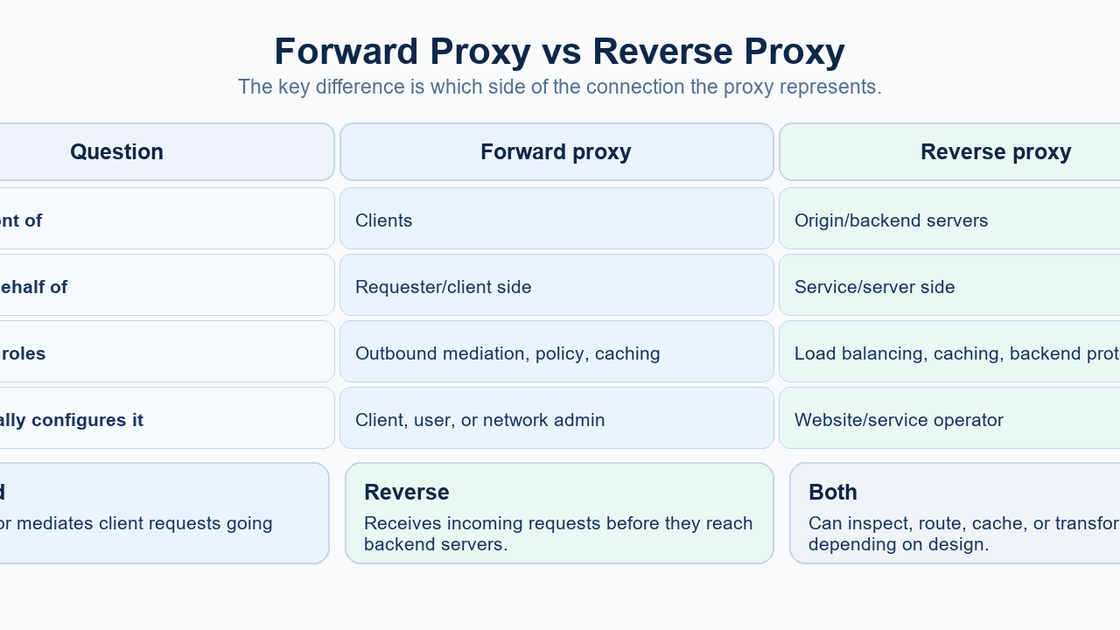
This is the most important architectural distinction.
MDN's proxy and tunneling guide distinguishes forward proxies from reverse proxies.
Forward proxy
A forward proxy acts on behalf of a client or group of clients.
The client knows that the proxy exists and sends eligible requests to it.
Typical roles include:
- controlling outbound access;
- applying organizational policy;
- caching frequently requested resources;
- routing selected application traffic;
- providing a consistent network egress point.
When people manually enter a proxy hostname and port into an operating system, browser, or application, they are usually configuring a forward proxy.
Reverse proxy
A reverse proxy acts on behalf of servers.
The user connects to the public service, but the request reaches the reverse proxy before it reaches the actual backend.
Cloudflare's reverse proxy overview describes reverse proxies as servers that sit in front of web servers and can improve security, performance, and reliability.
Common reverse-proxy roles include:
- load balancing between backend servers;
- caching static content;
- hiding backend topology;
- centralizing TLS or request-handling logic;
- applying security and traffic-management controls.
The simplest distinction is:
Forward proxy: represents clients.
Reverse proxy: represents servers.
They share the same broad idea—an intermediary in the communication path—but solve different architectural problems.
Types of Proxy Servers: Use the Right Classification
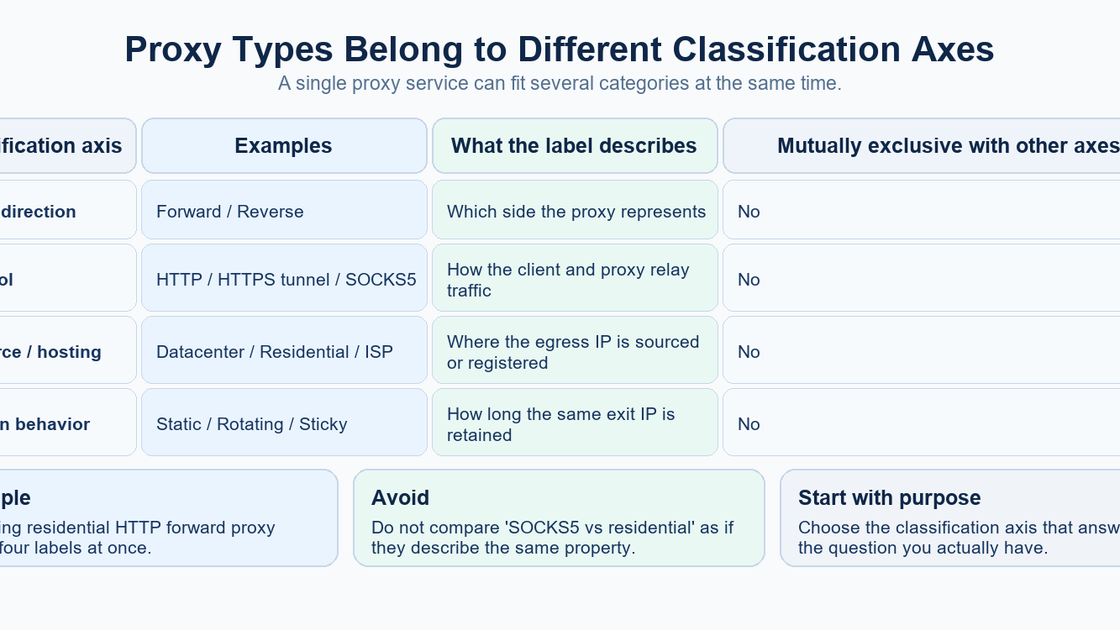
“Types of proxy servers” sounds like one simple list.
In practice, proxy terminology mixes several independent dimensions.
For example:
- forward vs reverse describes traffic direction and architectural role;
- HTTP vs SOCKS5 describes protocol behavior;
- residential vs datacenter vs ISP describes where an egress IP comes from or how it is registered/hosted;
- static vs rotating vs sticky describes how exit addresses behave over time.
These categories are not mutually exclusive.
A service could simultaneously be:
forward + HTTP + residential + rotating
Another could be:
forward + SOCKS5 + datacenter + static
And a reverse proxy does not belong in the same comparison axis as “residential” or “SOCKS5.”
This classification model is more useful than treating every marketing label as a separate, competing kind of proxy.
By Traffic Direction
Forward proxy
Represents clients making outbound requests.
This is the category most consumer and commercial proxy discussions mean when they simply say “proxy server.”
Reverse proxy
Represents servers receiving inbound requests.
Reverse proxies are infrastructure components used by website and application operators rather than ordinary client-side proxy settings.
By Protocol
HTTP proxy
An HTTP proxy understands HTTP request semantics and can relay or process web requests.
For HTTPS destinations, HTTP proxies commonly use tunneling.
MDN's CONNECT documentation explains that the CONNECT method asks a proxy to establish a tunnel to a destination host and port and then relay data in both directions.
Conceptually:
client → HTTP proxy → CONNECT host:443 → TLS connection to destination
The key point is that HTTP proxy describes a protocol relationship. It does not tell you whether the exit address is residential, datacenter, static, or rotating.
SOCKS5 proxy
SOCKS5 is a separate proxy protocol.
RFC 1928 defines SOCKS Version 5 as a relay framework for client-server applications and includes support for both TCP and UDP.
SOCKS5 operates more generically than an HTTP-specific proxy because it is not limited to interpreting HTTP requests.
Again, this is a protocol label.
A SOCKS5 proxy can still have a datacenter, residential, ISP, or other type of network address depending on how the service is built.
By IP Source or Hosting Model
Commercial proxy services often classify forward proxies by the network identity or source of their exit addresses.
Datacenter proxies
Datacenter proxy addresses come from hosting or data-center infrastructure rather than ordinary household broadband connections.
Residential proxies
Residential proxy services use addresses associated with consumer ISP networks.
Oxylabs' datacenter vs residential guide illustrates this market distinction between hosting-provider IP space and ISP-associated residential addresses.
ISP or static residential proxies
“ISP proxy” or “static residential proxy” is a commercial label commonly used for stable IPs registered to an ISP but hosted on server infrastructure.
These labels describe the network identity and hosting model of the egress address.
They do not replace the forward/reverse or HTTP/SOCKS classifications.
That distinction prevents questions such as:
“Should I choose SOCKS5 or residential?”
from being treated as an either/or decision.
One describes protocol behavior; the other describes IP sourcing.
By Session Behavior
Another classification concerns how long the same exit IP remains in use.
Oxylabs' current static-vs-rotating guide distinguishes persistent/static addresses from rotating pools and also notes that sticky sessions retain the same IP for a defined period.
Static proxy
The same assigned address is retained rather than intentionally changed between requests.
Rotating proxy
The service selects different exit addresses according to provider-specific rotation rules.
Sticky session
A service attempts to retain the same exit address for a session or configured period before rotation occurs.
These are session-allocation behaviors, not separate protocols.
A rotating service can still use HTTP or SOCKS5, and its IPs can still be residential or datacenter.
What Are Proxy Servers Used For?
Proxy servers have legitimate uses on both sides of internet infrastructure.
Network access and policy enforcement
Organizations can require supported outbound traffic to pass through a controlled proxy.
This provides a central place for authentication, logging, filtering, or access policy.
Microsoft explicitly notes that organizations may require proxy use on Windows networks.
Caching
A proxy can store frequently requested content so that it does not always need to retrieve the same object from the original source.
Squid's documentation describes proxy caching as storing internet objects closer to requesting clients.
Caching can reduce repeated upstream transfers and improve delivery for cacheable resources.
Load balancing and backend protection
Reverse proxies can distribute incoming requests across multiple backend servers.
They can also hide backend topology from clients and provide a central point for traffic management.
Controlled application routing
A developer, administrator, or application can route selected traffic through a known network intermediary for testing, diagnostics, or policy reasons.
Monitoring and public-data workflows
Organizations may use appropriately sourced proxies to distribute legitimate public-data collection or monitoring workloads across controlled network endpoints.
The proxy is only one part of such a system; authorization, website terms, request rates, and applicable rules still matter independently.
Testing network-dependent behavior
A proxy can also be useful when testing how an application behaves through a specific gateway, network path, or egress environment.
The important point is that the use case determines which proxy properties matter.
What a Proxy Server Does Not Automatically Do
A proxy changes the path or handling of traffic that uses it.
It does not automatically provide every security or privacy property sometimes associated with the word “proxy.”
It does not guarantee anonymity
A destination may see the proxy-side network address instead of a direct client IP for proxied requests.
But changing the network address does not remove application-level identity. MDN's cookie guide explains that cookies can carry session IDs and help a server recognize the same browser or signed-in user across requests.
Using a proxy is therefore not equivalent to becoming anonymous.
It does not guarantee encryption
The word “proxy” says nothing by itself about whether the client-to-proxy link is encrypted.
For HTTPS through an HTTP proxy, CONNECT can establish a tunnel for the TLS connection to the destination.
That is different from saying the proxy itself automatically encrypts every connection.
It may not cover every application
A proxy configured in one browser, operating system setting, or application may apply only to traffic that honors that configuration.
Do not assume one successful proxied browser request proves that every process on the device is using the same proxy path.
It does not make all proxy types interchangeable
An HTTP proxy, SOCKS5 relay, reverse proxy, and residential forwarding service solve different problems.
The correct comparison starts with the requirement, not the label.
Proxy Server vs VPN
Proxy servers and VPNs can both place an intermediary between a device and a destination, so they are often compared.
But they are not the same technology.
A proxy commonly handles traffic from applications or protocols that are configured to use it.
A VPN uses a network tunnel rather than the same application-level proxy mechanism. Microsoft's VPN connection-type documentation describes Windows VPNs as point-to-point connections that use tunneling protocols.
Microsoft treats proxy and VPN configuration as separate connection mechanisms in Windows and notes that VPN connections may require separate proxy settings.
The practical distinction is scope and architecture:
- choose a proxy when an application, protocol, gateway, cache, or server-side intermediary is what you need;
- choose a VPN when the requirement is a network-level tunnel for device or network traffic.
Do not assume either label alone answers every security question. Encryption, authentication, DNS handling, routing scope, logging, and trust still depend on the actual implementation.
How Proxy Servers Are Configured
A manually configured forward proxy usually requires:
server or hostname
port
protocol/type
authentication, if required
For example:
proxy.example.com:8080
But manual configuration is not the only option.
Systems can also use a Proxy Auto-Configuration (PAC) file.
MDN documents PAC files as JavaScript-based rules that can decide whether a browser request should go directly to the destination or through a proxy.
So a user may see:
https://example.org/proxy.pac
instead of one fixed proxy IP and port.
That means “what is my proxy server?” and “how is my proxy selected?” can be different questions.
FAQ
What is a proxy server in simple terms?
A proxy server is an intermediary that handles a network request on behalf of a client or server. For a typical forward proxy, the client sends the request to the proxy, the proxy communicates with the destination, and the response returns through the proxy.
What does a proxy server do?
Depending on its role, a proxy can forward traffic, apply access policy, authenticate users, cache responses, modify selected request data, load balance requests, or hide backend infrastructure.
Does a proxy server hide your IP address?
For traffic forwarded through a forward proxy, the destination can see a proxy-side address rather than the client's direct network address. That does not guarantee anonymity because other application-level identifiers can remain.
What is the difference between a forward proxy and a reverse proxy?
A forward proxy represents clients making outbound requests. A reverse proxy represents servers receiving inbound requests.
What is an HTTP proxy?
An HTTP proxy handles HTTP traffic. For HTTPS, an HTTP proxy can use CONNECT to create a tunnel to the destination host and port.
What is a SOCKS5 proxy?
SOCKS5 is a general proxy relay protocol defined by RFC 1928. It supports TCP and UDP use cases and is not limited to HTTP request semantics.
Is a residential proxy a different protocol from SOCKS5?
No. “Residential” describes the source or network identity of an exit IP, while SOCKS5 describes a proxy protocol. A residential proxy service can support SOCKS5.
What is a reverse proxy used for?
Reverse proxies commonly sit in front of backend services for load balancing, caching, traffic management, and backend protection.
Does a proxy encrypt internet traffic?
Not automatically. Encryption depends on the protocol and configuration. HTTPS can remain protected by TLS when tunneled through an HTTP proxy using CONNECT, but the word “proxy” alone does not imply encryption.
Is a proxy server the same as a VPN?
No. They can both alter the traffic path, but a proxy usually mediates configured application/protocol traffic, while a VPN generally creates a network-level tunnel. Exact behavior depends on implementation.
Can a proxy server cache content?
Yes. Caching proxies can store eligible objects and serve later requests without retrieving the same object from the origin every time.
Final Takeaway
A proxy server is best understood as an intermediary in a network request path.
The basic forward-proxy model is:
client → proxy → destination
But that definition becomes much more useful when proxy terminology is separated into the right dimensions:
direction: forward or reverse
protocol: HTTP, HTTP tunneling, SOCKS5
IP source/hosting: datacenter, residential, ISP
session behavior: static, rotating, sticky
Those labels answer different questions and can overlap.
A proxy can route, filter, cache, authenticate, load balance, or otherwise mediate network traffic. What it does—and what security or privacy properties it provides—depends on the exact architecture and configuration, not on the word “proxy” alone.
Sources
- MDN's proxy server definition
- Microsoft's Windows proxy guide
- MDN's proxy and tunneling guide
- Cloudflare's reverse proxy overview
- MDN's CONNECT documentation
- RFC 1928
- Oxylabs' datacenter vs residential guide
- Oxylabs' current static-vs-rotating guide
- Squid's documentation
- MDN's cookie guide
- Microsoft's VPN connection-type documentation