
A proxy browser is not a separate Internet protocol or a formally standardized class of browser. In practice, the term usually means a web browser that has been configured to send some or all of its browser traffic through a proxy server.
That configuration can come from several places:
- browser-specific proxy settings;
- an operating-system proxy setting that the browser inherits;
- a browser extension with permission to manage proxy configuration;
- a PAC file that decides which URLs use a proxy and which connect directly;
- command-line or enterprise policy settings.
The important point is scope. A browser proxy changes how selected browser requests are routed. It does not automatically route every application on the device, and it is not the same thing as a VPN tunnel.
Quick Answer
A browser proxy works by changing the browser's next network hop.
Instead of:
browser → website
the request path becomes:
browser → proxy server → website
The destination website normally sees the proxy server as the direct network peer for traffic that actually passes through the proxy.
This can be useful for:
- testing how a website behaves from another network location;
- isolating browser traffic from other applications;
- using a corporate or development proxy;
- applying browser-level filtering or routing;
- switching between proxy endpoints without reconfiguring the entire device.
But a browser proxy is not automatically a privacy or security layer. Coverage depends on the browser, proxy protocol, configuration, bypass rules, extensions, DNS behavior, and whether some traffic is allowed to connect directly.
What Does “Proxy Browser” Actually Mean?
The phrase is ambiguous because different products use it differently.
A “proxy browser” may refer to:
1. A normal browser using a proxy.
Firefox, Chrome, Edge, and other browsers can use proxy settings supplied directly, through the operating system, through policy, or through extensions.
2. A browser extension that manages proxies.
Chrome exposes the chrome.proxy API so an authorized extension can read or change Chrome's proxy configuration. The API supports modes such as direct, system, fixed servers, automatic detection, and PAC scripts.
3. A browser profile or dedicated browser instance with its own proxy.
This is useful when one browser or profile should use a proxy while the rest of the device stays on the normal network path.
4. A commercial browser product with built-in proxy management.
Some tools bundle proxy selection, profile management, location switching, or automation into one interface.
The term should therefore describe the configuration scope, not be treated as a new proxy protocol.
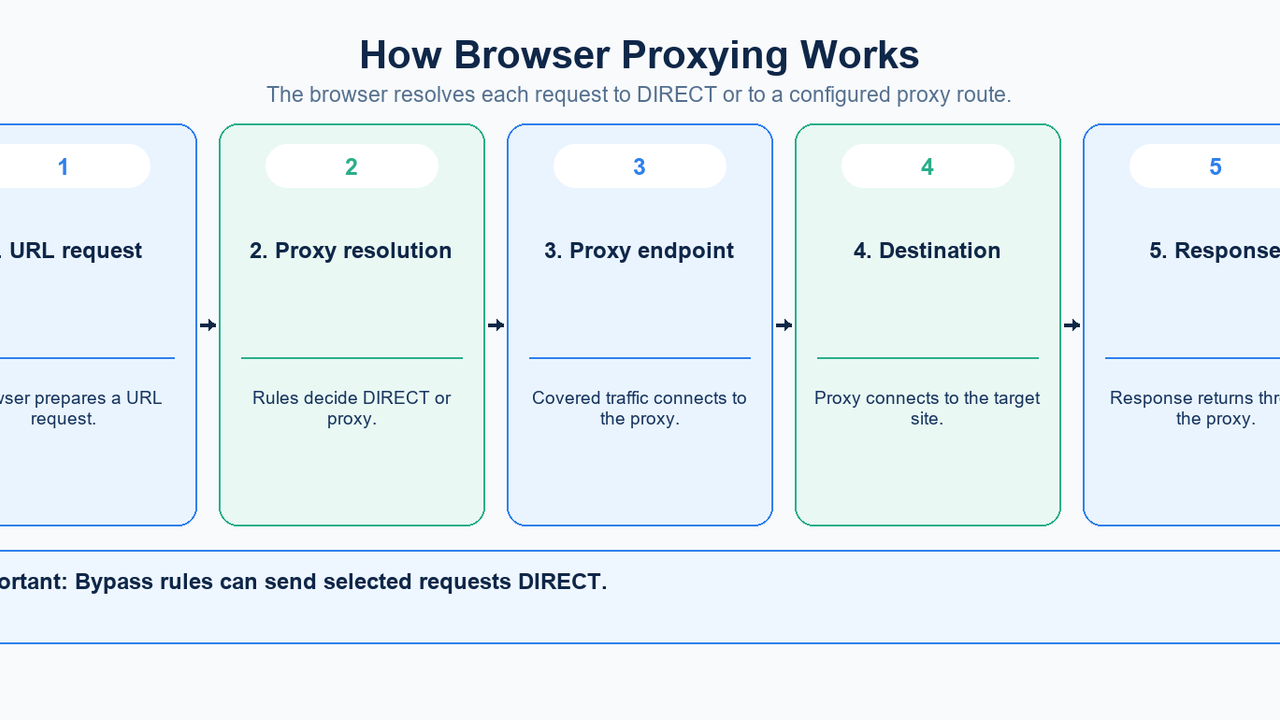
How Browser Proxying Works
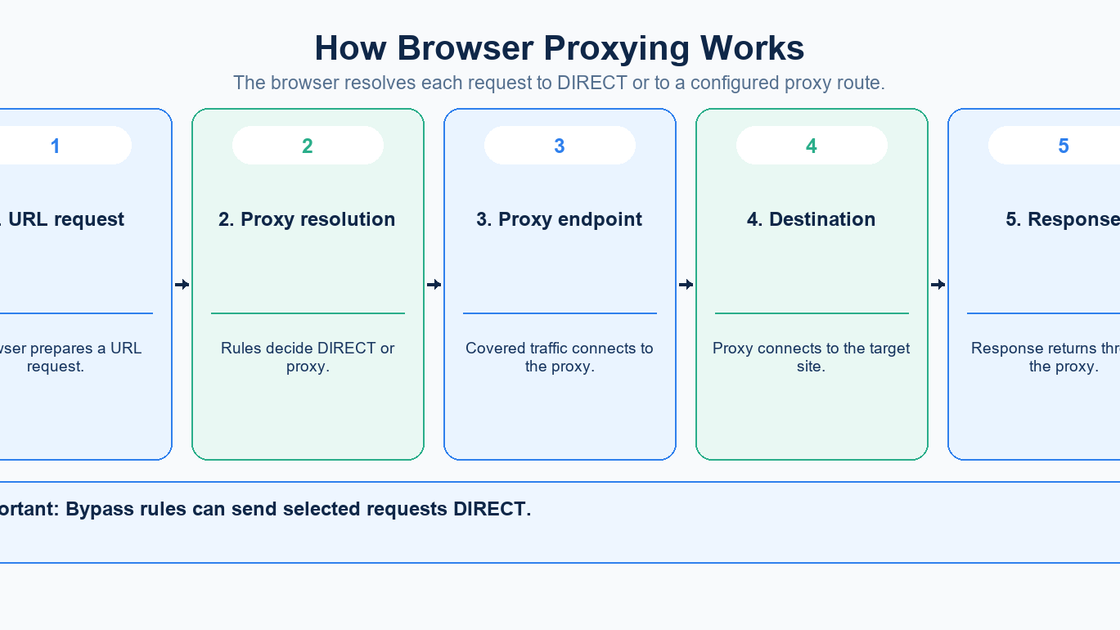
Browser proxying begins with proxy resolution: the browser decides whether a given URL should connect directly or through a proxy.
Chromium's proxy documentation describes proxy resolution as taking a URL and producing either a proxy endpoint or a direct connection. That decision can come from manual rules, a PAC script, auto-detection, command-line settings, extensions, enterprise policy, or system settings.
1. The browser receives a URL
A user enters a URL, clicks a link, or a page initiates a request.
Before opening the network connection, the browser determines which proxy rule applies.
2. The browser resolves the proxy configuration
Possible outcomes include:
- direct connection;
- fixed HTTP or HTTPS proxy;
- SOCKS proxy;
- PAC-based routing;
- a proxy inherited from the operating system.
A bypass rule may send specific hosts directly even when a proxy is configured.
3. The browser connects to the proxy
For ordinary HTTP requests through an HTTP proxy, the browser sends the request to the proxy, which then connects onward to the destination.
For HTTPS through an HTTP proxy, the browser commonly uses the HTTP CONNECT method to create a tunnel to the destination. Chromium documents that the TLS exchange to the website is then carried through the proxy tunnel rather than terminated by the ordinary forward proxy.
4. The proxy connects to the destination
The destination receives the connection from the proxy infrastructure rather than from the browser's direct public network address.
The proxy may also enforce authentication, location selection, session rules, or other provider-specific behavior.
5. The response returns through the proxy
The website response returns to the proxy and then back to the browser.
This path applies only to traffic covered by the active proxy rules. Other applications, browser traffic that matches a bypass rule, or unsupported traffic may use a different network path.
Browser-Level Proxy vs System Proxy
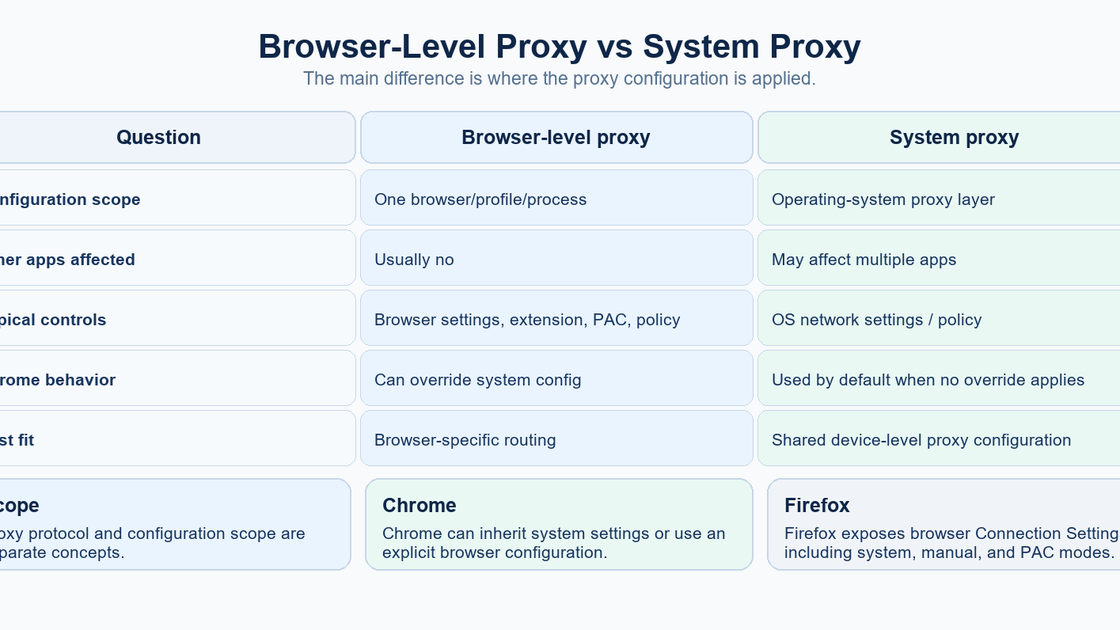
One of the most important distinctions is where the proxy setting lives.
Browser-level proxy
A browser-level configuration is intended to affect one browser, profile, or browser process.
Mozilla Firefox provides its own Connection Settings interface with options for:
- no proxy;
- auto-detect;
- system proxy;
- manual proxy configuration;
- PAC URL;
- proxy bypass entries.
Microsoft's Dev Proxy documentation explicitly describes browser-specific proxying as a way to intercept one browser instance without changing system proxy settings.
System proxy
A system proxy is configured at the operating-system level and may be inherited by multiple applications.
Chromium documentation notes that Chrome uses system proxy settings by default, although Chrome can also be given proxy configuration through policy, command-line options, extensions, or PAC.
That distinction matters because changing a “Chrome proxy” through the normal system-settings route can affect more than Chrome.
Browser Proxy Extension vs Manual Proxy Configuration
A proxy extension and a manually configured proxy can ultimately produce a similar routing result, but the control surface differs.
Browser extension
An extension can make switching easier by:
- selecting a proxy from a saved list;
- enabling or disabling proxy use;
- changing country or endpoint;
- applying browser proxy modes;
- managing credentials or service-specific configuration.
Chrome's official proxy API requires the extension to declare the proxy permission before it can manage those settings.
The configured browser still uses the underlying proxy rules and proxy protocols. The extension is a management layer, not a new networking protocol.
Manual configuration
Manual settings are more direct.
You specify the proxy host, port, protocol, and optional bypass rules yourself. This approach is useful when:
- you have a fixed endpoint;
- you want to minimize extension dependencies;
- the proxy is provided by an organization;
- you need explicit control over routing rules.
The tradeoff is that switching endpoints or credentials is less convenient.
PAC Files: Conditional Browser Proxying
A Proxy Auto-Configuration (PAC) file allows the browser to decide whether each request should use a proxy or connect directly.
MDN documents PAC as a JavaScript function named FindProxyForURL() that returns routing instructions such as:
- DIRECT;
- PROXY host:port;
- SOCKS host:port.
This allows rules such as:
- proxy external sites but connect directly to internal hosts;
- use one proxy for one domain and another proxy elsewhere;
- try a primary proxy and then a fallback;
- bypass the proxy for specific networks.
PAC files are therefore useful when “use a proxy” is too coarse and the browser needs per-destination routing logic.
What Traffic Does a Browser Proxy Cover?
The answer depends on the browser and configuration.
For Chrome, Chromium documents explicit proxy support for URL schemes including HTTP and HTTPS, and its HTTP proxy implementation can also handle WebSocket traffic. SOCKS support is also available.
That does not justify the blanket statement that a browser proxy captures all network traffic generated by the browser.
Coverage can differ because of:
- proxy scheme;
- bypass rules;
- browser implementation;
- extensions;
- DNS behavior;
- non-HTTP protocols;
- direct connections explicitly allowed by policy or PAC.
The safest operational approach is to verify the traffic that matters rather than assuming complete coverage.
HTTPS Through a Browser Proxy
A common misconception is:
If the browser uses an HTTP proxy, HTTPS is no longer encrypted.
That is not generally correct.
Chromium documents that when Chrome sends an HTTPS request through an ordinary HTTP proxy, it can use CONNECT to establish a tunnel and then perform the TLS exchange with the destination through that tunnel.
This means:
- the proxy handles the network tunnel;
- the website TLS session can remain end-to-end between the browser and destination;
- the proxy can still learn connection metadata such as the destination host used to establish the tunnel.
This is different from TLS inspection, where an organization intentionally terminates and reissues TLS using a trusted local certificate authority. That requires a different trust configuration and should not be conflated with ordinary HTTP proxying.
Browser Proxy vs VPN
A browser proxy and a VPN can both change the public network path, but their scope is different.
Question | Browser proxy | VPN |
|---|---|---|
Typical scope | Selected browser traffic | Traffic routed through the VPN interface/tunnel |
Main mechanism | Application/browser proxy configuration | Protected tunnel to a VPN gateway |
Browser-specific routing | Yes | Usually not the primary control surface |
Can leave other apps unaffected | Yes, in a browser-specific setup | Depends on VPN routing and split-tunnel policy |
Proxy protocols | HTTP(S), SOCKS, PAC-based rules | VPN protocols/tunnel implementation |
A VPN should also not be described as “always device-wide.” Split tunneling can route only selected traffic through the VPN.
The practical distinction is that a browser proxy is convenient when the requirement is browser-specific routing, while a VPN is a broader tunneling architecture.
When a Browser Proxy Is Useful
Localized web testing
A browser proxy can make browser requests exit through a selected proxy location.
That is useful for checking:
- localized content;
- region-specific pricing or availability;
- search or advertising behavior;
- website language and country routing.
Results can still depend on cookies, account state, browser language, GPS permissions, or other application signals, so changing the network address alone does not guarantee a complete location simulation.
Development and debugging
A browser-specific proxy can isolate one browser instance for traffic inspection or testing while leaving the rest of the machine unchanged.
Microsoft documents this use case directly for Dev Proxy.
Corporate or controlled browsing
Organizations can use browser proxy policy to route selected browser traffic through filtering, logging, or security infrastructure.
PAC files and bypass rules can make the policy conditional rather than forcing every request through one endpoint.
Switching among proxy endpoints
A browser extension can reduce the friction of changing between proxy endpoints.
The supplied competitor, Webshare, frames its Chrome extension around this workflow: connect or disconnect from available proxies and filter endpoints by country from the browser interface. That is a convenience layer over browser proxy configuration, not a different type of proxy.
Separating browser identities or workflows
Different browser profiles or dedicated browser instances can be assigned different proxy configurations.
This can be useful for QA, account testing, or geographically separated browser sessions. It should not be treated as guaranteed anonymity because websites can still use cookies, logins, browser storage, and other application-level identifiers.
When a Browser Proxy Is Not Enough
You need non-browser applications routed too
A browser-specific proxy is the wrong scope if command-line tools, desktop apps, games, or background services also need the same network route.
Use an application-specific proxy, system-level proxy, VPN, or network-layer design appropriate to those applications instead.
You need guaranteed coverage of every connection
Browser proxy coverage can be affected by bypass rules, unsupported protocols, direct connections, or configuration inheritance.
Test the exact browser and workflow before relying on the proxy as a security boundary.
You need strong transport protection to the proxy gateway
An ordinary HTTP proxy does not automatically encrypt the browser-to-proxy connection.
For HTTPS destinations, the website TLS tunnel can remain protected through an HTTP proxy, but communication with the proxy itself follows the configured proxy scheme. Chromium distinguishes ordinary HTTP proxies from HTTPS proxies, where the connection to the proxy is itself protected by TLS.
You need anonymity rather than routing
Changing the visible network address does not remove browser-level identity.
Cookies, session IDs, account logins, stored state, and fingerprintable browser characteristics can still correlate activity.
A proxy should therefore be treated as a routing component, not as a guarantee of anonymity.
How to Choose a Browser Proxy Setup
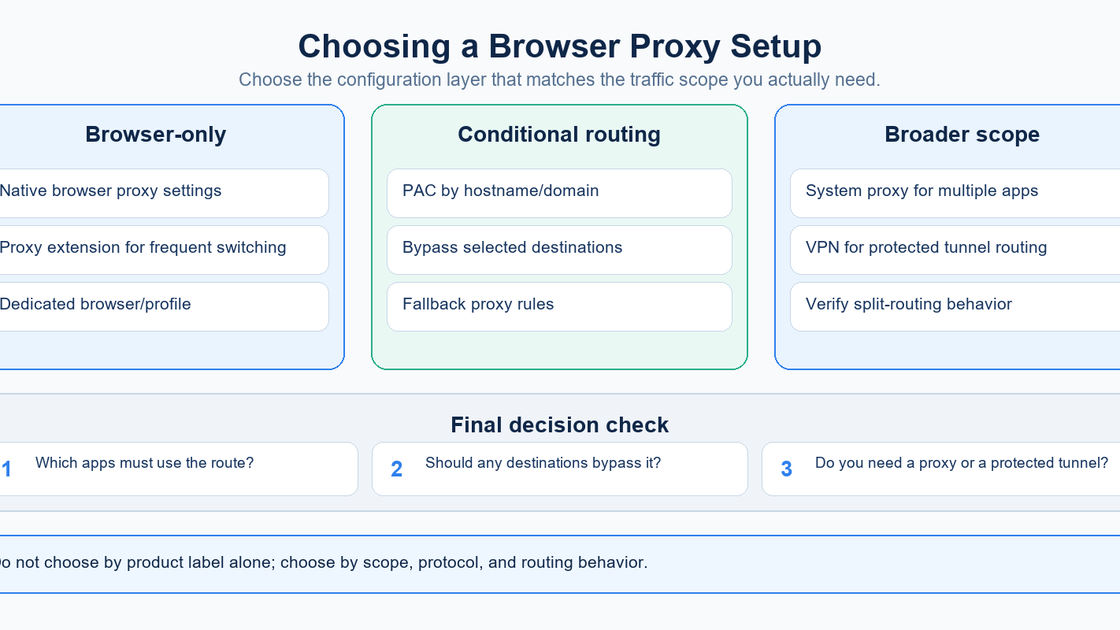
Use the requirement first, then choose the mechanism.
Choose browser-native settings when:
- one browser needs a stable proxy;
- you want minimal dependencies;
- manual host/port configuration is acceptable.
Choose a browser extension when:
- you switch proxies frequently;
- the service exposes many endpoints;
- convenience matters more than minimizing extension permissions.
Review the extension's permissions and vendor before granting proxy-control access.
Choose PAC when:
- some destinations should be proxied and others direct;
- routing depends on hostname, domain, network, or fallback logic;
- administrators need centrally controlled browser rules.
Choose a system proxy when:
- multiple applications should inherit the same proxy;
- the operating system is the intended configuration layer.
Choose a VPN when:
- the requirement is a protected tunnel rather than browser-specific proxy routing;
- multiple applications or network routes should use the same gateway;
- split-tunnel or organization-wide network policy is needed.
Browser Proxy Security Checklist
Before relying on a browser proxy, verify:
- Scope: Which browser profiles and applications actually use it?
- Proxy type: HTTP, HTTPS, SOCKS4, or SOCKS5?
- HTTPS behavior: Is HTTPS tunneled with CONNECT or intercepted intentionally?
- Proxy transport: Is the connection to the proxy itself encrypted?
- DNS behavior: Where are destination names resolved for the chosen proxy mode?
- Bypass rules: Which hosts connect directly?
- Authentication: Are credentials stored and transmitted appropriately?
- Extension permissions: Which extension can control proxy configuration?
- Fallback behavior: Does failure produce an error, another proxy, or a direct connection?
- Verification: Does an external test confirm the expected exit IP and location?
The safest assumption is that proxy behavior is configuration-specific until you verify it.
FAQ
Is a proxy browser the same as a proxy server?
No. A proxy server is the intermediary endpoint. A proxy browser is usually a browser configured to use that endpoint.
Does Chrome have its own proxy settings?
Chrome supports its own proxy configuration mechanisms, including command-line, policy, extensions, PAC, and fixed-server modes. Chromium also documents that Chrome uses system proxy settings by default when no overriding configuration applies.
Can a Chrome extension change proxy settings?
Yes. Chrome provides the chrome.proxy API, and an extension must request the proxy permission to manage those settings.
Does Firefox support browser-specific proxies?
Yes. Firefox exposes Connection Settings that can use no proxy, system proxy, manual configuration, automatic detection, or a PAC URL.
Does a browser proxy hide my IP address?
For traffic that actually exits through the proxy, the destination normally sees the proxy's network address as the direct peer rather than the browser's original public address. That does not make the browser anonymous.
Does a browser proxy encrypt traffic?
Not inherently. HTTPS can remain TLS-protected through an HTTP proxy tunnel, but the proxy configuration itself does not guarantee encryption of every network leg.
Can I use different proxies for different websites?
Yes. PAC files and some proxy-management tools can choose routes based on the destination.
Is a browser proxy faster than a VPN?
There is no universal answer. Performance depends on proxy or VPN protocol, endpoint distance, server load, routing, encryption overhead, and the amount of traffic being routed.
Final Takeaway
A proxy browser is best understood as browser-scoped proxy routing.
The browser resolves each request to either:
DIRECT
or:
PROXY → destination
depending on its configuration.
The main configuration models are:
1. browser-native proxy settings;
2. system proxy settings inherited by the browser;
3. proxy extensions;
4. PAC-based conditional routing;
5. command-line or enterprise policy.
That distinction matters because “browser proxy” does not automatically mean “all device traffic,” “encrypted tunnel,” or “anonymous browsing.”
Use browser-level proxying when you specifically need browser traffic to take a different network path. Use a broader system proxy or VPN when the routing requirement extends beyond the browser.