
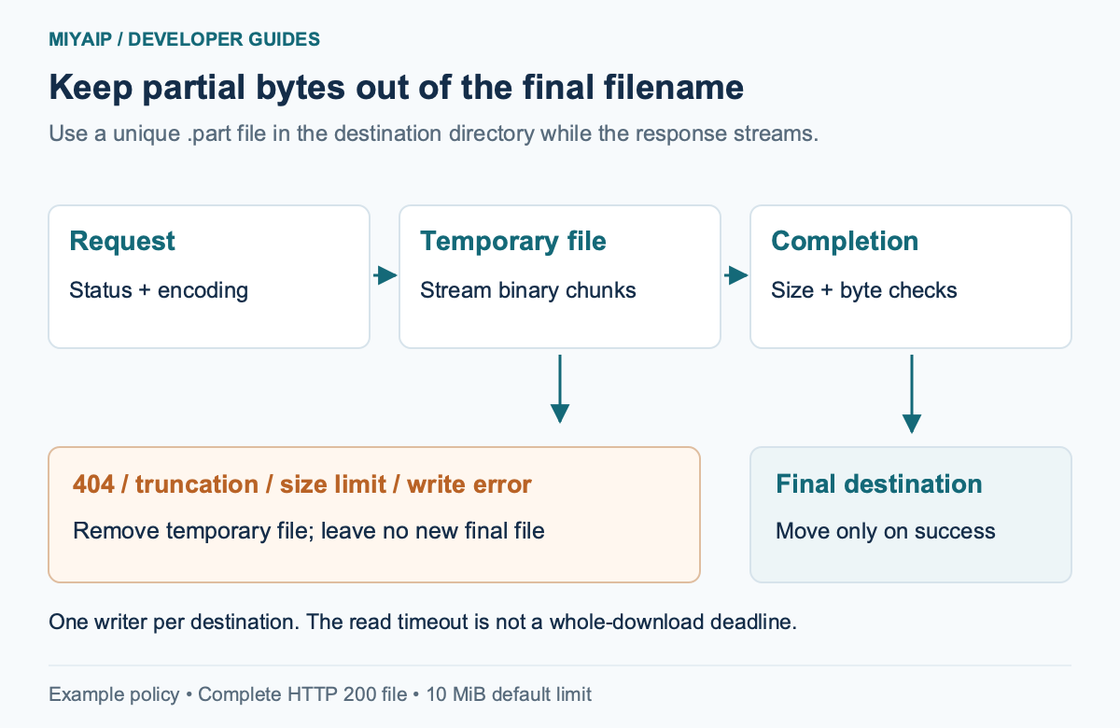
小型可信响应可以用 Python Requests 的 response.content 读取。如果文件较大或下载可能中断,可以流式读取响应,将二进制块写入临时文件,传输完成后再移到最终路径。
下面的下载器会检查 HTTP 状态、限制字节数、关闭网络和文件资源,并在失败时清除临时文件。每次运行下载完整文件,断点续传需要单独处理。
流程概览
安装 Requests 并启动本地服务
使用 Python 3.10 或更高版本和独立虚拟环境。以下 POSIX shell 命令在示例包的 examples 目录运行。
python3 -m venv .venv
. .venv/bin/activate
python -m pip install -r requirements.txt
python demo_server.py
示例依赖固定为 Requests 2.34.2 和 defusedxml 0.7.1。保持服务终端运行,在另一个终端激活虚拟环境并下载虚构二进制文件。
python download_file.py \
  'http://127.0.0.1:8772/files/archive.bin' \
  downloads/archive.bin
预期输出为 Saved 131072 bytes to downloads/archive.bin。已存在的目标文件会保留。再次运行时请选择新路径。
将响应流写入临时文件
"""Download one identity-encoded file; keep failed transfers out of the final path."""
import argparse
import os
from pathlib import Path
import tempfile
import requests


def download(url, destination, max_bytes=10 * 1024 * 1024):
    destination = Path(destination)
    if destination.exists():
        raise FileExistsError(f"Destination already exists: {destination}")
    destination.parent.mkdir(parents=True, exist_ok=True)
    temporary = None
    try:
        with requests.Session() as session:
            session.trust_env = False
            proxy = os.environ.get("PROXY_URL")
            if proxy:
                session.proxies.update({"http": proxy, "https": proxy})
            with session.get(url, stream=True, timeout=(3, 10),
                             headers={"Accept-Encoding": "identity"}) as response:
                response.raise_for_status()
                if response.status_code != 200:
                    raise ValueError(f"Expected a complete HTTP 200 response, got {response.status_code}")
                if response.headers.get("Content-Encoding", "identity").lower() != "identity":
                    raise ValueError("Expected an identity-encoded response")
                length = response.headers.get("Content-Length")
                expected = int(length) if length is not None else None
                if expected is not None and expected > max_bytes:
                    raise ValueError("Declared file size exceeds the limit")
                total = 0
                with tempfile.NamedTemporaryFile(mode="wb", dir=destination.parent,
                                                 prefix=destination.name + ".", suffix=".part",
                                                 delete=False) as file:
                    temporary = Path(file.name)
                    for chunk in response.iter_content(chunk_size=64 * 1024):
                        if not chunk:
                            continue
                        total += len(chunk)
                        if total > max_bytes:
                            raise ValueError("Downloaded file exceeds the limit")
                        file.write(chunk)
                if expected is not None and total != expected:
                    raise ValueError("File size does not match Content-Length")
                # One writer per destination; the same directory keeps the move local.
                if destination.exists():
                    raise FileExistsError(f"Destination appeared during download: {destination}")
                temporary.replace(destination)
                return total
    finally:
        if temporary is not None:
            temporary.unlink(missing_ok=True)


if __name__ == "__main__":
    parser = argparse.ArgumentParser()
    parser.add_argument("url")
    parser.add_argument("destination")
    parser.add_argument("--max-bytes", type=int, default=10 * 1024 * 1024)
    args = parser.parse_args()
    if args.max_bytes < 1:
        parser.error("--max-bytes must be positive")
    try:
        size = download(args.url, args.destination, args.max_bytes)
        print(f"Saved {size} bytes to {args.destination}")
    except (requests.RequestException, OSError, ValueError) as error:
        raise SystemExit(f"Download failed: {error}")
Requests 流式读取指南说明了消费或关闭响应的必要性。这里使用上下文管理器管理会话和响应,文件以二进制模式打开,按块写入。
64 KiB 是写入块的大小,实际网络读取可能返回更短的数据。计数器按实际读出的字节累加。默认大小上限为 10 MiB,可通过 --max-bytes 设置其他正数上限。
校验响应后再使用最终文件名
完整文件应返回 HTTP 200。raise_for_status() 拒绝 HTTP 错误,额外的状态检查也会拒绝意外的部分响应。请求要求使用 identity 编码,收到其他内容编码时停止,以便实际字节数可与 Content-Length 比较。
缺少长度头时仍会执行实时字节上限。有长度头时,程序会检查声明值是否超限,并核对实际读取是否完整。需要验证业务文件时,可另外检查 CSV 表头、PDF 签名、归档内容或可信校验和。
临时文件使用目标目录中的唯一 .part 文件名。传输成功后移至最终路径,失败时在 finally 中删除。每个目标路径应由一个任务写入,并发任务需要另行协调。
观察失败场景
保持虚构服务运行,执行下列命令。
python download_file.py \
  'http://127.0.0.1:8772/files/missing.bin' \
  downloads/missing.bin

python download_file.py \
  'http://127.0.0.1:8772/files/truncated.bin' \
  downloads/truncated.bin

python download_file.py \
  'http://127.0.0.1:8772/files/archive.bin' \
  downloads/too-large.bin --max-bytes 100
第一条遇到 HTTP 404,第二条收到的字节少于声明长度,第三条因声明大小超限而失败。三条命令都会给出失败提示,并清除相应的临时文件。
完整二进制文件的 SHA-256 如下。
59f410ae5e17962412e2aed4f815918f634932f2abf084f00bb638c4db017850测试时同时核对实际字节和终端提示。远程文件有可信的预期校验值时,应使用该值进行比对。
设置超时与代理
timeout=(3, 10) 分别设置连接和读取超时。持续缓慢返回数据的服务可能让整个下载超过十秒。需要全程时限的应用应增加独立的取消策略,并避免多个重试同时写入一个路径。
会话忽略环境中的隐式配置,并接收明确的可选 PROXY_URL。可用以下命令测试附带的虚构 HTTP 代理。
PROXY_URL='http://demo:example-only@127.0.0.1:8773' \
python download_file.py \
  'http://127.0.0.1:8772/files/archive.bin' \
  downloads/proxy-archive.bin
实际 MIYAIP 地址和认证字段见代理指南。凭据作为代理 URL 的一部分时要正确编码保留字符。保留 TLS 校验。如需自定义可信 CA,请显式配置,trust_env=False 会跳过环境中 CA 文件的设置。
常见问题
为什么使用 wb?
下载的数据是字节。文本模式可能改变字节序列并破坏二进制格式。下一步确实需要文本并且已知编码时,再对字节解码。
这个函数支持断点续传吗?
它每次将完整响应写入新临时文件。实现续传需要范围请求、服务端验证及资源变更处理规则。
使用代理后仍要验证文件吗?
需要。代理改变获取响应的路径,下载器仍需检查状态、文件格式、大小和传输是否完整。