
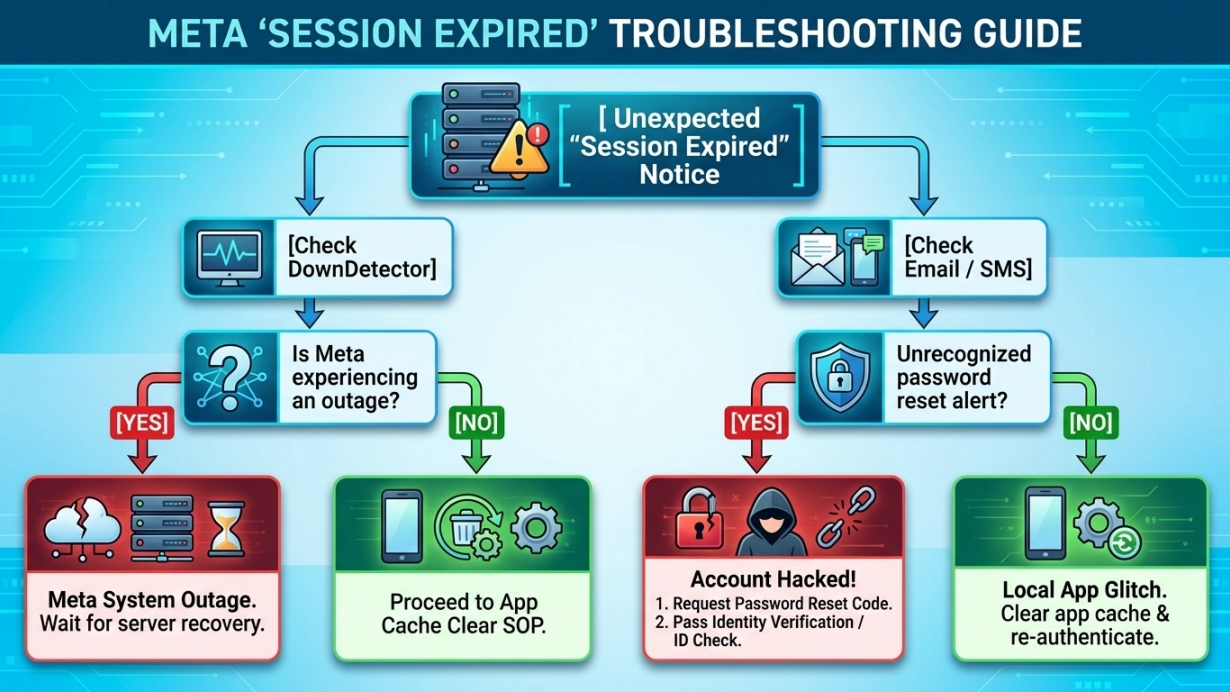
The Facebook "Session Expired" message means the current login session can no longer be validated. The cause may be an expired session, damaged local app data, a browser problem, a security change, or a temporary Meta service issue. The safest fix is to identify the layer that failed and then use Facebook's supported sign-in or recovery flow.
TL;DR Executive Summary
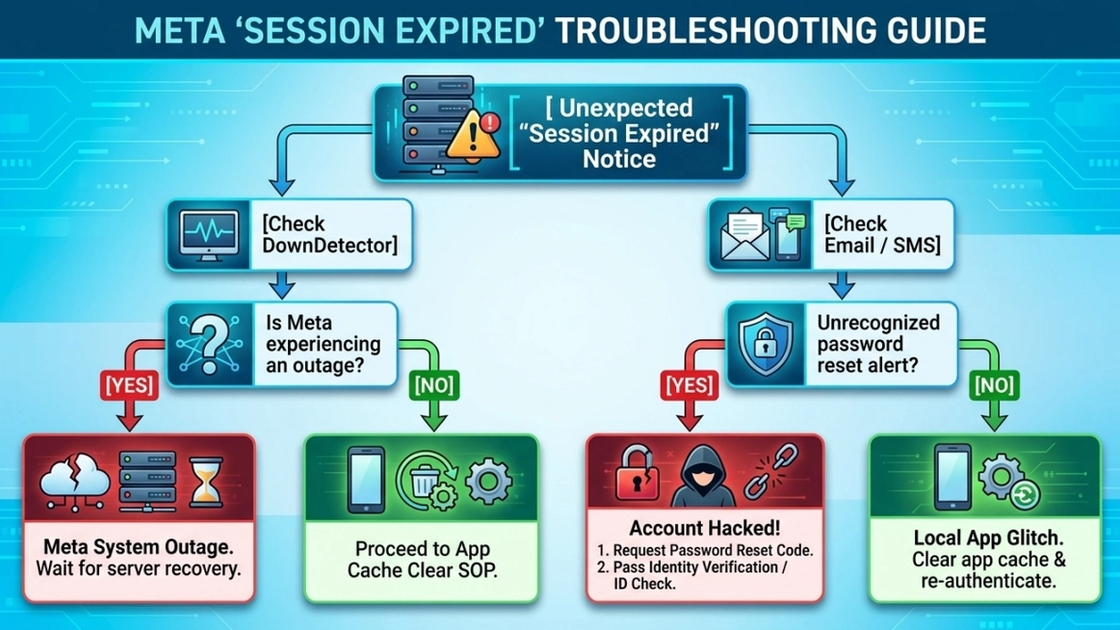
For a normal Facebook or Messenger account, start by checking whether Meta is experiencing an outage, update the app, restart it, clear only the relevant cache or site data, and sign in again. If the logout arrives with an unexpected password, email, phone, or device alert, treat it as a security incident and use Facebook's official recovery process from a recognized device.
Why Does Facebook Keep Saying Session Expired?
Facebook invalidates a session when the app or browser no longer presents state that Meta accepts for that account. Common reasons include a naturally expired session, an app update or cache problem, cleared cookies, a password or security change, a manual logout from another device, an authorization change in an approved integration, or a platform outage. The message alone does not prove that the account was hacked.
Fault Classification & Instant Response Matrix
Scenario & Symptoms | Likely Cause | Target Layer | Safe First Response |
|---|---|---|---|
Mobile app loop (iOS / Android) | Outdated app build, damaged cache, or stale local session state | Client app and storage | Force-stop the app, update it, clear cache where supported, and sign in again. |
Desktop / browser loop | Stale Facebook cookies, blocked storage, or an interfering extension | Browser and site data | Clear Facebook site data, temporarily disable suspect extensions, and re-authenticate. |
Unexpected logout plus password, email, or device alert | Possible account security change or compromise | Account security | Use facebook.com/hacked from a recognized device, secure the account, review sessions, and enable 2FA. |
Authorized app or API integration stops | Expired or revoked access, changed scopes, or an API version/configuration issue | Official Meta authorization | Stop the job, preserve logs, and follow current Meta OAuth and Graph API documentation. |
Quick Blueprint: How to Fix a Facebook Session Expired Loop
- Check Meta service status and whether the same error appears on another device.
- Update Facebook or Messenger, restart the device, and retry once.
- Clear the affected app cache or facebook.com site data; save anything local before clearing full app data.
- Sign in through the official app or website and complete any supported identity check.
- If account details changed unexpectedly, stop troubleshooting and begin official account recovery.
Facebook Session Management & Token Lifecycle
A consumer Facebook session is maintained by the official app or browser. Approved developer integrations use access tokens issued through Meta's documented authorization flows. These are different contexts: browser cookies are not a supported substitute for developer credentials, and a user logout or password change may invalidate previously issued access.
What Does "Session Expired" Mean on Facebook?
It means the current client can no longer prove an accepted login state for the requested action. Facebook therefore asks the user to authenticate again or complete a security check. The event may be routine, but unexpected account changes require a security response.
How Do Facebook Sessions and Authorized Access Work?
- App and browser sessions: the official client stores local session state and refreshes it as Meta permits.
- Authorized API access: an approved app receives scoped access through documented Meta authorization rather than through copied browser cookies.
- Security revocation: password changes, session removal, suspected compromise, or permissions changes can invalidate access.
- Network continuity: a stable connection can reduce transport interruptions, but it cannot restore a revoked account session or expand permissions.
Session State & Recommended Response
Observed State | Possible Meaning | Recommended User or System Action | Do Not Do |
|---|---|---|---|
Routine session expired message | The local session is no longer valid | Open the official app or site and sign in again. | Do not import cookies from another person or device. |
Password or account detail changed | A security change or possible compromise occurred | Use official recovery, change the password, review sessions, and enable 2FA. | Do not keep retrying automated logins. |
User intentionally logged out or removed a device | The session was deliberately revoked | Authenticate again only if the user still owns and authorizes the session. | Do not attempt to preserve the revoked session. |
Approved API request returns an authorization error | Token, scope, app review, API version, or account permission may have changed | Stop requests, inspect logs, and follow current Meta developer documentation. | Do not switch IPs to work around an authorization denial. |
The Four Common Root Causes Triggering "Session Expired" Errors
The source document grouped the problem into local storage, network changes, security checks, and server-side invalidation. Those categories are useful, but fixed percentages cannot be verified and are therefore not presented as measured risk.
1. Local App & Storage Failure
A failed update, low storage, a crash, or damaged cached data may leave the Facebook or Messenger app with state it cannot reuse. Updating, restarting, and clearing the affected cache are reasonable first steps.
2. Network Interruption During Sign-In
A weak connection, captive portal, VPN disconnect, or switching between Wi-Fi and cellular service can interrupt a login request. Use one reliable connection while completing the sign-in or recovery flow; changing networks is troubleshooting, not a way to evade a security decision.
3. Account Security Change or Unrecognized Activity
Meta may ask for additional verification after an unfamiliar sign-in, a password change, removed sessions, or other activity it considers risky. Complete only the official prompt and review account security settings.
4. Service Outage, Revocation, or Inactivity
A Meta outage, server-side session revocation, or a long period of inactivity can also end a session. During a widespread outage, wait and avoid repeated password or code requests.
Consumer vs. Authorized Integration: Diagnose the Right Layer
Consumer-Level Errors
- Environment: the Facebook or Messenger mobile app, or a standard desktop browser.
- First checks: app version, local cache, browser site data, device time, network availability, and account alerts.
- Escalation: official recovery when credentials, contact details, or recognized sessions changed unexpectedly.
Authorized App and API Errors
- Environment: an app registered with Meta and using documented Graph API products and permissions.
- First checks: token validity, granted scopes, app review status, API version, endpoint, and account permissions.
- Escalation: stop requests, preserve logs, and use Meta developer support or documentation. Do not fall back to browser cookie automation.
Solution Rating Matrix: Troubleshooting and Resolution
Troubleshooting Method | Best For | Evidence Level | Account Safety | Cost / Effort |
|---|---|---|---|---|
Clear relevant cache or site data | Local app or browser loops | Standard client troubleshooting; outcome varies by cause | Low risk when local drafts or unsaved data are protected | Low |
Update or reinstall the official app | Outdated or damaged app files | Standard store-delivered repair step | Low risk; preserve local drafts and login recovery methods first | Low |
Temporarily disable browser extensions | Browser-only failures | Useful when an extension blocks storage or scripts | Low risk when extensions are restored deliberately | Low |
Secure the account and enable 2FA | Unexpected credential or account changes | Official recovery and security response | Recommended for suspected compromise | Moderate |
Review documented OAuth/API configuration | Approved developer integrations | Required for supported Meta API access | Safe when scopes and terms are followed | Varies |
Consumer & App Troubleshooting SOP
How to Fix a Session Expired Loop on Messenger or Facebook Mobile
- Force-stop Facebook or Messenger and restart the device.
- Install the latest app version from the official App Store or Google Play listing.
- On Android, clear cache first. Clear full storage only after saving local drafts and confirming recovery methods.
- On iOS, update or offload/reinstall the app if a normal restart does not help.
- Sign in again through the official app and complete 2FA or the supported identity prompt.
Enterprise & Authorized App Operations
For a registered Meta app, reliability comes from documented authorization, least-privilege scopes, protected credentials, conservative request handling, and clear stop conditions. It does not come from preserving browser fingerprints or keeping copied consumer sessions alive.
Key Architecture Rules for Authorized Stability
- Use Meta Login and Graph API products that are approved for the use case.
- Keep access credentials in a managed secret store and never place them in screenshots, client-side code, or logs.
- Treat authorization errors as stop conditions until token, scope, app review, and account state are verified.
- Use stable networking only for an already authorized workflow; network routing must not be used to override denial or rate controls.
Extreme Security Incidents: Account Compromise vs. Meta Outage
An unexpected logout combined with an unfamiliar password, email, phone, or device notification should be handled as a potential compromise. By contrast, simultaneous failures reported across many users may point to an outage. Neither conclusion should be based on the session-expired message alone.
Did Anyone Get "Facebook Session Expired" and Password Changed?
A password-change alert that you did not initiate is enough reason to secure the account immediately. Use facebook.com/hacked from a device previously used for Facebook, check the account email for official security messages, remove unfamiliar sessions, and change the password. If the issue is only a widespread outage, avoid repeated credential resets and wait for service recovery.
Five-Step Facebook Session Recovery Workflow
Classify the incident
Check whether the issue affects one app, one device, the whole account, or many users. Look for official account alerts before changing settings.
Refresh the official client
Update Facebook or Messenger, restart the device, and clear only the affected cache or browser site data. Preserve drafts and recovery information before clearing full storage.
Re-authenticate safely
Use the official app or facebook.com, enter credentials only there, and complete any supported 2FA or identity prompt.
Secure a suspicious account
If credentials or contact details changed unexpectedly, use facebook.com/hacked from a recognized device, review active sessions, change the password, and enable 2FA.
Handle authorized API failures separately
For an approved Meta integration, stop requests and review official token, scope, app review, API version, and permission requirements. Do not replace OAuth with browser cookies or IP switching.
Frequently Asked Questions
Why does Facebook keep saying my session expired?
The current app or browser session is no longer accepted. Update and restart the official client, clear the affected cache or site data, and sign in again. If account details changed unexpectedly, use official recovery instead.
Is the error caused by an app bug or an account security action?
It can be either. A problem limited to one outdated app points toward local state, while unfamiliar password, email, phone, device, or session changes require an account-security response.
What is the most effective way to solve a Facebook session expired error?
There is no universal fix. Classify the cause first, then use the smallest supported action: refresh local state, re-authenticate, wait for an outage, or begin official account recovery.
How do I fix a Messenger session expired loop?
Update Messenger, force-stop it, restart the device, clear cache where supported, and sign in again through the official app. Save local content before clearing full app storage.
Does a password-change notice prove my Facebook account was hacked?
Not by itself, but an unrecognized password change is a serious security signal. Use Facebook's official hacked-account flow immediately and review account sessions and contact details.
Sources & Compliance References
Facebook Help Center: Recover a hacked account — official account recovery guidance.
Facebook Help Center: Limits on the use of certain features — Meta explains that limits vary and does not publish fixed thresholds.
Meta: How We Combat Scraping — automated collection from Meta products requires permission.
Use stable routing only for workflows you are allowed to run
MiyaIP static residential proxies provide consistent ISP-sourced sessions, while dynamic residential proxies support controlled rotation and location targeting. Neither product restores Facebook authorization or bypasses account security.