
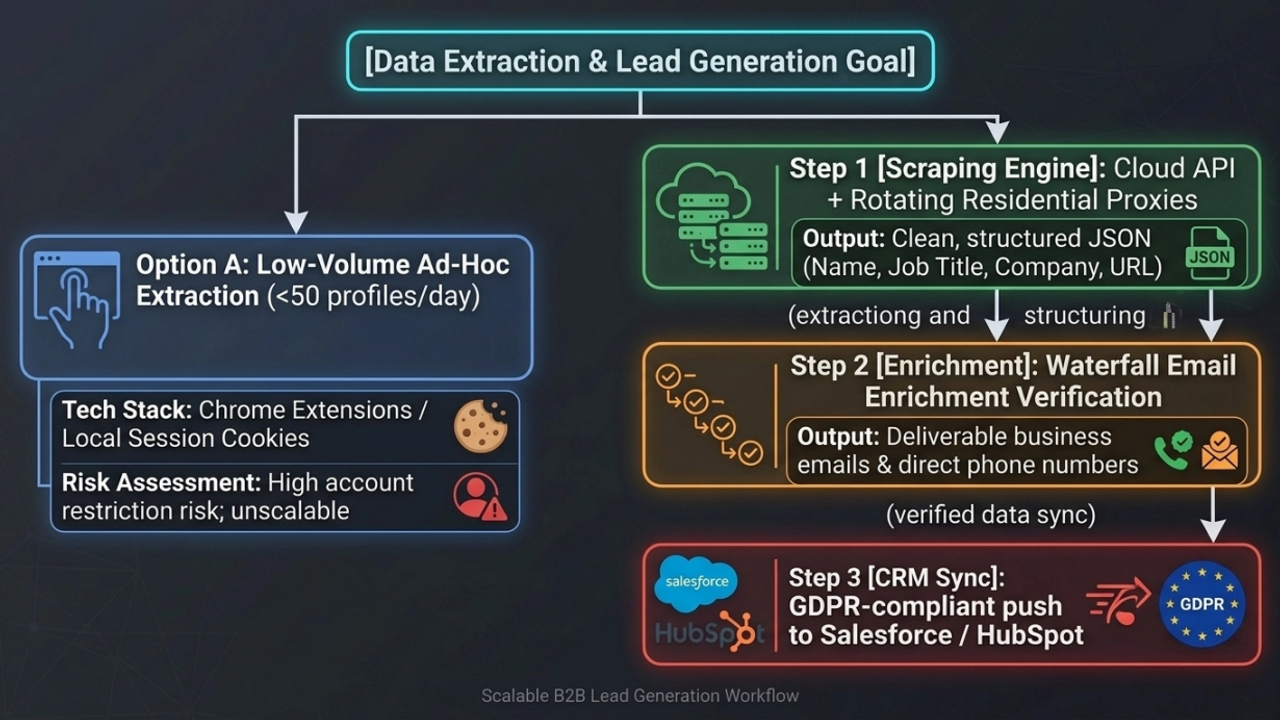
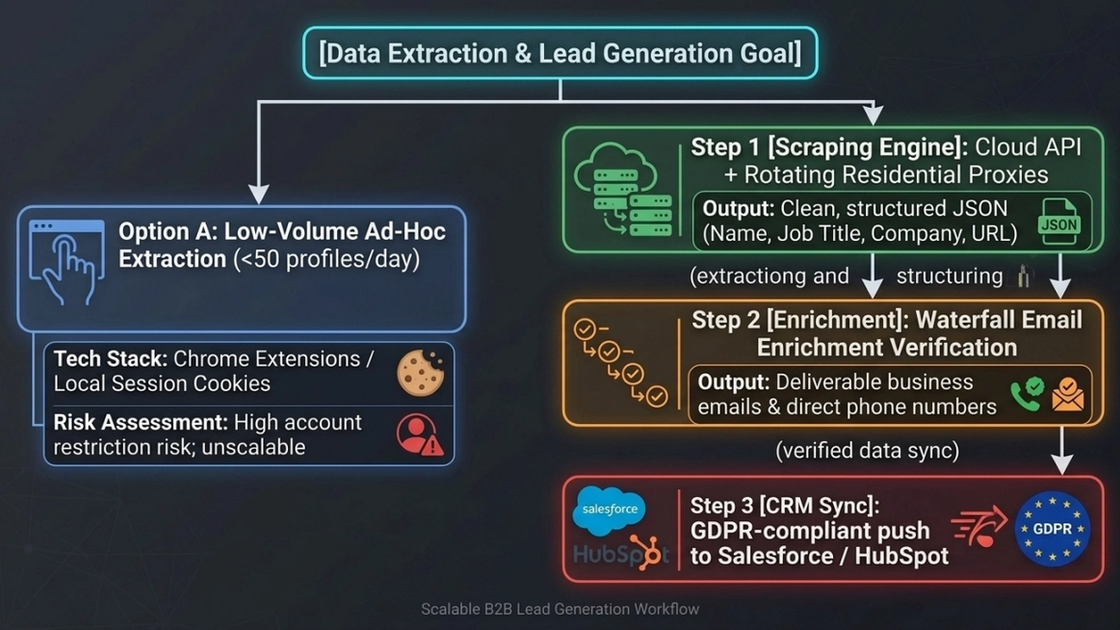
In 2026, sustainable LinkedIn data extraction relies on credential-free cloud architectures, rotating residential proxies, and third-party waterfall enrichment rather than browser extensions tied to personal accounts.
The 3 Rules of LinkedIn Scraping in 2026: Stealth, Compliance, and Data Enrichment
With automated bot traffic now accounting for nearly 40%–50% of global web activity, security leaders have aggressively upgraded their anti-bot infrastructure. LinkedIn’s Anti-Abuse AI has evolved far beyond basic IP blocking; it now calculates real-time Fraud Scores by analyzing browser fingerprints, TLS/JA3 handshakes, and behavioral patterns.
To scale LinkedIn Scraping without burning your operational accounts, your data pipeline must follow three non-negotiable rules:
Rule 1: Stealth Architecture (Credentials-Free & Residential Proxies)
Ditch browser extensions tied to personal session cookies—they are primary account-ban vectors. Instead, transition to a Cloud API model that decouples personal credentials from data extraction. Routing requests through Rotating Residential Proxies with high ISP trust scores and spoofed TLS/JA3 signatures ensures your scraper blends seamlessly into organic human traffic.
Rule 2: Strict Compliance Boundaries
The hiQ Labs v. LinkedIn litigation addressed a narrow U.S. CFAA question involving public pages; it does not create blanket permission or override LinkedIn's terms, privacy, intellectual-property, or other applicable laws. Scaling responsibly also requires strict alignment with privacy regulations like GDPR. Always maintain a documented "legitimate interest" rationale and provide frictionless opt-out mechanisms for outreach campaigns.
Rule 3: End-to-End Data Closure (Email Enrichment)
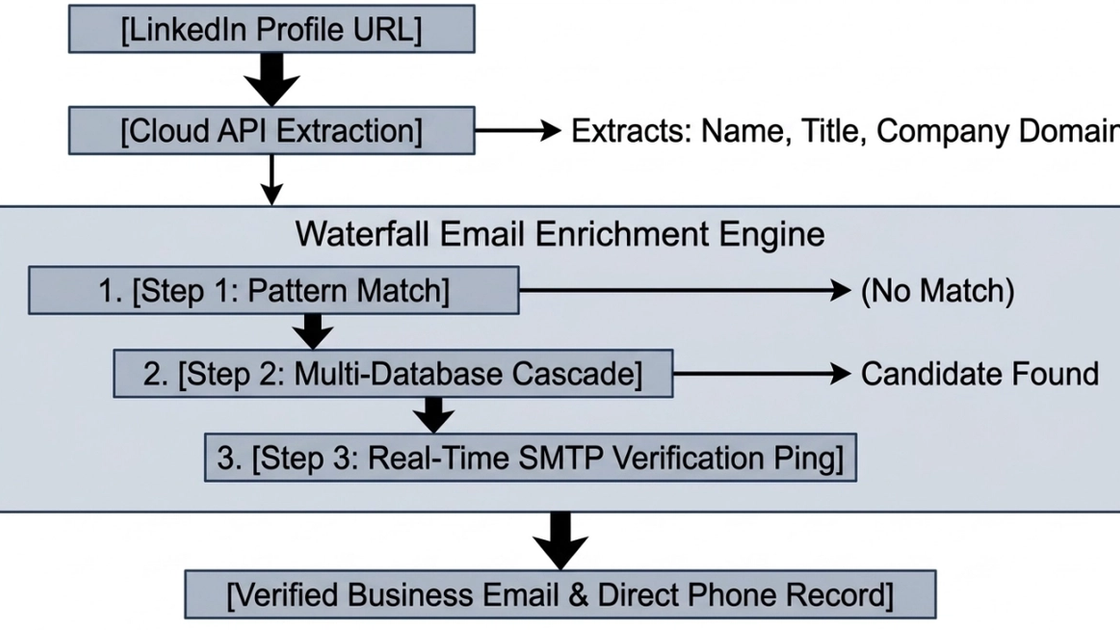
Scraping profiles yields rich professional context—names, titles, companies, and career history—but rarely outputs direct contact info. To convert raw profile URLs into campaign-ready B2B leads, integrate a Waterfall Email Enrichment pipeline. This multi-tier workflow combines domain pattern matching, database cross-referencing, and real-time SMTP verification to deliver high-deliverability business emails at scale
2026 Decision Tree: LinkedIn Data Extraction Architecture
Why LinkedIn Data is the Ultimate Strategic Asset for B2B Growth and AI in 2026
LinkedIn represents the largest real-time B2B professional database, where automated scraping replaces high-cost manual prospect research with campaign-ready structured data.
With over 1 billion active professional profiles, LinkedIn has become the definitive intelligence layer for modern business. Whether powering high-conversion B2B Outreach, refining Recruitment Intelligence, or feeding high-grade training data to large language models (LLMs), real-time LinkedIn data is no longer optional—it is a core competitive moat.
Yet, legacy Sales Prospecting remains notoriously inefficient. According to Salesforce’s State of Sales report, sales reps spend up to 70% of their working hours on non-selling activities, with manual data collection and lead research taking up the lion's share. Compounding this inefficiency is constant decay: IDC data shows B2B contact records degrade by roughly 30% every year as professionals change roles, companies, and locations. Without automated data pipelines, sales velocity stalls and CRM Data Hygiene rapidly degrades.
Automated Lead Generation replaces manual copy-pasting with continuous, structured data ingestion—slashing Customer Acquisition Costs (CAC) while keeping pipeline data fresh and actionable.
Efficiency Baseline: Manual Collection vs. Automated Scraping
Metric / Dimension | Manual Prospect Research | Automated LinkedIn Scraping Pipeline |
|---|---|---|
Prospecting Throughput | ~15–20 profiles / hour | 1,000–10,000+ profiles / hour |
Cost per Lead (CPL) | $5.00–$12.00 (Human labor) | $0.01–$0.05 (Infrastructure cost) |
CRM Data Decay Control | Reactive (Quarterly manual audits) | Proactive (Real-time automated sync) |
Sales Time Spent Selling | ~30% (70% lost to admin tasks) | ~75%+ (Directly fed by automated leads) |
LinkedIn’s Anti-Bot Evolution: From Basic Rate Limits to Dynamic Fraud Scores
LinkedIn's Anti-Abuse AI assigns a real-time Fraud Score by evaluating IP reputation, TLS/JA3 fingerprints, header signatures, and request sequence patterns.
Gartner’s Market Guide for Bot Management details how enterprise platforms have migrated from basic IP blocklists to dynamic, machine-learning-driven defense engines. LinkedIn leads this trend. Simple Rate Limits and IP checks are no longer the primary roadblocks for Anti-bot Bypass.
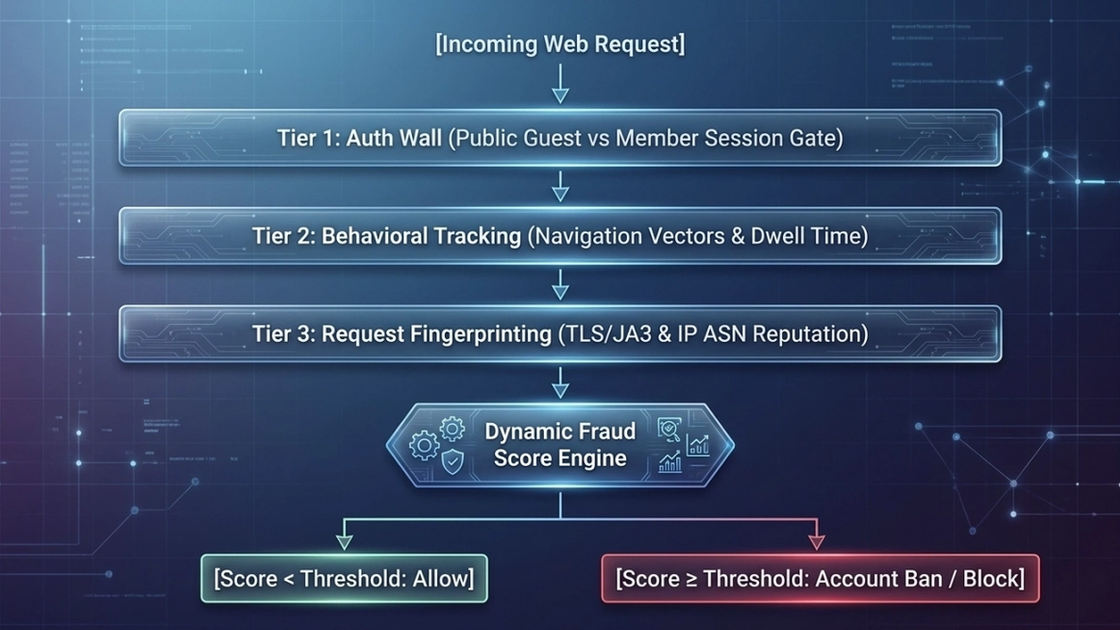
Today, LinkedIn’s Anti-Abuse AI evaluates incoming traffic through a three-tiered defense topology:
The Auth Wall: Segregates public guest views from authenticated member sessions. Account-bound requests are subject to strict per-user activity ceilings.
Behavioral Tracking: Monitors client telemetry—including mouse movement vectors, click velocity, page dwell time, and scroll depth—to flag non-human navigation patterns.
Request Fingerprinting: Inspects network-level signatures, evaluating TLS/JA3 handshakes, HTTP/2 frame configurations, and IP ASN reputation (Datacenter vs. Residential).
These signals feed into a dynamic Fraud Score model. Once an extraction attempt crosses the risk threshold, the system triggers invisible CAPTCHAs, invalidates session tokens, or executes account suspensions, creating massive Account Ban Risk for unoptimized scrapers.
Multi-Tiered Anti-Abuse Risk Architecture
Architectural Breakdown: Cloud API vs. Chrome Extension vs. Headless Browser
Cloud-based APIs offer the lowest ban risk and highest scalability by managing dedicated proxy networks and session pools independently from user accounts.
Choosing the right technical stack determines whether your scraping operation scales smoothly or burns your company’s LinkedIn assets. When evaluating how to collect data safely, developers and revenue teams generally choose among three primary architectures:
Chrome Extensions: These plugins run directly within your local browser, piggybacking on your active session cookies. While easy to install, they tie extraction directly to your personal account. According to operational safety benchmarks from Cleverly and Datablist, pushing past 50–100 profile views per day with an extension triggers aggressive LinkedIn throttling and carries an elevated Account Ban Risk.
Headless Browsers (Playwright / Selenium): Automation frameworks like Playwright and Selenium give engineers full programmatic control over web pages. However, maintaining stealth requires constant updates to disguise browser fingerprints and bypass security scripts. Running headless browsers over standard IP ranges often results in immediate CAPTCHAs, limiting safe volume to just 10–50 profiles per day while incurring high server infrastructure costs.
Cloud APIs: Enterprise-grade Cloud API providers decouple data extraction from individual user accounts entirely. By routing requests through managed, credential-free pipelines, these APIs reduce direct exposure of personal accounts while scaling throughput to 1,000–10,000+ profiles daily at a fraction of the per-lead cost.
Comparative Architecture Matrix
Extraction Architecture | Account Ban Risk | Safe Daily Limit | Tech Implementation Effort | Scalability & API Integration | Estimated Cost per Lead |
|---|---|---|---|---|---|
Cloud API | Very Low (Credentials-free / Isolated sessions) | 1,000–10,000+ profiles / day | Low (Ready-to-use JSON REST endpoints) | Very High (Native Webhooks & automation) | $0.015 – $0.03 |
Chrome Extension | Medium to High (Tied to personal Cookie / IP) | 50–100 profiles / day | Very Low (Plug-and-play browser add-on) | Low (Requires manual execution / local browser) | $0.03 – $0.05 (+ Sales Nav fee) |
Headless Browser | Very High (Datacenter IPs / Bot fingerprints) | 10–50 profiles / day | High (Requires ongoing script maintenance) | Medium (Capped by proxy & fingerprinting costs) | High (Includes server & node maintenance) |
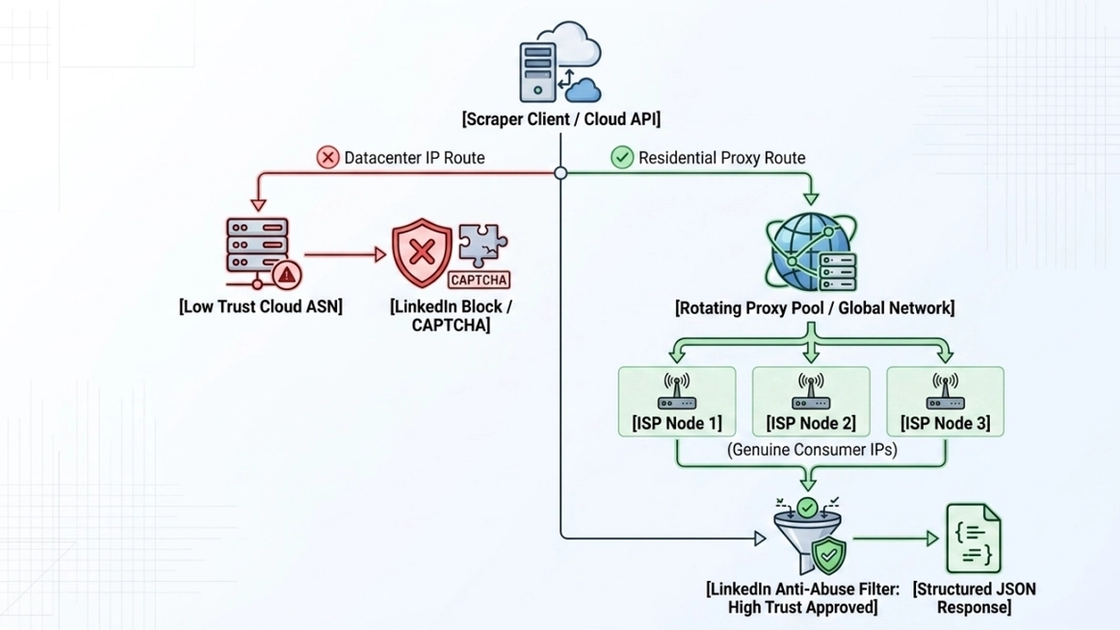
Network Topology: Residential Proxies vs. Datacenter IPs
For authorized public-web requests, rotating residential proxies distribute traffic across ISP-assigned IP addresses and reduce request concentration; they do not grant access permission or guarantee avoidance of LinkedIn rate limits.
IP origin and IP Reputation dictate whether a request reaches LinkedIn’s servers or gets blocked at the network perimeter. Threat intelligence databases like MaxMind and Spur categorize every IP address by Autonomous System Number (ASN) and network type, allowing security systems to instantly recognize incoming request sources.
Why do Datacenter IPs consistently fail on LinkedIn profile pages?
Datacenter IP ranges belong to commercial cloud providers (such as AWS, DigitalOcean, or Hetzner). Because legitimate human users rarely browse LinkedIn from cloud server ranges, LinkedIn marks these ASNs with low trust scores, triggering rate limits or immediate block screens.
To maintain high request success rates, enterprise extraction pipelines rely on Residential Proxies:
Rotating Residential Proxies: These route each request through real consumer devices assigned by legitimate internet service providers (ISPs). By constantly switching IP addresses across global Proxy Networks, rotation prevents request aggregation on any single node, allowing scrapers to stay well under rate limit thresholds.
Static ISP Proxies: These combine the high trust scores of residential ASN allocations with the low latency and session stability of dedicated datacenter infrastructure, making them ideal for multi-step session workflows.
Independent industry benchmarks from Proxyway confirm that rotating residential IP pools achieve significantly higher success rates on heavily protected targets compared to datacenter alternatives.
IP Network Topology Comparison
IP Type Performance Comparison Matrix
IP Category | Stealth & Trust Score | Request Success Rate | Latency Profile | Bandwidth Cost | Ideal Use Case |
|---|---|---|---|---|---|
Datacenter IPs | Low (Commercial Cloud ASN) | Very Low (<20% on profile pages) | Ultra-low (<50ms) | Very Inexpensive | Public Job Postings / Unprotected endpoints |
Rotating Residential Proxies | Very High (Genuine Residential ISP) | Very High (95%+ success rate) | Moderate (100–300ms) | Pay-per-GB usage | Scale Profile Scraping & Sales Nav Export |
Static ISP Proxies | High (Residential ASN + Dedicated Line) | High (90%+ success rate) | Low (<100ms) | Fixed Monthly / Per-IP | Long-session automation & authenticated tasks |
Profile Scraping and Waterfall Email Enrichment
LinkedIn profile scraping collects rich contextual B2B data, which requires a secondary waterfall enrichment step to yield verified direct business emails and phone numbers.
When developers ask, "Can you get email addresses from scraping LinkedIn profiles?", the short answer is: Not directly from the profile page alone.
LinkedIn limits profile page visibility to professional context—such as full name, current job title, company name, location, and employment history. Direct Business Email Address data and Direct Phone Numbers are rarely exposed publicly. To build campaign-ready prospect records when you Scrape LinkedIn Profiles, your scraper must serve as the primary trigger for a multi-provider Email Enrichment workflow.
Relying on a single data provider often yields a poor match rate (typically 30%–45%). Industry benchmarks from Skrapp.io and Datablist demonstrate that deploying a Waterfall Email Finder increases enrichment match rates to 60%–80%.
A waterfall pipeline cascades unfulfilled requests through a sequential hierarchy of enrichment engines:
- Domain Pattern Matching: Evaluates company domain naming conventions (e.g., first.last@company.com vs. f.last@company.com).
- Database Cascade Lookup: Queries multiple B2B data repositories in real-time until a candidate match is identified.
- SMTP Ping Verification: Performs real-time server handshakes to confirm mailbox existence without sending actual emails, filtering out spam traps and catch-all addresses.
Waterfall Email Finder Pipeline Architecture
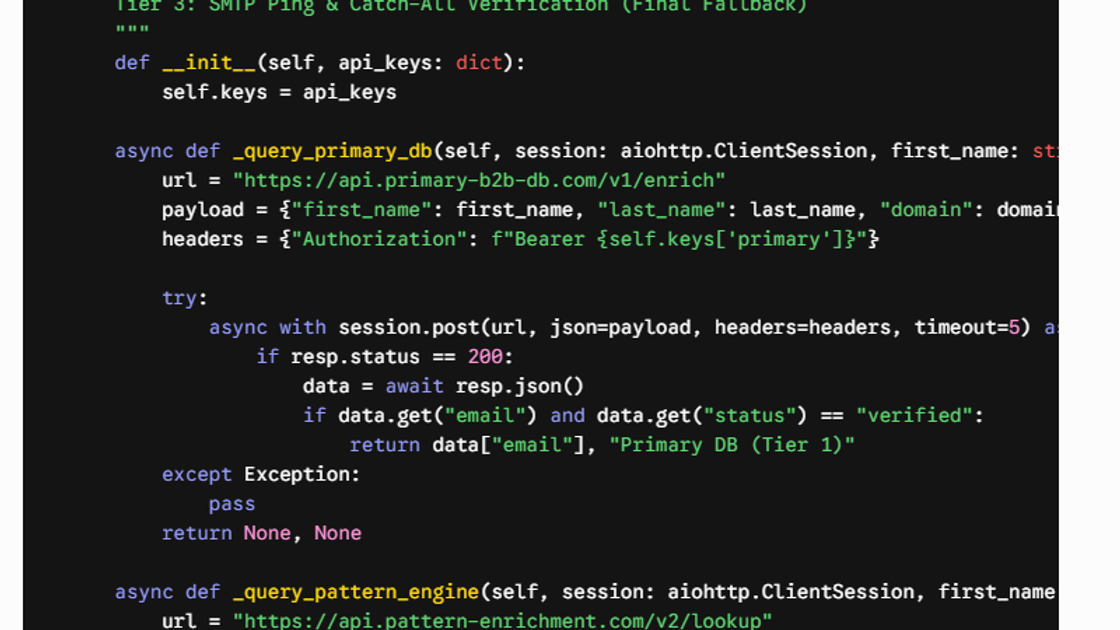
Code Implementation: Async Waterfall Email Enrichment Engine
Working MiyaIP proxy example. Set the credentials and an authorized public URL through environment variables; the code does not include account cookies, authenticated-page selectors, or CAPTCHA bypass logic.
import os
import requests

username = os.environ["MIYAIP_USERNAME"]
password = os.environ["MIYAIP_PASSWORD"]
target_url = os.environ["AUTHORIZED_PUBLIC_URL"]

proxy = f"http://{username}:{password}@gateway.miyaip.com:10000"
proxies = {
    "http": proxy,
    "https": proxy,
}

response = requests.get(target_url, proxies=proxies, timeout=20)
response.raise_for_status()
print(response.text[:500])
Scraping Company Profiles and Job Postings for Intent Signals
LinkedIn job postings represent low-friction public data sources that provide critical hiring signals and technology adoption insights for B2B intelligence.
Is it easier to scrape LinkedIn jobs than profiles? Yes, significantly.
As detailed in Scrapfly's technical extraction guides, job postings and corporate pages exist as Publicly Available Data indexed directly by search engine crawlers. Because these pages sit outside LinkedIn's strict user authentication wall, extracting data using a LinkedIn Company Profile Scraper or job scraping engine encounters far less anti-bot friction and requires zero session credentials.
Beyond basic lead generation, learning How to Scrape LinkedIn Jobs unlocks high-value account intelligence:
Hiring Signals: Tracking active job requisitions reveals immediate team expansion and organizational priorities.
Buying Intent & Tech Stack Mapping: Analyzing job description requirements (e.g., listing experience with Snowflake, HubSpot, or Kubernetes) pinpoints an enterprise's exact technology stack and vendor replacement windows. Signal monitoring data from Flocurve shows that outreach triggered by active hiring signals yields double the reply rates of cold outreach.
Field Extraction Mapping Table
Target Entity | Extracted Field Schema | Anti-Bot Friction Level | Strategic B2B Value |
|---|---|---|---|
Company Page | Company Name, Headcount, Industry, Website URL, HQ Location, Employee Growth Rate | Low (Publicly Accessible) | Account Qualification, Firmographic Segmentation, TAM Analysis |
Job Posting | Job Title, Department, Location, Tech Stack Requirements, Budget/Salary Range, Date Posted | Very Low (Search Engine Indexed) | Hiring Signals, Buying Intent, Tech Stack Identification |
Individual Profile | Full Name, Job Title, Work History, Skills, Profile URL, Geographic Location | High (Auth-Wall Protected) | Decision-Maker Identification, Lead Enrichment |
Exporting Sales Navigator Searches and Automated Data Cleaning
Working with Sales Navigator searches at scale requires authorized workflows that segment queries within the 2,500-result ceiling while maintaining standardized CRM-ready data.
LinkedIn Sales Navigator offers unmatched B2B lead filtering, but extracting search results safely presents two technical bottlenecks:
- The 2,500 Result Pagination Cap: LinkedIn hard-caps search viewability at 2,500 results (100 pages of 25 results), regardless of total query matches.
- Account Rate Limits: Scrolling through search pages using account-bound browser extensions quickly triggers anti-scraping flags.
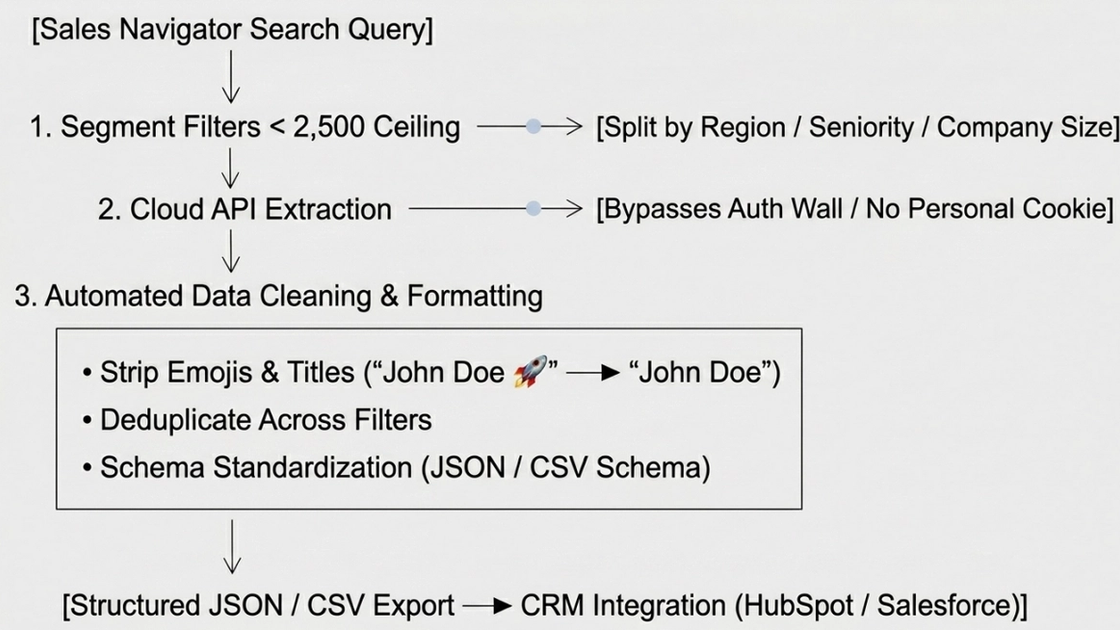
To execute Sales Navigator Scraping safely, operational guides from Evaboot and Datablist recommend breaking broad searches into sub-segmented filters (e.g., splitting a query by specific geographic regions or company size brackets) so each search cluster contains under 2,500 leads. This organizes an authorized search within the platform limit; it must not be used to defeat authentication or other access controls.
Once raw search payloads are retrieved via Cloud APIs, automated Data Cleaning normalizes the dataset:
String Normalization: Strips emojis, special characters, and non-standard capitalization from names and job titles.
Deduplication: Removes duplicate profile entries generated by overlapping search filters.
Schema Standardization: Formats output fields into a clean CSV Export or Structured JSON Output tailored for direct CRM Integrations with platforms like HubSpot or Salesforce.
End-to-End Extraction & Data Cleaning Pipeline
The Future of Anti-Bot Warfare: AI Agent Automation and Dynamic Extraction
Next-generation LinkedIn scraping leverages autonomous AI agents with stealth Chromium instances to dynamically adapt to layout changes and anti-bot challenges.
Gartner and Scrapfly forecast that by 2026+, autonomous AI agents will drive a significant portion of enterprise web automation. As platform anti-bot defenses become more sophisticated, traditional web scraping scripts are giving way to intelligent, self-healing extraction architectures.
When developers ask, "How will AI change web scraping on LinkedIn?", the shift lies in moving from rigid, hardcoded scripts to adaptive Autonomous Web Scraping:
LLM & AI Browser Agents: Frameworks utilizing Model Context Protocol (MCP Server) integrations and autonomous agent drivers (such as browser-use) allow AI agents to navigate LinkedIn using natural language goals rather than fixed step sequences.
Controlled Chromium Integration: Agents can control Chromium instances and pause for human takeover when CAPTCHA, SMS, or other visual verification appears. MiyaIP does not promise automatic challenge solving or avoidance of platform risk controls.
Dynamic DOM Extraction: Traditional scrapers break whenever LinkedIn updates its HTML markup or obfuscates CSS class names. AI agents perform semantic parsing, locating target data fields (e.g., job titles, work history) based on context and visual layout rather than rigid XPath selectors.
Evolution of Web Scraping: Traditional Scripts vs. AI Agent-Driven Architecture
Feature Dimension | Traditional Script Scrapers (Puppeteer/Selenium) | Next-Gen AI Agent Scrapers (MCP / Autonomous Agents) |
|---|---|---|
Script Maintenance | High; breaks whenever CSS/DOM classes change | Lower-touch; adapts semantically but still requires monitoring and validation |
Parsing Mechanism | Hardcoded XPath / CSS Selectors | Dynamic DOM Extraction via LLM Vision & Context |
Anti-Bot Evasion | Static headers & manual proxy rotation | Controlled browser, compliant rate limits, and human takeover |
CAPTCHA Resolution | Manual fallback / Third-party solver APIs | Pause and request human review; no guaranteed automatic solving |
Workflow Definition | Fixed code logic | Natural language goal prompts & autonomous execution |
Summary & Actionable Enterprise Roadmap
Building a resilient LinkedIn data pipeline in 2026 requires selecting credential-free cloud architectures, deploying residential IP pools, and maintaining strict GDPR opt-out frameworks.
To build a reliable data pipeline based on this LinkedIn Scraping Guide, enterprise revenue operations must balance architectural performance, proxy security, data enrichment quality, and legal compliance.
If you are looking for a concrete answer to "What is the step-by-step roadmap for LinkedIn data extraction?", this B2B Growth Roadmap—modeled after proven commercial deployment frameworks from Cleverly and Flocurve—outlines the implementation process:
Step Enterprise Implementation Roadmap
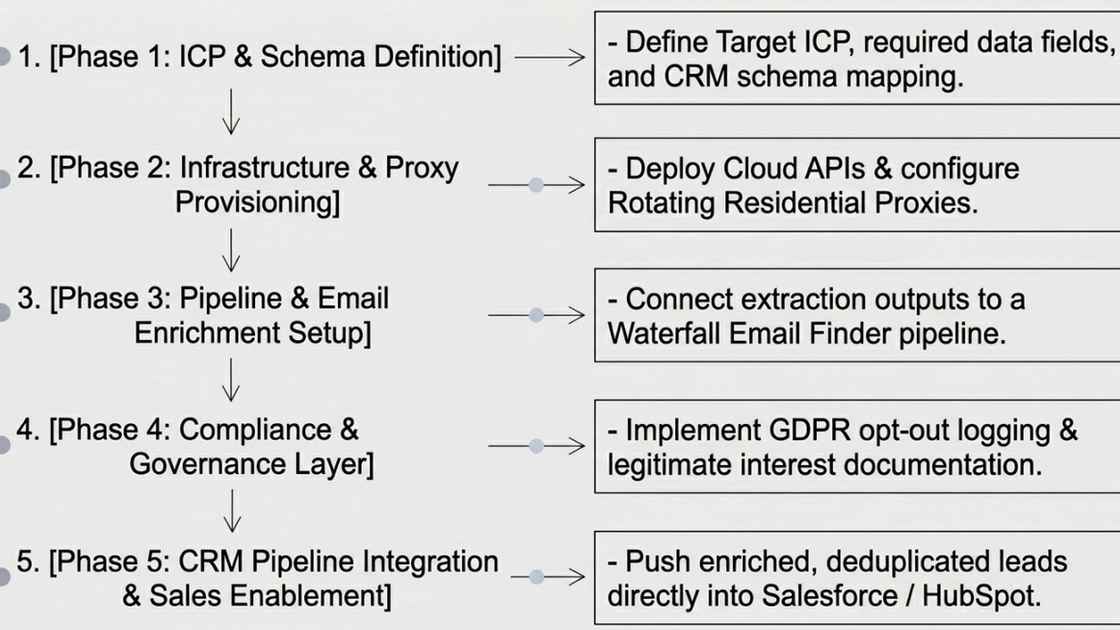
Five-step enterprise implementation roadmap
1. Define the ICP and data schema
Document the business purpose, target entity, permitted fields, retention period, lawful basis, and opt-out process before collecting data.
2. Provision compliant access and network routing
Prefer official APIs or written permission. For authorized public-web tasks, configure MiyaIP Dynamic Residential Proxy for rotation or location targeting; use Static Residential Proxy only when session continuity is genuinely required.
3. Build the extraction and enrichment pipeline
Collect only the approved public fields, normalize and deduplicate the records, and pass unresolved contact fields to a separately contracted third-party enrichment provider. MiyaIP does not provide email enrichment.
4. Apply governance and human review
Enforce conservative rate limits, stop on verification or access-control prompts, minimize personal data, protect credentials, log decisions, and process deletion or opt-out requests.
5. Integrate with the CRM and monitor quality
Export a documented CSV or JSON schema, validate freshness and accuracy, track failure and complaint rates, and review the workflow whenever platform rules or page behavior changes.
By following this Lead Generation Blueprint, enterprise teams can eliminate manual prospecting overhead, maintain high data hygiene, and scale outreach without risking account bans.
Frequently asked questions
Is scraping LinkedIn data legal in 2026?
There is no blanket legal permission. The hiQ litigation addressed a narrow U.S. CFAA issue involving public pages, while LinkedIn's current terms prohibit unauthorized automated scraping. Any workflow must also satisfy privacy, intellectual-property, contract, and other applicable laws.
How do I scrape LinkedIn profiles without exposing my personal account?
Do not attach automation to personal credentials or session cookies. Prefer official APIs or written permission; for an authorized public-web workflow, isolate the task from personal accounts, apply conservative rate limits, and stop when authentication or verification is required.
Can verified email addresses be extracted directly from LinkedIn profiles?
LinkedIn profile pages rarely expose direct contact details publicly. Verified business emails generally require a separate third-party enrichment workflow, and the resulting personal data still needs a lawful purpose, minimization, and opt-out handling.
How should I handle Sales Navigator's 2,500-result limit?
Work within the limit by narrowing an authorized search into documented segments such as geography or company size. Do not use segmentation to defeat authentication, access controls, or other platform restrictions.
Disclaimer
This article is for educational and architectural design purposes only. Readers must comply with applicable laws, GDPR regulations, and platform terms of service. The author assumes no liability for account restrictions or legal consequences resulting from improper usage.
Sources
Choose the right MiyaIP network path
Start with Dynamic Residential Proxy for rotation and location targeting, or explore the Web Crawler for a managed public-web workflow.